00197719-01_IM_Integration_SMD-Tower_EN.pdf - 第6页
© ASM 1-1 0019771 9 - 01 / Octo ber 22, 2014 1 Prepar e SMD - To w e r 1.1 Intr oduction The preparation has t o be done, if the combination of t he following c omponents is used: · SIPLACE Materi al Manager · Material T…

About this Manual
© ASM v
00197719-01 / October 22, 2014
Note If a certain subject must be emphasized it is
written as a note.
Note:
Adjust the guide pins
symmetrically
History
Index Release Changes
01 October 22, 2014 First release

© ASM 1-1
00197719-01 / October 22, 2014
1 Prepare SMD-Tower
1.1 Introduction
The preparation has to be done, if the combination of the following components is used:
· SIPLACE Material Manager
· Material Tower Software
· SMD-Tower
1.2 Prerequisits
1.2.1 Software Version on SMD-Tower
For the interaction between SMD-Tower and Material Tower software, the software version,
installed on SMD-Tower must be 1225 or lower.
Note:
Do not perform any stock rotations on SMD-Tower as long as the import to the Material
Tower software and all the setups of Material Tower software are on progress.
1.3 Installing Web Service Client
Install the Web Service Client on the SMD-Tower
Refer to the manufacturer's manual for detailed information about the installation of the software.
Prepare SMD-Tower
© ASM
1-2
00197719-01 / October 22, 2014
1.4 Setting up the Web Service Client
Setup the Web Service Client
C:
\Programs\SMD-Tower
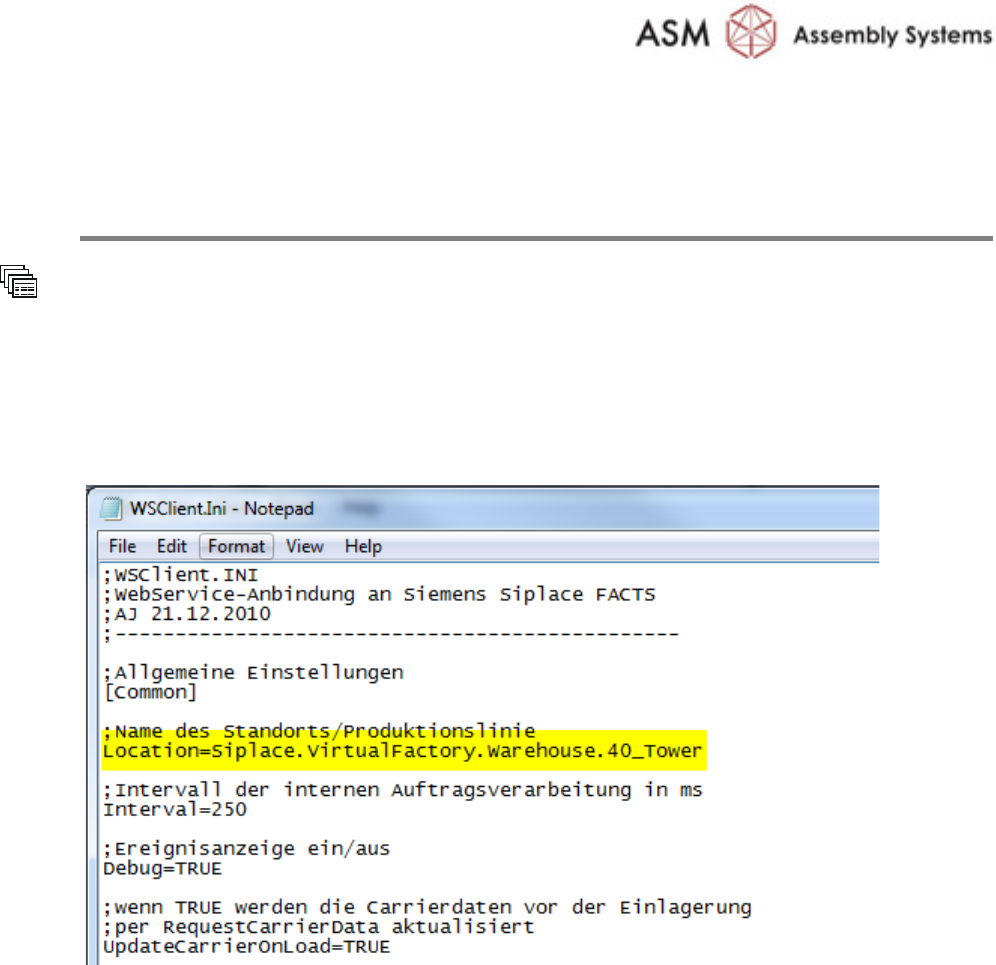
Open the file
WSClient.ini by using the Notepad Editor
Add to common settings
Name of location/production line:
Location=Siplace.VirtualFactory.Warehouse.40_Tower