TK55253.FeederIDLog.pdf - 第3页
Product Engineering Division SMT Sect ion Robotics Operations Y AMAHA MOTOR CO., L TD MDOC-SOFT50281 3/ 15 1. A pplicable models and sof tw are versions Applicable feeders and software version are as below . T a ble1.1 A…

Product Engineering Division
SMT Section
Robotics Operations
YAMAHA MOTOR CO., LTD
MDOC-SOFT50281
2/15
Contents
Feeder ID Log................................................................................................................................ 1
Function Specifications .................................................................................................................. 1
Contents ........................................................................................................................................ 2
1. Applicable models and software versions ................................................................................. 3
2. Outline ....................................................................................................................................... 3
3. Detail ......................................................................................................................................... 3
3.1 Feeder ID log screen ........................................................................................................... 3
3.1.1 Display items ................................................................................................................. 4
3.1.2 “Save Log” button .......................................................................................................... 6
3.1.3 “Reset” button ............................................................................................................... 6
3.1.4 “Option” button .............................................................................................................. 7
3.2 Feeder ID log file ................................................................................................................. 8
3.2.1 Feeder ID individual log file ........................................................................................... 8
3.2.2 Feeder ID daily log file .................................................................................................. 8
3.2.3 Feeder ID log backup file .............................................................................................. 8
3.3 Feeder ID log file format ...................................................................................................... 8
4. Setting ..................................................................................................................................... 11
4.1 Setting in “ID log setting” screen........................................................................................ 11
4.2 Setting in “Unit log” screen ................................................................................................ 13
4.3 Setting in “Setting Detail History” screen ........................................................................... 13
5. Error Message ......................................................................................................................... 14
Product Engineering Division
SMT Section
Robotics Operations
YAMAHA MOTOR CO., LTD
MDOC-SOFT50281
3/15
1. Applicable models and software versions
Applicable feeders and software version are as below.
Table1.1 Applicable feeders and software version
Feeders Software Version Remarks
CLi feeder,
FSi feeder
V3.42STD R1.000 or later YG300,
YG12 series mounters
SS feeder,
ZS feeder
V3.42STD R1.000 or later
V4.42STD R1.000 or later
YS series mounters,
YSM series mounters
Auto Loading Feeder only V3.49STD R3.000 or later
V4.63STD R4.000 or later
YS series mounters,
YSM series mounters
2. Outline
Feeder ID Log function is able to manage the information about feeder usage condition,
error frequency, etc. for each one feeder (each feeder ID) by identifying feeder ID of each
feeder. However, target feeders are only SS feeder, ZS feeder, Auto Loading Feeder
▲2
, CLi
feeder, and FSI feeder.
To use this function, it is necessary to validate Feeder Maintenance Notice function. When
the first installation, Feeder Maintenance Notice function becomes effective by default.
3. Detail
This chapter explains about the feeder ID log screen and the feeder ID log file.
3.1 Feeder ID log screen
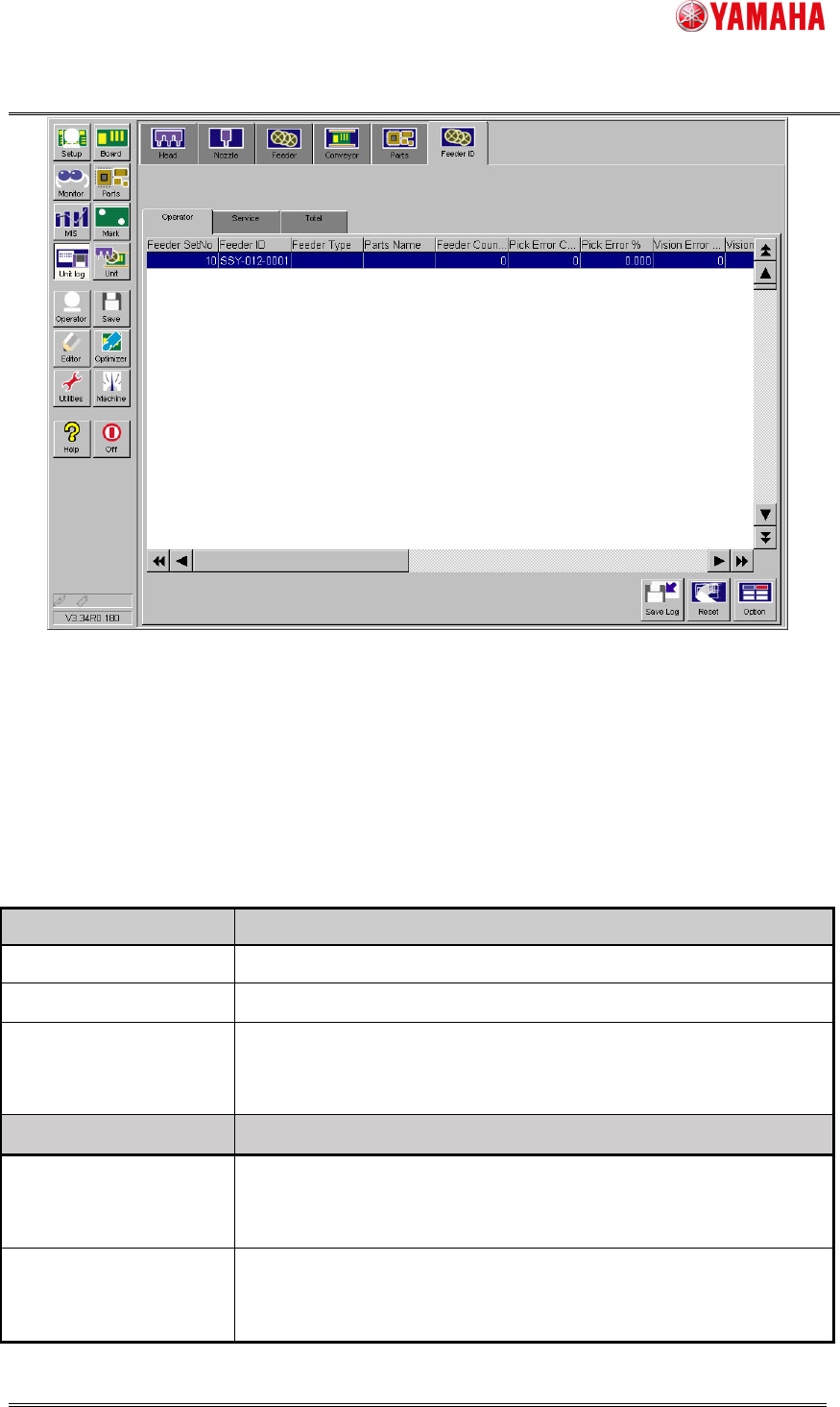
The feeder ID log is displayed at [Unit Log]-[Feeder ID] tab.
“Feeder ID” tab is further divided into three tabs. The "Operator" or "Service" tab can be
cleared as needed. The "Total" log cannot be cleared.
Product Engineering Division
SMT Section
Robotics Operations
YAMAHA MOTOR CO., LTD
MDOC-SOFT50281
4/15
Fig.3.1 Feeder ID log
screen
3.1.1 Display items
The display items of feeder ID log screen are as follows.
When feeder is attached or machine is turned on, the last saved data is displayed. If the
last saved data does not exist, the initial value is displayed.
Table3.1 Display items of feeder ID log screen
Column name Contents
Feeder Set No Set position number of attached feeder is displayed.
Feeder ID Feeder ID is displayed.
Feeder Type Feeder type specified by parts data is displayed.
In the case of the feeder unused by board data, the last feeder
type is displayed.
Column name Contents
Parts Name Parts name attached to the feeder is displayed.
In the case of the parts unused by board data, the last parts name
is displayed.
Feeder Counter Number of times of feeder drive (number of shots) is displayed.
This count is used as the standard when calculating various error
ratios.