00196378-0102_UM X-Feeder_EN.pdf - 第24页
Overview of X Feeder Modules Functions and Operating Contr ols Display at the Tape Feeder Modules 24 User Manual X Feeder Modules SIPLACE Family Error Messages Basically, three types of errors can be distinguished for 2x…

Overview of X Feeder Modules
Display at the Tape Feeder Modules Functions and Operating Controls
User Manual X Feeder Modules SIPLACE Family 23
Ad 1.: Pitch display
The currently set pitch is indicated at the operator panel for both tracks by the corresponding LED 1, 2,
4 or 8.
Ad 2.: Track display
Indicates the relevant active track, that is triggered by the operating buttons. There is a left (L) and a
right (R) track.
Ad 3.: TRACK CHANGE button
Short press: When the TRACK CHANGE button is released, the track display switches to the
other track. The following button inputs will trigger this track until the TRACK
CHANGE button will be pressed again.
The 2x8 mm X feeder module consists of two individual 8 mm tracks. Both tracks
are controlled via the operator panel, although only one track can be active at any
one time. The other buttons, FORWARDS; BACKWARDS; FOIL and SET, always refer
to the currently active track.
Ad 4.: FORWARDS button
Short press: When the button is released, a tape transport cycle in forward direction is started
using the currently set pitch.
Long press: a) The foil is not tensioned: The tape drive continuously transports forwards as
long as the button remains pressed.
b) The foil is tensioned: The tape is repeatedly transported forwards as long
as the button remains pressed.
Ad 5.: BACKWARDS button
Short press: When the button is released, a tape transport cycle in backward direction is started
using the currently set pitch.
Long press: a) The foil is not tensioned: The tape drive continuously transports backwards as
long as the button remains pressed and the foil rocker
does not move down.
b) The foil is tensioned: The tear down procedure is enabled.
c) Torn foil error active: The tear down procedure is performed immediately.
Caution: If you pace the feeder module backwards, lift the pickup window from the cover foil by pushing
it up or by using the locking latch. Otherwise, the cover foil will be damaged.
Ad 6.: FOIL button
By pressing this button the foil removal motor is started.
It is moving until one of the following events occurs:
▪ the button was released
▪ the button was pressed longer than 30 sec. and the foil is not tensioned yet
The foil tension made the rocker move down to the switch off point.
Ad 7.: SET button
Together with the FORWARDS, BACKWARDS or FOIL button the SET button serves for setting the
pitch and the pickup position.
Ad 8.: STATUS display
Indicates the current status of both tracks.
Overview of X Feeder Modules
Functions and Operating Controls Display at the Tape Feeder Modules
24 User Manual X Feeder Modules SIPLACE Family
Error Messages
Basically, three types of errors can be distinguished for 2x8 mm tape feeder modules:
▪ Track errors: These are displayed, if an error occurs in the drives or the sensors of the feeder module
that is only relevant for the respective track of the feeder module.
▪ Process errors: These are sent to the feeder module by the placement machine and are displayed
by the feeder module.
▪ Module errors: These are displayed, if an error occurs in the control unit of the feeder module that
concerns the whole feeder module.
The feeder module always indicates an error state by a red status display. Either one or both LEDs can
light up red in this case.
The status of the pitch display allows for a distinction of the error type.
For module and track errors one or more slowly flashing LEDs of the pitch display give additional infor-
mation about the error type (see below).
Display of a track error
NOTICE
Art und Quelle der Gefahr
If one of the buttons (except the Track change button) is pressed, while a module or track
error is signalled, the currently set pitch is temporarily displayed for the selected track or both
tracks (in case of module errors). The status display still lights up red.
One second after releasing the button, the pitch display switches back to the error mode.
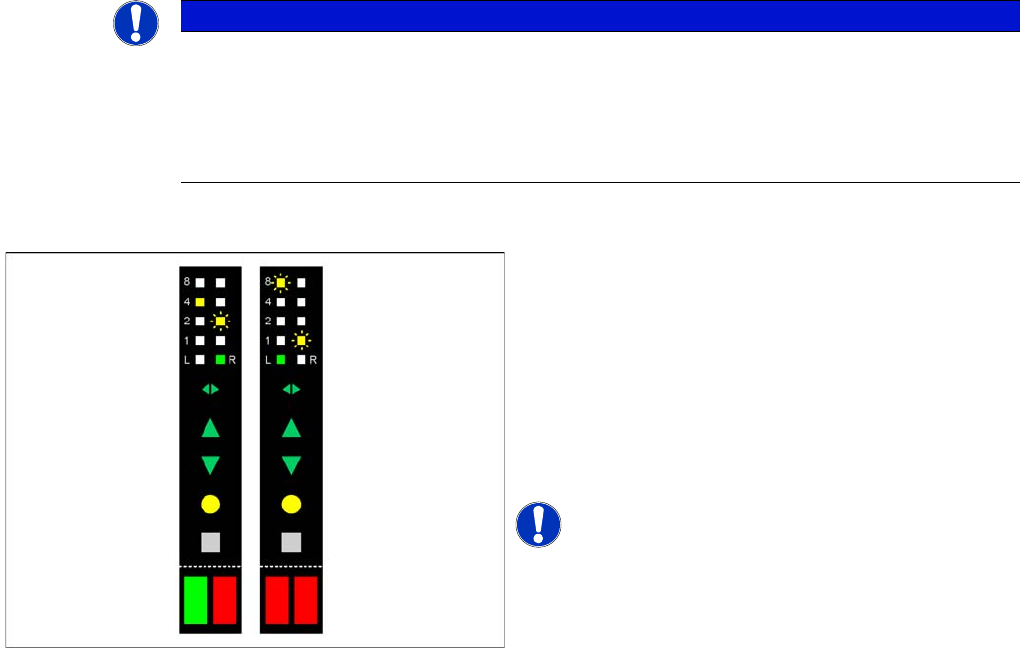
One LED of the pitch display in the track at fault flashes
slowly.
The pitch display signals the error type:
▪ LED 8: - Feed error
▪ LED 4 - (not in use)
▪ LED 2 - Torn foil
▪ LED 1 - Foil removal error
At least one LED of the status display lights up red.
NOTICE! Track errors can occur in both tracks
at the same time (right-hand picture).
Within one track two errors at most can occur. In this
case, two LEDs of the pitch display for this track are
flashing.
Overview of X Feeder Modules
Display at the Tape Feeder Modules Functions and Operating Controls
User Manual X Feeder Modules SIPLACE Family 25
Display of a process error
Display of a module error
See also
5.1 Messages for 2x8 mm Feeder Modules [ ➙ 79]
5.1.1 Module Error: Error Messages Concerning the Control Unit of the Feeder Module [ ➙ 79]
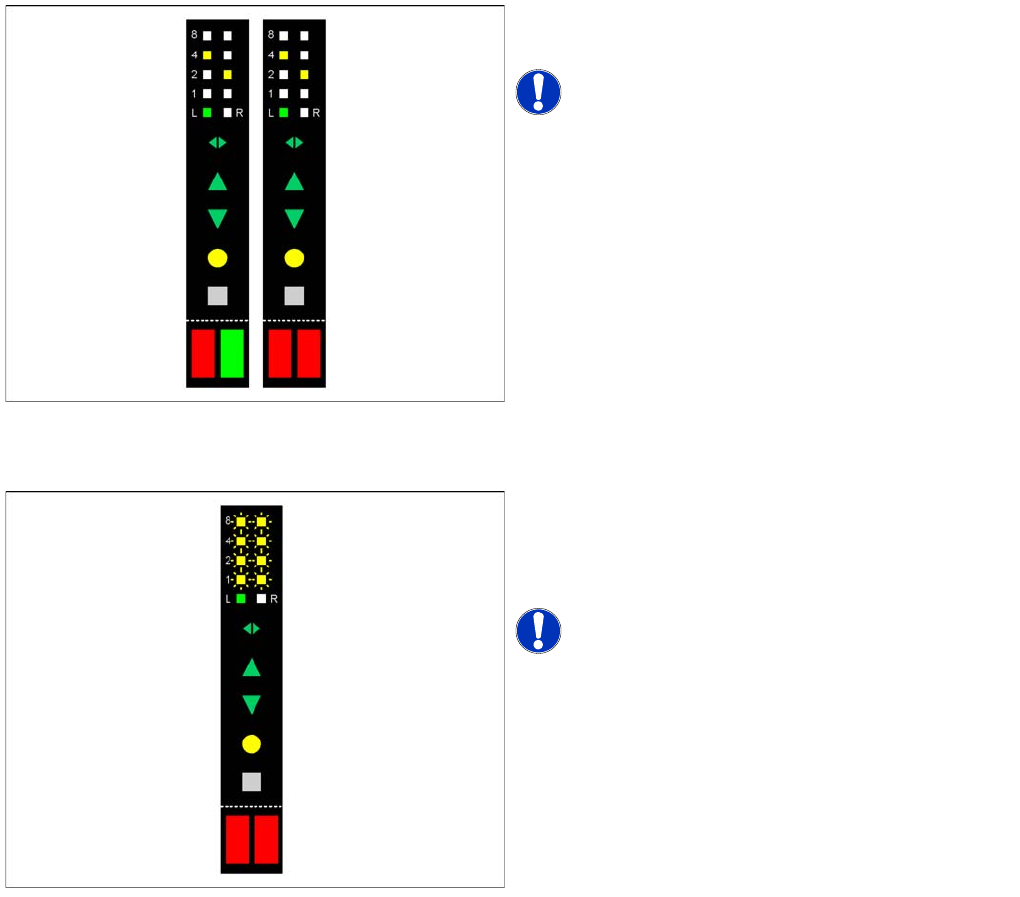
No LED of the pitch display is flashing.
At least one LED of the status display lights up red.
NOTICE! Track errors can occur in both tracks
at the same time.
All LEDs of the pitch display either flash slowly or do not
light up at all, or display a running light.
Both LEDs of the pitch display light up red or or orange or
they flash in red.
NOTICE! For module errors there are different
displays depending on the error type.