CP14 Head Part Exchange - Replacing the DP Drive en.pdf - 第13页
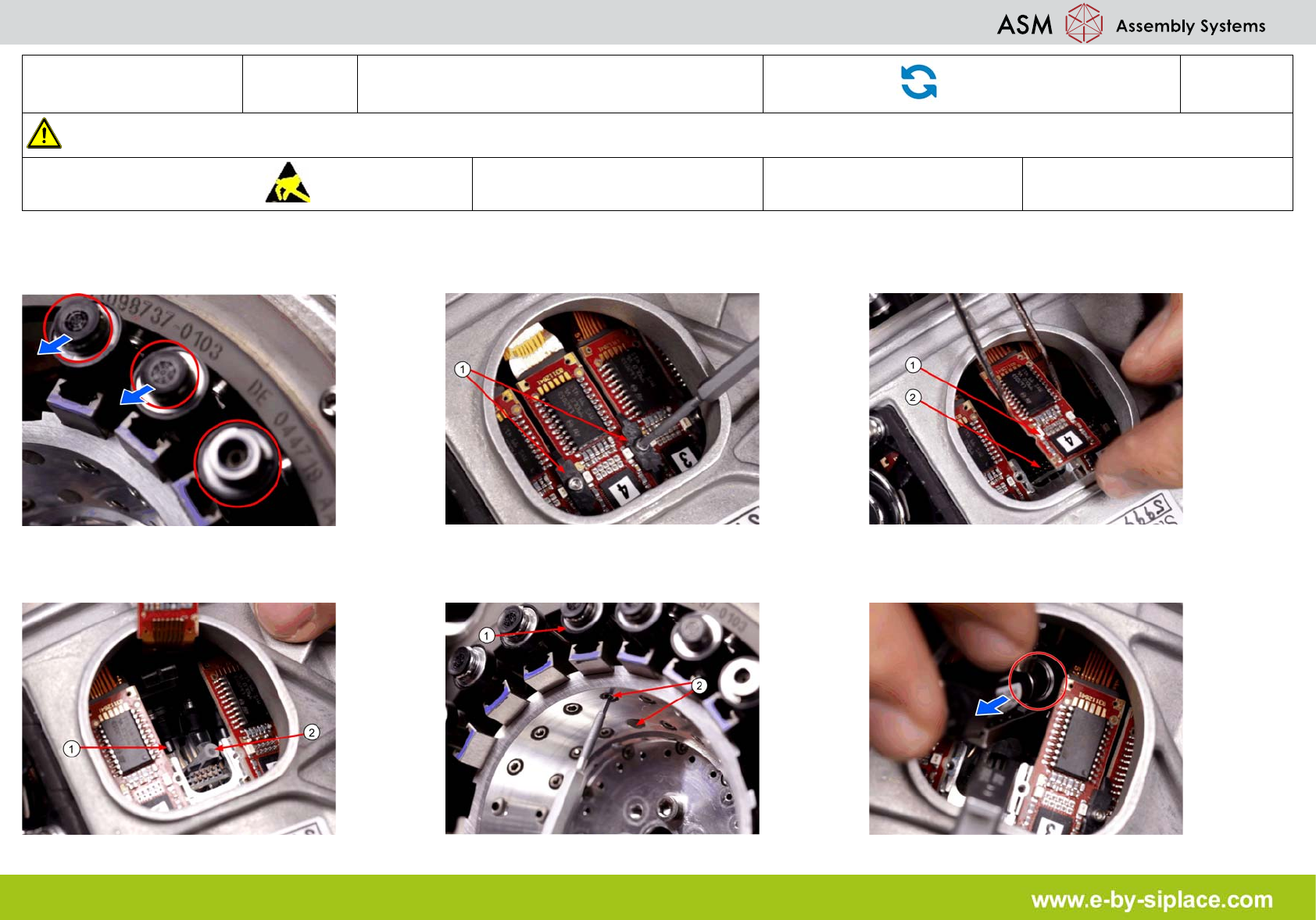
E-by SIPLACE CP14 Removing the DP Drive Part Exchange 1/1 CAUTION! Refer to safety inst ructions in user manual before working on the machine. ESD guidelines are to be followed Tool: Wear Part: Consum ables: 1. Pull the …

E-by SIPLACE CP14 Removing the DP Drive
Part Exchange
1/1
CAUTION! Refer to safety instructions in user manual before working on the machine.
ESD guidelines are to be followed
Tool: Wear Part: Consumables:
1. Pull the nozzle off the segment. 2. Through the service aperture, loosen the
brackets (1) of the relevant DP drive.
3. Carefully pull the board (1) off the connector
(2) with tweezers.
4. Disconnect the hose (2) from the DP drive
(1).
5. Loosen the two screws (2) fastening the rel-
evant DP drive (1) (inside of the star carrier).
6. Remove the DP drive through the service
aperture.