TK26620.Feeder ID Log Function Specification.pdf - 第11页
SMT Software Engineering Group IM Operations YAMAHA M OTOR CO., LTD. MDOC-SOFT50281 11/13 Ite m name Explanation Interva l Save T ime ( Hour) Set t he interval time that outputs the feeder ID individual log file pe r hou…
SMT Software Engineering Group
IM Operations YAMAHA MOTOR CO., LTD.
MDOC-SOFT50281
10/13
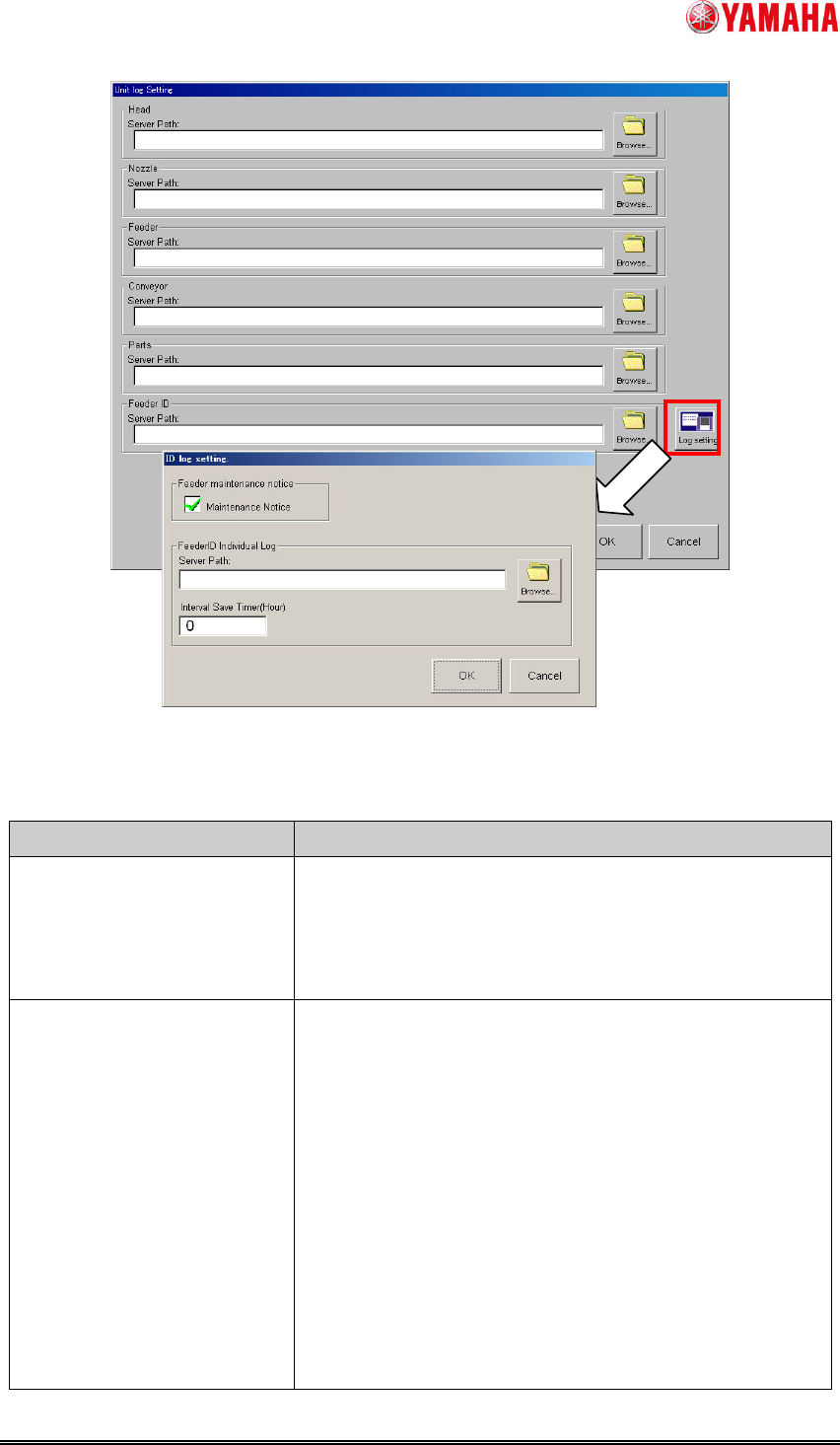
Fig.4.2 “Unit log Setting” screen and “ID log setting” screen
Table4.1 Setting items of”ID log setting” screen
Item name Explanation
Maintenance Notice
checkbox
If checked, the maintenance notice function becomes
effective.
When the first installation, this check is attached by the
default.
Server Path Set output path of the feeder ID individual log file.
By tapping “Browse” button and opening “Browse Folder”
screen, you can specify the folder path.
When empty, the feeder ID log function becomes invalid.
SMT Software Engineering Group
IM Operations YAMAHA MOTOR CO., LTD.
MDOC-SOFT50281
11/13
Item name Explanation
Interval Save Time (Hour) Set the interval time that outputs the feeder ID individual
log file per hour. When "0" is set, interval save is not
performed.
When reaching the interval save time during
auto-running, file is output after stopping auto-running.
When changing this value and tapping "OK" button, the
current interval save timer is reset and the interval save
timer is restarted with new interval time.
4.2 Setting in “Unit log” screen
Close the [ID log setting] screen and return to [Unit Log Setting] screen.
When outputting the feeder ID daily log file, set output path of the feeder ID daily log file to
“Server Path” in the “Feeder ID” field. By tapping the [Browse] button and opening the
[Browse Folder] screen, you can specify the folder path.
When “Server Path” is empty, the feeder ID daily log file is not output.
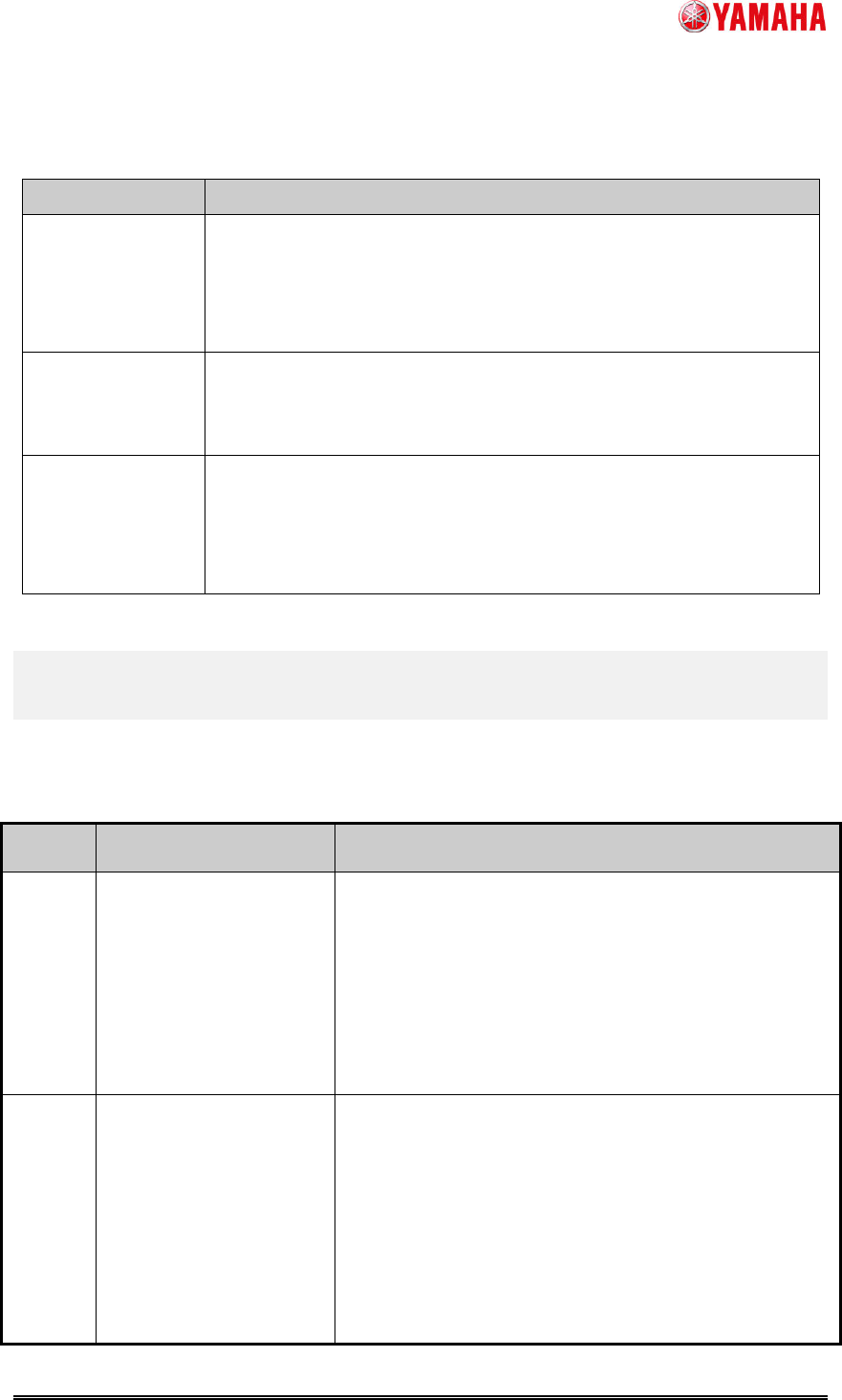
4.3 Setting in “Setting Detail History” screen
Tap the [Setup] - [Software Setting] button - [History] tab – [Unit log] button and open the
[Setting Detail History] screen. If needed, perform the setting related to history. (This setting
also influences histories other than feeder)
SMT Software Engineering Group
IM Operations YAMAHA MOTOR CO., LTD.
MDOC-SOFT50281
12/13
Fig.4.3 “Setting Detail History” screen
Table4.2 Setting items of “Setting Detail History” screen (Only items related to feeder ID log)
Item Explanation
Feeder Log Use
UserNo Mode
This is the setting of the output form when feeder set number is
output to a file.
- Checked: “Set No.” field is saved start from “1” (User No.).
- Unchecked: “Set No.” field is saved start from “0” (Soft No.).
Multi Language
Output
This is the setting of whether a file is outputted in multilingual mode.
- Checked: File is output in multilingual mode.
- Unchecked: File is not output in multilingual mode.
Limit size of total
History
When you want to set a limit on the total amount of operation history
data to be saved, enter limit size.
No limit is placed when set to "0".
This is applied to the feeder ID daily log file only.
5. Error Message
Error messages displayed by this function are as follows.
Table5.1 Error message
Error
Number
Title Causes and measures
12691 Feeder ID log file access
error
< Cause >
It is impossible to access to the folder specified in
“Server Path” of “ID log setting” screen. The specified
folder path might be incorrect.
< Measures >
Set an effective path to “Server Path”.
If the ID log management is set to "invalidity",
production is able to continue. However, counters such
as feeding times, pick error etc. are not counted.
12692 Feeder ID log file access
error
< Cause >
It is impossible to access to the feeder ID individual log
file on the devices (such as external HDD). The
specified folder path might be incorrect.
< Measures >
Set an effective path to “Server Path”.
If the ID log management is set to "invalidity",
production is able to continue. However, counters such
as feeding times, pick error etc. are not counted.