TK26620.Feeder ID Log Function Specification.pdf - 第3页
SMT Software Engineering Group IM Operations YAMAHA M OTOR CO., LTD. MDOC-SOFT50281 3/13 Fig.3.1 F eeder ID log screen 3.1.1 Disp lay items The disp lay items o f feede r ID log scre en are as fo llows. When feeder is at…
SMT Software Engineering Group
IM Operations YAMAHA MOTOR CO., LTD.
MDOC-SOFT50281
2/13
1. Applicable models and software versions
Applicable items and software version are as below.
Table1.1 Applicable models and software version
Item Name Software Version Remarks
YS series mounters,
YG300,
YG12 series mounters
VGOS V3.42STD R1.000 or later SS feeder, ZS feeder, CLi
feeder, FSi feeder only
YSM40 VGOS V4.42STD R1.000 or later SS feeder, ZS feeder only
2. Outline
The feeder ID log function is able to manage the information about feeder usage condition,
error frequency, etc. for each one feeder (each feeder ID) by identifying feeder ID of each
feeder. However, target feeders are only SS feeder, ZS feeder, CLi feeder, and FSI feeder.
To use this function, it is necessary to validate the feeder maintenance notice function.
When the first installation, the feeder maintenance notice function becomes effective by
default.
3. Detail
This chapter explains about the feeder ID log screen and the feeder ID log file.
3.1 Feeder ID log screen
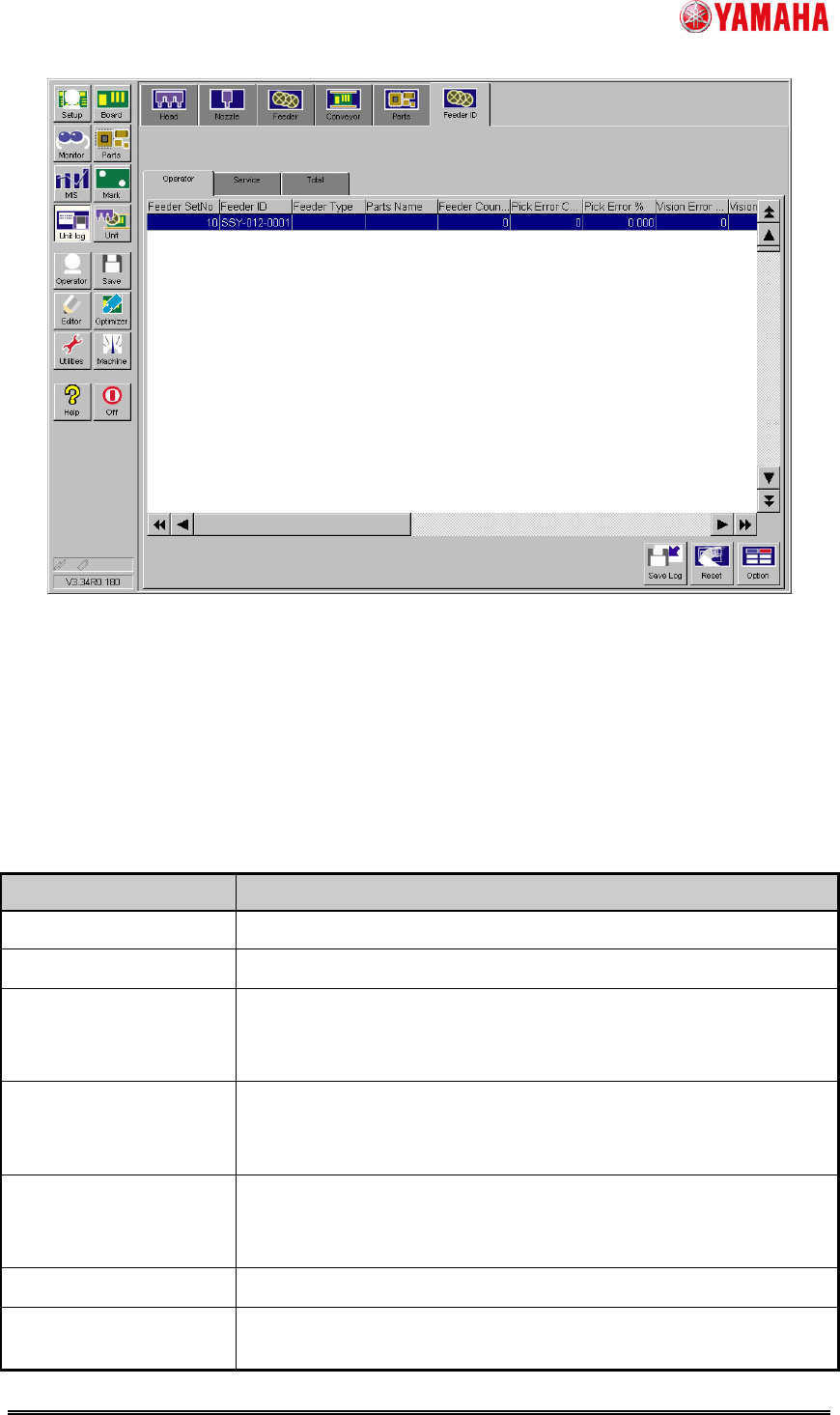
The feeder ID log is displayed at [Unit Log] - [Feeder ID] tab.
“Feeder ID” tab is further divided into three tabs. The "Operator" or "Service" tab can be
cleared as needed. The "Total" log cannot be cleared.
SMT Software Engineering Group
IM Operations YAMAHA MOTOR CO., LTD.
MDOC-SOFT50281
3/13
Fig.3.1 Feeder ID log
screen
3.1.1 Display items
The display items of feeder ID log screen are as follows.
When feeder is attached or machine is turned on, the last saved data is displayed. If the
last saved data does not exist, the initial value is displayed.
Table3.1 Display items of feeder ID log screen
Column name Contents
Feeder SetNo Set position number of attached feeder is displayed.
Feeder ID Feeder ID is displayed.
Feeder Type Feeder type specified by parts data is displayed.
In the case of the feeder unused by board data, the last feeder
type is displayed.
Parts Name Parts name attached to the feeder is displayed.
In the case of the parts unused by board data, the last parts name
is displayed.
Feeder Counter Number of times of feeder drive (number of shots) is displayed.
This count is used as the standard when calculating various error
ratios.
Pick Error Counter Number of pick error of the parts on the feeder is displayed.
Pick Error % Ratio of “Pick Error Counter” / “Feeder Counter” is displayed.
SMT Software Engineering Group
IM Operations YAMAHA MOTOR CO., LTD.
MDOC-SOFT50281
4/13
Column name Contents
Vision Error Counter Number of vision error of the parts on the feeder is displayed.
Vision Error % Ratio of “Vision Error Counter” / “Feeder Counter” is displayed.
No Parts Error Counter Number of no-parts error of the parts on the feeder is displayed.
No Parts Error % Ratio of "No Parts Error Counter" / "Feeder Counter" is displayed.
Nozzle Error Counter Number of nozzle error of the parts on the feeder is displayed.
Nozzle Error % Ratio of "Nozzle Error Counter" / "Feeder Counter" is displayed.
Date
Date when the feeder was used first is displayed.
Last Update Date Date when the feeder was used last is displayed.
Specifically, this is the time when either of "Feeder Counter", "Pick
Error Counter", "Vision Error Counter", "No Parts Error Counter,”
or "Nozzle Error Counter" is counted last.
Stroke Length / Feed
Time
Distance of the tape sent by the feeder (unit: mm) is displayed.
In case of a multi stick feeder, feeding time (unit: sec) is
displayed.
Smart Exist Count
Number of feeder attachment times is displayed.
After Adjust Drive Cnt Number of times of feeder drive after adjusting by SS Tune-Up
Station is displayed. (This value cannot be initialized)
Cumulated Drive Cnt Number of times of past feeder drive is displayed. (This value
cannot be initialized)
Feeder MACS Correct
X
Feeder MACS Correction value X is displayed.
When “FEEDER MACS CORRECTION VALUE ERROR” occurs,
the error value is displayed. (This value cannot be initialized)
Feeder MACS Correct
Y
Feeder MACS Correction value Y is displayed.
When “FEEDER MACS CORRECTION VALUE ERROR” occurs,
the error value is displayed. (This value cannot be initialized)
* Depending on timing of refresh screen, updated value might not be reflected to the screen
immediately.
3.1.2 “Save Log” button
By the following procedure, you can save the feeder ID log data displayed on the screen,
into any location such as an USB memory or network drive.
1. Tap the [Save Log] button to open the "Save Logged File" dialog box.
2. Tap the [Media] and [Folder] buttons, and set the location to save the log data.
3. Name the file and tap the [Save] button. The file of the log data will be saved in the
specified location. A file extension (.csv) will be automatically assigned to each file.