TK26620.Feeder ID Log Function Specification.pdf - 第9页
SMT Software Engineering Group IM Operations YAMAHA M OTOR CO., LTD. MDOC-SOFT50281 9/13 No. Item name Explanation 43 [ total] Last Upd ate Date T ot al mode: Last update d ate is outp ut. 44 [ total] S troke Length / Fe…
SMT Software Engineering Group
IM Operations YAMAHA MOTOR CO., LTD.
MDOC-SOFT50281
8/13
No.
Item name
Explanation
12 Feeder SetNo Set position number of attached feeder is output.
13 Cart No Cart number of attached feeder is output.
14 Cart Set No
Set position number of attached feeder in cart is
output. (Relative position in cart)
15 Location 0 fixed (Not in use)
16 Use Status 0 fixed (Not in use)
17 [user] Count
User mode: Number of times of feeder drive is
output.
18 [user] Pick Error User mode: Number of pick error is output.
19 [user] Parts Error User mode: Number of vision error is output.
20 [user] NoParts Error User mode: Number of no-parts error is output.
21 [user] Nozzle Error User mode: Number of nozzle error is output.
22 [user] Date
User mode: Date when measurement was started is
output.
23 [user] Last Update Date User mode: Last update date is output.
24 [user] Stroke Length / Feed Time
User mode: Distance of the tape sent by the feeder
(In case of a multi stick feeder, feeding time) is
output.
25 [user] Smart Exist Count
User mode: Number of feeder attachment times is
output.
26 [user] After Adjust Drive Cnt
User mode: Number of times of feeder drive after
adjusting by SS Tune-Up Station is output.
27 [Maintenance] Count
Maintenance mode: Number of times of feeder drive
is output.
28 [Maintenance] Pick Error Maintenance mode: Number of pick error is output.
29 [Maintenance] Parts Error Maintenance mode: Number of vision error is output
30 [Maintenance] NoParts Error
Maintenance mode: Number of no-parts error is
output
31 [Maintenance] Nozzle Error
Maintenance mode: Number of nozzle error is
output.
32 [Maintenance] Date
Maintenance mode: Date when measurement was
started is output.
33 [Maintenance] Last Update Date Maintenance mode: Last update date is output.
34
[Maintenance] Stroke Length /
Feed Time
Maintenance mode: Distance of the tape sent by the
feeder (In case of a multi stick feeder, feeding time)
is output.
35 [Maintenance] Smart Exist Count
Maintenance mode: Number of feeder attachment
times is output.
36
[Maintenance] After Adjust Drive
Cnt
Maintenance mode: Number of times of feeder drive
after adjusting by SS Tune-Up Station is output.
37 [total] Count
Total mode: Number of times of feeder drive is
output.
38 [total] Pick Error Total mode: Number of pick error is output.
39 [total] Parts Error Total mode: Number of vision error is output
40 [total] NoParts Error Total mode: Number of no-parts error is output.
41 [total] Nozzle Error Total mode: Number of nozzle error is output.
42 [total] Date
Total mode: Date when measurement was started is
output.
SMT Software Engineering Group
IM Operations YAMAHA MOTOR CO., LTD.
MDOC-SOFT50281
9/13
No.
Item name
Explanation
43 [total] Last Update Date Total mode: Last update date is output.
44 [total] Stroke Length / Feed Time
Total mode: Distance of the tape sent by the feeder
(In case of a multi stick feeder, feeding time) is
output.
45 [total] Smart Exist Count
Total mode: Number of feeder attachment times is
output.
46 [total] After Adjust Drive Cnt
Total mode: Number of times of feeder drive after
adjusting by SS Tune-Up Station is output.
47 Cumulated Drive Cnt Number of times of past feeder drive is output.
4. Setting
When using the feeder ID log, perform the following settings.
4.1 Setting in “ID log setting” screen
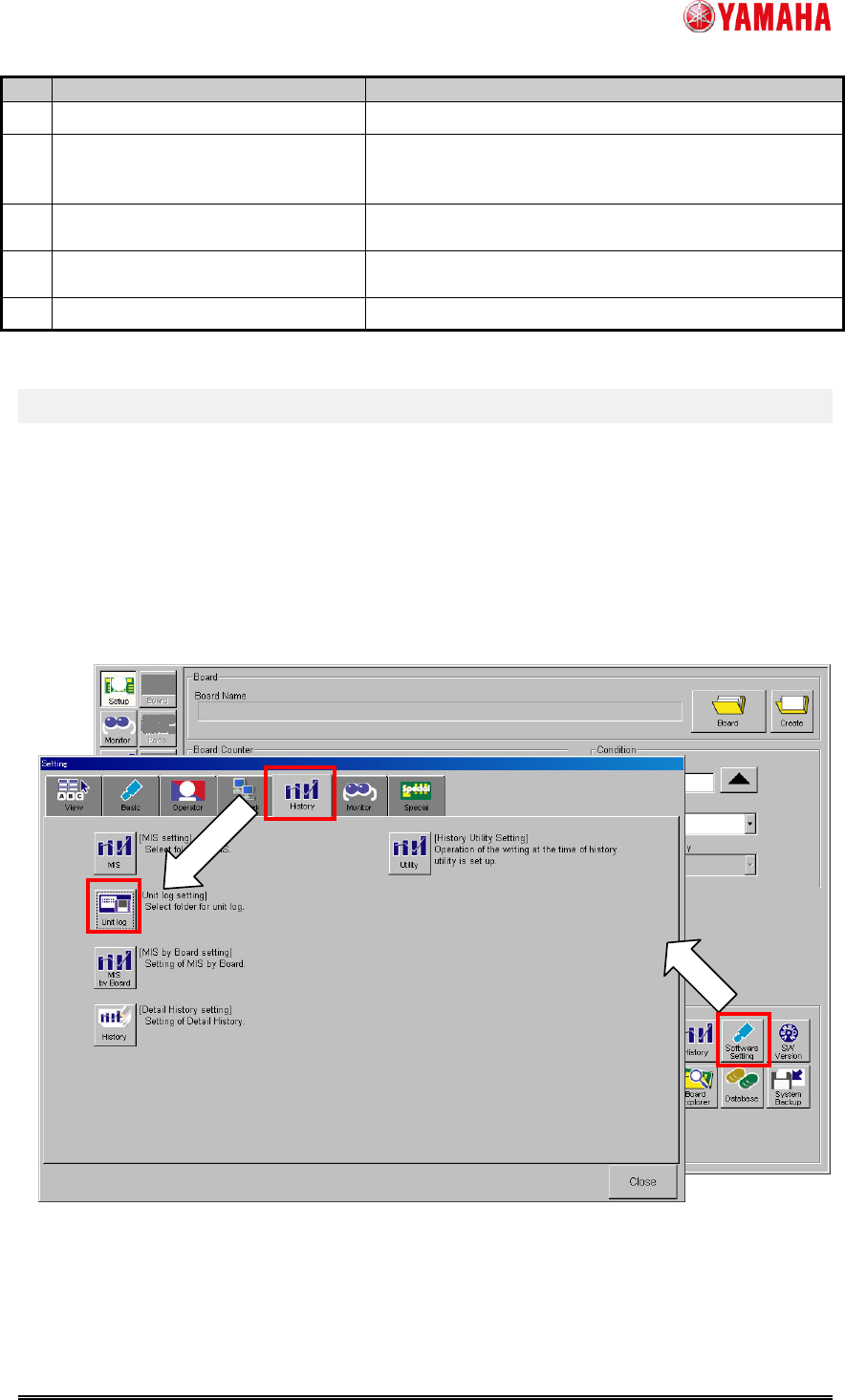
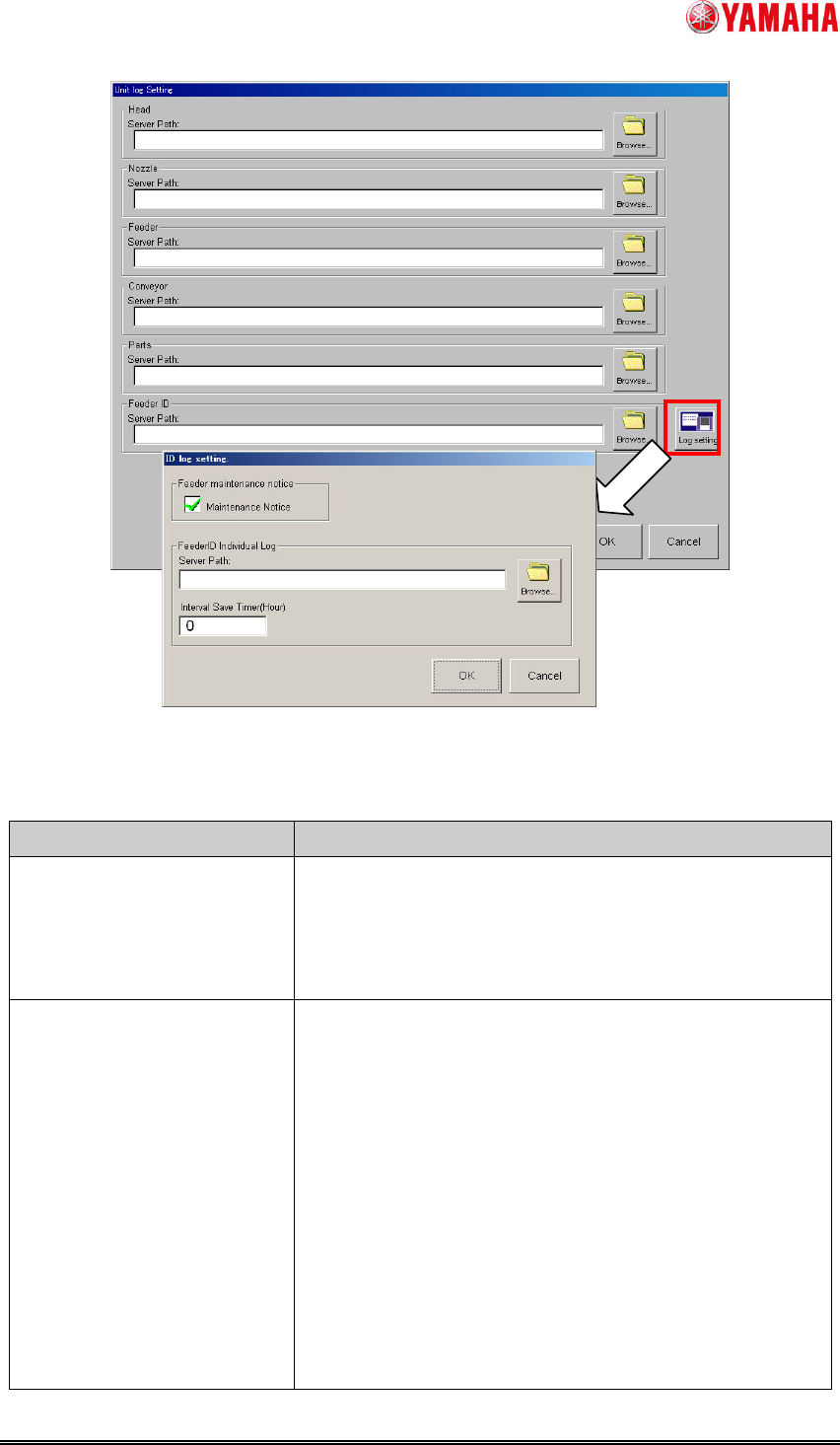
Tap [Setup] - [Software Setting] button - [History] tab - [Unit Log] button - [Log Setting]
button and open “ID Log Setting” screen. Enable the maintenance notice function and set
the feeder ID individual log file path to “Server Path”.
Fig.4.1 “History” tab of “Software Setting” screen
SMT Software Engineering Group
IM Operations YAMAHA MOTOR CO., LTD.
MDOC-SOFT50281
10/13
Fig.4.2 “Unit log Setting” screen and “ID log setting” screen
Table4.1 Setting items of”ID log setting” screen
Item name Explanation
Maintenance Notice
checkbox
If checked, the maintenance notice function becomes
effective.
When the first installation, this check is attached by the
default.
Server Path Set output path of the feeder ID individual log file.
By tapping “Browse” button and opening “Browse Folder”
screen, you can specify the folder path.
When empty, the feeder ID log function becomes invalid.