TT5064_UserDefinition_MachineSetup_ManualRev1.pdf
SMT Software En gineering Group IMOperations YAMAHAMOTORCO.,LTD. MD OC-SOFT50064 1/12 “U se r Def i nitio n” Machine Setup Manual Chapter “ User Defin ition ” Mach ine Setup Manu al ..... .... ..…

SMT Software Engineering Group
IMOperationsYAMAHAMOTORCO.,LTD.
MDOC-SOFT50064
1/12
“User Definition” Machine Setup Manual
Chapter
“User Definition” Machine Setup Manual .............................................. 1
1. Introduction ..................................................................... 2
2. Outline ......................................................................... 2
3. Setting ......................................................................... 2
4. Usage .......................................................................... 3
4.1 Display of setup information on “User Definition” .................................. 3
4.2 Setup work of “User Definition”.................................................. 5
4.2.1 Setup work of necessary item ............................................... 5
4.2.2 Remove work of unnecessary item (Work with the barcode scan) ................ 8
4.2.3 Remove work of unnecessary item (Work with [Remove] button) ................ 10
5. Restrictions .................................................................... 12
Revision No.
Update Changes
000 2010/4/7 Create
001 2010/5/14 [Remove] button is changed to the constant use.
SMT Software Engineering Group
IMOperationsYAMAHAMOTORCO.,LTD.
MDOC-SOFT50064
2/12
1. Introduction
The target model and version are as follows.
Table1.1 Target model and version
Item Object Remarks
Target models YS Series Mounter, YSP
YG12 Series Mounter, YG300
Target version V3.22STD R1.000 or later
2. Outline
Setup of the “User Definition" is a means to do "Setup Verify" of Item other than the parts.
As a result, "Setup Verify" of Item other than surface-mounted components become
possible, and mis-setup is prevented.
Ex.
“Backup”
(Plate of pushup pin. In the machine for Twin push-up, a necessary count changes by
the board.)
“Bare board pack”
It is necessary to register items other than surface-mounted components as IDs, perform
the following procedure to use the function.
1. Setting method of “User Definition”
・ Refer to "ID Editor User Definition" Manual.
2. Registration method of check item
・ Refer to "User Definition Setting Item Editor" Manual. (The check item of each Board
is set.)
3. Method of setup “User Definition”
・ Refer to this material.
3. Setting
The “User Definition” is one of "Setup verify" function.
When "Setup verify" is available, it is possible to use it.
SMT Software Engineering Group
IMOperationsYAMAHAMOTORCO.,LTD.
MDOC-SOFT50064
3/12
4. Usage
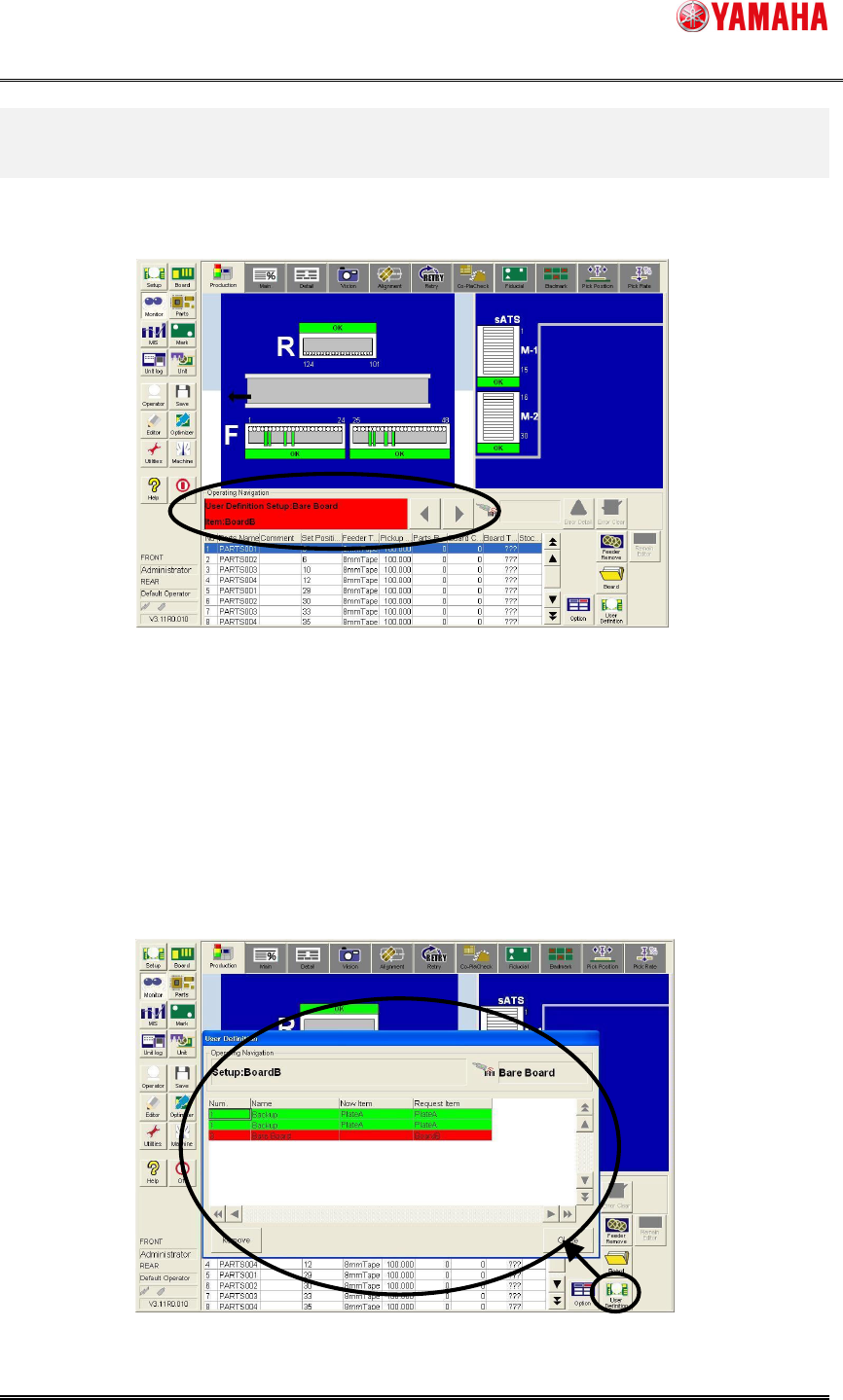
When the setup work of the “User Definition” is necessary, [User Definition Setup:…] is
displayed in [Monitor] - [Production] - [Operating Navigation].
Figure4.1 Production Monitor
4.1 Display of setup information on “User Definition”
To check setup of "User Definition" insufficient in the start production, the setup situation is
displayed.
When [User Definition] button* is clicked, [Monitor] – [Production] is started.
*The [User Definition] button is available when the check items of the read board data
other than parts are registered.
Figure4.1.1 User definition information dialog start