Printer 710_810 v8 Rapid Transit Conveyor Module.pdf - 第11页
RAPI D TRANS IT CON VEYOR (RTC) MODULE ADJUS TMENTS AN D SETTING S Chapter Issue 2 Oct 06 Technical Reference Manual 18.11 ADJUSTMENTS AND SETTINGS Rising T able Home Setting T o check and adjust the ri sing ta ble home …
RAPID TRANSIT CONVEYOR (RTC) MODULE
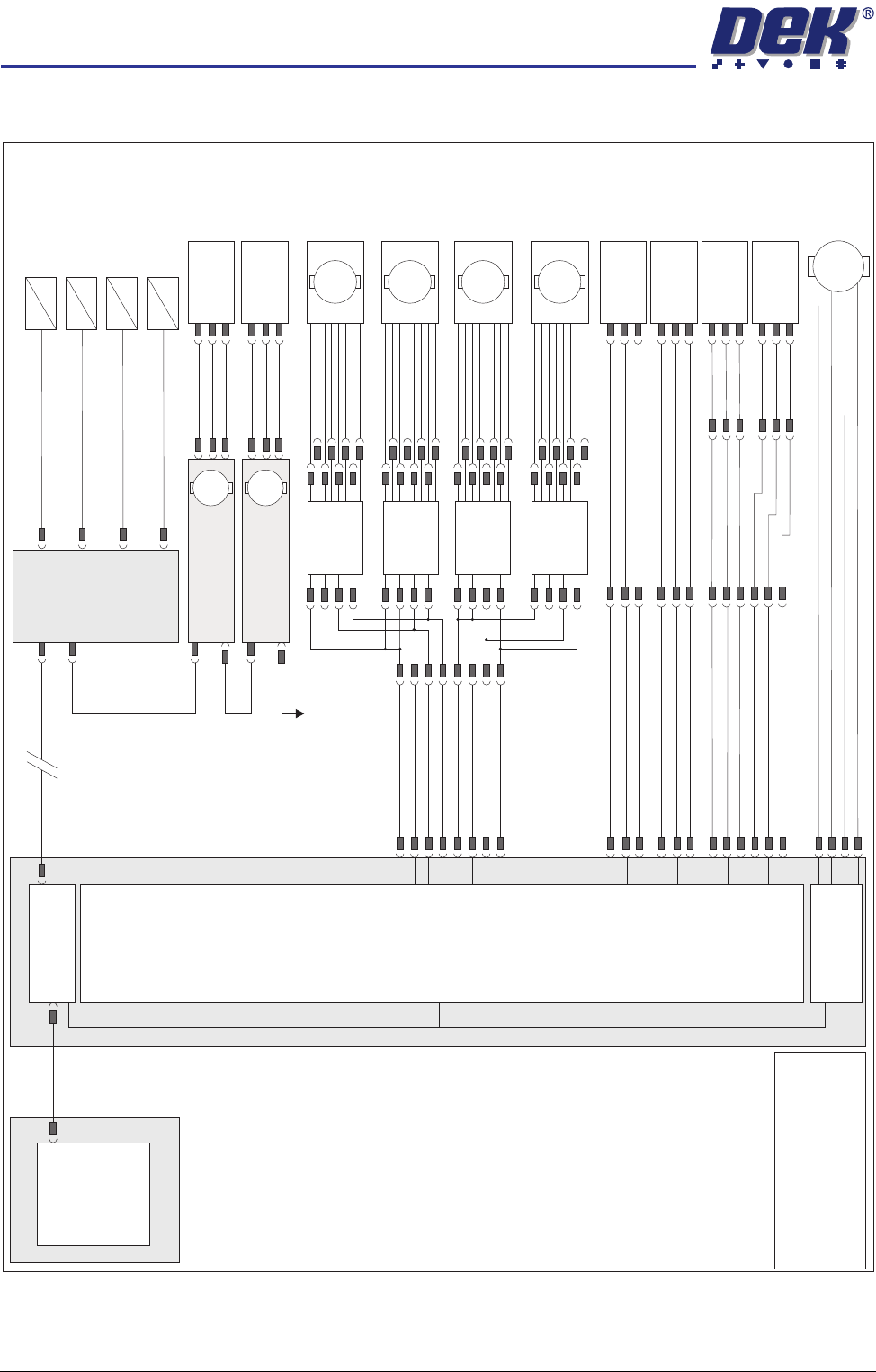
ELECTRICAL SCHEMATIC
18.10 Technical Reference Manual Chapter Issue 2 Oct 06
ELECTRICAL SCHEMATIC
Machine PC
Motherboard
Machine Control Enclosure
DIG IN 10
DIG IN 11
DIG IN 6
Rail Lift
Sensor (8SE5)
Outroad Board
Sensor (8SE7)
Inroad Board
Sensor (8SE8)
8PL10
8PL04
M36PL17
8PL03
8PL12
Dual Stepper
X3
NextMove
Interface Card
X4
NextMove ES
(I/O Node 1)
X5
Main Machine
I/O Node 2
Board Clamp
Solenoid (16SOL10)
DIG OUT 9
Rail Width Clamp
Solenoid (16SOL14)
DIG OUT 10
Outroad Board Stop
Solenoid (16SOL22)
DIG OUT 12
Inroad Vane Lift
Solenoid (16SOL03)
DIG OUT 15
N2PL4
CAN Bus
CAN Bus
N2SK2
N11SK3
N12SK3
N2SK3
N11PL4
N12PL4
USB
NOTE
The breaks in the CAN Bus chain
reflect that additional I/O Nodes may
be fitted, refer to Machine Control
chapter for the complete CAN Bus
chain.
+12V
Sig
0V
DIG IN 8
Board At Stop
Sensor (8SE32)
M36PL11
8PL147
+12V
Sig
0V
+12V
Sig
0V
+12V
Sig
0V
Transport
Mechanism
Home (8SE31)
N11PL01
+12V
Sig
0V
Moving Rail
Home (8SE6)
N12PL01
+12V
Sig
0V
M36PL22
Vane Stepper
Motor (8M19)
Motor 2B-
Motor 2A-
Motor 2B+
Motor 2A+
M
8PL22
M36PL18
+V
+V
Dir
Dir
Enable
DIG OUT 2
DIG OUT 3
Enable
0V
0V
Right R-L
Speed
Controller
BGE 3004
8SK135
Front Outroad
Belt Drive
(8M21)
M
Right L-R
Speed
Controller
BGE 3004
8SK133
Rear Outroad
Belt Drive
(8M18)
M
Rear Inroad
Belt Drive
(8M17)
Left L-R
Speed
Controller
BGE 3004
8SK132
M
Front Inroad
Belt Drive
(8M20)
Left R-L
Speed
Controller
BGE 3004
8SK134
M
I/O Node 11
Transport Mechanism
Servo Motor
I/O Node 12
Rail Width
Stepper Motor
M
M
To I/O Node 4
RAPID TRANSIT CONVEYOR (RTC) MODULE
ADJUSTMENTS AND SETTINGS
Chapter Issue 2 Oct 06 Technical Reference Manual 18.11
ADJUSTMENTS AND SETTINGS
Rising Table
Home Setting
To check and adjust the rising table home setting, refer to the Rising Table
Module of this manual.
Parallelism
WARNING
BOARD CLAMPS. EXTREME CARE MUST BE EXERCISED WHEN WORKING IN
THE TOOLING AREA OF THE MACHINE TO AVOID INJURY. THE FOILS ON THE
FRONT AND REAR BOARD CLAMPS ARE VERY SHARP.
Parallelism of the print station rails and the camera X axis requires the Rail
Setting Jig (187652).
Front Rail
Parallelism
1. To move the vanes clear of the front print station rails, set the board length
to maximum and home the transport mechanism.
2. Home the RTC rails and set the rising table to vision height.
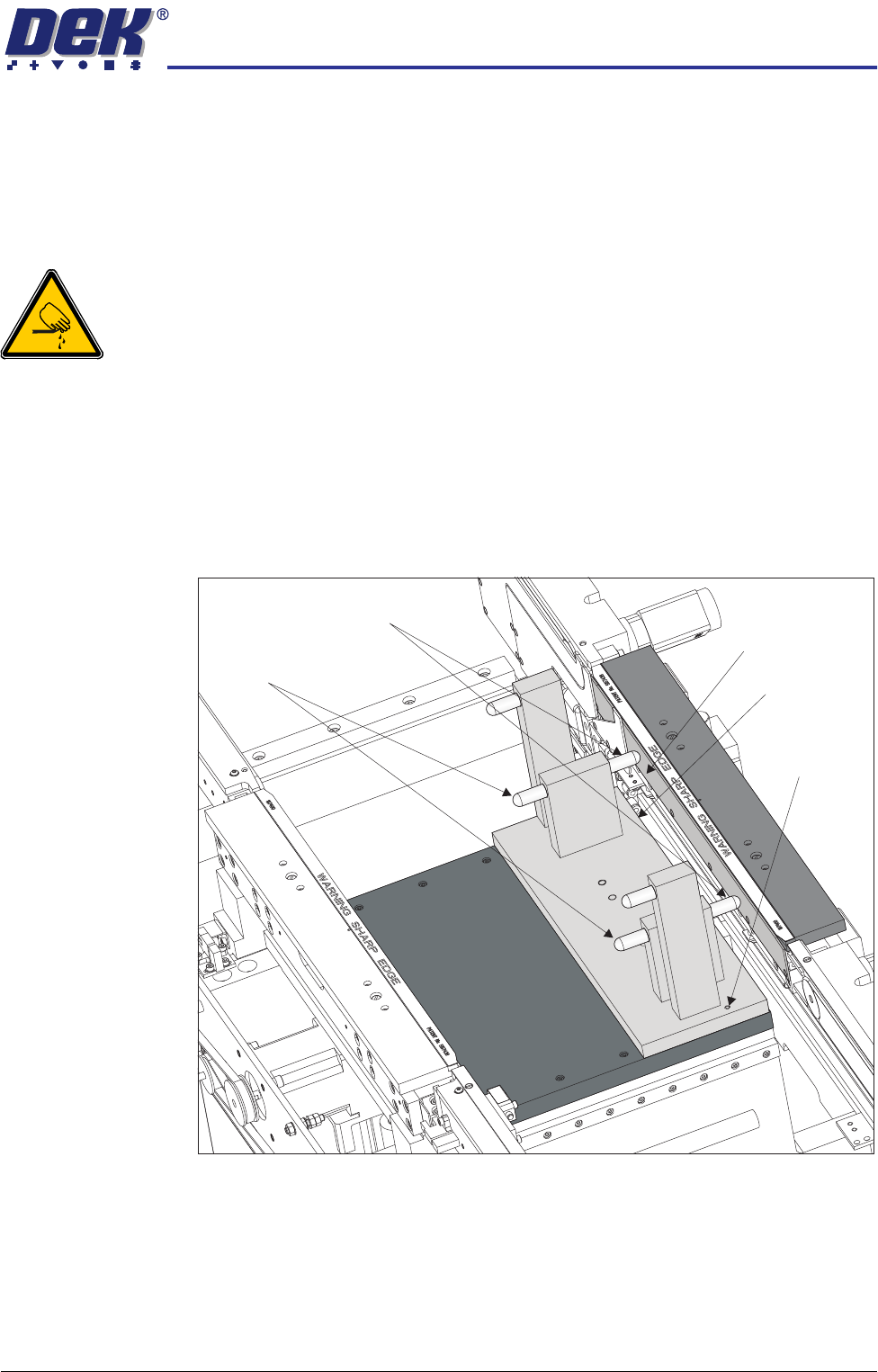
3. Fit the rail setting jig to the manual tooling plate locating the two dowels in
to the holes on the tooling plate.
NOTE
The rail setting jig must not exert any force on the front rail during placement.
If any force is felt, remove the jig, loosen the front print station rail securing
screws as described in Step 6, refit the jig and continue with Steps 7 to 9.
4. Using a 0.05mm feeler as a NO-GO gauge, check that the stops on the rail
setting jig abut the board support plate on the front print station rail.
5. If adjustment is not required, go to the next section - Rear Rail Parallelism.
Board Support Plate
Rail Setting Jig
Locating Dowel
(in 2 positions)
Rear Rail Stops
Front Rail Stops
RAPID TRANSIT CONVEYOR (RTC) MODULE
ADJUSTMENTS AND SETTINGS
18.12 Technical Reference Manual Chapter Issue 2 Oct 06
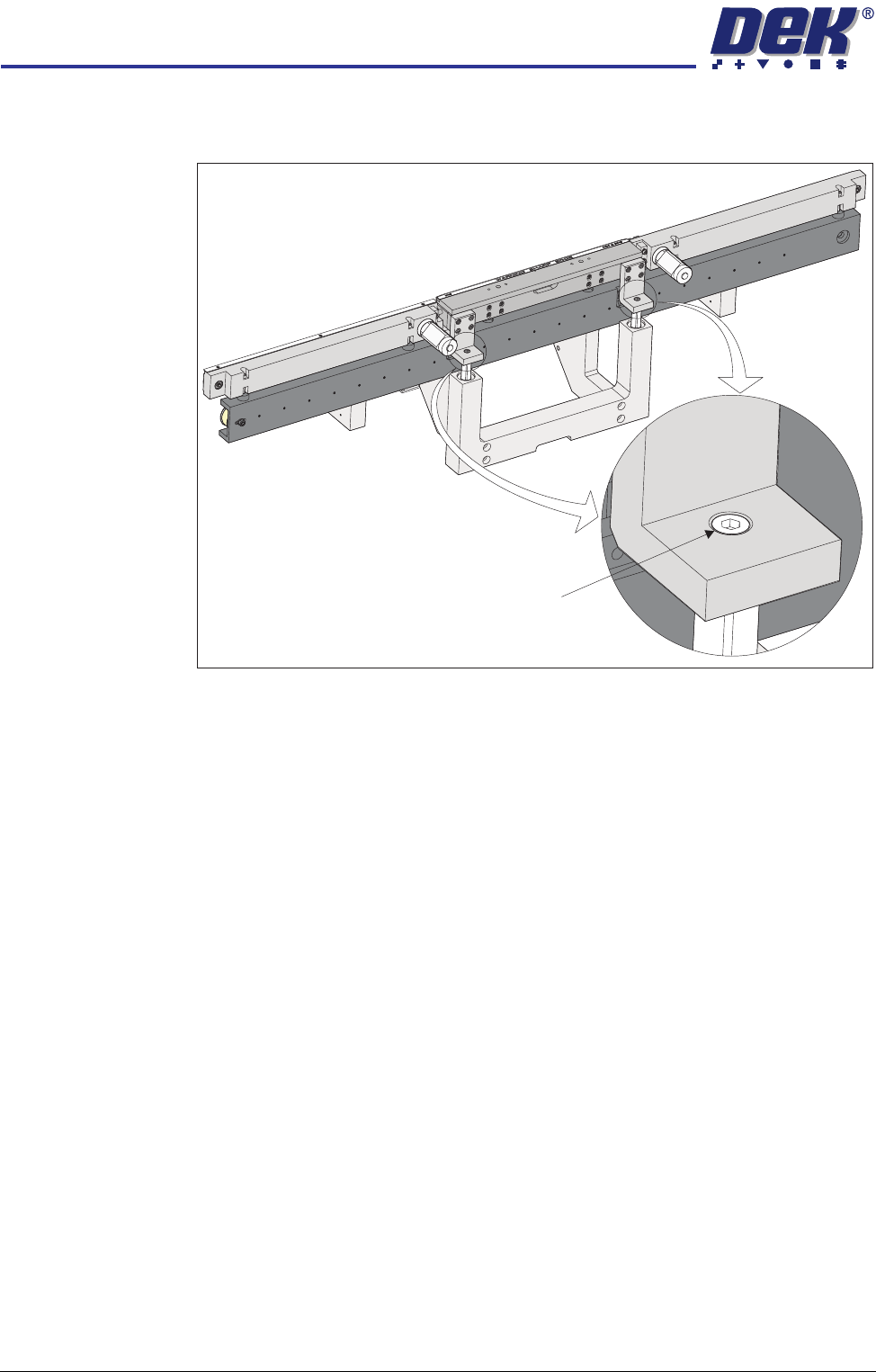
6. To adjust the front print station rail parallelism, loosen the two front print
station rail securing screws.
NOTE
The securing screws need to be loosened just enough to allow the rail to be
moved.
7. Move the front print station rails so that the front print station rail abuts both
stops on the jig without any pressure.
8. Tighten the securing screws.
9. Repeat Steps 4 to 8 until parallelism is achieved.
Rear Rail
Parallelism
Front rail parallelism must be carried out before this procedure.
1. Using the drive belt, manually move the rear rail so that the rear print station
rail abuts the two stops on the rail setting jig without any pressure.
2. Using a 0.05mm feeler as a NO-GO gauge, check that no gap exists
between the stops and the board support plate.
3. If adjustment is not required, manually move the rear rail away from the jig
and remove the jig from the rising table.
4. To adjust the parallelism of the rear print station rail, the board clamp must
be removed.
Front Print Station Rail Securing Screw
(in 2 positions)