Printer 710_810 v8 Rapid Transit Conveyor Module.pdf - 第19页
RAPI D TRANS IT CON VEYOR (RTC) MODULE ADJUS TMENTS AN D SETTING S Chapter Issue 2 Oct 06 Technical Reference Manual 18.19 4. If adjustme nt is required on the front i nroad conveyor , loosen the two print st ation lif t…
RAPID TRANSIT CONVEYOR (RTC) MODULE
ADJUSTMENTS AND SETTINGS
18.18 Technical Reference Manual Chapter Issue 2 Oct 06
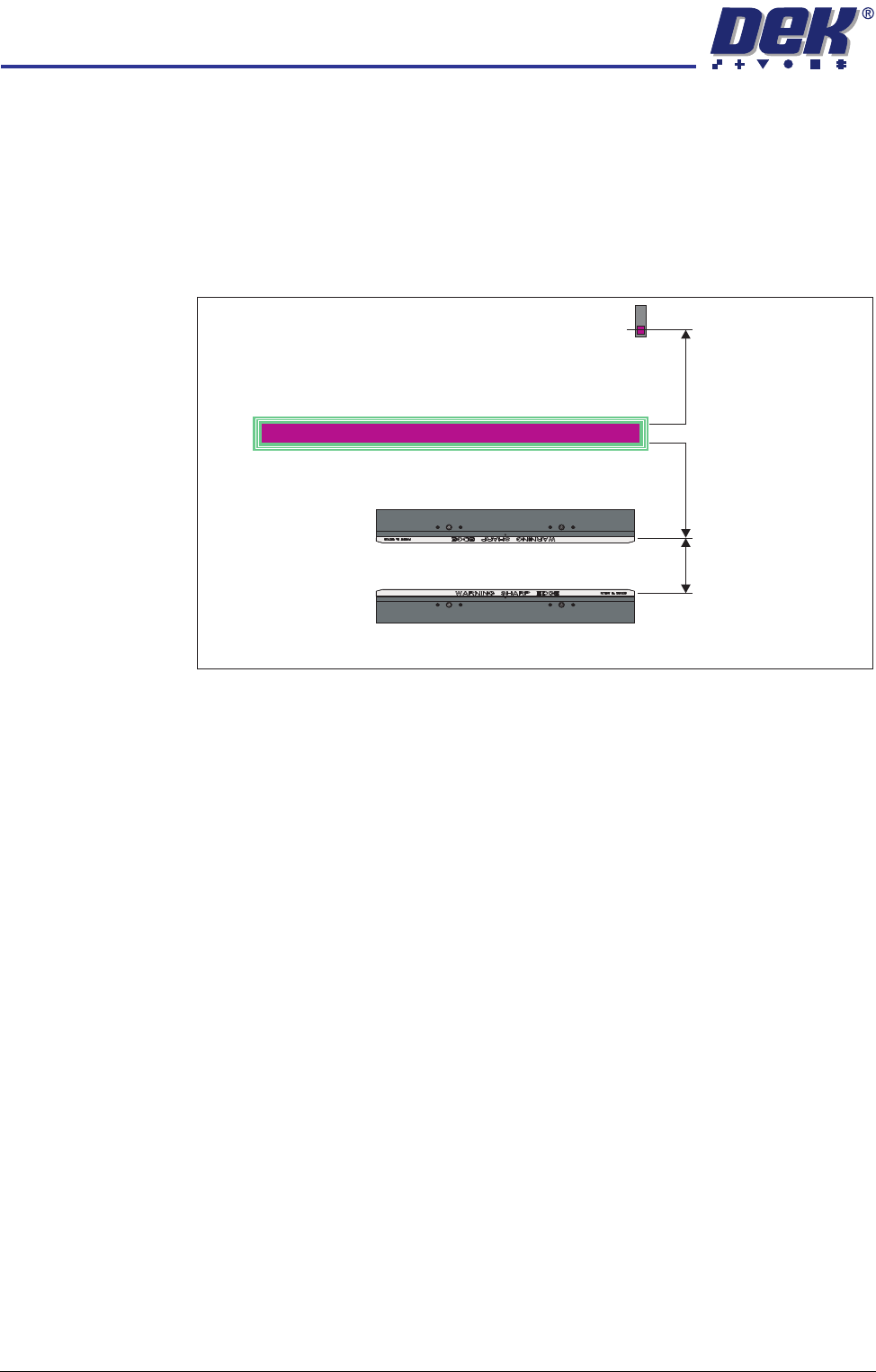
15. Select Run Diagnost to open the Rail Width Offset window.
16. Use Incr. or Decr. to set the offset required to achieve the dimension in Step
11.
NOTE
Increasing the offset increases the dimension between the rear rail and the
home position therefore, decreasing the width between the front and rear
rails.
17. Select Move.
18. Open the front printhead cover/shutter and recheck the measurement.
19. If the rail width is incorrect, close the printhead cover/shutter, press the
System button and repeat Steps 16 to 18.
20. If the rail width is correct, close the printhead cover/shutter, press the
System button and select Set.
21. Select Yes to save the information.
Inroad/Outroad Conveyors
Conveyor Height
Setting
The inroad and outroad conveyors must be the same height as the print station
for smooth transition of the board through the length of the rail system. Use the
following procedure to check and adjust the height:
1. To move the vanes clear of the front print station rails, set the board length
to maximum and home the rapid transit conveyor board loader.
2. Place the Board Clamp Setting Plate (140403) half on the print station and
half on the inroad conveyor.
3. Viewing from the left side of the machine, ensure that the board clamp
setting plate is in contact with the transport belts on the front and rear inroad
conveyors.
Plan View on Print Station of RTC Rails
Home Position
Rail Width
RAIL WIDTH OFFSET 0.00 mm
+/- 3.00mm
RAPID TRANSIT CONVEYOR (RTC) MODULE
ADJUSTMENTS AND SETTINGS
Chapter Issue 2 Oct 06 Technical Reference Manual 18.19
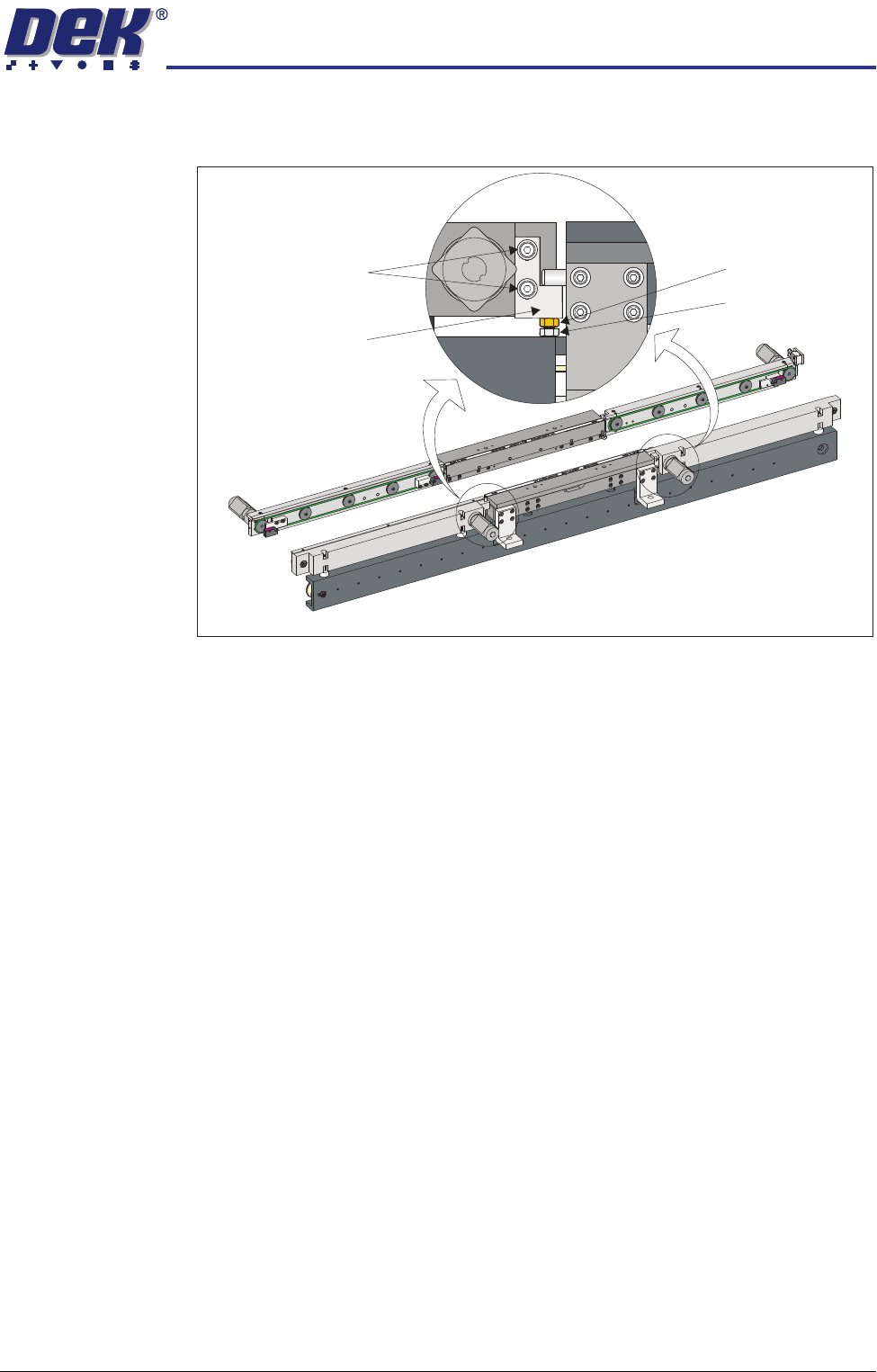
4. If adjustment is required on the front inroad conveyor, loosen the two print
station lift bracket locking screws on the front inroad conveyor.
5. Using an 8mm spanner, loosen the locking nut.
6. Adjust the adjusting screw until the board clamp setting plate is sitting evenly
on the print station board support plate and the transport belts of the front
inroad conveyor.
7. Tighten the two print station lift bracket locking screws on the front inroad
conveyor.
8. Using two 10mm spanners, hold the adjusting screw whilst tightening the
locking nut.
9. Recheck the level.
10. If adjustment is required on the rear inroad conveyor, move the board clamp
setting plate fully on to the inroad conveyor.
11. Manually lift the rear print station rail.
View on Front of RTC Rail System
Locking Screws
Print Station Lift
Bracket
Locking Nut
Adjusting screw
RAPID TRANSIT CONVEYOR (RTC) MODULE
ADJUSTMENTS AND SETTINGS
18.20 Technical Reference Manual Chapter Issue 2 Oct 06
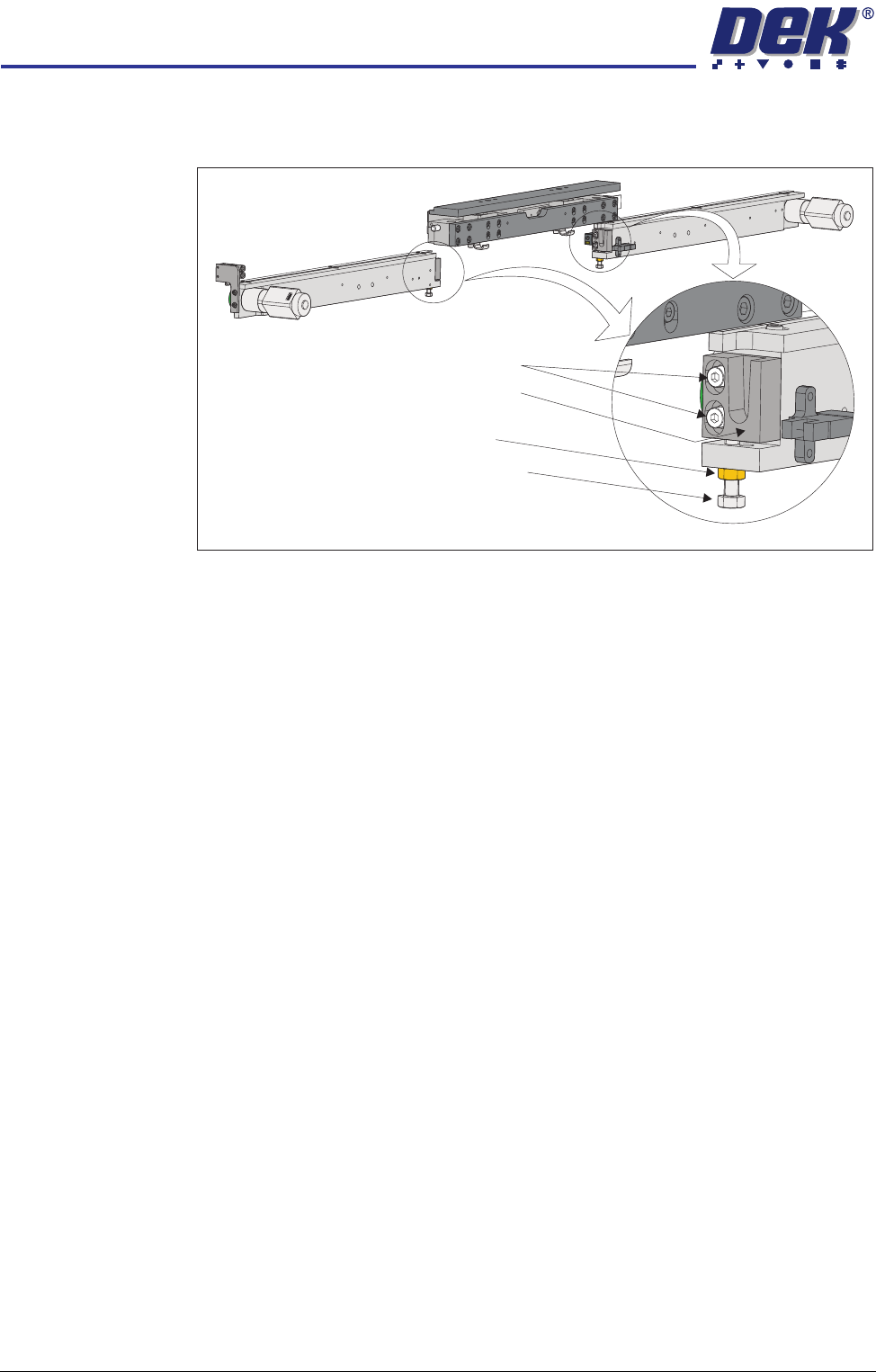
12. Loosen the two print station lift bracket locking screws on the rear inroad
conveyor.
13. Lower the rear print station rail.
14. Using an 8mm spanner, loosen the locking nut.
15. Move the board clamp setting plate back to its original position.
16. Adjust the adjusting screw until the board clamp setting plate is sitting evenly
on the print station board support plate and the transport belts of the rear
inroad conveyor.
17. Move the board clamp setting plate fully on to the inroad conveyor.
18. Manually lift the rear print station rail.
19. Tighten the two print station lift bracket locking screws on the rear inroad
conveyor.
20. Lower the rear print station rail.
21. Using two 8mm spanners, hold the adjusting screw whilst tightening the
locking nut.
22. Move the board clamp setting plate back to its original position and recheck
the level.
23. Remove the board clamp setting plate from the rail system.
24. Move the rapid transit conveyor board loader to the ready position.
25. Place the board clamp setting plate half on the print station and half on the
outroad conveyor.
26. Viewing from the right side of the machine, ensure that the board clamp
setting plate is in contact with the transport belts on the outroad conveyor.
27. If adjustment is required, repeat Steps 4 to 23 on the outroad conveyors.
Locking Screws
Locking Nut
Adjusting Screw
Print Station Lift
Bracket
View on Rear of Rear RTC Rail