Printer 710_810 v8 Rapid Transit Conveyor Module.pdf - 第22页
RAP ID TRA NSIT CO NVEY OR (RTC) MODUL E ADJUS TMENTS AN D SETTIN GS 18.22 Technical Reference Manual Chapter Issue 2 O ct 06 Rear Conveyor Alignment The rear inroad and outr oad conveyors t aper slig htly away from the …
RAPID TRANSIT CONVEYOR (RTC) MODULE
ADJUSTMENTS AND SETTINGS
Chapter Issue 2 Oct 06 Technical Reference Manual 18.21
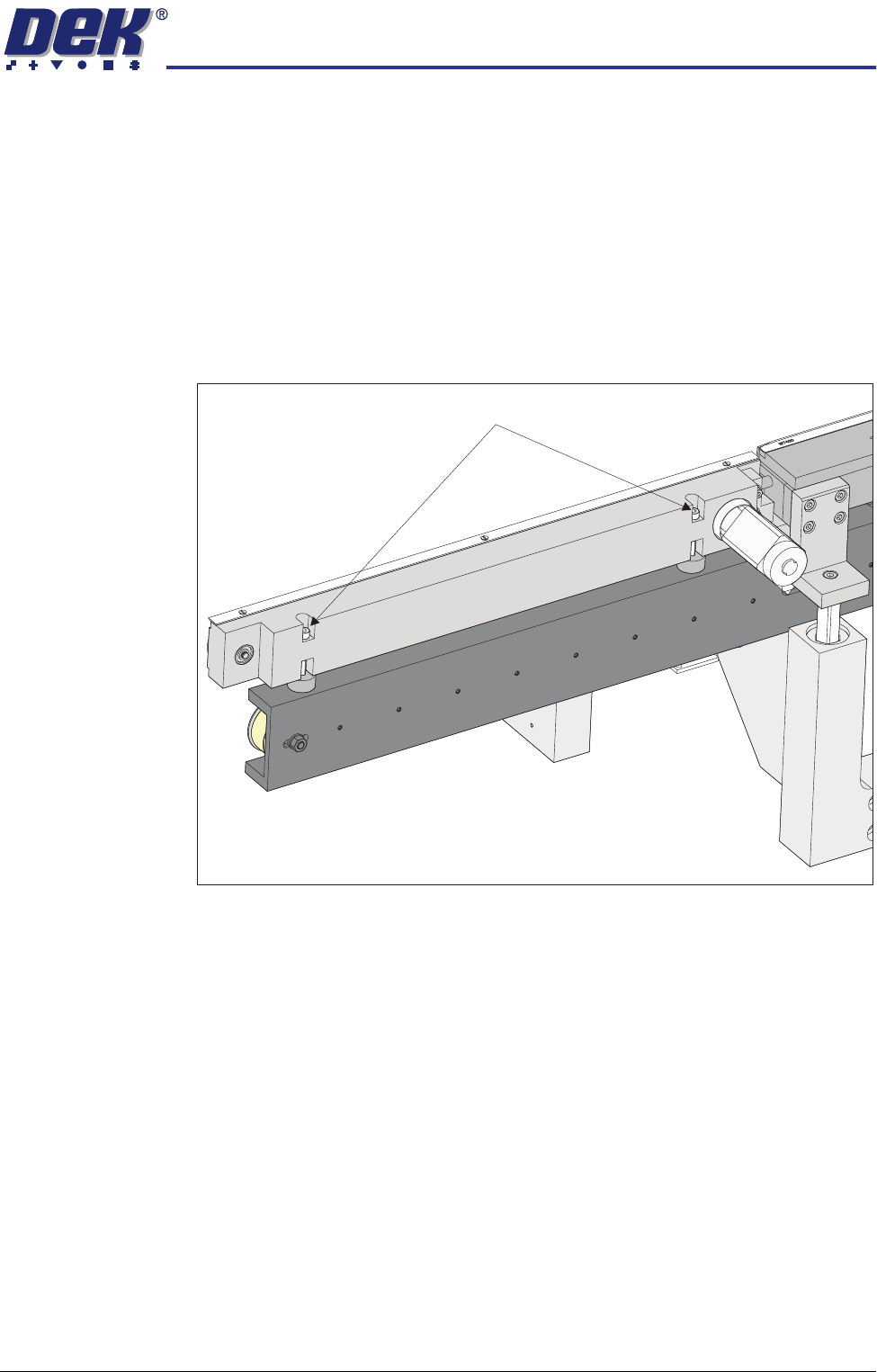
Front Conveyor
Alignment
The front inroad conveyor must be perfectly aligned to the print station rail as
the vanes travel the whole length of the rail system. Use the following procedure
to check and adjust the alignment:
1. To move the vanes clear of the front print station rails, set the board length
to maximum and home the rapid transit conveyor board loader.
2. Using a 1 metre straight edge rule above the transport belt on the inroad
conveyor and above the board support plate on the print station rail, check
that the inroad conveyor and print station are aligned.
3. If adjustment is required, loosen the two front inroad conveyor securing
screws.
4. Place a 5mm Allen key between the conveyor and the print station to
maintain the correct gap.
5. Adjust the conveyor to achieve alignment with the print station rail.
6. Tighten the securing screws, remove the Allen key and recheck the align-
ment.
7. Move the rapid transit conveyor board loader to the ready position.
8. Using a 1 metre straight edge rule above the transport belt on the outroad
conveyor and above the board support plate on the print station rail, check
that the outroad conveyor and print station are aligned.
9. If adjustment is required, loosen the two front outroad conveyor securing
screws.
10. Place a 5mm Allen key between the conveyor and the print station to
maintain the correct gap.
11. Adjust the conveyor to achieve alignment with the print station rail.
12. Tighten the securing screws, remove the Allen key and recheck the align-
ment.
View on Front Inroad Conveyor
Front Inroad Conveyor Securing Screws
RAPID TRANSIT CONVEYOR (RTC) MODULE
ADJUSTMENTS AND SETTINGS
18.22 Technical Reference Manual Chapter Issue 2 Oct 06
Rear Conveyor
Alignment
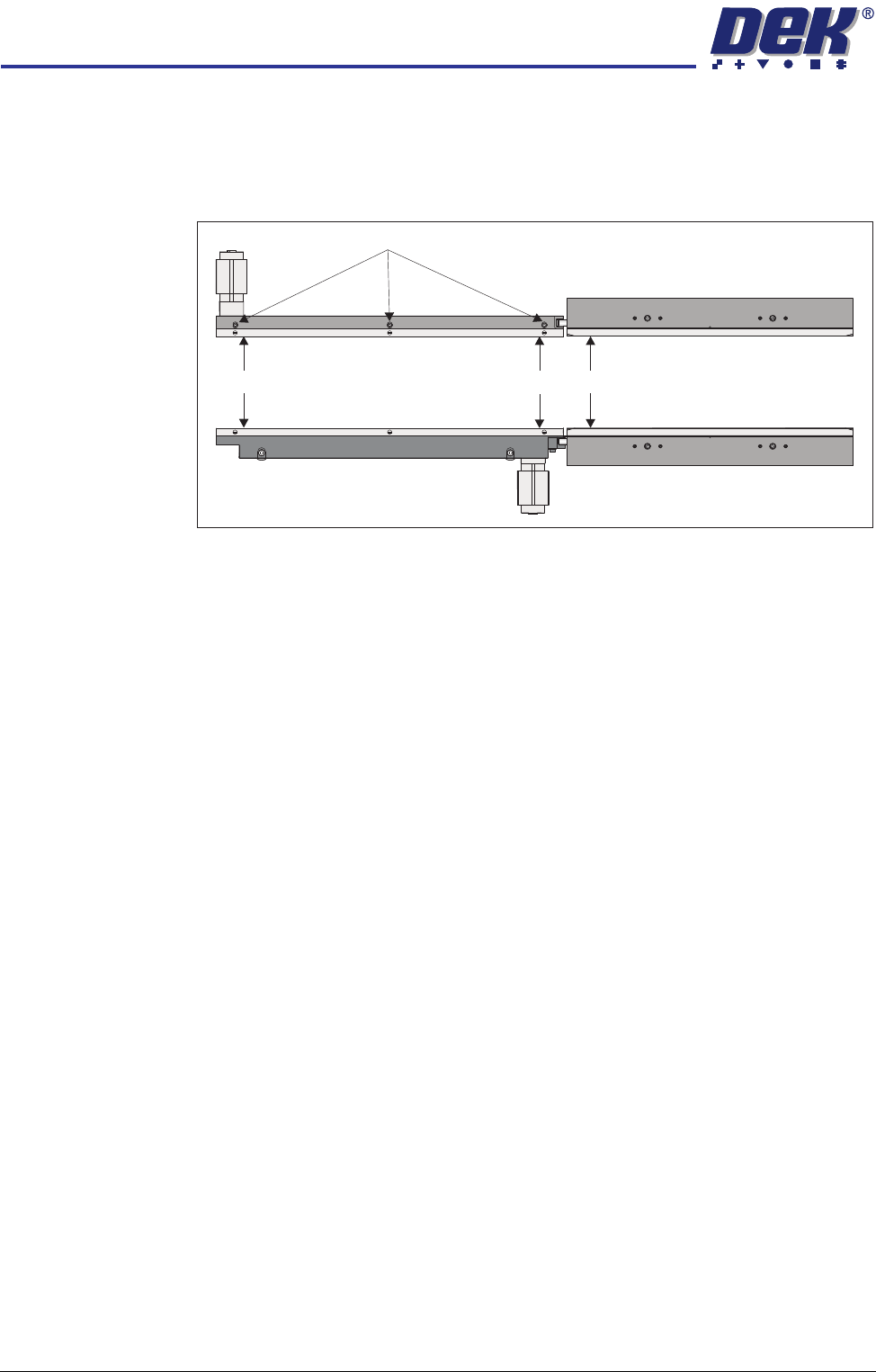
The rear inroad and outroad conveyors taper slightly away from the print station.
Use the following procedure to check and adjust the alignment:
1. Using a vernier above the board support plate, measure the rail width on the
print station (Dimension A).
2. Measure the rail width on the inroad conveyor close to the print station
(Dimension B). Dimension B must be between Dimension A and A plus
0.05mm.
NOTE
Ensure that the measurement is taken from the flat and not the chamfered
end.
3. Measure the rail width on the inroad conveyor close to the end of the inroad
conveyor (Dimension C). Dimension C must be between Dimension B plus
0.10mm and B plus 0.20mm.
NOTE
Ensure that the measurement is taken from the flat and not the chamfered
end.
4. If adjustment is required, loosen the board guide securing screws and adjust
the board guide to achieve the measurements above.
5. Tighten the board guide securing screws.
6. Repeat Steps 1 to 5 for the outroad conveyor.
Rail Lifted Sensor There is no adjustment on the rail lifted sensor or the vane.
Board Guide Securing Screws
C
B
A
RAPID TRANSIT CONVEYOR (RTC) MODULE
ADJUSTMENTS AND SETTINGS
Chapter Issue 2 Oct 06 Technical Reference Manual 18.23
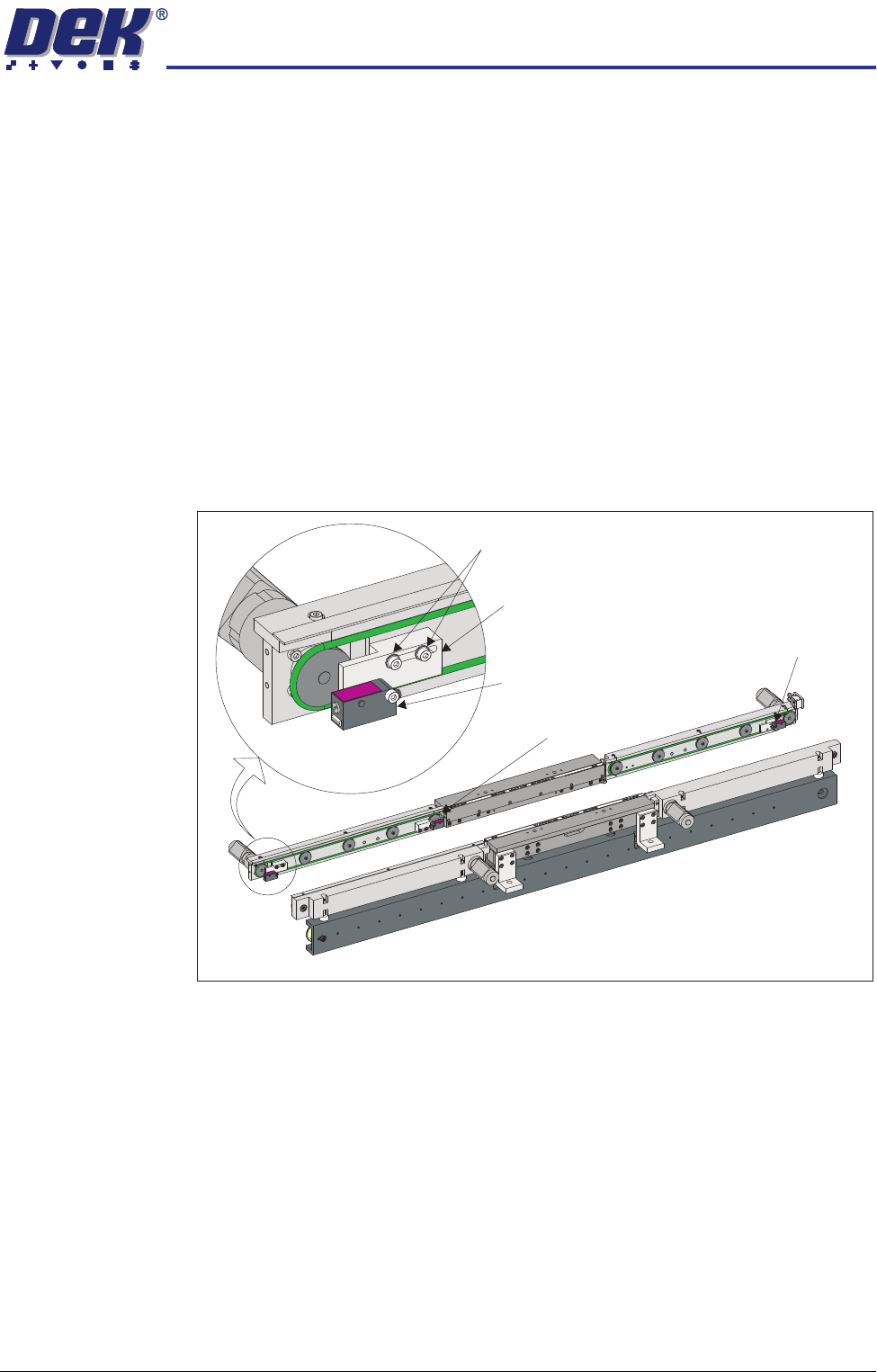
Board Optos There are three board optos:
• Board at Left Sensor
• Board at Stop Sensor
• Board at Right Sensor
Positional
Adjustment
The board optos are adjustable in the X direction to compensate for any holes
or cut-outs on the product board that coincide with the sensor when the board
is in the stopped position.
With the board in the stopped position over the sensor, if the sensor is not
seeing the board due to a hole or cut-out, use the following procedure to adjust
the sensor:
1. Power down the machine.
2. Using a 2.5mm Allen key, loosen the two bolts that secure the sensor
bracket to the rails.
3. Move the sensor to the required position.
4. Tighten the two bolts that secure the sensor bracket to the rails.
5. Power up the machine and check for correct operation of the sensor.
View on Front of RTC System
Board at Stop Sensor
Board at Right Sensor
Sensor Securing Screws
Board at Left Sensor
Sensor Bracket