00197475-01_IM_Traceability3.6_EN.pdf - 第30页
Upgrade General steps for all Traceability versions 1 .x /2.x 30 Installation Manual SIPLACE Traceability 3.6 6.2 6 . 2 G e n e r a l s t e p s f o r a ll T r a c e a b ilit y v e r s io n s 1 . x / 2 . x General steps f…

Upgrade
New database concept introduced from Traceability version 3.3
Installation Manual SIPLACE Traceability 3.6 29
6
6 Upgrade
Upgrade
6.1
6.1 New database concept introduced from Traceability version 3.3
New database concept introduced from Traceability version 3.3
From version 3.3 Traceability comes with a new database concept which has significant impacts on the
deployment and the DBView interface.
The following has changed:
▪ The "Trace Host" Service was removed. Trace Service replaces the functionality and data will direct-
ly be exported to the database without detouring through the file system.
▪ The database schema was completely redesigned (see advantages).
This new concept has the following advantages for the customer:
▪ one service less needed for the traceability solution (less configuration options, less administrative
overhead)
▪ XML file export / file shares are not longer needed to store the traceability data to the database (al-
though XML file export is still an available export option in Trace Service for archiving purposes)
▪ less complexity, higher performance and improved reliability in the new database model compared
to the old solution
▪ the new DBView Interface is easier to comprehend than the old one
▪ The "Trace Monitor" tool supports the old TraceHost database schema (created/upgraded by Trace-
Host 3.2) and the new database schema (created by TraceServer 3.3 and newer) in common (only
one tool needed to query in databases)
The following restrictions exists":
▪ The old DBView Interface will not longer be supported. Customers have to adapt their own SQL
statements
▪ A database migration will only be supported as part of a customer project. We always recommend
to create a new database.
Please see the User Guide for further information about configuring the new traceability database.
NOTICE
Parallel operation
TraceHost 3.2 databases and TraceService 3.4 databases can be used with Trace Monitor 3.4
Upgrade
General steps for all Traceability versions 1.x /2.x
30 Installation Manual SIPLACE Traceability 3.6
6.2
6.2 General steps for all Traceability versions 1.x /2.x
General steps for all Traceability versions 1.x /2.x
► This chapter is only relevant in case of an upgrade of Traceability 1.x, 2.x to 3.x.
In Traceability 3.x it is no longer possible to forward Traceability XML files directly from the stations to
the Trace Host because Trace Host is no longer supported.
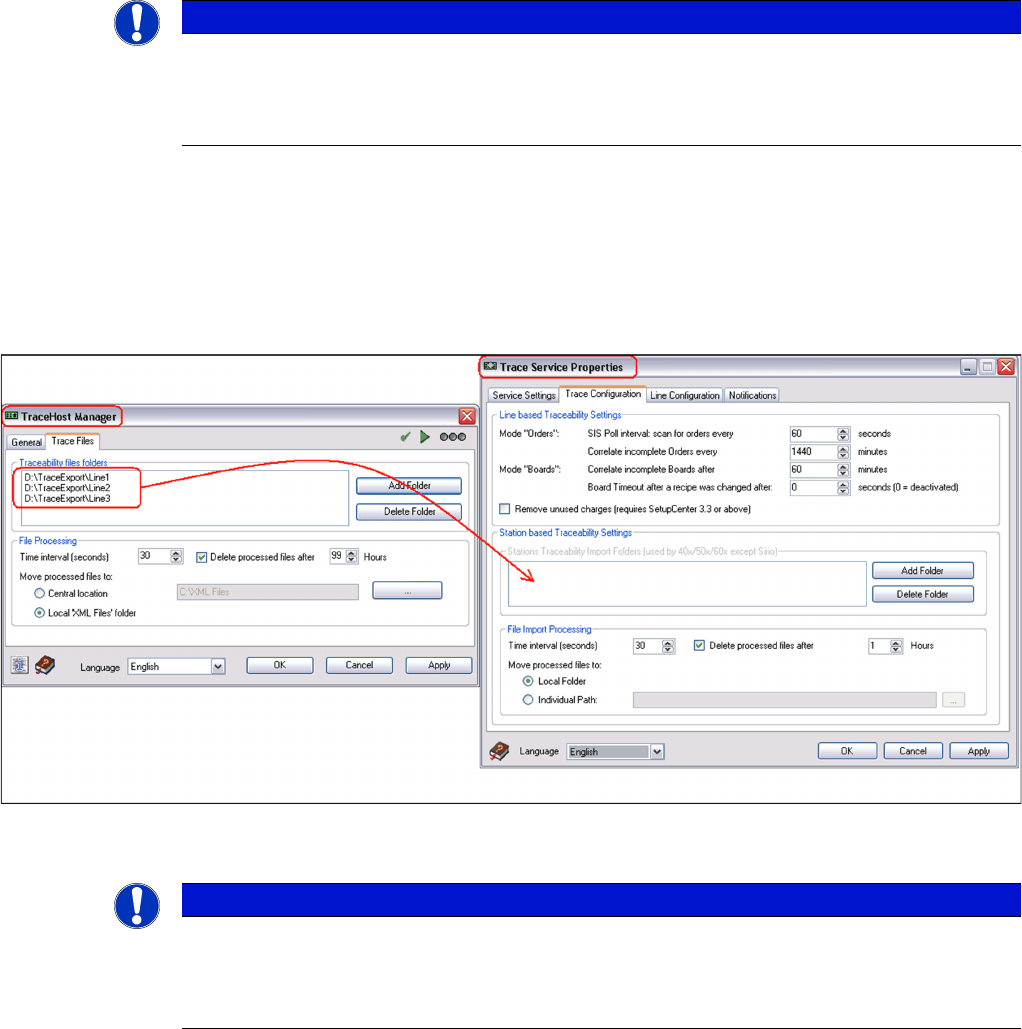
In previous Traceability versions the XML file import path was configured on the stations and in Trace
Service. However in Traceability 3.x, XML files are processed by Trace Service and then forwarded to
3rd Party Applications or stored to database. Therefore you have to configure XML file directories (net-
work shares) on the stations in Trace Service.
► Please execute the following steps to adapt the configuration of the XML file directories:
To enable the Trace Service to process XML files coming from the stations you have to configure the
network shares (formerly configured in Trace Host) now in Trace Service:
If you want to change the existing shares you have to change the path configuration in Trace Service
(see above) and on the stations (relevant for 40x, 50x, 60x station SW).
NOTICE
Configuration of Traceability XML file directories
In case of an upgrade of Traceability 1.x or 2.x installations to Traceability 3.x without modifi-
cation of the XML file directory configuration, all XML files from stations will no longer be pro-
cessed!
NOTICE
Trace Host will no longer be supported
Since Trace Host will no longer be supported by Traceability 3.3 and newer, the database op-
tion has to be configured directly in Trace Service Manager. Please refer the User Guide for
more assistance.
acpage