00198374-03_UG_OSC-Paket_R19-1_DE_EN.pdf - 第96页
4 Working with the OSC Features 4.9 Placement Head TH – Increased Placement Force (fromR18-2) 96 Bedienungsanleitung OSC Package User Guide OSC-Paket 05/2019 4.9 Placement Head TH – Increased Placement Force (fromR18-2…
4 Working with the OSC Features
4.8 Placement of An Exceptionally High Component (fromR18-2)
Bedienungsanleitung OSC Package User Guide OSC-Paket 05/2019 95
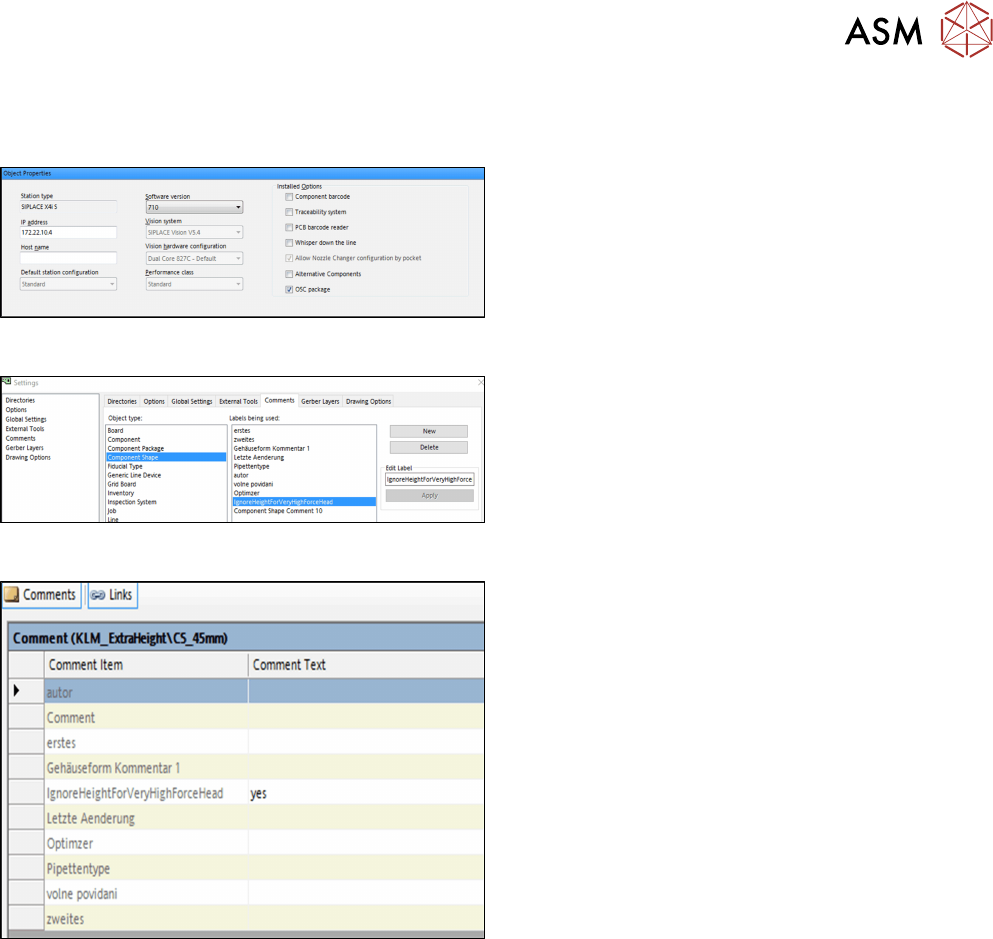
4.8.2 Application Example
Step 1: SIPLACE Pro
► In the Station Editor under Placement Station,
enable the OSC Package option under Installed
options.
Step 2: SIPLACE Pro
► In the Settings in SIPLACE Pro Desk under
Comments, select the Component Shape object
type and the IgnoreHeightForVeryHighForce-
Head label.
► Click on New to create the comment.
Step 3: SIPLACE Pro
In the Component Shape Editor, you must confirm the
comment for the component shape.
► Under Comments, enter "yes" as comment text
for the IgnoreHeightForVeryHighForceHead com-
ment item.
No height check will be performed for the component. The optimizer ensures that the component is
placed in the last placement area of the line and that the placement positions of this component are
the last ones to be placed.

4 Working with the OSC Features
4.9 Placement Head TH – Increased Placement Force (fromR18-2)
96 Bedienungsanleitung OSC Package User Guide OSC-Paket 05/2019
4.9 Placement Head TH – Increased Placement Force
(fromR18-2)
From R18-2, an increased placement force up to 30 N is supported for the TH placement head.
Prerequisites
●
At least one station in the line is equipped with a TH placement head.
●
On this station/these stations, station software version 712.0 must have been installed.
●
This station/these stations must have been configured for the OSC package (OSC license
assigned, OSC package enabled in the Station Editor in SIPLACE Pro).
●
At least one component is assigned to a component shape for which the placement process
requires a placement force from >15 N to 30 N. Placement process and placement force must
have been set in the Component Shape Editor in the Handling tab.
When a job containing such a component is optimized, the component will be assigned to a station
that meets the prerequisites mentioned.
Restrictions
●
The increased placement force is not supported on SIPLACE X-Series placement machines.
4 Working with the OSC Features
4.10 Placement of Tall Components (from R19-1)
Bedienungsanleitung OSC Package User Guide OSC-Paket 05/2019 97
4.10 Placement of Tall Components (from R19-1)
It is possible to place exceptionally high components with the placement heads Twin VHF or CPP
with automatic crash avoidance by the software. In this case, the gantry and the placement head
are moved around this component.
WARNING
Description of the component height
It is essential that the description of the component height in SIPLACE Pro is correct.
Otherwise, the hardware (machine, board camera etc.) could be damaged ).
The described component height is used in the station software to decide whether the
placement head and the board camera are allowed to be moved over an already placed
component. If this is not possible without collision, they are moved around this component.
Prerequisites
Depending on which placement head the high component is assigned to, specific prerequisites
must be met.
Placement with Twin VHF Placement Head, see 4.8 "Placement of An Exceptionally High Compon-
ent (fromR18-2)" [}93].
Placement with CPP Placement Head:
●
CPP placement head, mounted in high position on last placement area of the line; no Twin or
Twin VHF placement head must be used in the same placement area.
●
Maximum Component Height: 15.5 mm
For both placement heads:
●
The high components are placed in the last station of the line.
●
The user has to define precedences in SIPLACE Pro so that every area on the board can be
reached.
●
The minimum horizontal safety distance for moving components around other already placed
components is 5 mm.
●
The highest of the previously placed components defines the minimum flying altitude for all
components placed by the last station.
CAUTION
Set behavior for machine stop to "Cycle Stop"
When placing high components, it is recommended to set the behavior for a manual
machine stop to "Cycle Stop". This can be done under Line Control GUI > Manual Opera-
tions > Entire Machine > Hardware stop button behavior. By doing so, after the stop
button is pressed, the placement cycle is continued for a specific time to complete the
placement cycle before the machine stops and the cover lock is released. This way, when
the user moves the gantry while the cover is open, collisions of high components still on the
placement head with already placed components can be avoided. The behavior is active
even after the machine is restarted.
In some cases it is possible that the placement cycle is not finished after the stop button is
pressed. In this case it is possible that components are still at the placement head which
can collide with other already placed components if the user moves the gantry while the
cover is open.
CAUTION
Risk of collisions when manually moving the gantry
When the user moves the gantry of the CPP placement head while the machine is stopped,
there is a collision risk when moving the CPP placement head over already placed high
components, e.g. components placed by a Twin VHF placement head.