TM2596.Functional Specification of Mount Group Number.pdf
SMT Software En gineering Group IMOperations YAMAHAMOTORCO.,LTD. MD OC-SOFT50106 1/11 Functional Specification of Mount Group Number Content s Funct ional S peci f ication of Mount Group Num be r…
SMT Software Engineering Group
IMOperationsYAMAHAMOTORCO.,LTD.
MDOC-SOFT50106
1/11
Functional Specification of Mount Group Number
Contents
Functional Specification of Mount Group Number
..........................................1
1. Introduction ................................................................................................................................2
2. Outline of functions ....................................................................................................................2
3. Limitation....................................................................................................................................2
4. Setting method...........................................................................................................................3
4.1 Setting method of Mount Group Number in Board Editor ....................................................3
4.2 Setting method of Mount Group Number in Optimizer.........................................................4
4.3 Manual setting method of Mounting Order...........................................................................6
4.4 Resetting method of Mounting Order...................................................................................6
4.5 Error message “Ea24536: BOARD DATA ERROR” and countermeasures......................... 7
5. Additional item of Board Data ....................................................................................................8
5.1 Mount Sequence Method.....................................................................................................8
5.2 Group ID and Group Order ..................................................................................................9
6. Codicil: About arranging Mounting Order ................................................................................10
6.1 Arranging Mounting Order with “Parts Group Number” .....................................................10
6.2 Arranging Mounting Order with “Mount Group Number”.................................................... 11
Revision Date Contents
000 2011/2/25 Create
SMT Software Engineering Group
IMOperationsYAMAHAMOTORCO.,LTD.
MDOC-SOFT50106
2/11
1. Introduction
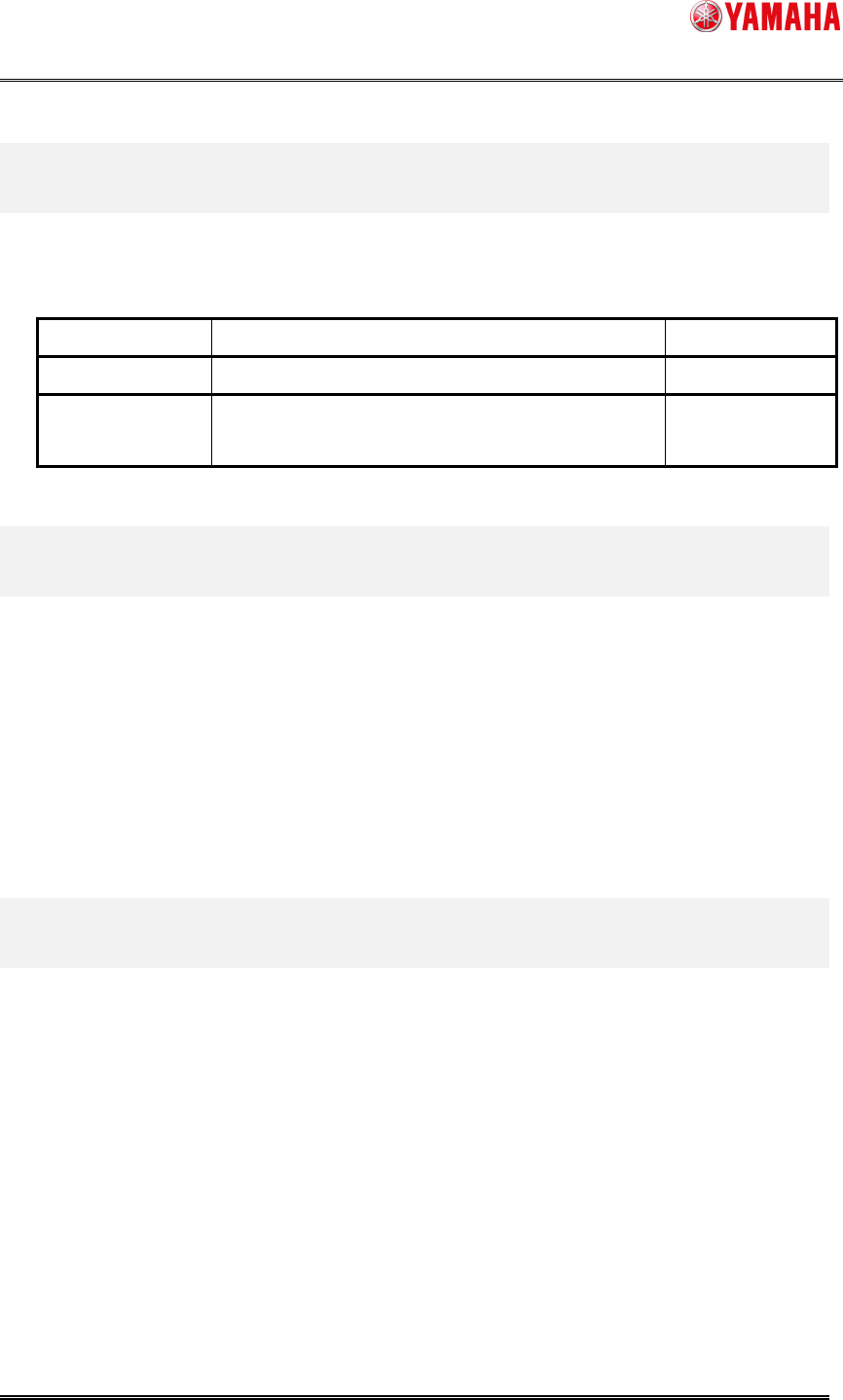
The target model and version are as follows.
Table1.1 Target model and version
Item name Object Remarks
Target model YS Series Mounter, YG12 Series Mounter, YG300
Target version V3.25STD R1.000 or later (Mounter)
V1.25STD R1.000 or later (Y.FacT)
2. Outline of functions
From this version, “Mount Group Number Function” has been added.
To avoid parts and nozzles interfering in a case that clearances between mounting parts are
small, it is necessary to control the mounting order.
When using “Mount Group Number”, results of Optimization (cycle time) will improve by
controlling the mounting order more efficiently than using “Parts Group Number”. (Please refer to
“6. Codicil: About arranging Mounting Order” for details.)
We recommend you use “Mount Group Number” from this version.
3. Limitation
• This function is supported only with board data whose type is “YGX”.
• For a compatibility of board data, please upgrade applications of the following machines
to V2.48STD R1.000 or later.
YG200, YG100, YG88
• If a machine that uses “Parts Group Number” and a machine that uses “Mount Group
Number” exist on the same line, it is not able to use “Distribute in Line” in [Set
optimization parameters] – [Basic Condition] – [Exec Condition] – [Feeder Set
Condition].
SMT Software Engineering Group
IMOperationsYAMAHAMOTORCO.,LTD.
MDOC-SOFT50106
3/11
4. Setting method
Please execute Nozzle Interference Check by using Board Editor or Optimizer of Y.FacT, if you
want to use “Mount Group Number”.
4.1 Setting method of Mount Group Number in Board Editor
Please execute the following procedure.
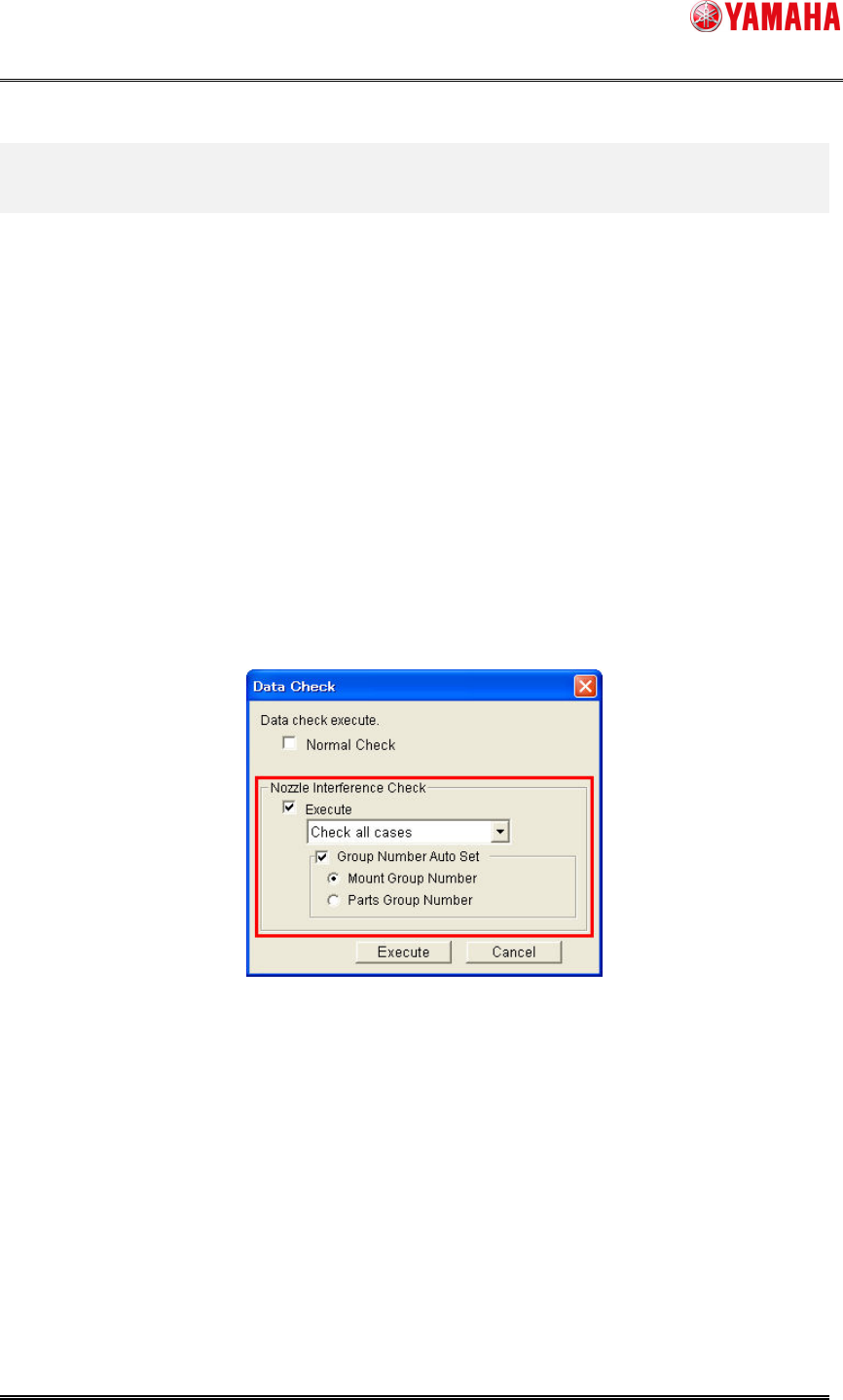
1. Select [Menu] – [Tool] – [Data Check] – [Execute].
2. On the [Data Check] dialog, set as follows.
A) Check the box of [Nozzle Interference Check] – [Execute], and select “Check all
cases” from the combo box.
B) Check the box of [Nozzle Interference Check] – [Group Number Auto Set], and
click the radio button of “Mount Group Number” (or “Mount Group Number
Preferentially”).
Fig4.1 Data Check dialog
3. Click the [Execute] button.
After executing the above procedure, [Board] – [Board] – [Mount Sequence Method] is set with
“Mount Group Number”, and [Mount] – [Group ID] and [Group Order] are set automatically.
Please refer to “5. Additional item of Board Data” for detailed explanation of each item.