manual-pedal-P005-0028920_ID-223540.pdf - 第4页
4 Pedal Compatibility Pedal s P4 0 5 * P3 05* P005 Control Unit DIU DDU DMU HDU JN AU JTU WSU ALU NAU Station AL Module MSE MVE MNE Preheater PHNK PHSK PHBK PHX K Fum e Ex tractor FA E1 FA E 2 * not included, sold separa…
3
Pedal
Ref. P-005
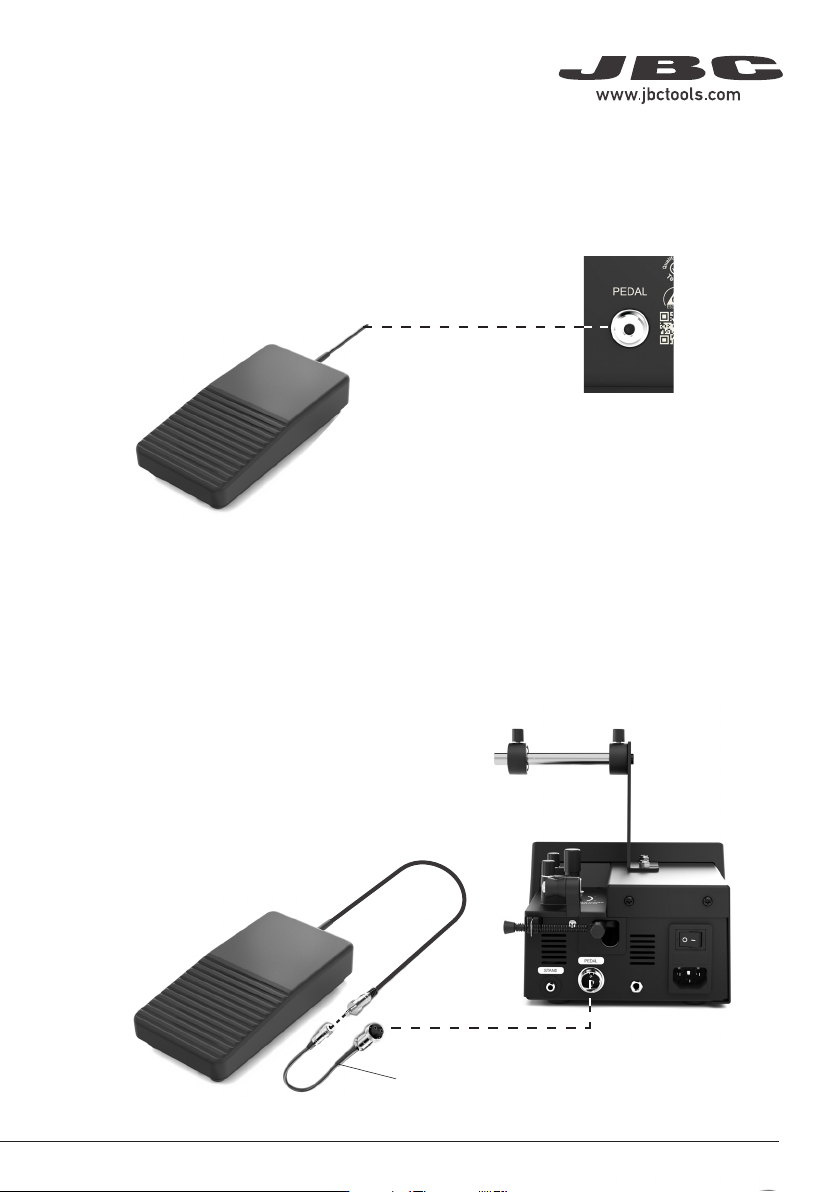
Connection to Control Units or Peripherals
Connect the pedal to JBC station or peripherals. The connector is identified by the designation
“ P E D A L”.
Connection to AL
Connect the pedal by means of the adpter cablet to the AL station. The connector at the rear of the
station is identified by the designation “PEDAL”.
Adapter Cable
40 mm
50 mm
60 mm
80 mm
100 mm
130 mm
130 mm
para manuales - color gris
200 mm
300 mm
4
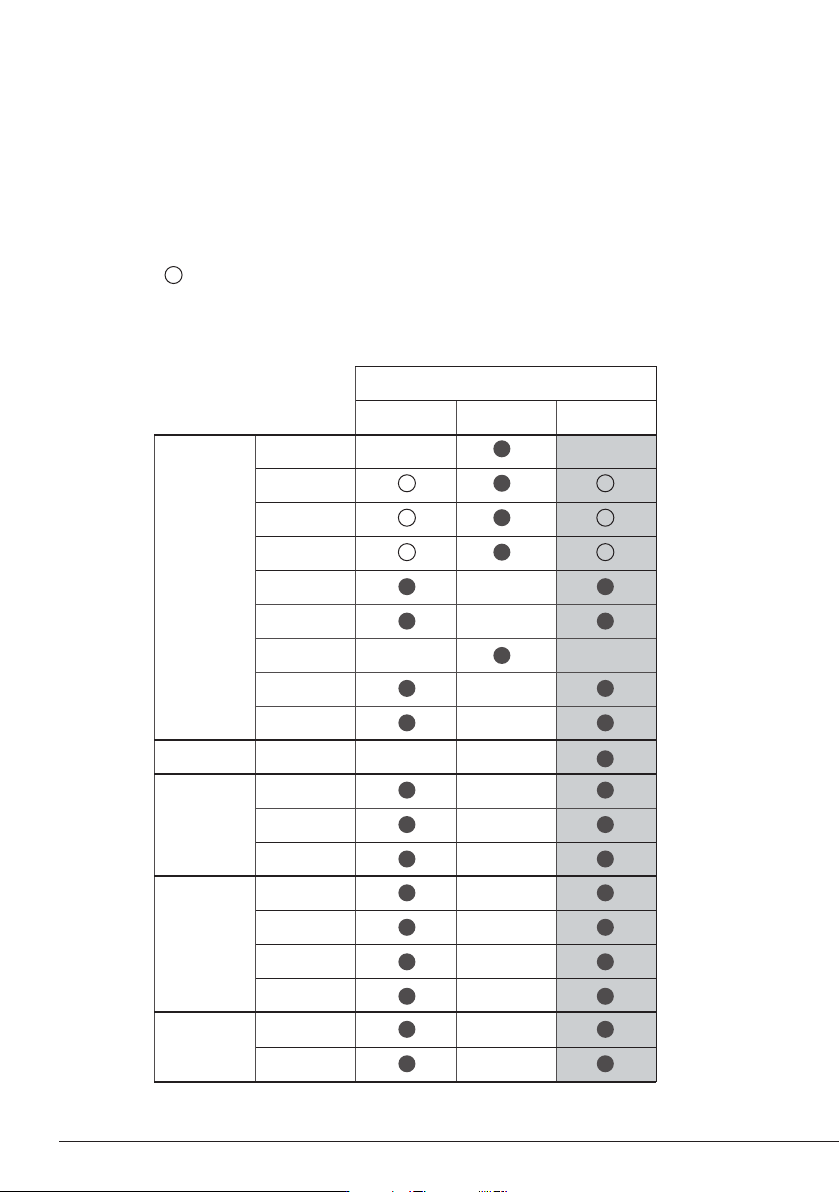
Pedal Compatibility
Pedals
P405* P305* P005
Control
Unit
DIU
DDU
DMU
HDU
JNAU
JTU
WSU
ALU
NAU
Station AL
Module
MSE
MVE
MNE
Preheater
PHNK
PHSK
PHBK
PHXK
Fume
Extractor
FAE1
FAE2
* not included, sold separately
P005 is compatible with JBC devices as shown in the table in the highlighted column.
P305* and P405* is also shown in the table below.
Marked with means pedal P005 cannot be connected directly to JBCs control unit. A module
must be used (See next pages “Pedal Set Up”).
Peripherals Port 2-PA
17:14
Pedal PD_a
Function Extractor
Mode released
Minimum time 0 sec
Back
Peripherals Port 2-PA
17:14
Pedal PD_a
Module MSE
Pedal
PD_a
PD_b
None
Peripherals Port 2-PA
17:14
Pedal PD_a
Module MSE
5
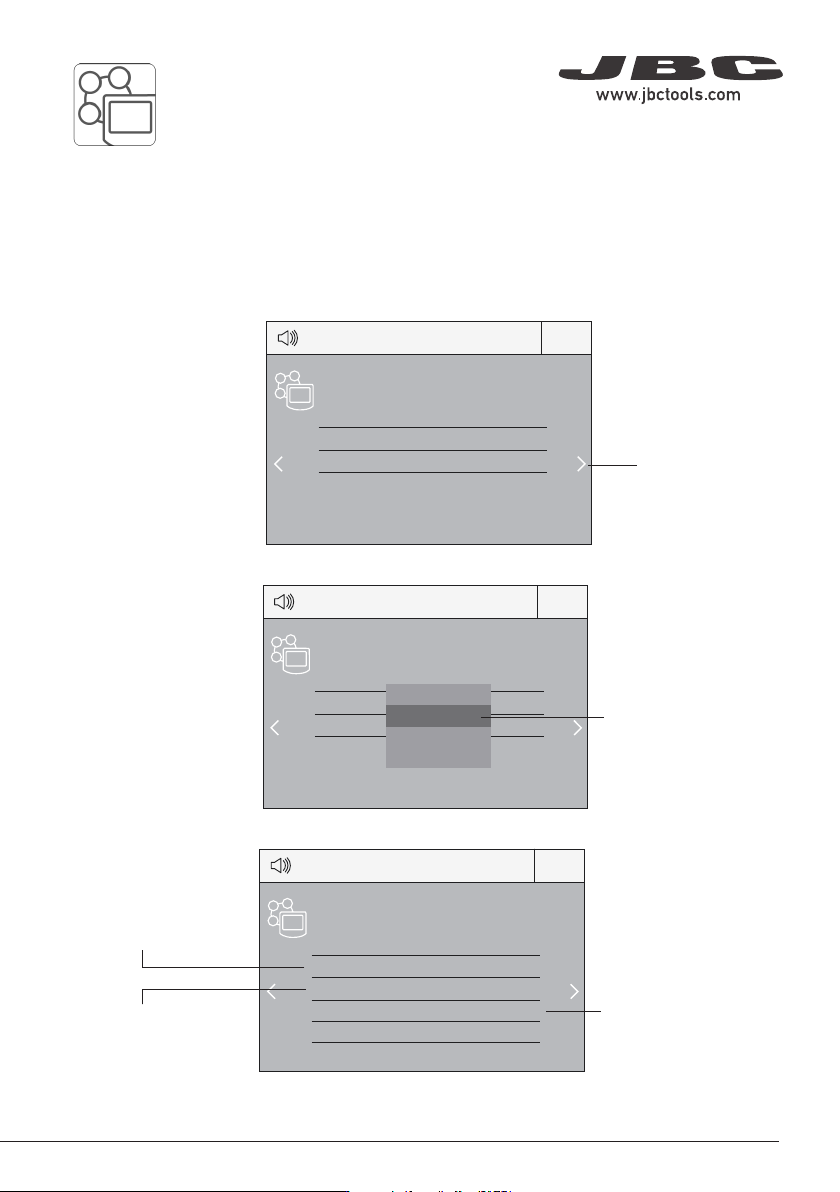
Select how the pedal
acts: as Sleep,
Extractor (hibernation)
or as a module switch.
Select the activating
mode of the pedal
(pressed/released)
Pedal Set Up for:
- DDU, HDU, NAU, JNAU, JTU, ALU (Control Units)
- PHNK, PHSK, PHBK, PHXK (Preheaters)
Select port
Note that your first
connection is denoted
as “a”, the second
being “b”, etc. (e.g.
PD_ a, PD_ b,...)
Set the duration
of the activation
time when pressing
the pedal once*.
For continuous
functioning keep the
pedal pressed.
*NB: The same can be applied inversely by continually pressing the pedal and releasing to activate.
3. Set the pedal function according to your work needs:
2. Select the pedal from the list.
1. Enter the Peripherals Menu and select the port which you want to join to the pedal.
Note: Peripheral moduls - MSE, MVE or MNE - are needed to connect the pedal to DDU y HDU.
40 mm
50 mm
60 mm
80 mm
100 mm
130 mm
130 mm
para manuales - color gris
200 mm
300 mm