manual-pedal-P005-0028920_ID-223540.pdf - 第5页
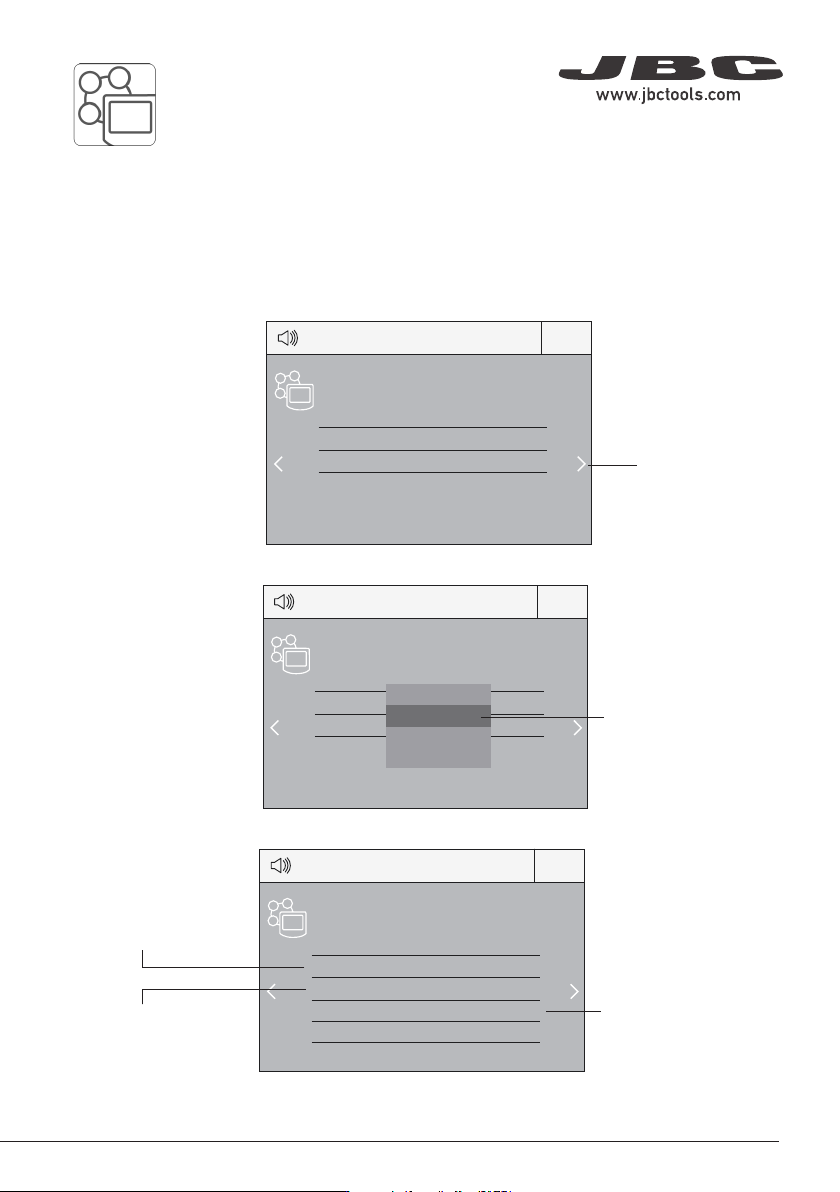
Peripherals Port 2-P A 17:14 Pedal PD_a Function Extractor Mode released Minimum time 0 sec Back Peripherals Port 2-P A 17:14 Pedal PD_a Module MSE Pedal PD_a PD_b None Peripherals Port 2-P A 17:14 Pedal PD_a Module MSE …
4
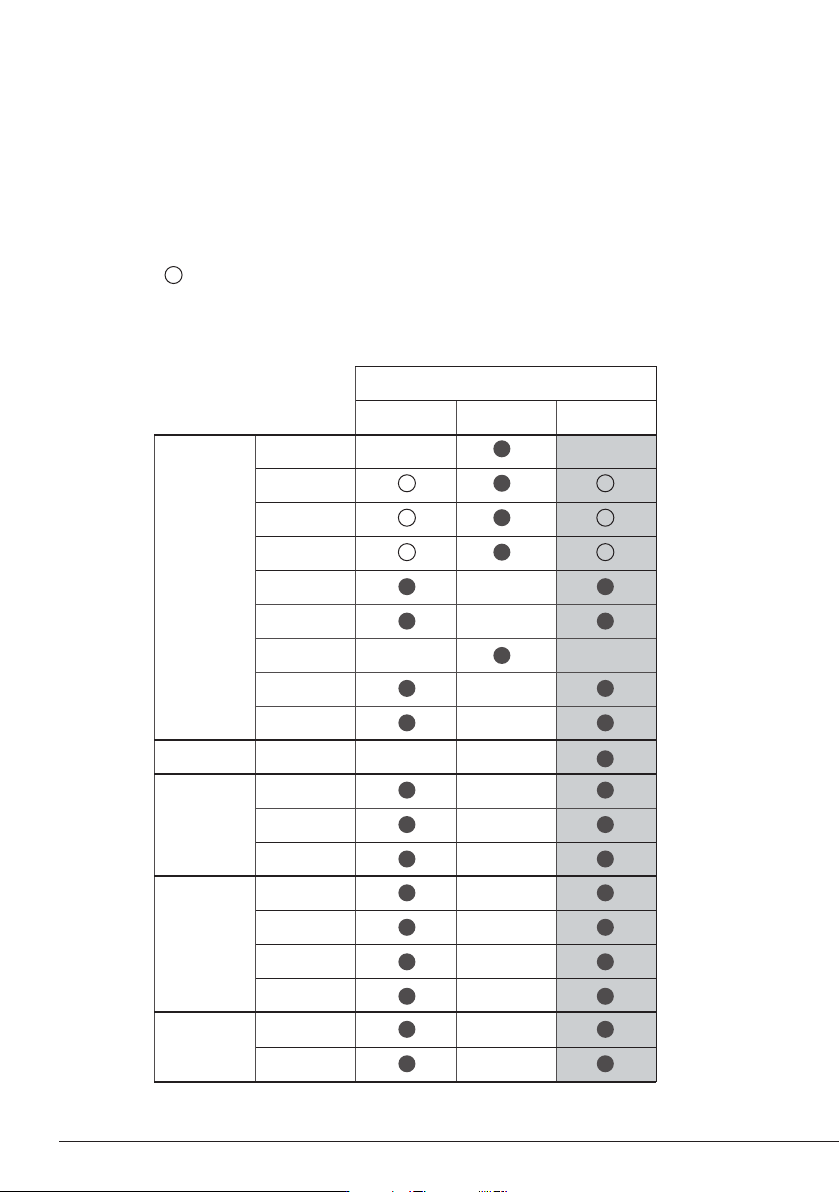
Pedal Compatibility
Pedals
P405* P305* P005
Control
Unit
DIU
DDU
DMU
HDU
JNAU
JTU
WSU
ALU
NAU
Station AL
Module
MSE
MVE
MNE
Preheater
PHNK
PHSK
PHBK
PHXK
Fume
Extractor
FAE1
FAE2
* not included, sold separately
P005 is compatible with JBC devices as shown in the table in the highlighted column.
P305* and P405* is also shown in the table below.
Marked with means pedal P005 cannot be connected directly to JBCs control unit. A module
must be used (See next pages “Pedal Set Up”).
Peripherals Port 2-PA
17:14
Pedal PD_a
Function Extractor
Mode released
Minimum time 0 sec
Back
Peripherals Port 2-PA
17:14
Pedal PD_a
Module MSE
Pedal
PD_a
PD_b
None
Peripherals Port 2-PA
17:14
Pedal PD_a
Module MSE
5
Select how the pedal
acts: as Sleep,
Extractor (hibernation)
or as a module switch.
Select the activating
mode of the pedal
(pressed/released)
Pedal Set Up for:
- DDU, HDU, NAU, JNAU, JTU, ALU (Control Units)
- PHNK, PHSK, PHBK, PHXK (Preheaters)
Select port
Note that your first
connection is denoted
as “a”, the second
being “b”, etc. (e.g.
PD_ a, PD_ b,...)
Set the duration
of the activation
time when pressing
the pedal once*.
For continuous
functioning keep the
pedal pressed.
*NB: The same can be applied inversely by continually pressing the pedal and releasing to activate.
3. Set the pedal function according to your work needs:
2. Select the pedal from the list.
1. Enter the Peripherals Menu and select the port which you want to join to the pedal.
Note: Peripheral moduls - MSE, MVE or MNE - are needed to connect the pedal to DDU y HDU.
40 mm
50 mm
60 mm
80 mm
100 mm
130 mm
130 mm
para manuales - color gris
200 mm
300 mm
Peripherals
17:14
Port 1 2 3 4
MS a
?
PERIPHERAL
Peripheral 1 plugged:
Electric Suction Module
Setup
Postpone
Peripherals
17:14
Port 1 2 3 4
MS a
PD a
?
6
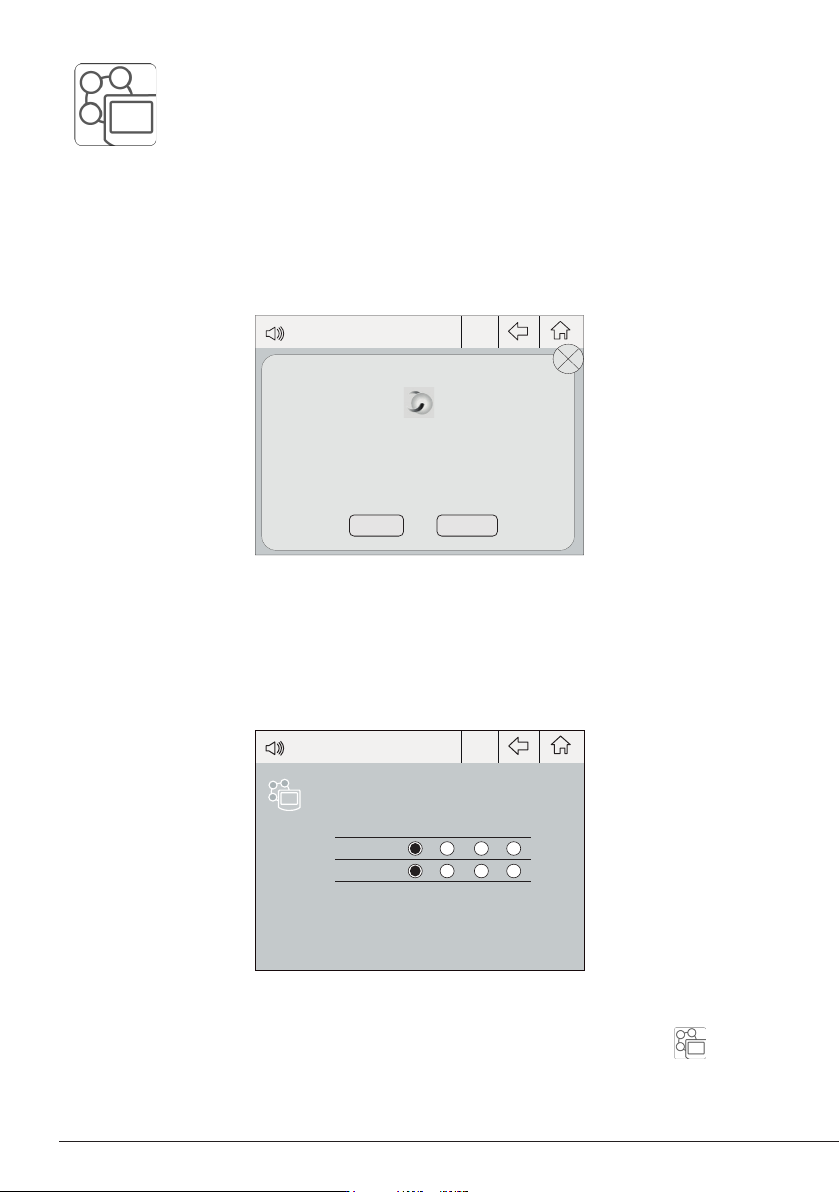
Note: Peripheral moduls - MSE, MVE or MNE - are needed to connect the pedal to DMU.
After connecting one of the mentioned moduls to the station a popup window opens.
2. Select the module from the list of peripheral connections. Remember your first connection is
denoted as “a”, the second being “b”, etc. (e.g. MS_a, MS_b,...). Do the same with the pedal (e.g.
PD_a,...)
3. Select the port of the tool you want to link to the peripheral.
Pedal Set Up for DMU (Control Unit)
1. To configure the module MSE/MVE/MNE press Setup in the popup window.
4. Press Menu or Back to save changes.
Once set up, the module settings can be changed by entering the Peripherals Menu .