00195722-0102_UM_X-Serie_SR605_EN.pdf - 第77页
User Manual SIPLACE X-Series 2 Operational safety From software version SR.605.xx 07/2008 EN Edition 2.6 Safety equipment 77 2.6.2.2 Position of protective switches on the placement machine 2 Fig. 2.6 - 5 Position of pro…
2 Operational safety User Manual SIPLACE X-Series
2.6 Safety equipment From software version SR.605.xx 07/2008 EN Edition
76
2
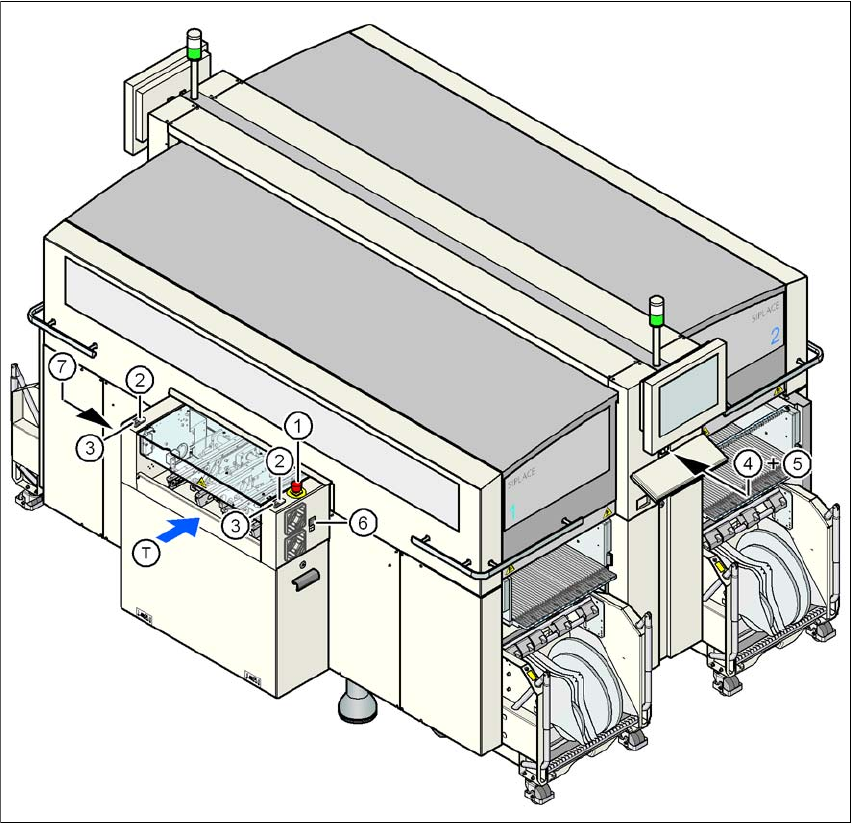
Fig. 2.6 - 4 Position of switches and buttons - View of the PCB input side
(1) EMERGENCY STOP button on the input side
(2) Start button (white) on the input side
(3) Stop button (black) on the input side
(4) Start button (white) on the operator panel on the compressed air unit side
(5) Stop button (black) on the operator panel on the compressed air unit side
(6) Button (black) for docking the component trolley in or out, location 1
(7) Button (black) for docking the component trolley in or out, location 4
(T) PCB transport direction
User Manual SIPLACE X-Series 2 Operational safety
From software version SR.605.xx 07/2008 EN Edition 2.6 Safety equipment
77
2.6.2.2 Position of protective switches on the placement machine
2
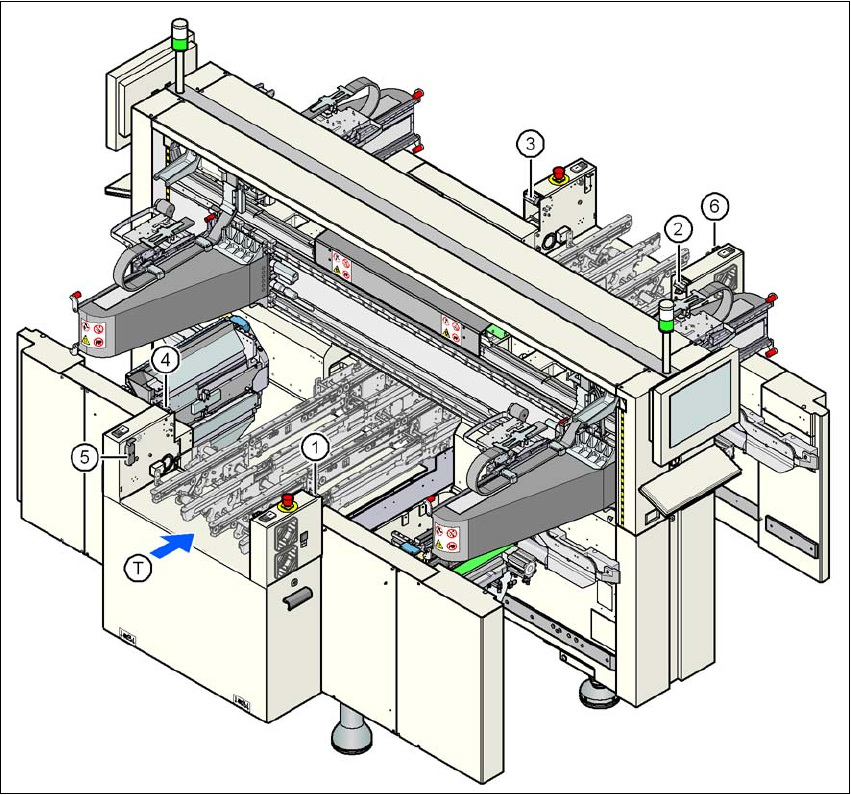
Fig. 2.6 - 5 Position of protective switches on the placement machine
2
(1) Protective cover switch, location 1
(2) Protective cover switch, location 2
(3) Protective cover switch, location 3
(4) Protective cover switch, location 4
(5) Protective switch for the cover flap on the PCB conveyor input side
(6) Protective switch for the cover flap on the PCB conveyor output side
(T) PCB transport direction

2 Operational safety User Manual SIPLACE X-Series
2.6 Safety equipment From software version SR.605.xx 07/2008 EN Edition
78
2.6.2.3 Description of the functions
Main power switch in the OFF position (see item 1 in Fig.
2.6 - 3, page 75) 2
The main power switch disconnects the three phases L1, L2, and L3 from the power supply.
WARNING
The following components still carry potentially lethal voltages even if the main power switch is
switched off:
– Cable connection terminals L1, L2, and L3 of the Q1 main power switch
– Z1 line filter
– Service socket X102
– F1 automatic circuit breaker for the service socket
– The color of all individual wires, which still carry potentially lethal voltages even if the main
power switch is switched off, is brown.
→ Death, serious injury or considerable damage may result if these automatic placement sys-
tems are handled incorrectly.
→ Always follow the applicable accident prevention and DIN regulations (particularly DIN EN 60
204, part 1) and the applicable regulations in your own country.
→ The safety door to the power supply must ONLY be opened by appropriately qualified and
trained personnel.
Main power switch in the ON position 2
After switching on the main power switch, the control computer and the machine controller will
start. All supply voltages, apart from the link voltages for the gantry axes (250 VDC) and the star
axes (145 VDC) are then available.
Stop button, black (item 2 and 7 in Fig. 2.6 - 3, page 75 and item 3 and 5 in Fig. 2.6 - 4, page 76)2
These buttons are used to stop the placement system.
Start button, white (item 3 and 6 in Fig. 2.6 - 3, page 75 and item 2 and 4 in Fig. 2.6 - 4, page 76)2
After switching on the main power switch you will be prompted to press the start button in order to
start the placement system for placement jobs. The same prompt appears if you open the protec-
tive covers or the press the EMERGENCY STOP button.
Component counter (item 4 in Fig. 2.6 - 3, page 75) 2
This displays the number of inserted components.