00191921-01.pdf - 第45页
45 Index Symbols #E . . . . . . . . . . . . . . . . . . . . . . . . . . . . . . 5 , 22 A Abbreviation s . . . . . . . . . . . . . . . . . . . . . . . . 5 Actuate clamping . . . . . . . . . . . . . . . . . . . . 30 Actuat…
44
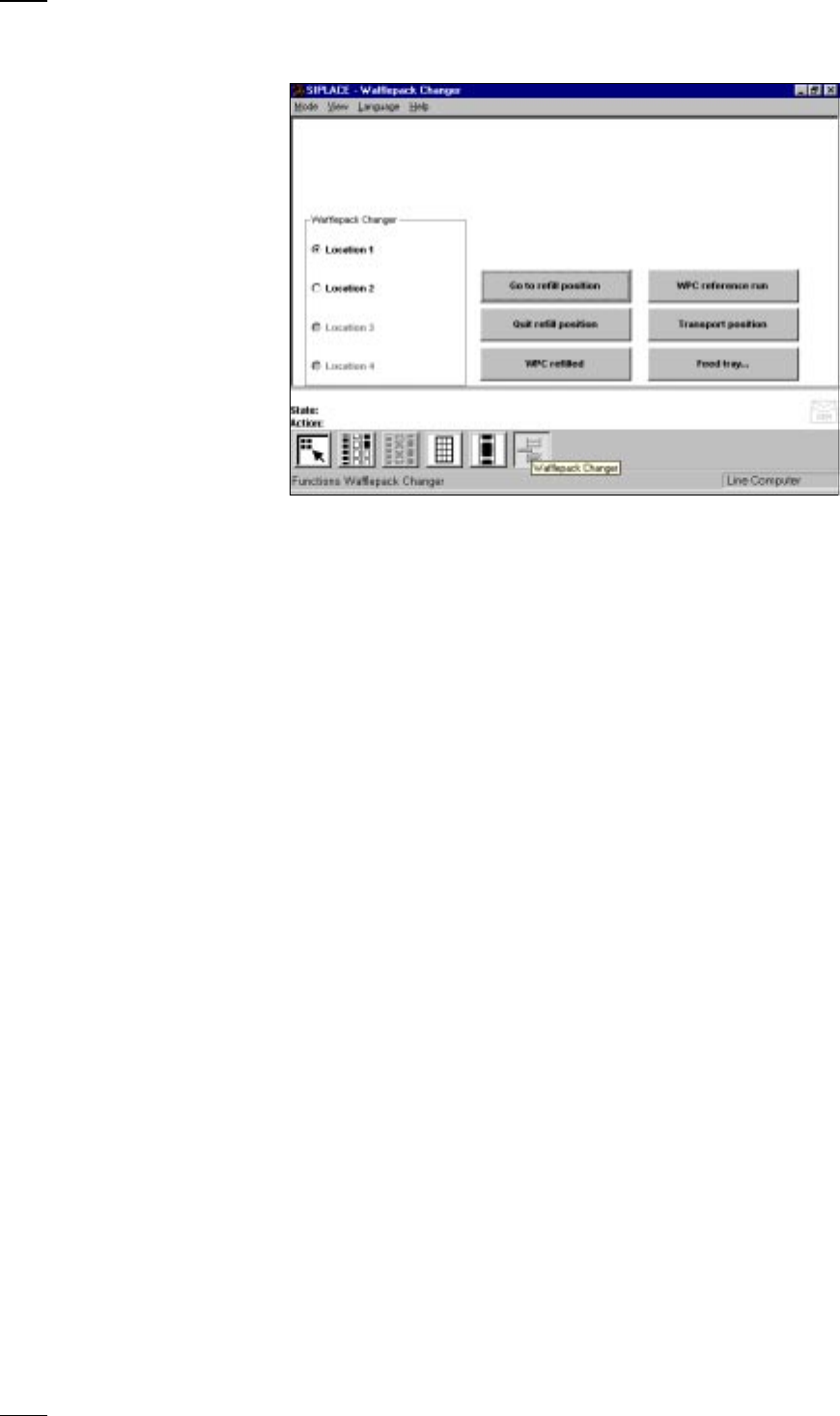
’Wafflepack changer’ menu
Go to refill position The lift is positioned so that all wafflepack magazines can either be
replaced or refilled.
Quit refill position This function is used for checking and aligning all of the flatpack maga-
zines configured in the setup. Any magazines which are missing will be
displayed on the screen.
WPC refilled All of the flatpack magazines configured in the setup are set to full.
WPC reference run First click on the Stop processing button and then on the WPC reference
run button. The wafflepack changer now carries out a reference run.
Transport position Move the lift of the wafflepack changer into the transport position, if you
wish to transport the wafflepack changer.
Feed tray... With this function you can bring up flatpack magazines from different
trays.
● First click on the Stop processing button.
● Now click on the Feed tray... button.
● Enter the magazine number in question into the dialog box which opens.
↑ UM 4.3.5

45
Index
Symbols
#E . . . . . . . . . . . . . . . . . . . . . . . . . . . . . . 5, 22
A
Abbreviations . . . . . . . . . . . . . . . . . . . . . . . . 5
Actuate clamping
. . . . . . . . . . . . . . . . . . . . 30
Actuate dp axis
. . . . . . . . . . . . . . . . . . . . . . 26
Actuate stopper
. . . . . . . . . . . . . . . . . . . . . 30
Areas of SIPLACE S-20 placem. stations
. . 9
B
Barcode comparison . . . . . . . . . . . . . . . . . 21
BC
. . . . . . . . . . . . . . . . . . . . . . . . . . . . . . . . 5
BE
. . . . . . . . . . . . . . . . . . . . . . . . . . . . . . . . . 5
Button
General errors menu
. . . . . . . . . . . . . . . 22
Machine errors menu
. . . . . . . . . . . . . . 22
Track errors menu
. . . . . . . . . . . . . . . . . 22
Transport errors menu
. . . . . . . . . . . . . . 22
Buttons
. . . . . . . . . . . . . . . . . . . . . . . . . 18, 39
C
Ceramic substrate centering . . . . . . . . . . . 30
Cmp
. . . . . . . . . . . . . . . . . . . . . . . . . . . . . . . 5
CO
. . . . . . . . . . . . . . . . . . . . . . . . . . . . . . . . 5
CO-BC
. . . . . . . . . . . . . . . . . . . . . . . . . . . . 20
Component barcode
. . . . . . . . . . . . . . . . . . 20
Component barcode reader (option)
. . . . . . 8
Component counter
. . . . . . . . . . . . . . . . . . . 7
Component name
. . . . . . . . . . . . . . . . . 20, 22
Continue processing
. . . . . . . . . . . . . . . . . . 10
Conveyor
. . . . . . . . . . . . . . . . . . . . . . . . . . 30
Conveyor track 1
. . . . . . . . . . . . . . . . . . . . . 9
Conveyor track 2
. . . . . . . . . . . . . . . . . . . . . 9
Cover
. . . . . . . . . . . . . . . . . . . . . . . . . . . . . 10
D
DEV . . . . . . . . . . . . . . . . . . . . . . . . . . . . 5, 22
Display empty tracks
with component verification
. . . . . . . . . . 24
without component verification
. . . . . . . 23
Displays and controls
. . . . . . . . . . . . . . . . . . 7
Division
. . . . . . . . . . . . . . . . . . . . . . . . . . . . 20
Docking and undocking the CO table
. . . . . 35
E
Emergency stop mushroom-head
push-button
. . . . . . . . . . . . . . . . . . . 6, 10
Empty track errors
. . . . . . . . . . . . . . . . . . . 32
Enter Password
. . . . . . . . . . . . . . . . . . . . . 15
Error counter
. . . . . . . . . . . . . . . . . . . . . . . 22
Error number
. . . . . . . . . . . . . . . . . . . . . . . 22
F
Fault list with title bar . . . . . . . . . . . . . . . . . 22
Feed tray
. . . . . . . . . . . . . . . . . . . . . . . . . . 44
Fiducial errors
. . . . . . . . . . . . . . . . . . . . . . . 34
Flowchart
„Switching on the SIPLACE line“
. . . . . 47
Forced air on/off
. . . . . . . . . . . . . . . . . . 26, 41
G
Gantry reference run . . . . . . . . . . . . . . . . . .25
General errors
. . . . . . . . . . . . . . . . . . . . . . .22
General operating statuses
. . . . . . . . . . . . . .8
GF
. . . . . . . . . . . . . . . . . . . . . . . . . . . . . . . . .5
GF no.
. . . . . . . . . . . . . . . . . . . . . . . . . . . . .20
Go to refill position
. . . . . . . . . . . . . . . . 42, 44
Go to service position
. . . . . . . . . . . . . . . . .25
Go to set-up position
. . . . . . . . . . . . . . . . . .25
Go to waiting pos’n
. . . . . . . . . . . . . . . . . . .25
Go to zero pulse
. . . . . . . . . . . . . . . . . . . . .25
Guard
. . . . . . . . . . . . . . . . . . . . . . . . . . . . .10
H
Head reference run . . . . . . . . . . . . . . . 26, 40
Holding circuit
. . . . . . . . . . . . . . . . . . . . . . .26
Hot key
. . . . . . . . . . . . . . . . . . . . . . . . . . . .11
I
Icons . . . . . . . . . . . . . . . . . . . . . . . . . . 18, 39
Init fluxer head
. . . . . . . . . . . . . . . . . . . . . . .42
Input box
. . . . . . . . . . . . . . . . . . . . . . . . . . .13
Input conveyor
. . . . . . . . . . . . . . . . . . . . . . . .9
K
Key switch . . . . . . . . . . . . . . . . . . . . . . . . . . .6
Keyboard with integral trackball
. . . . . . . . . .7
Keyboard with integrated mouse
. . . . . . . . .11
L
Line computer
Shutdown
. . . . . . . . . . . . . . . . . . . . . . . .16
Switching off
. . . . . . . . . . . . . . . . . . . . . .16
List field
. . . . . . . . . . . . . . . . . . . . . . . . . . . .28
Location
. . . . . . . . . . . . . . . . . . . . . . . . . . . .22
Location 1
. . . . . . . . . . . . . . . . . . . . . . . . . . .9
Location 3
. . . . . . . . . . . . . . . . . . . . . . . . . . .9
Location number
. . . . . . . . . . . . . . . . . . . . .20
Lock. op./close
. . . . . . . . . . . . . . . . . . . . . .29
LP
. . . . . . . . . . . . . . . . . . . . . . . . . . . . . . . . .5
M
Machine areas . . . . . . . . . . . . . . . . . . . . . . . .9
Machine control
Buttons
. . . . . . . . . . . . . . . . . . . . . . 18, 39
Icons
. . . . . . . . . . . . . . . . . . . . . . . . 18, 39
Machine errors
. . . . . . . . . . . . . . . . . . 22, 33
Machine operating mode
. . . . . . . . . . . . . . .39
GEM host
. . . . . . . . . . . . . . . . . . . . . . . .39
Line computer
. . . . . . . . . . . . . . . . . . . .39
Stand-alone
. . . . . . . . . . . . . . . . . . . . . .39
Main fault indicator
. . . . . . . . . . . . . . . . . . . .8
Main switch
. . . . . . . . . . . . . . . . . . . . . . . . . .6
Main view
. . . . . . . . . . . . . . . . . . . . . . . . . .12
Layout and explanation of the symbols
.12
Submenus
. . . . . . . . . . . . . . . . . . . . . . .12
Measure forced air
. . . . . . . . . . . . . . . . . . .26
Measure vacuum
. . . . . . . . . . . . . . . . . . . . .26
Menu
’Component verification with barcode’
. .21
’Display and refill empty tracks’
. . . . . . .23
’Display linear feeder and vibrate’
. . . . .24

46
’Display magazines and change
inventory levels’
. . . . . . . . . . . . . . . . . . .24
’Display trays and change
inventory levels’
. . . . . . . . . . . . . . . . . . .42
’Feeders’
. . . . . . . . . . . . . . . . . . . . .23, 42
’Flux application’
. . . . . . . . . . . . . . . . . . .42
’Gantry functions’
. . . . . . . . . . . . . . . . . .25
’IC-head functions’
. . . . . . . . . . . . . . . . .40
’Main view 80F4’
. . . . . . . . . . . . . . . . . .39
’Main view 80S-20’
. . . . . . . . . . . . . . . . .18
’Nozzle changer configuration IC head’
.41
’Nozzle changer configuration revolver
head’
. . . . . . . . . . . . . . . . . . . . . . . . . . .29
’Nozzle configuration
revolver head’
. . . . . . . . . . . . . . . . . . . . .28
’Nozzle offset revolver head’
. . . . . . . . .27
’PCB conveyor width’
. . . . . . . . . . . . . . .31
’Revolver head functions’
. . . . . . . . . . . .26
’Setup’
. . . . . . . . . . . . . . . . . . . . . . . . . .20
’Single functions - Gantries 1/2/3/4’
. . . .25
’Single functions Gantry 1’
. . . . . . . . . . .40
’Single functions PCB transport 1’
. . . . .30
’Vacuum test revolver head ’
. . . . . . . . .27
’Wafflepack changer’
. . . . . . . . . . . . . . .44
Menu control of the machine
. . . . . . . . . . . .11
Message boxes
. . . . . . . . . . . . . . . . . . . . . .13
N
Nozzle configuration errors . . . . . . . . . . . . .34
Nozzles
Picking up
. . . . . . . . . . . . . . . . . . . . . . . .29
Removing
. . . . . . . . . . . . . . . . . . . . . . . .29
Returning
. . . . . . . . . . . . . . . . . . . . . . . .29
O
One nozzle . . . . . . . . . . . . . . . . . . . . . . . . .28
On-screen displays
Control box
. . . . . . . . . . . . . . . . . . . . . . .14
Dialog box
. . . . . . . . . . . . . . . . . . . . . . .13
Selection box
. . . . . . . . . . . . . . . . . . . . .14
Operator guidance
. . . . . . . . . . . . . . . .18, 39
Output conveyor
. . . . . . . . . . . . . . . . . . . . . .9
P
Package form number . . . . . . . . . . . . . . . . .20
PCB
. . . . . . . . . . . . . . . . . . . . . . . . . . . . . . . .5
to center conveyor
. . . . . . . . . . . . . . . . .30
to output conveyor
. . . . . . . . . . . . . . . . .30
PCB barcode error (option)
. . . . . . . . . . . . .35
Pick up nozzle
. . . . . . . . . . . . . . . . . . . . . . .40
Pick-up circuit
. . . . . . . . . . . . . . . . . . . . . . .26
Pick-up side
. . . . . . . . . . . . . . . . . . . . . . . . .22
Processing conveyor
. . . . . . . . . . . . . . . . . . .9
Protective cover
. . . . . . . . . . . . . . . . . . . . .10
Protective glass disk
. . . . . . . . . . . . . . . . . .10
Q
Quit refill position . . . . . . . . . . . . . . . . . . . . .44
R
Refill WPC . . . . . . . . . . . . . . . . . . . . . . . . . .44
Reject circuit
. . . . . . . . . . . . . . . . . . . . . . . . 26
Resume placement of PCB
without components loss
. . . . . . . . . . . . 34
Return nozzle
. . . . . . . . . . . . . . . . . . . . . . . 40
Rinse fluxer head
. . . . . . . . . . . . . . . . . . . . 42
S
Safety devices . . . . . . . . . . . . . . . . . . . . . . 10
Screen displays
. . . . . . . . . . . . . . . . . . . . . 13
Seg
. . . . . . . . . . . . . . . . . . . . . . . . . . . . . 5, 22
Selection box
. . . . . . . . . . . . . . . . . . . . . . . 14
Sensor
. . . . . . . . . . . . . . . . . . . . . . . . . . . . 30
Set track to full
. . . . . . . . . . . . . . . . . . . . . . 21
SF
. . . . . . . . . . . . . . . . . . . . . . . . . . . . . . . . . 5
Shutdown
. . . . . . . . . . . . . . . . . . . . . . . . . . 16
SIPLACE 80F4
. . . . . . . . . . . . . . . . . . . . . . 38
SIPLACE line, switching off
. . . . . . . . . . . . 16
SIPLACE line, switching on
. . . . . . . . . . . . 15
Stand-alone
. . . . . . . . . . . . . . . . . . . . . . . . 39
Star step
. . . . . . . . . . . . . . . . . . . . . . . . 26, 28
Start button
. . . . . . . . . . . . . . . . . . . . . . . . . . 6
Stations
Starting
. . . . . . . . . . . . . . . . . . . . . . . . . 15
Switching off
. . . . . . . . . . . . . . . . . . . . . 16
Stop button
. . . . . . . . . . . . . . . . . . . . . . . . . . 6
Switches and buttons
. . . . . . . . . . . . . . . . . . 5
Switching off
Line computer
. . . . . . . . . . . . . . . . . . . . 16
SIPLACE line
. . . . . . . . . . . . . . . . . . . . 16
Stations
. . . . . . . . . . . . . . . . . . . . . . . . . 16
Switching on
Stations
. . . . . . . . . . . . . . . . . . . . . . . . . 15
T
Title bar . . . . . . . . . . . . . . . . . . . . . . . . . . . 22
Touchscreen
. . . . . . . . . . . . . . . . . . . . . 7, 11
TR/D/T
. . . . . . . . . . . . . . . . . . . . . . . . . . 5, 22
Track
. . . . . . . . . . . . . . . . . . . . . . . . . . . . . 20
Track barcode
. . . . . . . . . . . . . . . . . . . . . . 20
Track errors
. . . . . . . . . . . . . . . . . . . . . . . . 22
Track number
. . . . . . . . . . . . . . . . . . . . . . . 20
Trackball
. . . . . . . . . . . . . . . . . . . . . . . . . . . 11
Transport errors
. . . . . . . . . . . . . . . . . . 22, 33
Transport position
. . . . . . . . . . . . . . . . . . . 44
Tray
. . . . . . . . . . . . . . . . . . . . . . . . . . . . . . 20
Troubleshooting
. . . . . . . . . . . . . . . . . . . . . 32
Turn d axis
. . . . . . . . . . . . . . . . . . . . . . . . . 40
Twin conveyor option
. . . . . . . . . . . . . . . . . . 9
U
UM . . . . . . . . . . . . . . . . . . . . . . . . . . . . . . . . 5
Unclamp z axis
. . . . . . . . . . . . . . . . . . . . . . 41
User interface
. . . . . . . . . . . . . . . . . . . . . . . 12
User level ’Operator’ 80F4
. . . . . . . . . . . . . 39
User level ’Operator’ 80S-20
. . . . . . . . . . . 18
V
Vacuum on/off . . . . . . . . . . . . . . . . . . . 26, 41
Vacuum/offset measurement
. . . . . . . . . . . 40
W
Warning boxes . . . . . . . . . . . . . . . . . . . . . . 13
WPC reference run
. . . . . . . . . . . . . . . . . . 44