00191921-01.pdf - 第48页
Siemens A G 2000 All righ ts reserved Subjec t to change without prior notice Order no.: 0019 1921-01 Siemens Ak tiengesells chaft To be ordere d from: Siemens A G, PL EA 1 V M C Rupert-Mayer- Strasse 44 D-81359 Muenchen…

46
’Display magazines and change
inventory levels’
. . . . . . . . . . . . . . . . . . .24
’Display trays and change
inventory levels’
. . . . . . . . . . . . . . . . . . .42
’Feeders’
. . . . . . . . . . . . . . . . . . . . .23, 42
’Flux application’
. . . . . . . . . . . . . . . . . . .42
’Gantry functions’
. . . . . . . . . . . . . . . . . .25
’IC-head functions’
. . . . . . . . . . . . . . . . .40
’Main view 80F4’
. . . . . . . . . . . . . . . . . .39
’Main view 80S-20’
. . . . . . . . . . . . . . . . .18
’Nozzle changer configuration IC head’
.41
’Nozzle changer configuration revolver
head’
. . . . . . . . . . . . . . . . . . . . . . . . . . .29
’Nozzle configuration
revolver head’
. . . . . . . . . . . . . . . . . . . . .28
’Nozzle offset revolver head’
. . . . . . . . .27
’PCB conveyor width’
. . . . . . . . . . . . . . .31
’Revolver head functions’
. . . . . . . . . . . .26
’Setup’
. . . . . . . . . . . . . . . . . . . . . . . . . .20
’Single functions - Gantries 1/2/3/4’
. . . .25
’Single functions Gantry 1’
. . . . . . . . . . .40
’Single functions PCB transport 1’
. . . . .30
’Vacuum test revolver head ’
. . . . . . . . .27
’Wafflepack changer’
. . . . . . . . . . . . . . .44
Menu control of the machine
. . . . . . . . . . . .11
Message boxes
. . . . . . . . . . . . . . . . . . . . . .13
N
Nozzle configuration errors . . . . . . . . . . . . .34
Nozzles
Picking up
. . . . . . . . . . . . . . . . . . . . . . . .29
Removing
. . . . . . . . . . . . . . . . . . . . . . . .29
Returning
. . . . . . . . . . . . . . . . . . . . . . . .29
O
One nozzle . . . . . . . . . . . . . . . . . . . . . . . . .28
On-screen displays
Control box
. . . . . . . . . . . . . . . . . . . . . . .14
Dialog box
. . . . . . . . . . . . . . . . . . . . . . .13
Selection box
. . . . . . . . . . . . . . . . . . . . .14
Operator guidance
. . . . . . . . . . . . . . . .18, 39
Output conveyor
. . . . . . . . . . . . . . . . . . . . . .9
P
Package form number . . . . . . . . . . . . . . . . .20
PCB
. . . . . . . . . . . . . . . . . . . . . . . . . . . . . . . .5
to center conveyor
. . . . . . . . . . . . . . . . .30
to output conveyor
. . . . . . . . . . . . . . . . .30
PCB barcode error (option)
. . . . . . . . . . . . .35
Pick up nozzle
. . . . . . . . . . . . . . . . . . . . . . .40
Pick-up circuit
. . . . . . . . . . . . . . . . . . . . . . .26
Pick-up side
. . . . . . . . . . . . . . . . . . . . . . . . .22
Processing conveyor
. . . . . . . . . . . . . . . . . . .9
Protective cover
. . . . . . . . . . . . . . . . . . . . .10
Protective glass disk
. . . . . . . . . . . . . . . . . .10
Q
Quit refill position . . . . . . . . . . . . . . . . . . . . .44
R
Refill WPC . . . . . . . . . . . . . . . . . . . . . . . . . .44
Reject circuit
. . . . . . . . . . . . . . . . . . . . . . . . 26
Resume placement of PCB
without components loss
. . . . . . . . . . . . 34
Return nozzle
. . . . . . . . . . . . . . . . . . . . . . . 40
Rinse fluxer head
. . . . . . . . . . . . . . . . . . . . 42
S
Safety devices . . . . . . . . . . . . . . . . . . . . . . 10
Screen displays
. . . . . . . . . . . . . . . . . . . . . 13
Seg
. . . . . . . . . . . . . . . . . . . . . . . . . . . . . 5, 22
Selection box
. . . . . . . . . . . . . . . . . . . . . . . 14
Sensor
. . . . . . . . . . . . . . . . . . . . . . . . . . . . 30
Set track to full
. . . . . . . . . . . . . . . . . . . . . . 21
SF
. . . . . . . . . . . . . . . . . . . . . . . . . . . . . . . . . 5
Shutdown
. . . . . . . . . . . . . . . . . . . . . . . . . . 16
SIPLACE 80F4
. . . . . . . . . . . . . . . . . . . . . . 38
SIPLACE line, switching off
. . . . . . . . . . . . 16
SIPLACE line, switching on
. . . . . . . . . . . . 15
Stand-alone
. . . . . . . . . . . . . . . . . . . . . . . . 39
Star step
. . . . . . . . . . . . . . . . . . . . . . . . 26, 28
Start button
. . . . . . . . . . . . . . . . . . . . . . . . . . 6
Stations
Starting
. . . . . . . . . . . . . . . . . . . . . . . . . 15
Switching off
. . . . . . . . . . . . . . . . . . . . . 16
Stop button
. . . . . . . . . . . . . . . . . . . . . . . . . . 6
Switches and buttons
. . . . . . . . . . . . . . . . . . 5
Switching off
Line computer
. . . . . . . . . . . . . . . . . . . . 16
SIPLACE line
. . . . . . . . . . . . . . . . . . . . 16
Stations
. . . . . . . . . . . . . . . . . . . . . . . . . 16
Switching on
Stations
. . . . . . . . . . . . . . . . . . . . . . . . . 15
T
Title bar . . . . . . . . . . . . . . . . . . . . . . . . . . . 22
Touchscreen
. . . . . . . . . . . . . . . . . . . . . 7, 11
TR/D/T
. . . . . . . . . . . . . . . . . . . . . . . . . . 5, 22
Track
. . . . . . . . . . . . . . . . . . . . . . . . . . . . . 20
Track barcode
. . . . . . . . . . . . . . . . . . . . . . 20
Track errors
. . . . . . . . . . . . . . . . . . . . . . . . 22
Track number
. . . . . . . . . . . . . . . . . . . . . . . 20
Trackball
. . . . . . . . . . . . . . . . . . . . . . . . . . . 11
Transport errors
. . . . . . . . . . . . . . . . . . 22, 33
Transport position
. . . . . . . . . . . . . . . . . . . 44
Tray
. . . . . . . . . . . . . . . . . . . . . . . . . . . . . . 20
Troubleshooting
. . . . . . . . . . . . . . . . . . . . . 32
Turn d axis
. . . . . . . . . . . . . . . . . . . . . . . . . 40
Twin conveyor option
. . . . . . . . . . . . . . . . . . 9
U
UM . . . . . . . . . . . . . . . . . . . . . . . . . . . . . . . . 5
Unclamp z axis
. . . . . . . . . . . . . . . . . . . . . . 41
User interface
. . . . . . . . . . . . . . . . . . . . . . . 12
User level ’Operator’ 80F4
. . . . . . . . . . . . . 39
User level ’Operator’ 80S-20
. . . . . . . . . . . 18
V
Vacuum on/off . . . . . . . . . . . . . . . . . . . 26, 41
Vacuum/offset measurement
. . . . . . . . . . . 40
W
Warning boxes . . . . . . . . . . . . . . . . . . . . . . 13
WPC reference run
. . . . . . . . . . . . . . . . . . 44
47
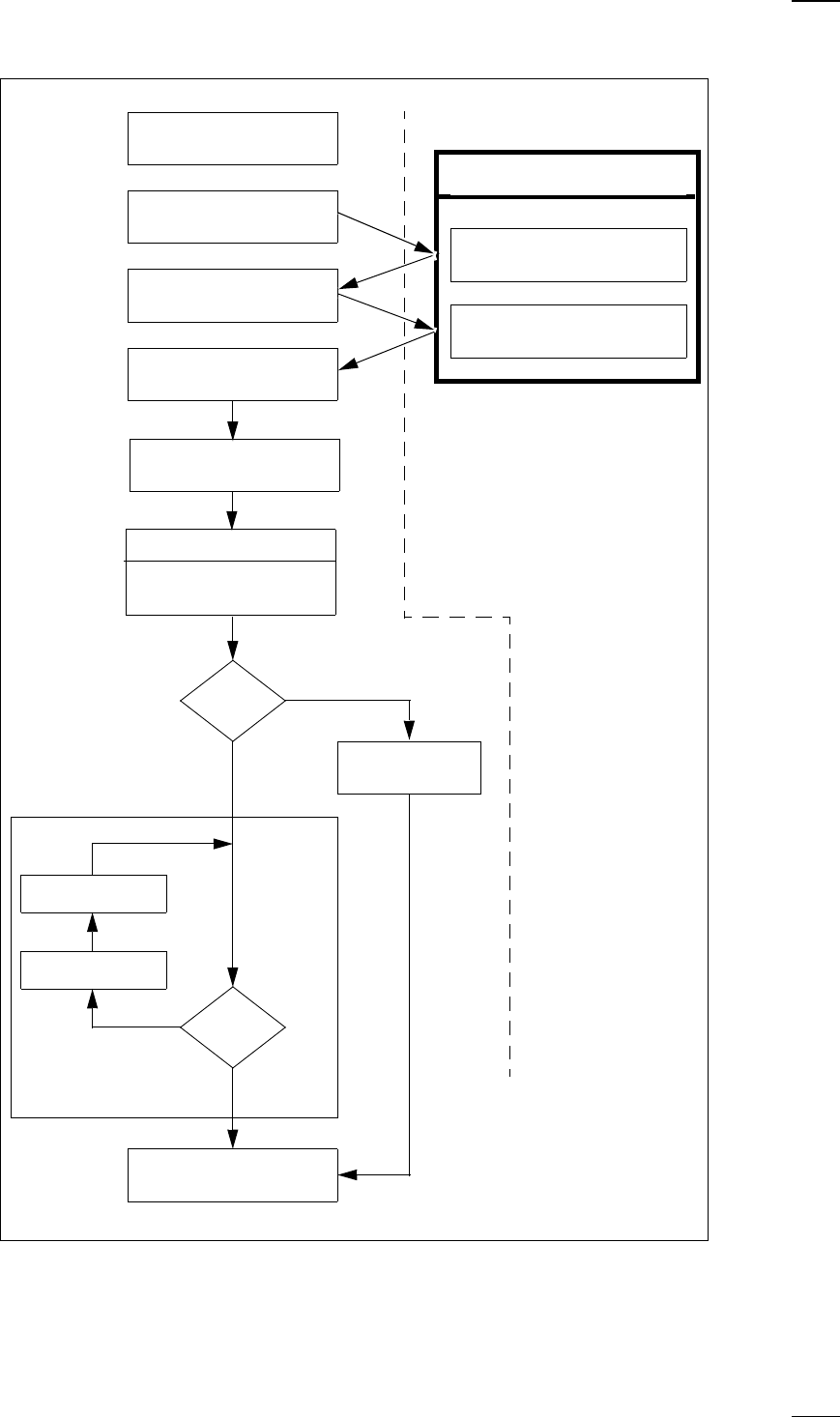
Flowchart "Switching ON the SIPLACE Line"
Test set-up
Reset tracks
No
Line computer tasks
Load cluster data
Fiducials
OK?
Make settings on the machine
Set-up generator appears
Check the set-up
(insert feeder modules)
Switch on
Nozzle check
Change nozzle
configuration, if necessary
Wait for PCB
Introduce PCB
Tra ck
errors
Ye s
Abort
processing PCB
Ye s
PCB onto output conveyor
No
Station computer
Bold :
Italic :
To be carried out
by the operator
Carried out or
signaled by the
station
Confirm the
set-up generator

Siemens AG 2000 All rights reserved Subject to change without prior notice
Order no.: 00191921-01 Siemens Aktiengesellschaft
To be ordered from:
Siemens AG,
PL EA 1 V MC
Rupert-Mayer-Strasse 44
D-81359 Muenchen
Printed in the Federal Republic of Germany