0771445_7708_Mar2018_077144500.pdf - 第9页
Model 7708 M ultiplexer M odule Instructions for use w ith DAQ6510 077144500 / April 2018 9 Connectio n log You can use the next t able to record your connection in f ormation. Channel Color Description Description Color…
Model 7708 Multiplexer Module Instructions for use with DAQ6510
8 077144500 / April 2018
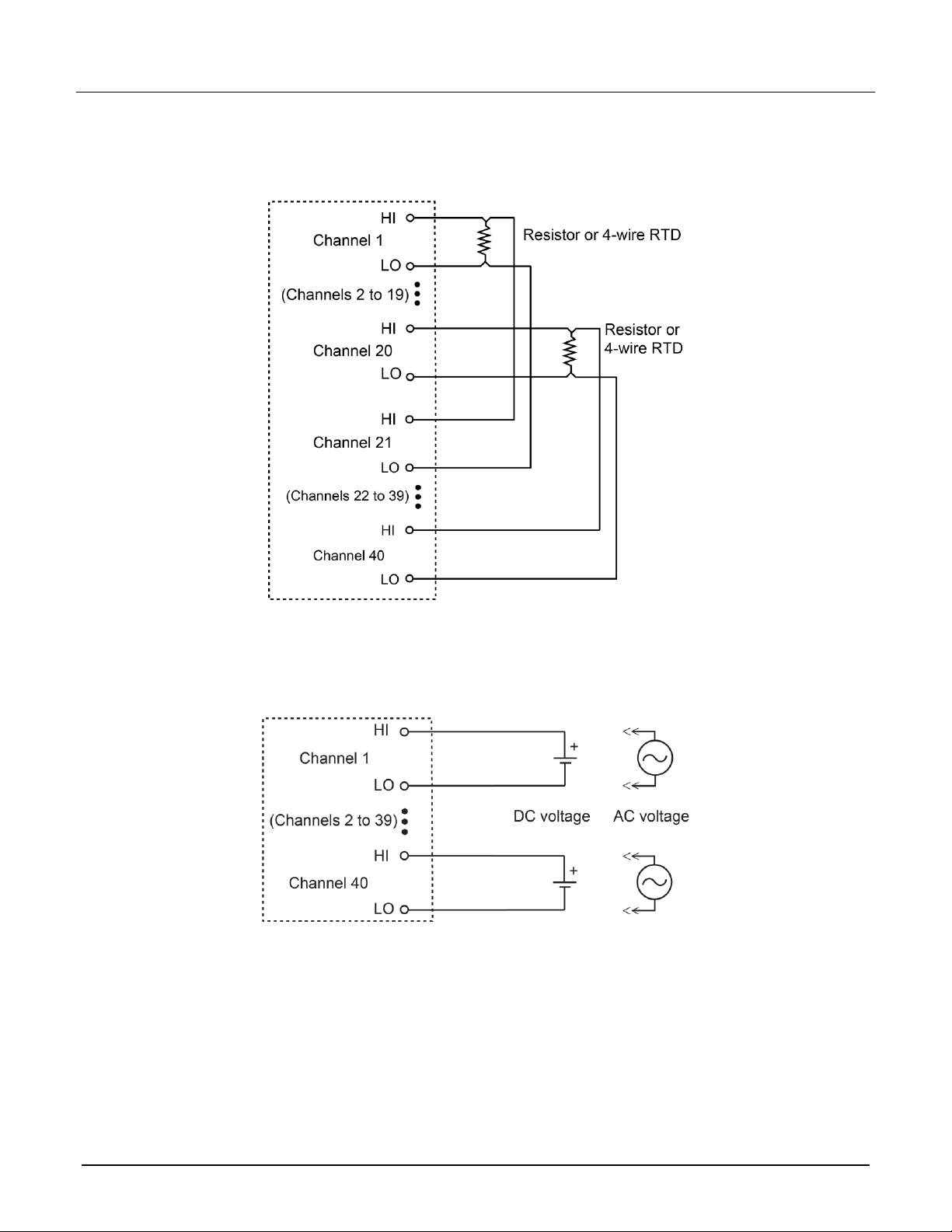
Four-wire resistance and RTD connections
Figure 7: 4-wire resistance and RTD connections
DC or AC voltage connections
Figure 8: Voltage connections - DC or AC

Model 7708 Multiplexer Module Instructions for use with DAQ6510
077144500 / April 2018 9
Connection log
You can use the next table to record your connection information.
Channel
Color
Description
Description
Color
Channel
INPUT
H
L
SENSE
H
L
CH1
H
H
CH21
L
L
CH2
H
H
CH22
L
L
CH3
H
H
CH23
L
L
CH4
H
H
CH24
L
L
CH5
H
H
CH25
L
L
CH6
H
H
CH26
L
L
CH7
H
H
CH27
L
L
CH8
H
H
CH28
L
L
CH9
H
H
CH29
L
L
CH10
H
H
CH30
L
L
CH11
H
H
CH31
L
L
CH12
H
H
CH32
L
L
CH13
H
H
CH33
L
L
CH14
H
H
CH34
L
L
CH15
H
H
CH35
L
L
CH16
H
H
CH36
L
L
CH17
H
H
CH37
L
L
CH18
H
H
CH38
L
L
CH19
H
H
CH39
L
L
CH20
H
H
CH40
L
L
Model 7708 Multiplexer Module Instructions for use with DAQ6510
10 077144500 / April 2018
Installation
Before operating an instrument with an accessory switching module, verify that the switching
module is properly installed and the mounting screws are tightly fastened. If the mounting
screws are not properly connected, an electrical shock hazard may be present.
To use the switching operations, a switching module must be installed in the DAQ6510.
If you are installing two switching modules, it is easier to install one switching module into Slot 2 first, then
install the second switching module into Slot 1.
If you have a Keithley Instruments Model 2700, 2701, or 2750 instrument, you can use your existing
switching module in the DAQ6510. Follow the instructions in your original equipment documentation
to remove the module from the instrument, then use the following instructions to install it in the
DAQ6510. You do not need to remove wiring to the module.
For inexperienced users, it is recommended that you do not connect a device under test (DUT) and
external circuitry to the switching module. This allows you to exercise close and open operations
without the dangers associated with live test circuits. You can also set up pseudocards to experiment
with switching. Refer to Pseudocards in the Model DAQ6510 Reference Manual for information on
setting up pseudocards.
To prevent electric shock that could result in injury or death, never handle a switching
module that has power applied to it. Before installing or removing a switching module, make
sure the DAQ6510 is turned off and disconnected from line power. If the switching module is
connected to a DUT, make sure power is removed from all external circuitry.
If a card slot is unused, you must install slot covers to prevent personal contact with high
voltage circuits. Failure to install slot covers could result in personal exposure to hazardous
voltages, which could cause personal injury or death if contacted.