TM2750.Squeegee_MachineSetup_Manual.pdf - 第3页
SMT Software En gineering Group IMOperations YAMAHAMOTORCO.,LTD. MDOC-SOFT50102 3/9 3.1. SystemCo nfi g setting Y ou can set up Squ eegee through the follow ing procedur e . S tep1. On a PC conta i ning Y AMAHA I…
SMT Software Engineering Group
IMOperationsYAMAHAMOTORCO.,LTD.
MDOC-SOFT50102
2/9
1. Target model and Target version
Target model and Target version of this specification are as follows.
Table1 Target Machine and Software
Machine, Software Version Remarks
IT System Server V1.25STD R1.000 or later
YSP V3.25STD R1.000 or later
2. Outline
“Setup Squeegee” is a function to check the setting of squeegee of a printer.
With this function, "Setup Verify" of squeegee becomes possible, and mis-Setup is
prevented.
To use this function, it is necessary to register a squeegee according to the following
procedure to use.
1. Register Squeegee in ID Editor.
・ Refer to "ID Editor Register Squeegee” Manual.
2. Method of setup “Squeegee”
・ Refer to this material.
3. Setting
“Squeegee Setup” is one of the functions of "Setup verify".
It is possible to use it, If "Setup verify" is effective,
SMT Software Engineering Group
IMOperationsYAMAHAMOTORCO.,LTD.
MDOC-SOFT50102
3/9
3.1. SystemConfig setting
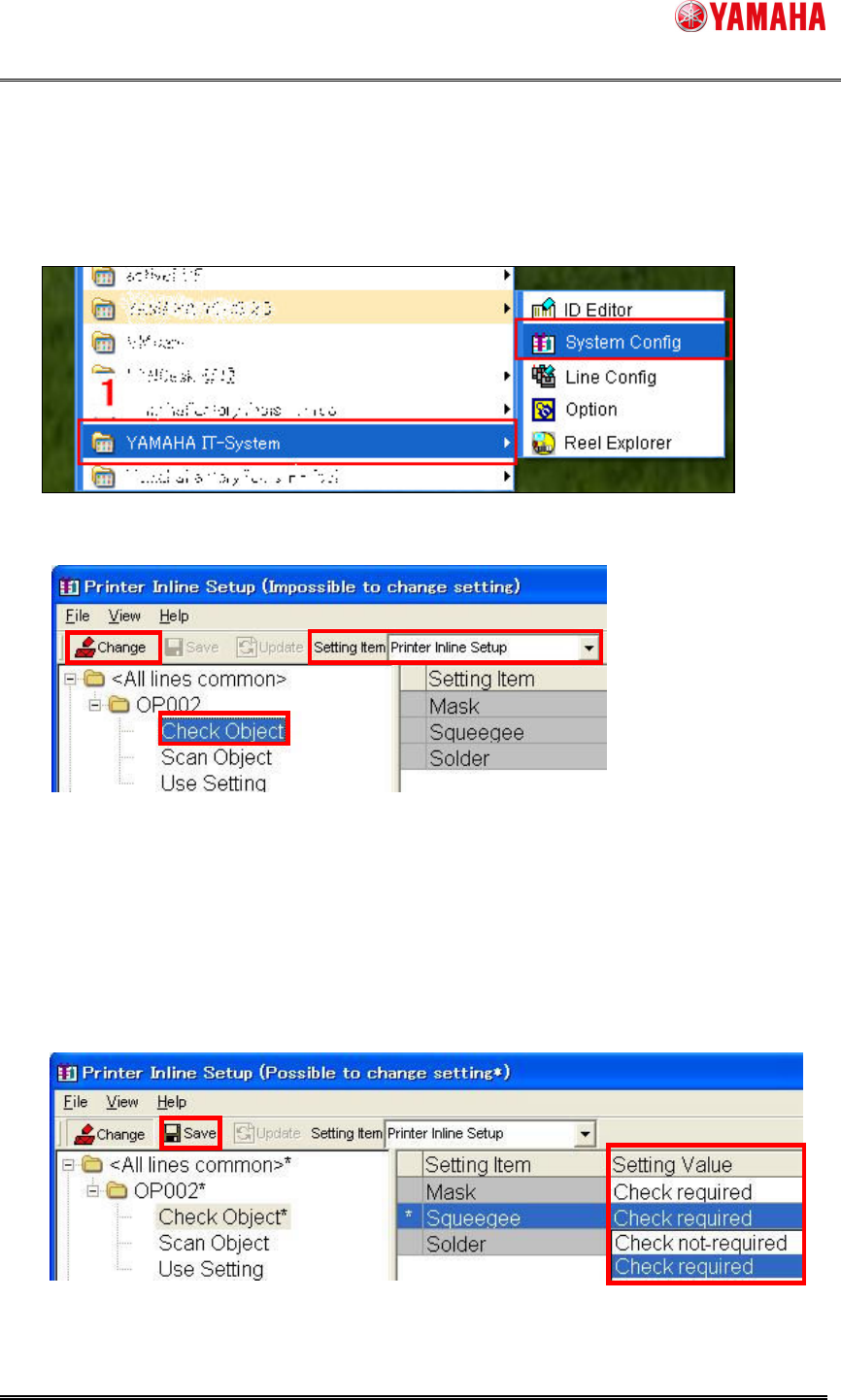
You can set up Squeegee through the following procedure.
Step1. On a PC containing YAMAHA IT-System,
1. Select [Start]-[Program]-[YAMAHA IT-System]-[System Config]
2. Select [Printer Inline Setup] from the combo box of [Setting Item] on the tool bar.
3. Select [OP002]-[Check Object] in the folder of <Line Unit>, which has the target
machine of this setting or <All line common>.
4. Click [Change]
5. Select [Check required] from the combo box of [Squeegee]-[Setting Value].
6. Click [Save] and finish.
4
2
3
6
5
SMT Software Engineering Group
IMOperationsYAMAHAMOTORCO.,LTD.
MDOC-SOFT50102
4/9
3.2. Machine setting
3.2.1. Collation Squeegee
You can ensure the squeegee setup by checking the following items.
- Check by "Squeegee Type".
- Check by "Squeegee Name".
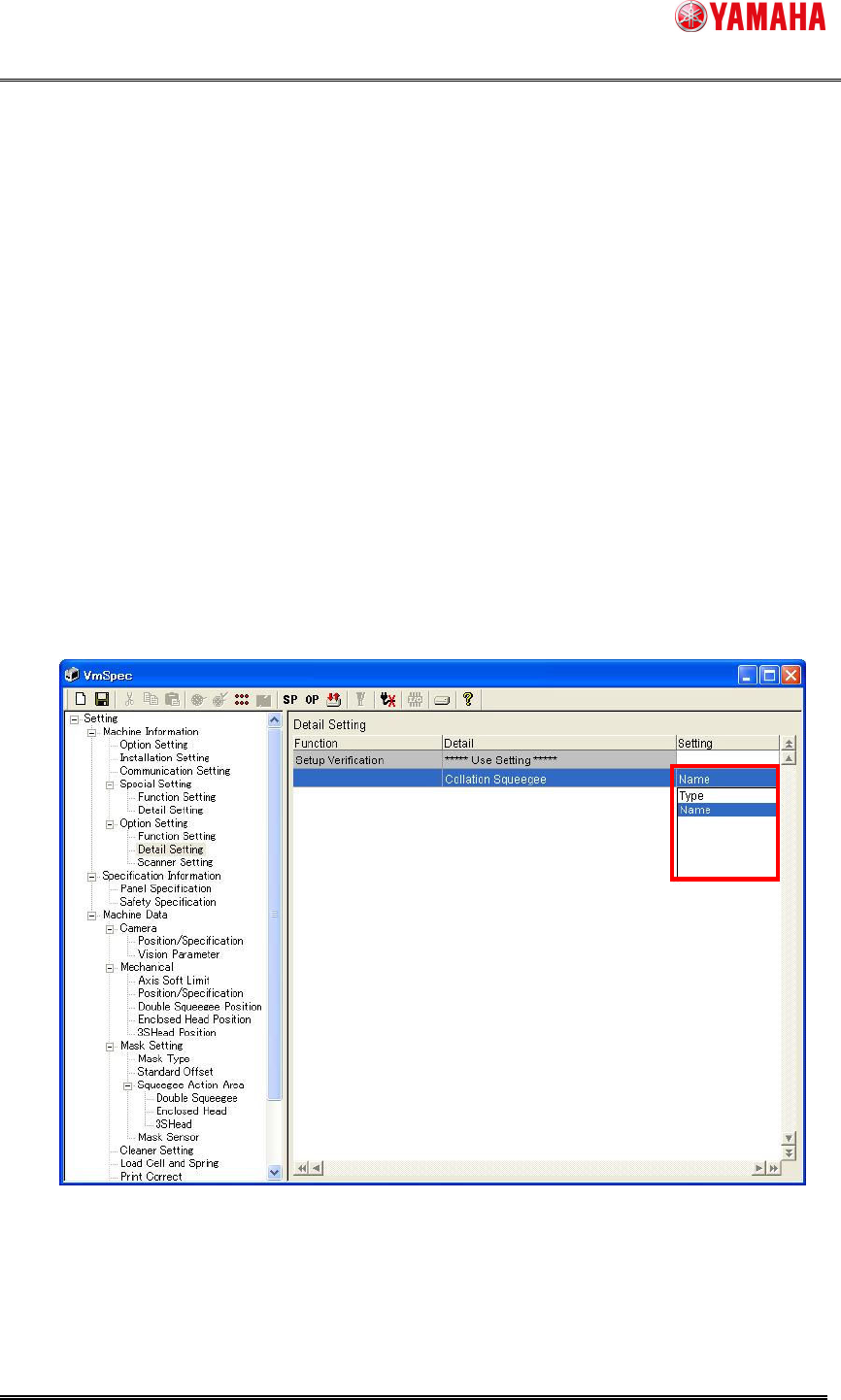
Set “Type" or “Name" in “Collation Squeegee” of [machine] – [setting] – [Machine
Information] – [Option Setting] – [Detail Setting]. (Refer to “Figure.3.2.1.1”)
“Type" Setup checking by “Squeegee Type” and “Squeegee Detail Type” of
[Print] – [Squeegee] in board data.
“Name” Setup checking by “Squeegee Name” of [Print] – [Squeegee] in board
data.
Figure3.2.1.1 Collation Squeegee