TS8100-PC-PUMP-USER-GUIDE.pdf - 第10页
10 3. Connect the motor cab le to Port C. Notes: Mak e sure the controll er is turned off when connecting the motor cable to port C 4. Connect syringe air hose to port B 5. Set air pressure t o feed the m aterial to th e…
8
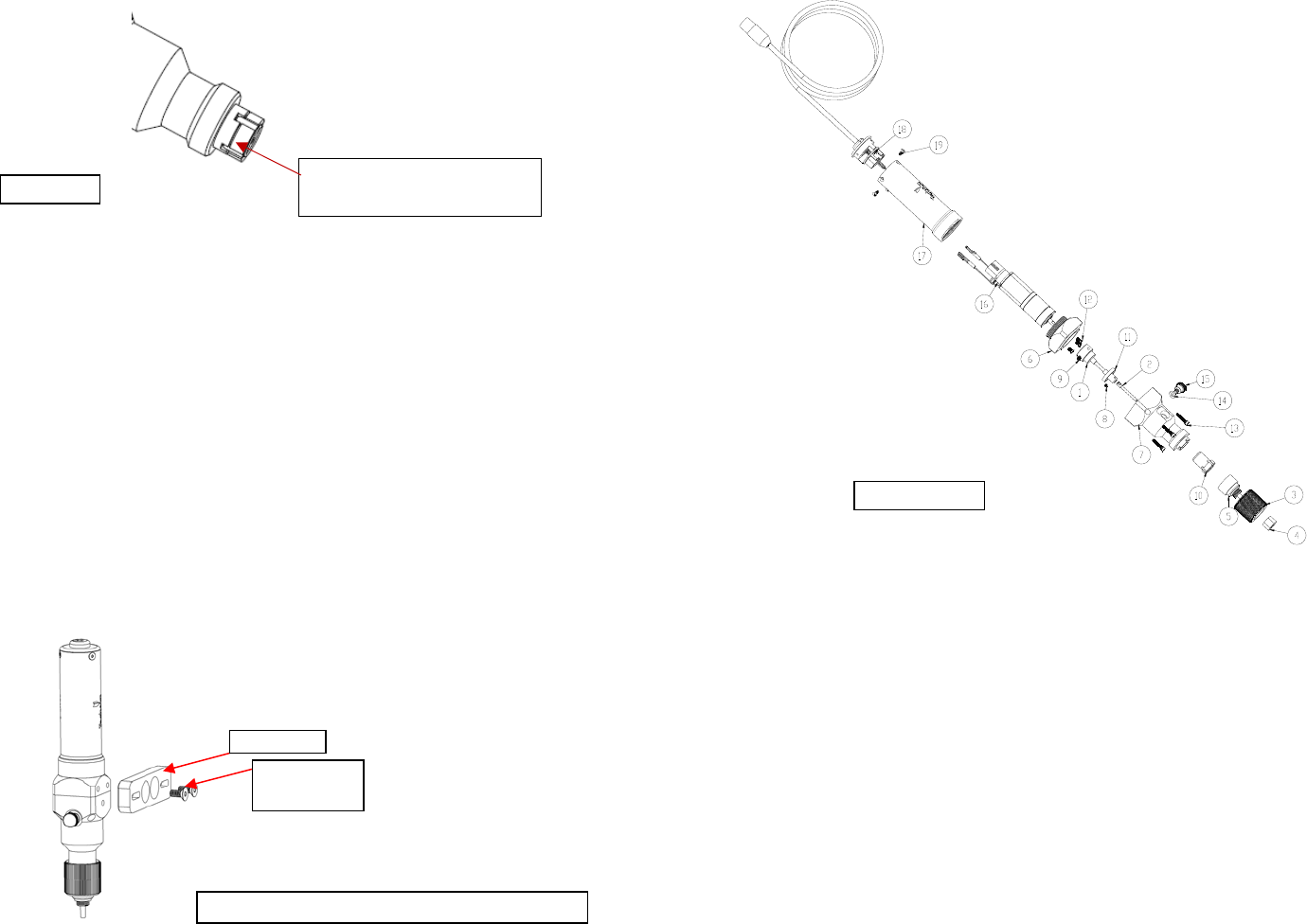
4. Apply some pressure on the stator by pushing it against the stator housing to
make sure it fully seats into the notches. Check to make sure the rotor tip is
flush with the stator.
5. Place the stator cap (4) into the retaining cap (5)
6. Install the retaining cap (5) (with the stator cap in place) by screw it onto the
stator housing (1) in the clockwise direction.
6.2 Mechanical Mounting:
Normally, the TS8100 Series PC Pump is used on an automation system such as a
bench-top robot. It is very important that the pump is mounted on the Z-axis
gantry, in a secure manner, that will not allow loosening during dispense
operation. The Z-axis must move in a precise and repeatable motion for successful
dispensing.
The provided mounting bracket must be attached to the Z-axis in a manner that
will provide the valve perpendicular travel to the horizontal plane of the surface on
which the fluid will be dispensed. The mounting should provide a means of
accurately adjusting the distance between the dispense tip and the substrate surface
such as a touchdown sensing device or a fixed distance standoff.
Push the stator against the
stator housing
Bracket
Mounting
Screw
Figure 7.0
Figure 8.0: Attach the bracket to pump as shown
13
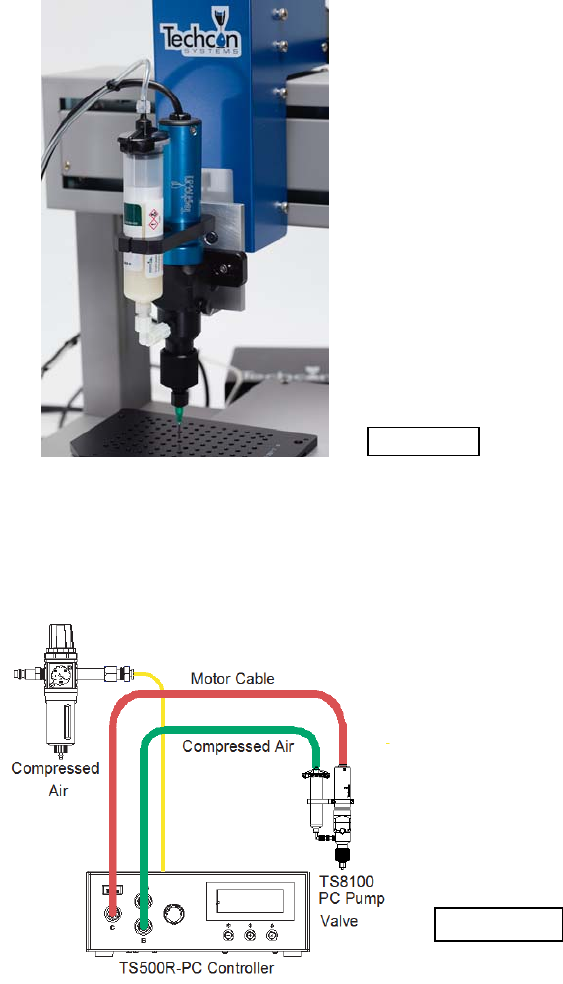
7.2 Thorough Cleaning: refer to diagram below
Recommended cleaning solvent: IPA or Acetone
Thorough cleaning procedures should be done whenever the following occur:
When the dispense material is changed to different type
When the dispense material is started to cure in the pump
When Pump has been dispensing for one month.
When the dispense tip clogged frequently
1. Perform Pump purging process by follow steps 1-6 in Section 9.1 “Purging”
2. Remove the Material Inlet Fitting
3. Rotate the retaining cap (3) counter clockwise until it completely detach from
the stator housing (7).
4. Pull the retaining cap (3) along with the stator cap (5) and the needle cap (4)
straight out from stator housing (7)
Figure 14.0
12
Notes: One complete rotor revolution = 2647 encoder count ≈
0.01068ml. To achieve maximum dispense repeatability it is
recommended that pump to be set to dispense at least one complete
revolution (2647 counts).
4. Press and hold the Set button for two seconds to move the cursor to the
reverse counts.
5. Press the Mode (+) or Power (-) button to set reverse count.
Notes: Recommended reverse count is 7
6. Press and hold the Set button for two seconds to move the cursor to the
output voltage.
7. Press the Mode (+) or Power (-) button to change the voltage value.
Notes: The recommended voltage setting is 0.65ml/M (10.5V).
8. Press and hold the Set button for two seconds to save the data.
9. Press and release the Foot Switch to activate the dispense cycle
7. MAINTENANCE AND CLEANING:
7.1 Pump Purging:
Purging the pump with dispensing conditioner (7305XCON) after each shifts is
recommended. The conditioner removes material residue from the material path
and conditions the pump for future use.
1. Release material feed pressure.
2. Remove material from the pump.
3. Remove dispense tip
4. Install a barrel of dispensing conditioner (Part number 7305XCON) to the pump
inlet and set air pressure at 10.0 psi.
5. Set the controller to “PURGE” mode
6. Press the foot switch to let the pump run until the conditioner is the only
material being dispensed at the pump outlet. If the conditioner is unable to
force the dispense material out the pump outlet then proceed to the “Thorough
Cleaning” section.
7. Release the foot switch to stop pump
8. Release conditioner feed pressure.
9
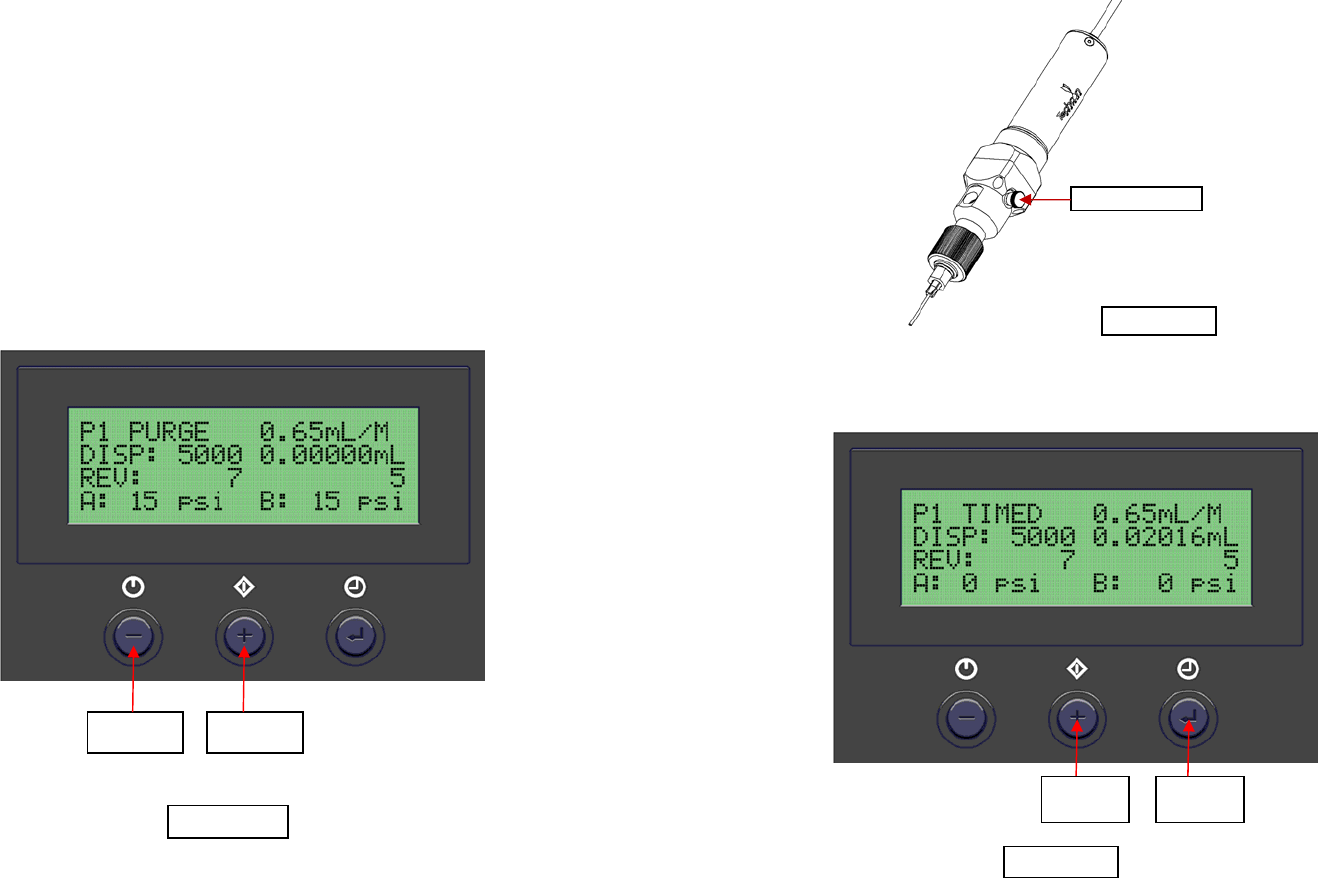
6.3 Connect the pump to the controller: refer to setup diaphragm below
The recommended controller for the TS8100 Series PC Pump is the TS500R-
PC.
1. Connect the power adapter to the TS500R-PC controller
2. Connect air hose to the TS500R-PC controller
Figure 9.0
Figure 10.0
10
3. Connect the motor cable to Port C. Notes: Make sure the controller is turned
off when connecting the motor cable to port C
4. Connect syringe air hose to port B
5. Set air pressure to feed the material to the pump
6. Notes: for low viscosity material the pressure setting should be 1 – 9 psi; for
medium viscosity material the pressure range setting should be 10-19 psi; for
high viscosity material the pressure range should be 20-80 psi
7. Press the Power button to turn on the unit.
6.4 Prime the Pump
1. Press the Mode button until “PURGE” appears on the Display
2. Press and hold the Foot Switch until a steady stream of material flowing
out the pump outlet without air bubbles.
3. Attach a dispense needle to the pump outlet
4. Repeat step #2
Power
Button
Mode
Button
Figure 11.0
11
Vent Screw
5. If air bubbles still appear in the material, open the vent hole by turning the
vent screw counter clockwise to allow air bubbles to escape.
6.5 Dispensing:
1. Push the Mode button to select “TIMED MODE”
2. Press and hold the Set button for two seconds to enter set up screen. The
dispense time (DISP) will be highlighted.
3. Press the Mode (+) or Power (-) button to set the motor counts
Set
Button
Mode
Button
Figure 12.0
Figure 13.0