TS8100-PC-PUMP-USER-GUIDE.pdf - 第7页
14 5. Remove the stator (10) b y rotating it counter clockwise. If necess ary, turn on the motor while rotating the stator. 6. Using the 2mm Hex Key to remove 4 mounting screws (13) 7. Pull the stator housing straight ou…
6
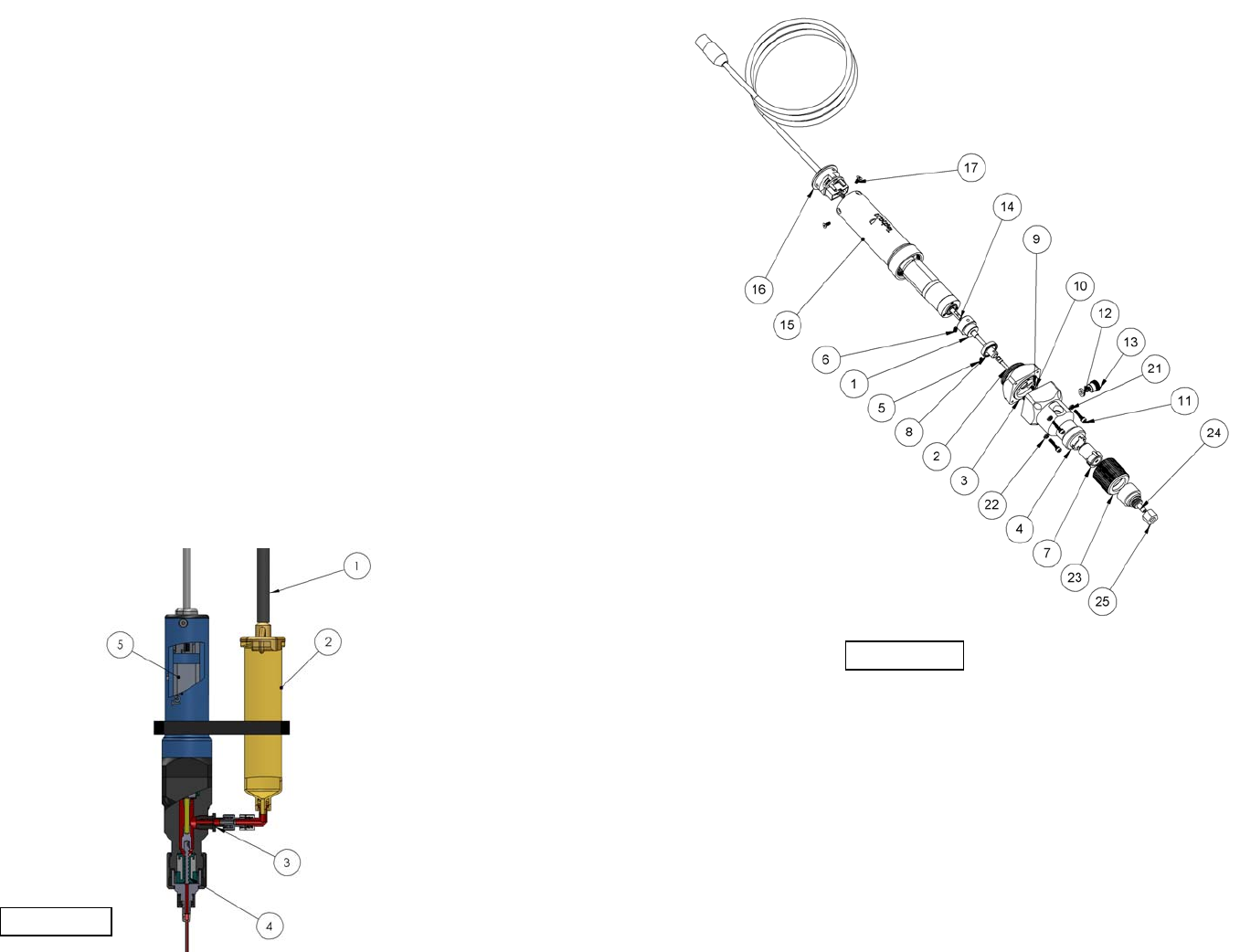
Figure 4.0
4. DESCRIPTION
The TS8100 series Positive Displacement Pump is a continuously volumetric dispense
pump based on the Progressive Cavity (PC) technology. The pump is designed to
dispense a wide range of fluids, from low viscosity coatings to high viscosity greases.
The many advantages of PC technology will simplify your dispense process and
improve reliability and quality in the long run.
The TS8100 series PC pump provides a consistent dispensing output due to a special
design of seal cavities in the fluid chamber which created a volumetric fluid flow. Two
main components are the stator and rotor. The metal rotor seals tightly against the
flexible rubber stator as it rotates, forming tightly sealed cavities which move toward
to the pump outlet, carrying the fluid. The pumped fluid does not change in shape or
size during the dispense process. Accuracy and repeatability rate of +/- 1% is
achievable.
5. THEORY OF OPERATION
The TS8100 Series Positive Displacement pump dispenses fluid with a positive
displacement action using a progressive cavity technology. Fluid is held in a feed
reservoir (2) under a positive head of air pressure, up to 30 psi (2.07bar), depending
upon the viscosity of the fluid. This positive air pressure, supplied by the air line (1),
forces the fluid out of the barrel (2) into the fluid feed path (3) then to the rotor/stator
chamber assembly (4). Fluid flows from this point (4) to the dispense tip outlet and is
controlled by the rotor rotation in the feed direction. The rotor is driven by the encoder
DC motor (5). Applying a voltage signal to the motor (5), will rotate the rotor and the
fluid will be forced out the dispense tip. The actual fluid deposited is dependent upon
adhesion of the dispensed fluid to the substrate. Shearing of the fluid is achieved by
reverse Z-motion (tip retraction). When the motor stops, the unit remains in position
for a fraction of a second (dwell) to allow the last drop of fluid to flow out of the
dispense tip. After the dwell period, the automation equipment moves the pump to the
next position.
15
8. SPARE PARTS:
Figure 15.0
14
5. Remove the stator (10) by rotating it counter clockwise. If necessary, turn on
the motor while rotating the stator.
6. Using the 2mm Hex Key to remove 4 mounting screws (13)
7. Pull the stator housing straight out (7); take care not to damage the seal
8. Submerge the stator (10) in a bath of cleaning solvent and use the cleaning
brush P/N: TSD2106-1 (includes in the cleaning kit) to clean the stator. Insert
the brush in the center of the stator and rotate it until all residues are cleaned
out.
9. Use the same cleaning brush to clean the internal chamber of the stator cap.
10. Use the soft cloth to wipe off material residue on the rotor (2) surface
11. Continue to clean the rotor by dip it in a solvent bath then use the TSD2106-1
brush to remove any leftover residues.
12. Use a soft cloth to wipe off material residue on the cup seal (11)
13. Inspect parts for wear or damage and replace if necessary
7
6. SET-UP INSTRUCTIONS
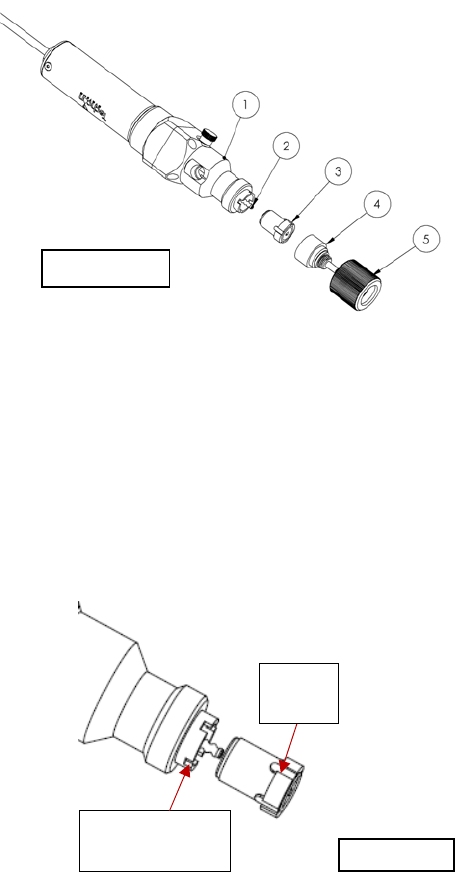
6.1 Install the Stator:
To prevent permanent set to the inside the stator, the pump is shipped without
the stator attached to the motor/rotor assembly. Follow instructions below to
install the stator.
1. Wet the rotor (2) by applying the dispensing fluid (or any appropriate lube that
is compatible with the dispensing fluid) to the expose portion of the rotor
surface.
2. Wet the stator (3) by squeezing a small amount of the dispensing fluid (or any
appropriate lube that is compatible with the dispensing fluid) in to the stator
opening.
3. Screw the stator (3) onto the rotor in the clockwise direction (2) until the 4 tabs
of the stator align with the 4 notches of the stator housing (see figure below)
Tab of
Stator
Notch of Stator
Housing
Figure 5.0
Figure 6.0
8
4. Apply some pressure on the stator by pushing it against the stator housing to
make sure it fully seats into the notches. Check to make sure the rotor tip is
flush with the stator.
5. Place the stator cap (4) into the retaining cap (5)
6. Install the retaining cap (5) (with the stator cap in place) by screw it onto the
stator housing (1) in the clockwise direction.
6.2 Mechanical Mounting:
Normally, the TS8100 Series PC Pump is used on an automation system such as a
bench-top robot. It is very important that the pump is mounted on the Z-axis
gantry, in a secure manner, that will not allow loosening during dispense
operation. The Z-axis must move in a precise and repeatable motion for successful
dispensing.
The provided mounting bracket must be attached to the Z-axis in a manner that
will provide the valve perpendicular travel to the horizontal plane of the surface on
which the fluid will be dispensed. The mounting should provide a means of
accurately adjusting the distance between the dispense tip and the substrate surface
such as a touchdown sensing device or a fixed distance standoff.
Push the stator against the
stator housing
Bracket
Mounting
Screw
Figure 7.0
Figure 8.0: Attach the bracket to pump as shown
13
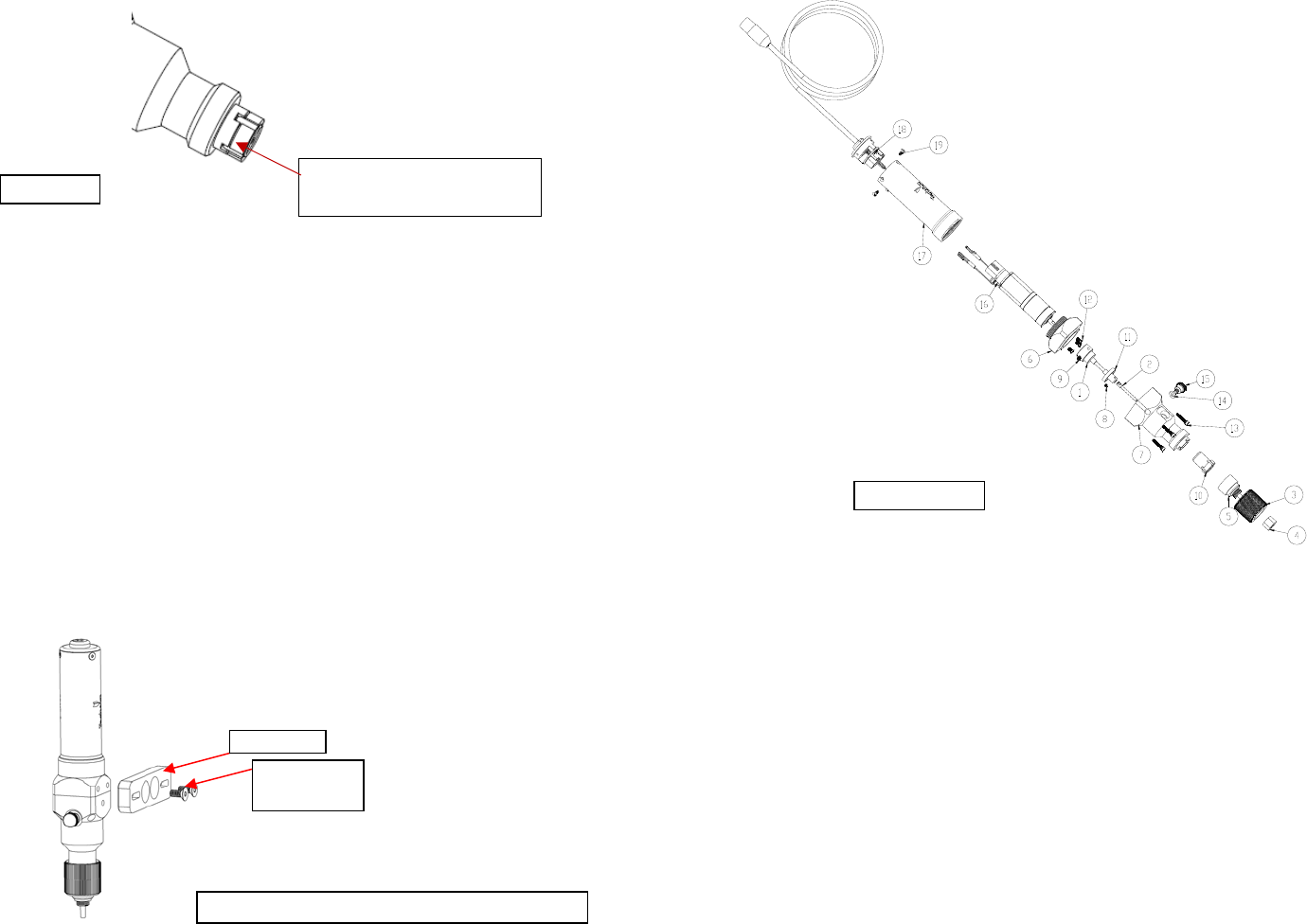
7.2 Thorough Cleaning: refer to diagram below
Recommended cleaning solvent: IPA or Acetone
Thorough cleaning procedures should be done whenever the following occur:
When the dispense material is changed to different type
When the dispense material is started to cure in the pump
When Pump has been dispensing for one month.
When the dispense tip clogged frequently
1. Perform Pump purging process by follow steps 1-6 in Section 9.1 “Purging”
2. Remove the Material Inlet Fitting
3. Rotate the retaining cap (3) counter clockwise until it completely detach from
the stator housing (7).
4. Pull the retaining cap (3) along with the stator cap (5) and the needle cap (4)
straight out from stator housing (7)
Figure 14.0