TM2243_Explanation Document of DualLane MachineYS24(DL)YS24X(DL).pdf - 第6页
MDOC - SOFT50073 6 3. The deta il of each s creen • In this chapter, t he diffe rences of each screen f rom th e conve ntional single lane machine is explained.

MDOC
-
SOFT50073
5
2. Limitations
• Following functions are not available in version
“V3.21STD R1.000”.
– MIS data for each board
– CMU report and CMU command
– 3A Process Control( Option )
– Automatic Program Change-Over (Option)

MDOC
-
SOFT50073
6
3. The detail of each screen
• In this chapter, the differences of each screen from the
conventional single lane machine is explained.
MDOC
-
SOFT50073
7
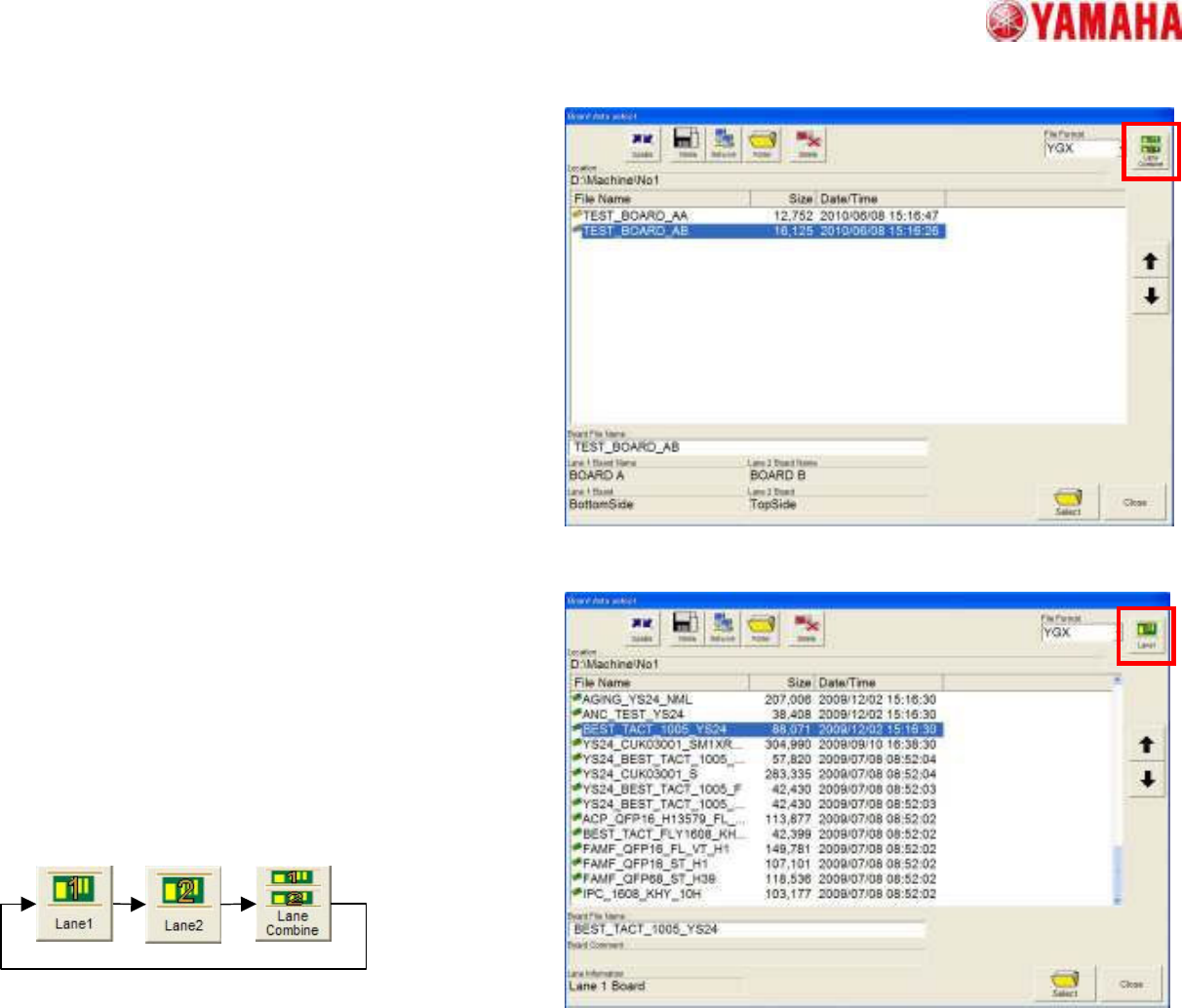
• The screen of “Board Data Select”
– Combined board data (YGX combined)
• Please tap the [Lane Select] button on
the top right of the screen, and choose
[Lane Combine].
– Single board data (such as YGX)
• Please tap the [Lane Select] button on
the top right of the screen, and choose
[Lane1] or [Lane2]
• The conventional format of the board
data can be available.
3. The detail of each screen