00197203-02_IM_Taceability_3.5_en.pdf - 第31页
Uninstalling Trace Service and Trace Monitor Installation Manual SIPLACE Traceability 3.5 31 5 Uninstalling Trace Service and Trace Monitor NOTICE Requirement You need administrator privilege for your operation system in…
Installation of Trace Service and Monitor
Trace Monitor Troubleshooting
30 Installation Manual SIPLACE Traceability 3.5
4.3.2.3 Generating a Web site is denied
If the generation of the Monitor web site fails, a corresponding error message is displayed.
This is only true for Windows Vista and Windows 7 if the Web site is regenerated manually using the
Install Monitor Webapplication shortcut in the start menu. You need administrator rights to generate the
Web site. In Windows Vista you don’t have administrator rights in Trace Monitor even if you are member
of a user group with administrator rights.
Workaround 1
► Change the rights of the Trace Monitor installation folder (e.g. C:\Program Files\SIPLACE\SIPLACE
Traceability Monitor) manually to Full control.
Workaround 2
Start the Monitor Configuration Tool with administrator rights:
► Navigate to the installation folder of Trace Monitor (e.g. C:\Program Files\SIPLACE\SIPLACE Trace-
ability Monitor)
► Right-click on InstallTHMonitor.exe
► Select Run as Administrator and confirm the following security message with Yes or Allow.
Uninstalling Trace Service and Trace Monitor
Installation Manual SIPLACE Traceability 3.5 31
5 Uninstalling Trace Service and Trace Monitor
NOTICE
Requirement
You need administrator privilege for your operation system in order to perform this installation.
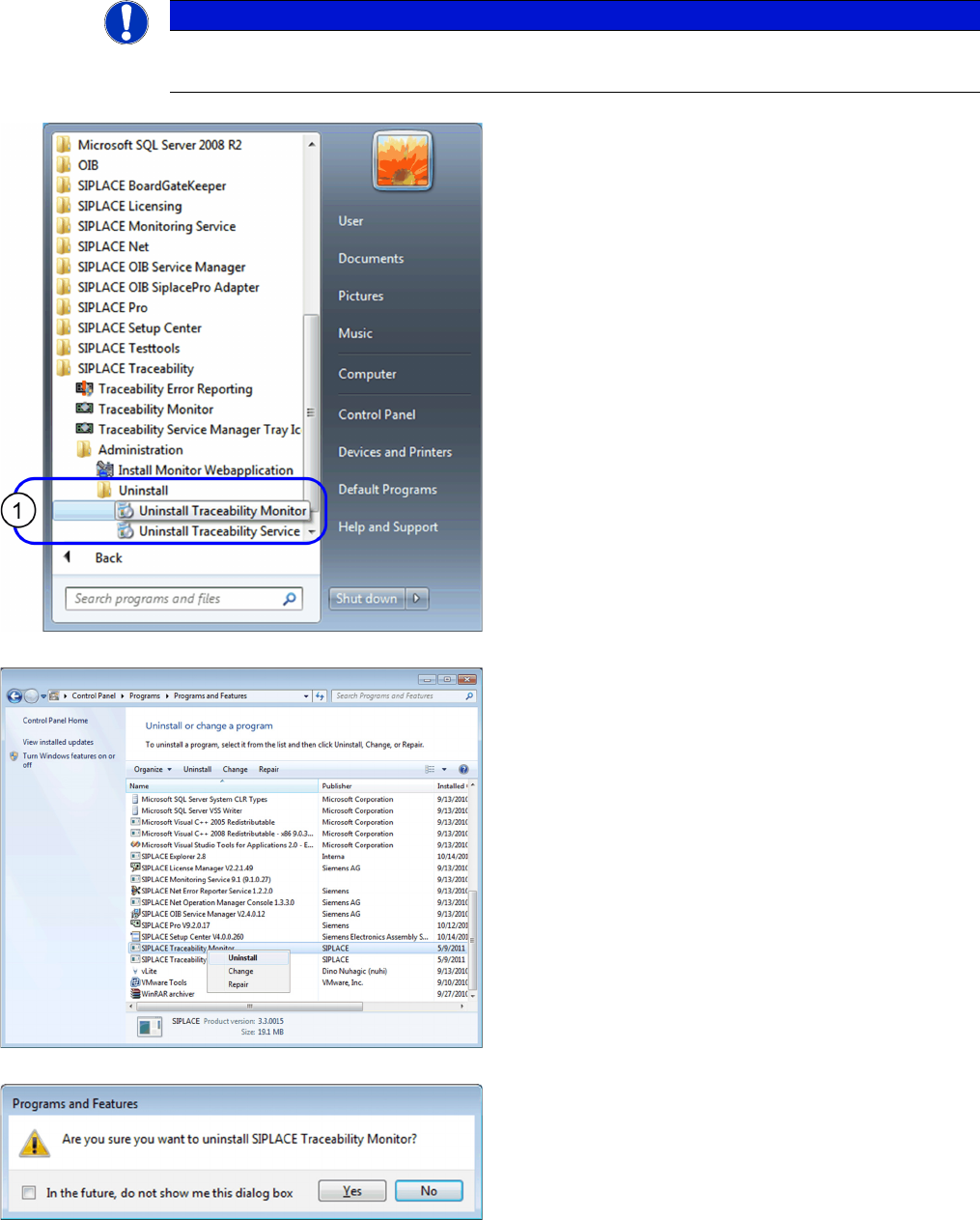
► In the Start Menu select the SIPLACE Traceability
program group -> Administration -> Uninstall (1) ->
Uninstall Traceability Monitor or Uninstall Traceability
Service.
⇨ The Application Setup is started where you can
choose to repair or remove the installation.
► In the Control Panel -> Programs -> Programs and
Features dialog select the application to be unin-
stalled, e.g. SIPLACE Traceability Monitor, right-click
and select Uninstall in the context menu.
You are prompted to confirm uninstalling Trace Monitor.
► Confirm with Yes.
Uninstalling Trace Service and Trace Monitor
32 Installation Manual SIPLACE Traceability 3.5
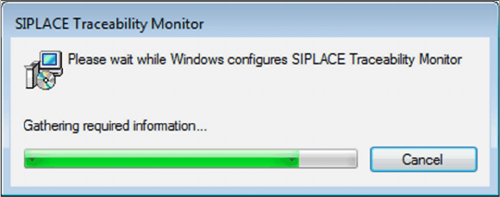
► The Install Shield Wizard will start and uninstalling
Trace Monitor will be prepared. Trace Monitor will be
uninstalled.
► Trace Monitor is no longer available.