00198015-01_IM_SQL_Server_2014_Express_EN.pdf - 第11页
SQL Server 2014 Ex press / Installation Manual 11/2015 Edition 11 T he SQL Server I nstallation Center is display ed . Figure 4-4: SQL Server Install ation Center ► Ensure that the Installation option is sel ected on the…
SQL Server 2014 Express / Installation Manual 11/2015 Edition
10
4.2 Installing SQL Server 2014 Express with Tools Edition
Follow the instructions below for the manual installation of SQL Server 2014 Express with Tools.
► Ensure that you have installed the SQL 2014 SQL Server 2014 Express Prerequisites as
described in section 4.1.
► Close all other applications before you start the installation.
► Select the appropriate Setup package suitable for the architecture of your operating system –
SQLEXPRWT_X64_ENU.EXE for 64-bit, SQLEXPRWT_X86_ENU.EXE for 32-bit.
► After you have downloaded the package from the Internet or copied the package from Support
Media, double-click the Setup package.
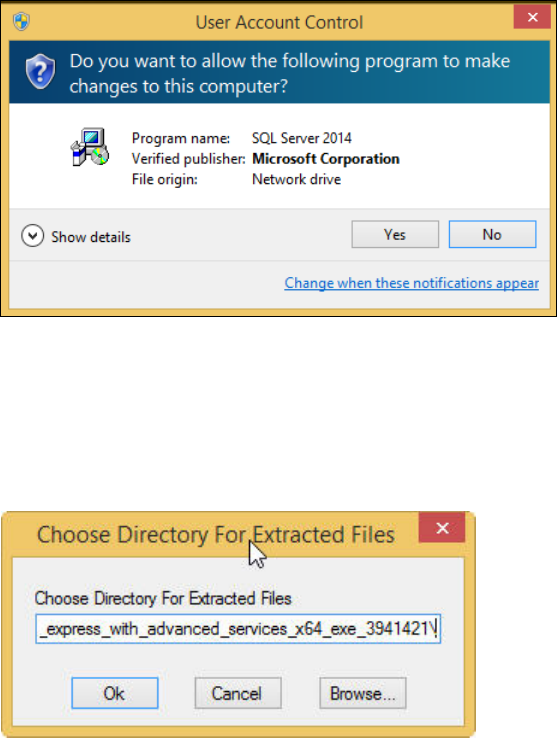
The Setup will extract files to a temporary location. After extraction, the UAC (User Account
Control) warning may occur:
Figure 4-2: User Account Control warning message
This message informs you that the started application requires permissions above the standard
user (in this case administrative permissions).
► Click the Yes button.
The following window is displayed.
Figure 4-3: Choosing directory for extracted files
► Select the directory in which the extracted files shall be stored.
► Click the OK button to continue.
SQL Server 2014 Express / Installation Manual 11/2015 Edition
11
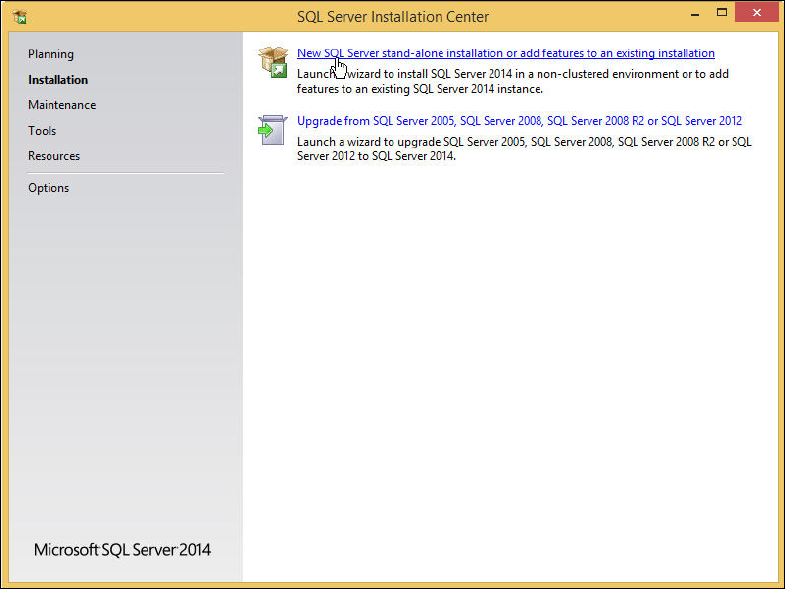
The SQL Server Installation Center is displayed.
Figure 4-4: SQL Server Installation Center
► Ensure that the Installation option is selected on the left side.
► Click the New SQL Server stand-alone installation or add features to an existing installation
link.
SQL Server 2014 Express / Installation Manual 11/2015 Edition
12
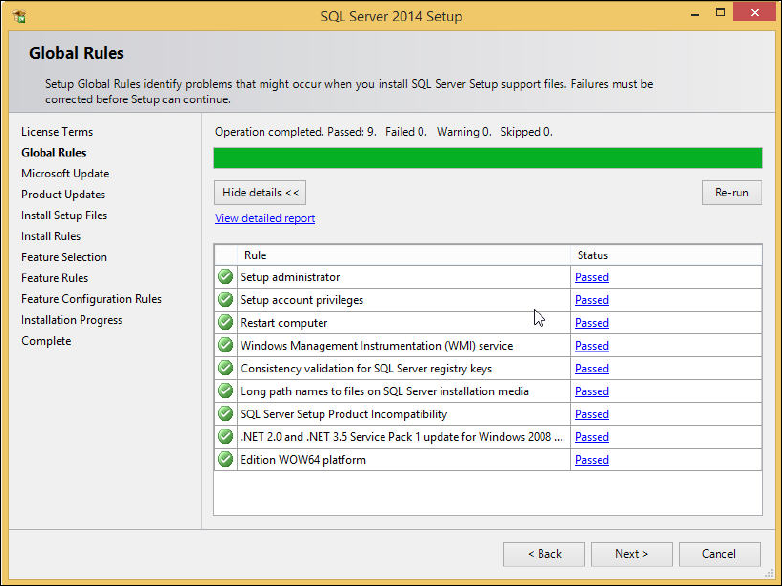
The Global Rules window is displayed.
Figure 4-5: Global Rules window
► Examine the result after the check is done.
► Click View detailed report to display details of the global rules.
► Click the result in the Status column.
► If failures occurred, correct them and click the Re-run button.
► Take note of warnings.
► Click the Next > button if this window is not skipped automatically.