KIC2000用户使用手册.pdf - 第84页
KIC 2000 v2.0.5.x KIC2000 用户手册 Page 84 7. KIC 软件打开后,进到 Profile Explorer 。你可以 看到新的数据路径目录显示界面 的右上角 : 所有这个 KIC2000 应用软件收集到的数据都会写到指定的网络文 件夹中。软件会自动地在目录选 项中创建 一个名称为 “Profiles” 文件夹。在这 个 “Profiles” 文件夹里 , 软件会自动为每 个产品名创建子文件夹,就 像 …
KIC 2000 v2.0.5.x
KIC2000 用户手册 Page 83
附录 C:
Writing KIC 2000 Data over a Network
KIC 软件能容易地设定为把收集数据写入到一个本地网络驱动器中。这就将允许从一个或多个系统中的
数据储存到一个本地驱动器中(服务器/共享硬盘
。
)
第一,从运行KIC软件的PC到本地网络间规划出一个网络驱动。
由于有不同的操作系统和网络构造,
KIC
不能列出详细步骤。我们推荐你联系你的
I.T.
部门
/
网络管理员
请求帮助。
一旦你确定了网络驱动,那么装有KIC软件的PC可以运行了,跟着如下步骤:
1. 确保KIC软件是关闭的,打开Windows浏览器,并且找出KIC Profiler 2000 的 “Log”目录。然后双击
KIC2000DataPath.kiccfg 文件。
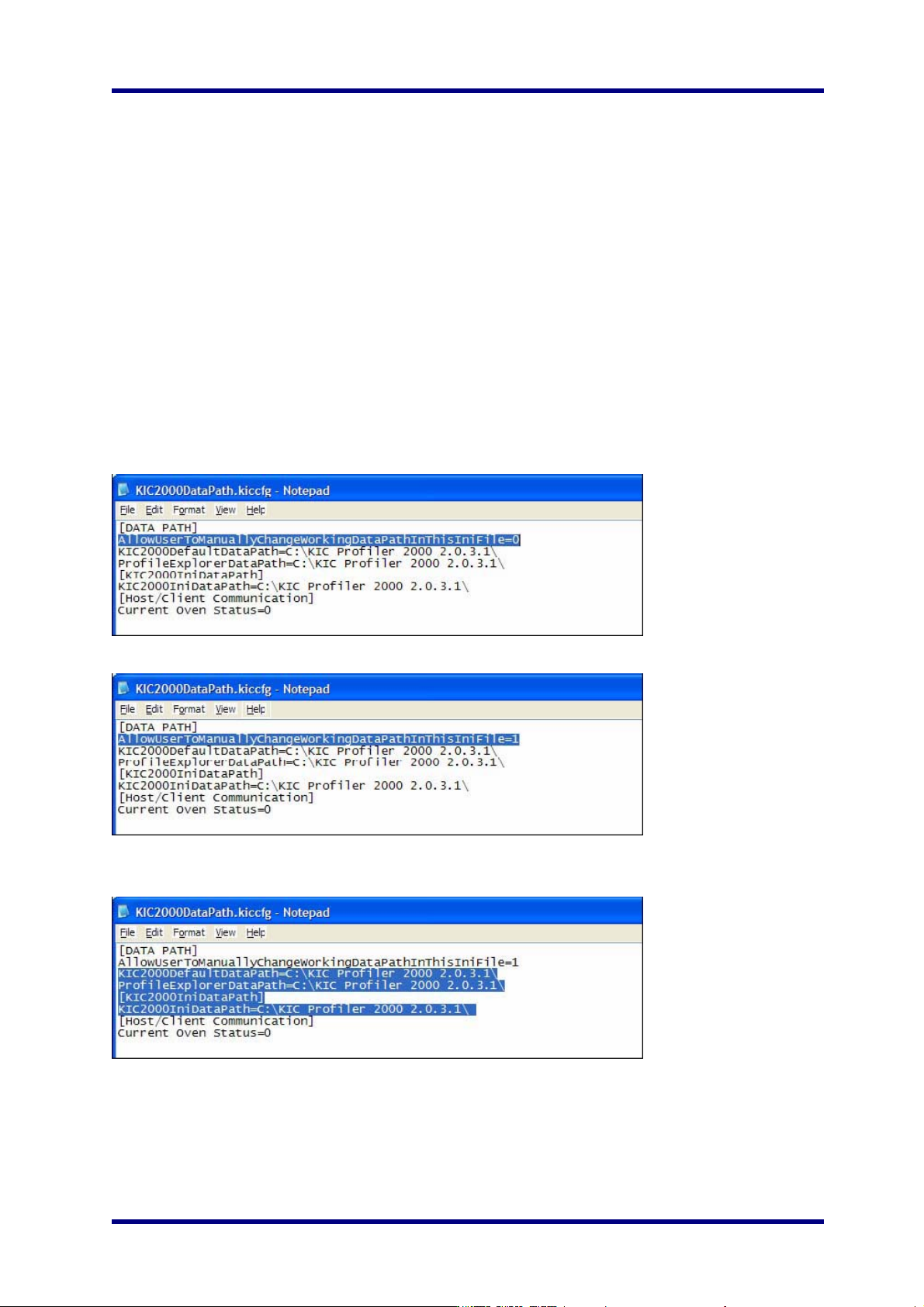
2. KIC2000Da t aPat h.ki ccfg 文件就会以记事本的方式打开,先是如下:
3. 把第一行的 “AllowUserToManuallyChangeWorkingDataPathInThisIniFile=0” 改为 =1, 先是如下:
4. 把 “KIC2000DefaultDataPath”, “ProfileExplorerDataPath”, 和 “KIC2000IniDataPath” 行改为要求的网络地
址:
5. 一旦DataPath.kiccfg 文件修改为一个新的地址,从下拉菜单中选择文件/保存按钮保存更改。
6. 关闭Windows浏览器并开启KIC 2000 软件。
KIC 2000 v2.0.5.x
KIC2000 用户手册 Page 84
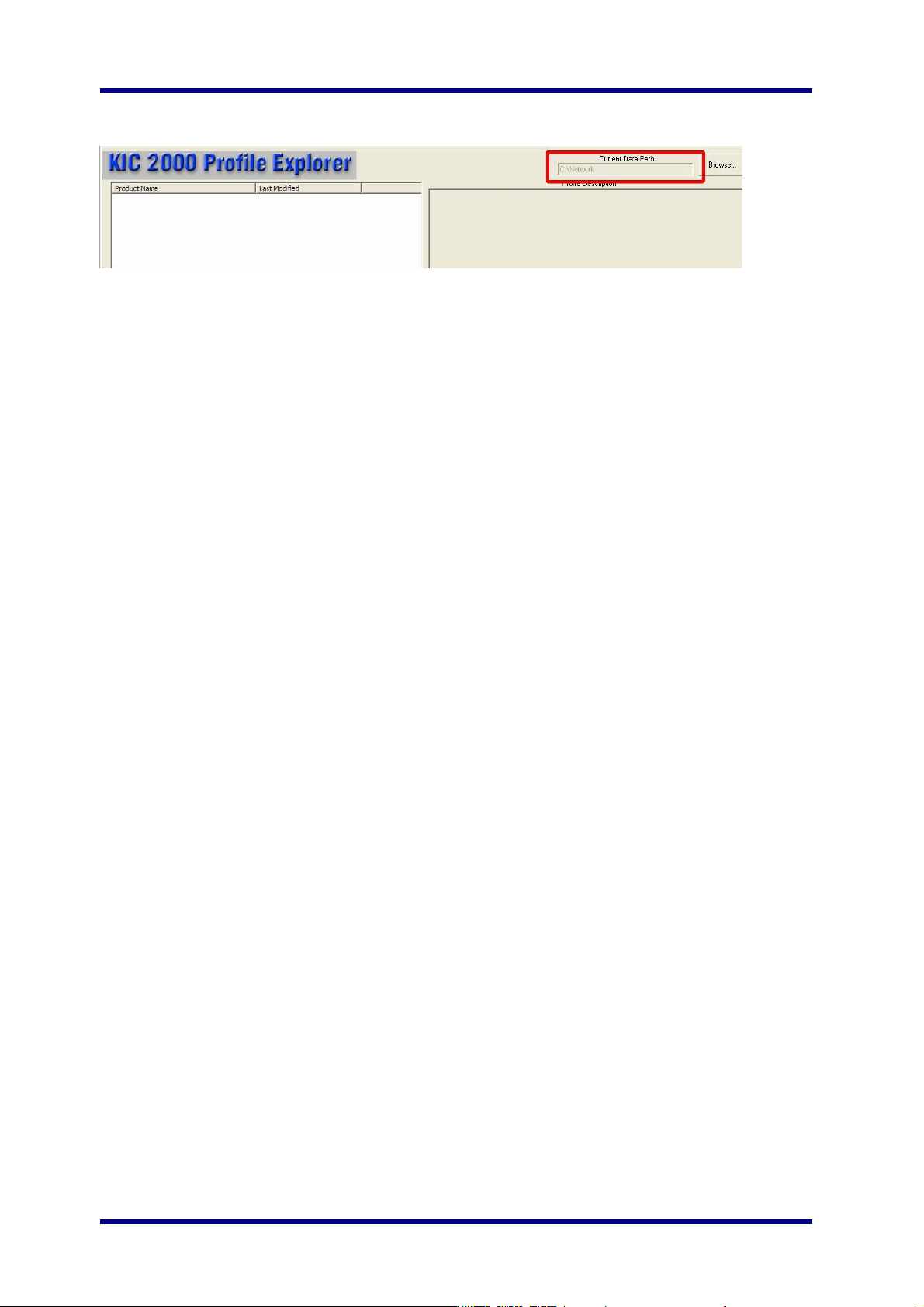
7. KIC 软件打开后,进到Profile Explorer。你可以看到新的数据路径目录显示界面的右上角:
所有这个KIC2000应用软件收集到的数据都会写到指定的网络文件夹中。软件会自动地在目录选项中创建
一个名称为“Profiles” 文件夹。在这个“Profiles” 文件夹里, 软件会自动为每个产品名创建子文件夹,就像
在默认的KIC2000软件中一样。
你现在就可以查看任何一台在网络中运行KIC2000的PC收集的数据。
当你选择文件夹时,浏览主”Profiles”文件的根目录就可以了。例如,如果曲线文件是F:\KIC Profiler
2000/Profiles/ Board A
,
那么你浏览F:\KIC Profiler 2000 folder 就可以了。
如果当
KIC
软件开始时没有网络连接,那么软件就会自动地改回数据路径为
C:\KIC Profiler 2000
。你要重
复上述步骤来恢复在网络地址上存储数据。

KIC 2000 v2.0.5.x
KIC2000 用户手册 Page 85
Contacting KIC
There are various means of contacting or attaining information from KIC.
KIC USA - Corporate
15950 Bernardo Center Drive #E
San Diego, CA 92127 USA
Phone: (858) 673-6050
Fax: (858) 673 0085
KIC Asia - Regional
Blk 115 Aljunied Ave #01-53B
Singapore 380115
Phone: +65.842.1232
Fax: +65.842.4460
KIC Europe- Regional
Phone: +44(0 )777 625-0039
On the Web
You can find the latest KIC product news along with a library of useful information at our website
www.kicthermal.com , or
www.kic.cn
KIC Technical Support
KIC Tech Support (phone) is available 24 hours a day, 365 days per year, (858) 673-6050 or by eMail,
USA: tech@kicmail.com
Asia: asia.tech@kicmail.com
Europe:
europe.tech@kicmail.com
KIC Product Training
Contact KIC Customer Support (858) 673-6050, or by eMail, training@kicmail.com
KIC Sales
Contact KIC sale s:
USA: phone (858) 673-6050, or b y eMail, sales@kicmail.com
Asia: phone +65.842.1232, or by eMail, asia.sales@kicmail.com
Europe: by eMail,
europe.sales@kicmail.com
Find the KIC Representative in Your Area
Call KIC; send an eMail, or visit or website www.kicthermal.com, Contacts section.