Infinity EX Print Carriage Module.pdf - 第10页
INFINITY EX PRINT CARRIAGE M ODULE SEQUEN CES 9.10 Technical Reference Manual C hapter I ssue 2 Aug 02 SEQUENCES Homin g Sequ ence The print carriage only carries out a homing sequence during initi alization, which can b…
INFINITY
EX
PRINT CARRIAGE MODULE
DRIVES AND SENSORS
Chapter Issue 2 Aug 02 Technical Reference Manual 9.9
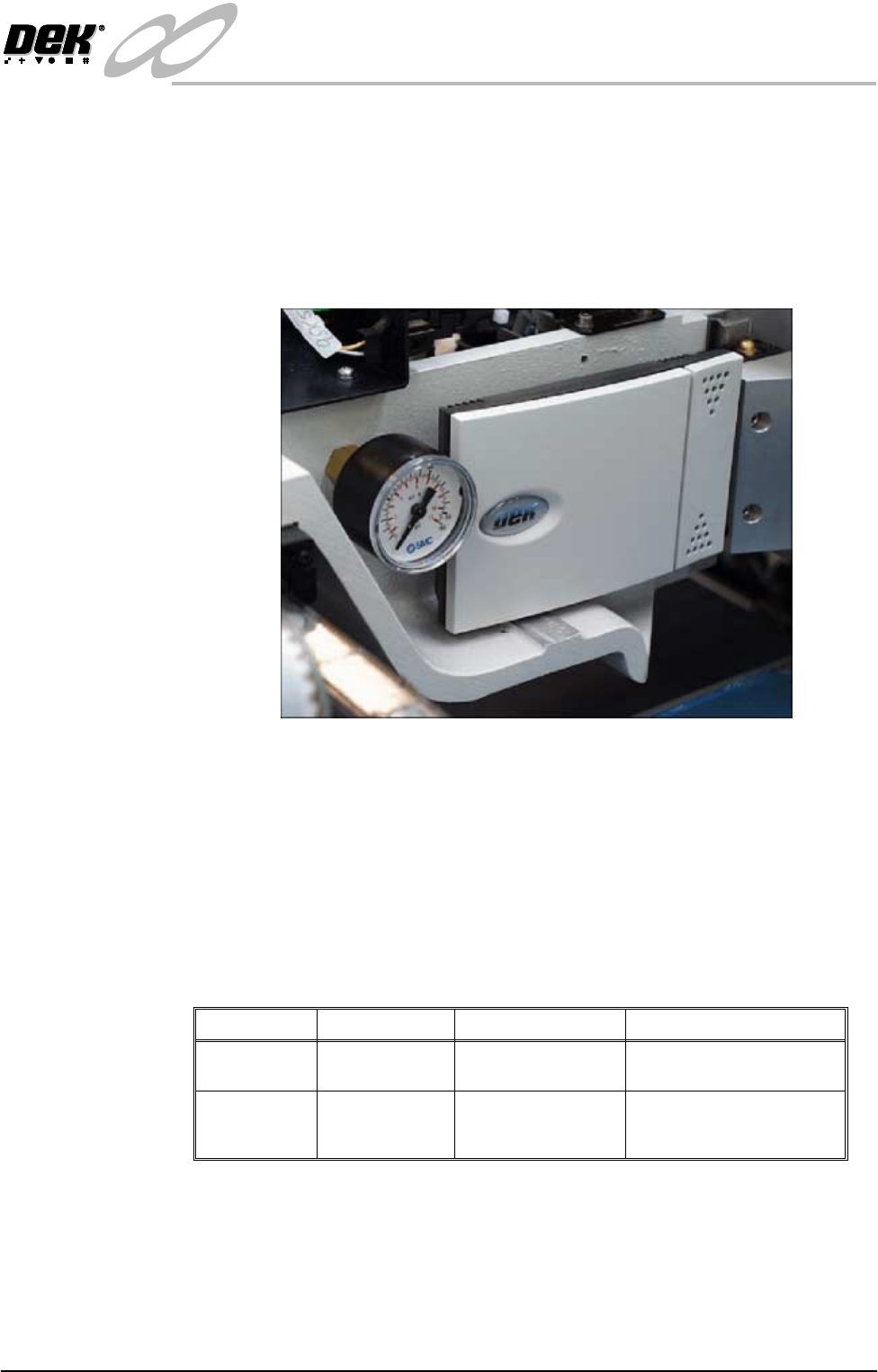
Temperature and
Humidity Sensor
The temperature and humidity sensor option is utilized during the applications
process of printing. In order to achieve maximum print quality during the
printing process, a continuous temperature and humidity monitor of the machine
printhead area is required.
The sensor provides the operator with accurate real time information of the
internal temperature and humidity levels of the machine. This is displayed on
the machine monitor Printer - Status window.
Figure 9-6 Temperature and Humidity Sensor
The sensor is a 4 wire transmitter which measures relative humidity, utilizing a
capacitive sensor, and temperature with an NTC resistive type sensor. Essen-
tially the sensor behaves like a variable source of current or voltage that is
adjusted dependent upon the temperature and humidity conditions.
Two linearized output signals are read by the machine PC NextMove card
(Temperature - ADC2 / Humidity - ADC4). Real time information is displayed
on the machine monitor Status Window.
The parameters of the temperature and humidity sensor is:
NOTE
Information on the application process of printing is detailed in the Print Quality
chapter of this manual.
Range Time Constant Accuracy
Temperature 5°C - 45°C 180 secs (still air) ±0.25°C at 25°C
±0.5°C from 0° - 50°C
Humidity 10%rH - 90%rH 15 secs (still air) 10 - 90%rH
±3% at 25°C
±6% from 0° - 50°C
INFINITY
EX
PRINT CARRIAGE MODULE
SEQUENCES
9.10 Technical Reference Manual Chapter Issue 2 Aug 02
SEQUENCES
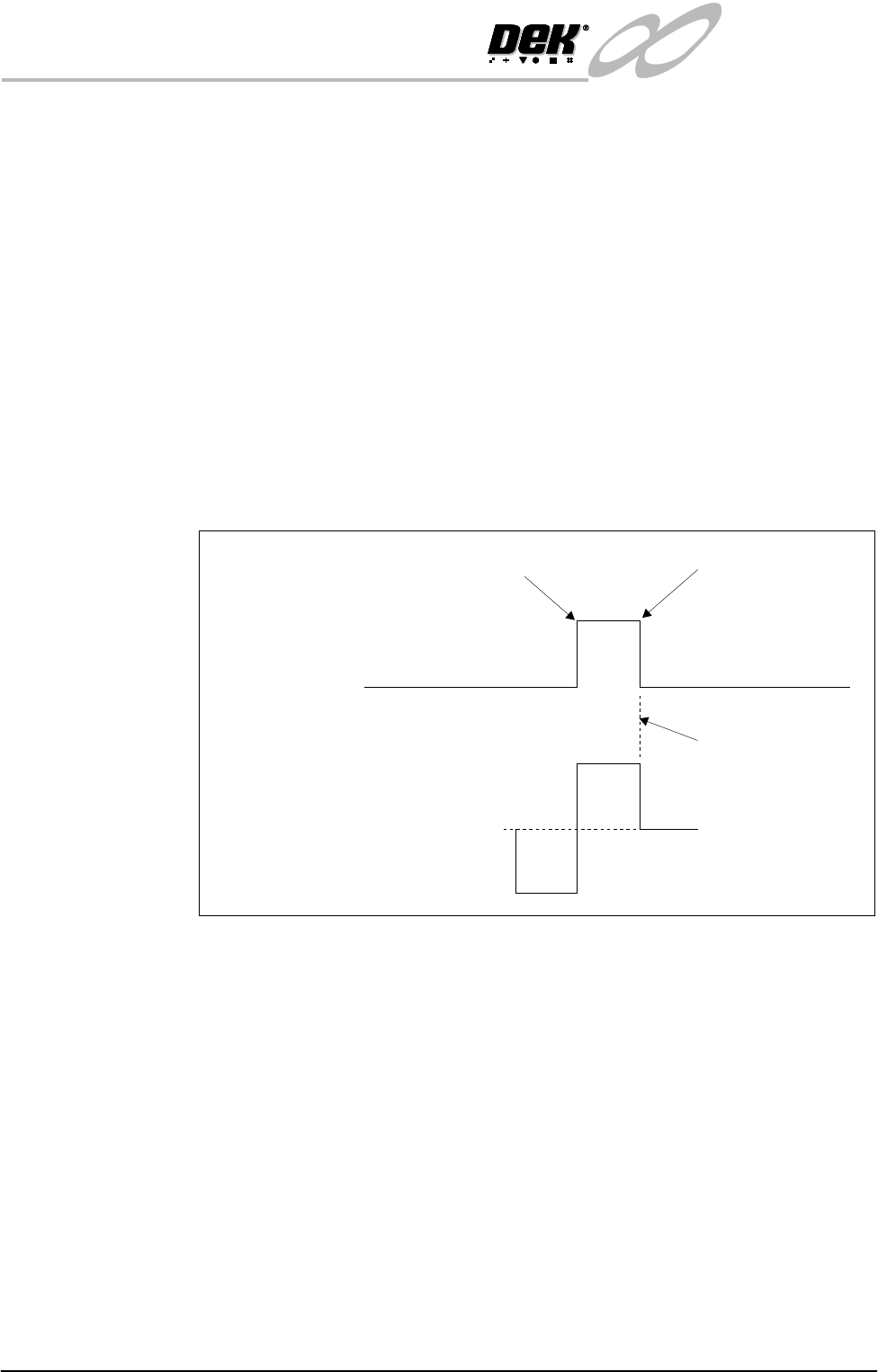
Homing Sequence The print carriage only carries out a homing sequence during initialization,
which can be from power-up or exiting diagnostics. The homing sequence is as
follows:
1. The print carriage moves towards the back of the machine.
2. The print carriage stops when the home sensor detects the vane.
3. The motor reverses, driving the print carriage towards the front of the
machine.
4. The print carriage stops as the vane just clears the home sensor.
NOTE
Although the servo motor is fitted with an encoder the index pulse is not used in
the homing sequence. To adjust the home position the sensor or vane must
simply be moved the amount needed to correct the error
Figure 9-7 Print Carriage Homing Sequence
Home Position
Fwd
Servo
Motor
Home
Sensor
0V
12V
Stopped
Rev
Vane leaves sensor
Vane enters sensor

INFINITY
EX
PRINT CARRIAGE MODULE
POSITIONING
Chapter Issue 2 Aug 02 Technical Reference Manual 9.11
POSITIONING
Print Carriage
Positioning
The print carriage mechanism moves the printhead assembly along the print
stroke length. The stroke length is automatically set when the board width
parameter is set.
When the initialization routine starts the print carriage moves to its home
position sensor (rear of the machine). When the sensor change has been detected
the motor reverses its direction at slow speed until the sensor clears, at this point
the motor stops. This is defined as its zero count position for the encoder to
position the carriage.
All positioning of the print carriage is referenced from the home position and
calculated in the machine software, taking into account :
• Board width
• Front and rear print limits
• Screen adaptors
• Front rail justification