Infinity EX Print Carriage Module.pdf - 第18页
INFINITY EX PRINT CARRIAGE M ODULE REP LAC EMEN T P ROC ED URES 9.18 Technical Reference Manual C hapter I ssue 2 Aug 02 10. Check the unit is functioning observing the readings on t he machine monitor status windo w . N…
INFINITY
EX
PRINT CARRIAGE MODULE
REPLACEMENT PROCEDURES
9.16 Technical Reference Manual Chapter Issue 2 Aug 02
6. Route the belt clockwise around the motor pulley returning along the print-
head, around the front pulley to the front end of the belt clamp.
7. Fasten the belt into the front end of the belt clamp. Apply suitable thread
locking compound and fully tighten the clamp securing screws. Fit a new
drag chain cable tie.
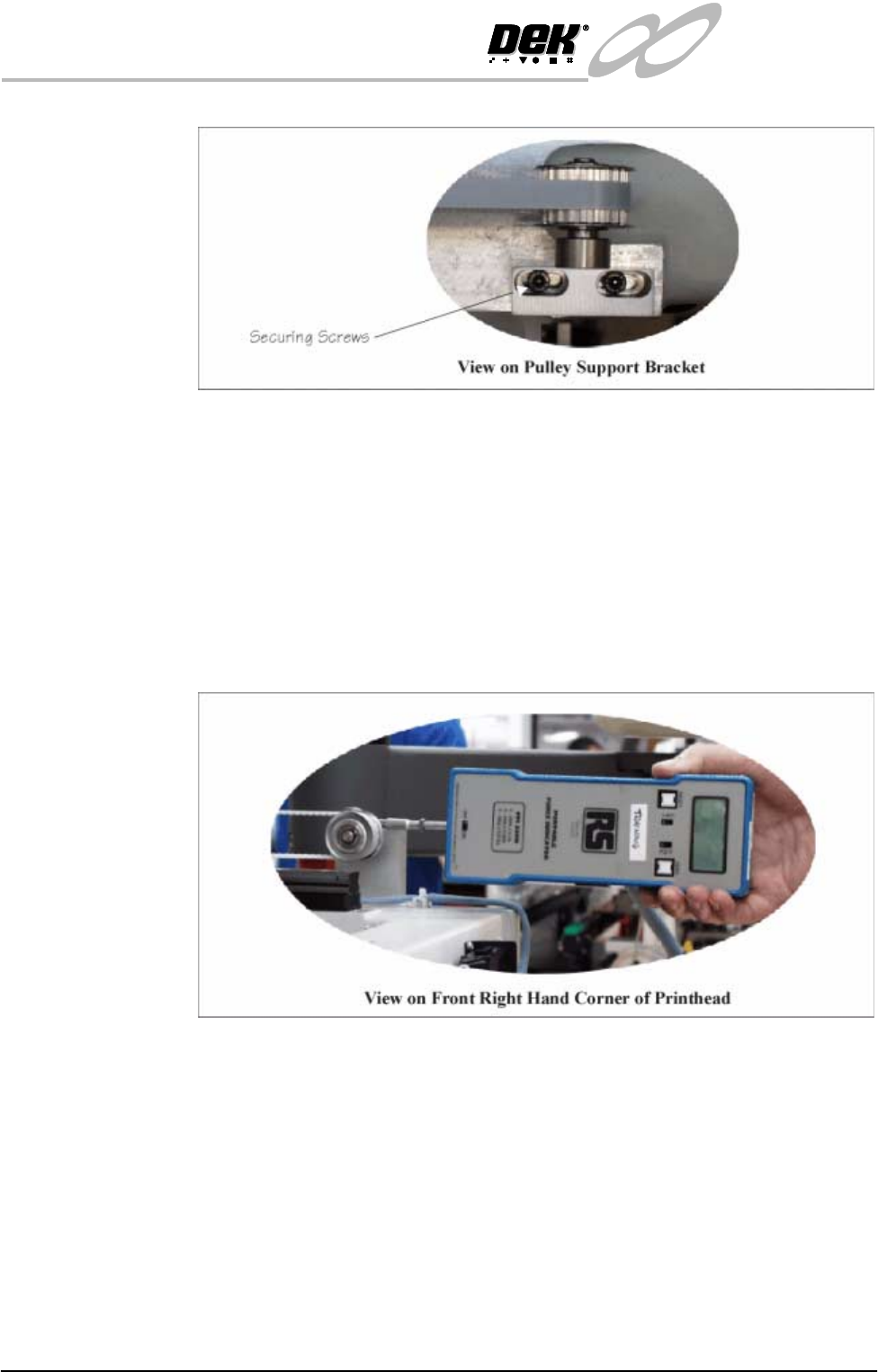
8. Engage a forcemeter with the front pulley spindle (Figure below refers).
Apply a horizontal force of 10kg to the belt. Maintaining this force, tighten
the front pulley securing screws.
NOTE
Check the orientation of the belt clamp ensuring the belt is not touching or
in close proximity of the motor drive belt.
9. Power up the machine, in Diagnostics select Cycle Print Carriage. Ensure
the belt tracks centrally on the pulleys.
10. If adjustment is required, engage the forcemeter with the front pulley spindle.
Apply and maintain a horizontal force of 10kg. Ease the front belt pulley
screws sufficiently to allow bracket movement, re-align the pulley, tighten
the screws and repeat Cycle Print Carriage.
11.Repeat Steps 9 and 10 until belt tracks centrally on the pulleys.
INFINITY
EX
PRINT CARRIAGE MODULE
REPLACEMENT PROCEDURES
Chapter Issue 2 Aug 02 Technical Reference Manual 9.17
Temperature and
Humidity Sensor
To replace the temperature and humidity sensor option, carry out the following
procedure:
1. Ensure the machine is switched OFF before attempting replacement of the
sensor unit.
2. Open the sensor cover by pushing the idented release catch on the left side
of the unit (using a small flat blade screwdriver). Remove the front cover to
a safe stowage.
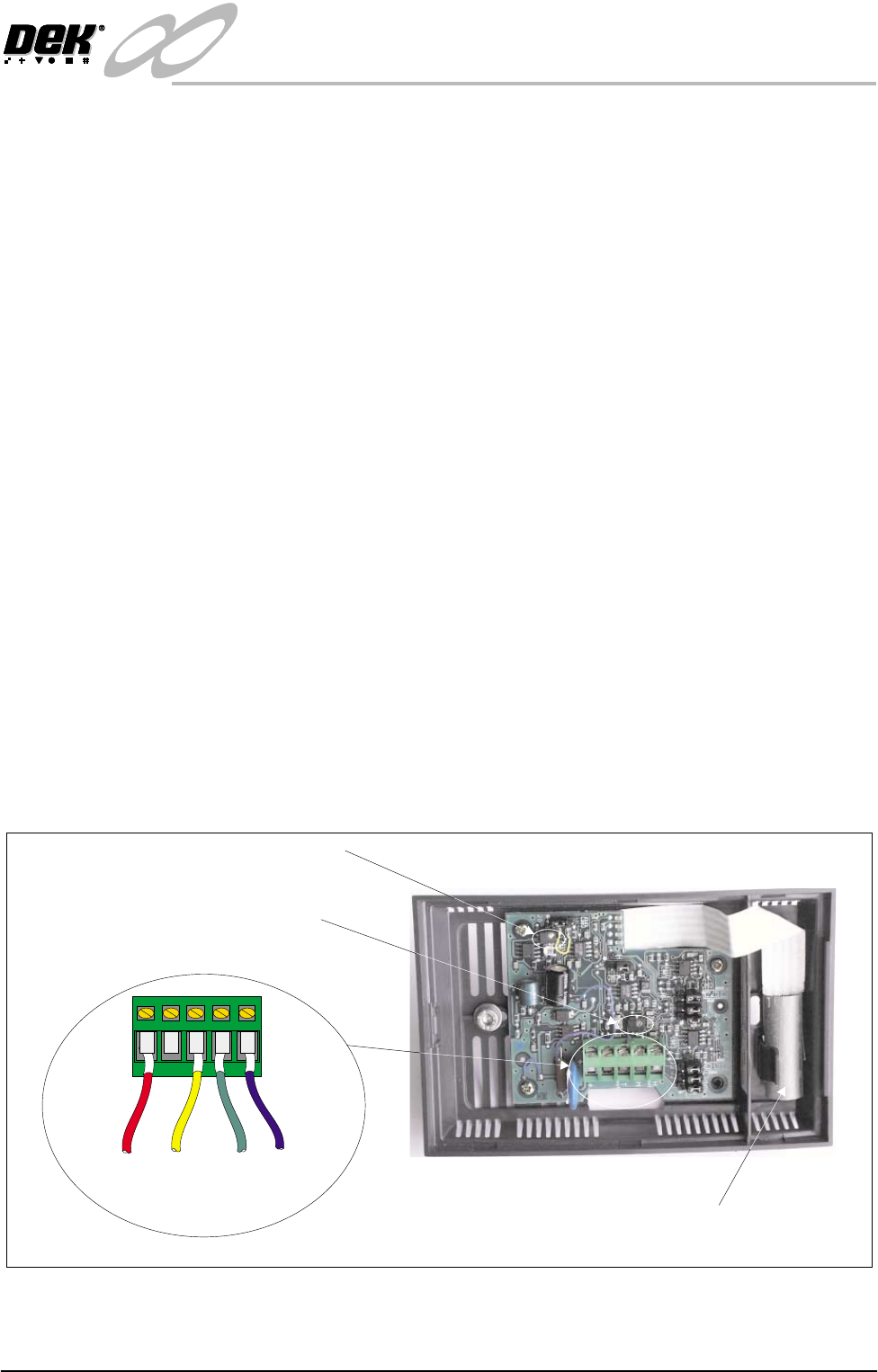
3. Unscrew the four sensor lead connectors from the sensor unit connector
block.
4. Unscrew the left hand plastic headed M4 screws securing the unit to the print
carriage.
5. Carefully move the shielded sensor to enable access to the right hand
securing screw. Remove the right hand plastic headed securing screw.
CAUTION
SENSOR. To prevent damage to the sensor unit and protective metal
shielding, great care must be taken when removing and fitting the right
hand side plastic headed securing screw.
6. Remove the sensor unit from the machine.
7. Fit the replacement sensor unit to the machine ensuring the four machine
sensor cables are threaded carefully through the back of the unit.
NOTE
Carefully move the shielded sensor when fitting the right hand plastic headed
screw.
8. Connect the four sensor leads to the sensor connector block as detailed
below:
9. Fit the sensor cover onto the sensor unit and secure by snap-fitting into
position.
+
(+12v)
T
(Temp)
H
(Hum)
M
(0V)
Humidity Trim Pot
Temperature Trim Pot
Sensor Connection and Adjustment Points
Shielded Sensor

INFINITY
EX
PRINT CARRIAGE MODULE
REPLACEMENT PROCEDURES
9.18 Technical Reference Manual Chapter Issue 2 Aug 02
10.Check the unit is functioning observing the readings on the machine monitor
status window.
NOTE
1. If a Temperature Control Unit (TCU) is fitted to the machine, ensure the
sensor temperature reading does not differ by more than 1°C with that of the
TCU.
2. If an Environmental Control Unit is fitted to the machine ensure both the
temperature and humidity reading of the sensor does not differ by more than
1°C and 5%rH respectively.
3. If adjustment is required (using a small flat blade screwdriver), carefully
turn the respective sensor trim potentiometer until the status window temper-
ature/humidity reading is within the required parameter range.