Seagate_IronWolf_Pro_SATA_Product_Manual_24-20-16-12TB_206815300B.pdf - 第46页
Seagate IronWolf Pro SAT A Pro duct Manua l, Rev B 46 www.seagate.com 05 T emperature Stat is tics Curren t T emperature Y es Ave rage Short T erm T emperatur e Y es Ave rage Long T e rm T emperature Y es Highest T emp e…
Seagate IronWolf Pro SATA Product Manual, Rev B 45
www.seagate.com
The following may contain drive-specific features that are included in the SATA specifications.
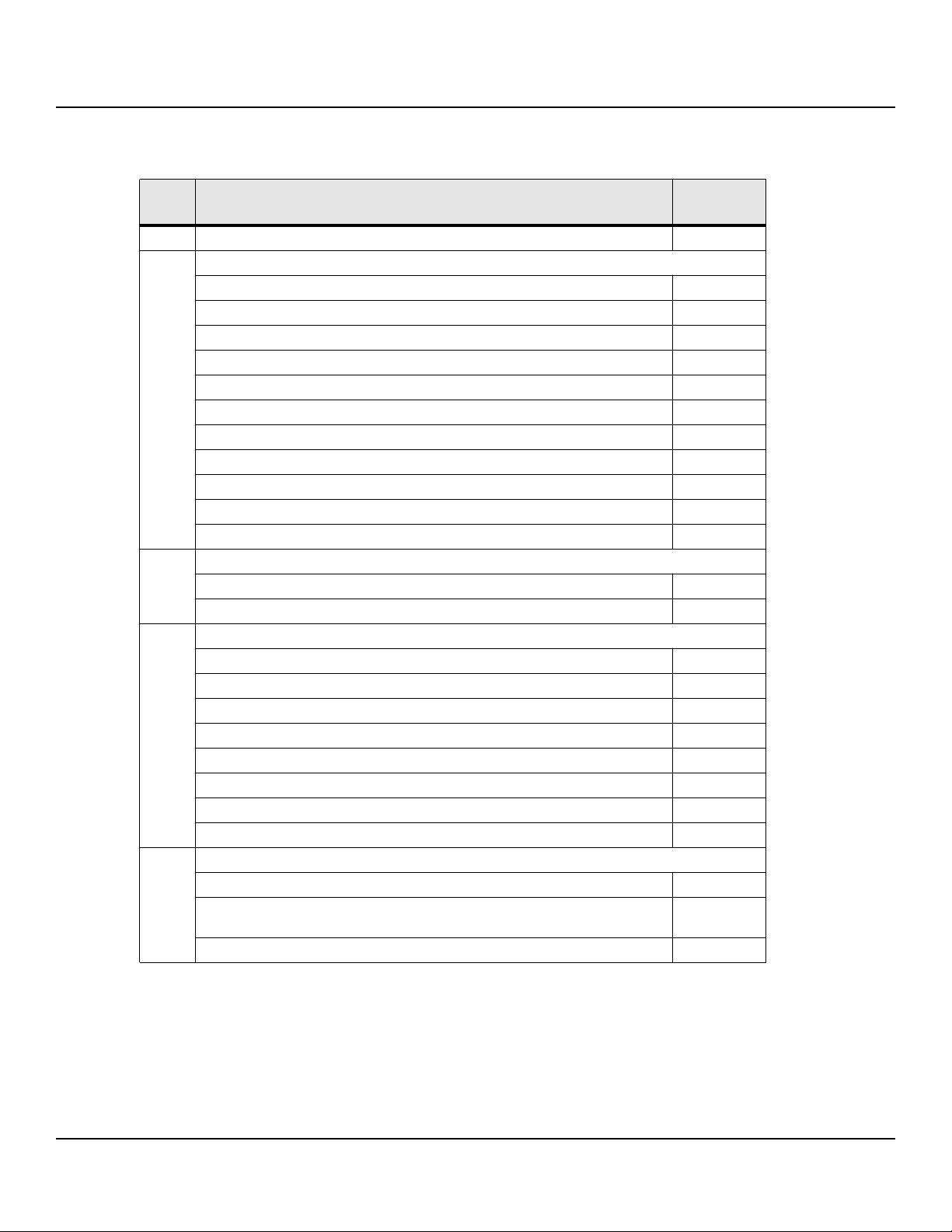
Table 26 - Device Statistics Log
Page
(hex)
Statistic Supported
00 List of supported log pages Yes
01
General Statistics
Lifetime Power-on Resets Yes
Power-on Hours Yes
Logical Sectors Written Yes
Number of Write Commands Yes
Logical Sectors Read Yes
Number of Read Commands Yes
Pending Error Count Yes
Workload Utilization No
Utilization Usage Rate No
Resource Availability No
Random Write Resources Used No
02
Free Fall Statistics
Number of Free-Fall Events Detected No
Overlimit Shock Events No
03
Rotating Media Statistics
Spindle Motor Power-on Hours Yes
Head Flying Hours Yes
Head Loaded Events Yes
Number of Reallocated Logical Sectors Yes
Read Recovery Attempts Yes
Number of Mechanical Start Failures Yes
Number of Reallocation Candidate Logical Sectors Yes
Number of High Priority Unload Events Yes
04
General Errors Statistics
Number of Reported Uncorrectable Errors Yes
Number of Resets Between Command Acceptance and Command Completion Yes
Physical Element Status Changed Yes
Seagate IronWolf Pro SATA Product Manual, Rev B 46
www.seagate.com
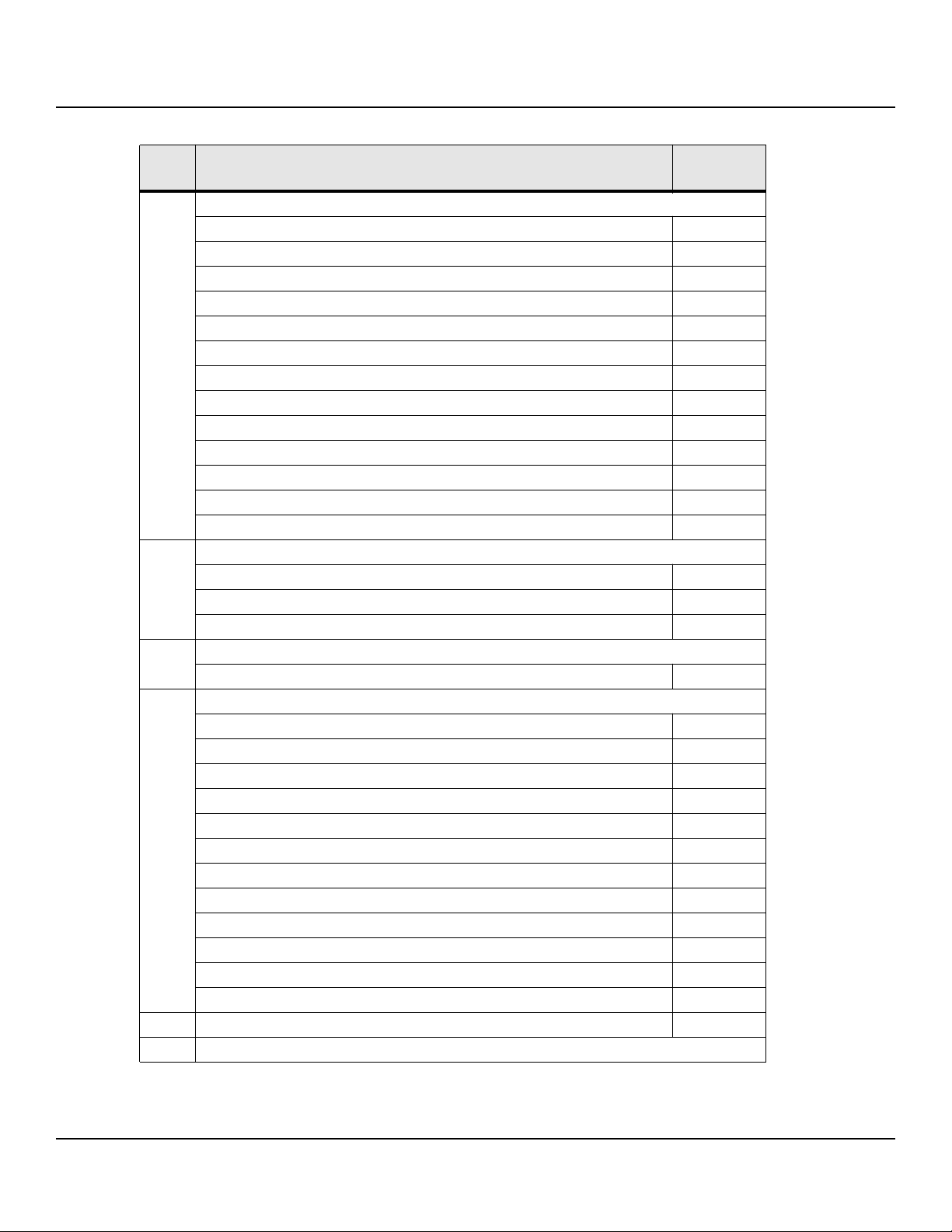
05
Temperature Statistics
Current Temperature Yes
Average Short Term Temperature Yes
Average Long Term Temperature Yes
Highest Temperature Yes
Lowest Temperature Yes
Highest Average Short Term Temperature Yes
Lowest Average Short Term Temperature Yes
Highest Average Long Term Temperature Yes
Lowest Average Long Term Temperature Yes
Time in Over-Temperature Yes
Specified Maximum Operating Temperature Yes
Time in Under-Temperature Yes
Specified Minumum Operating Temperature Yes
06
Transport Statistics
Number of Hardware Resets Yes
Number of ASR Events Yes
Number of Interface CRC Errors Yes
07
Solid State Device Statistics
Percentage Used Endurance Indicator No
08
Zoned Device Statistics
Maximum Open Zones No
Maximum Explicitly Open Zones No
Maximum Implicitly Open Zones No
Minimum Empty Zones No
Maximum Non Sequential Zones No
Zones Emptied No
Suboptimal Write Commands No
Commands Exceeding Optimal Limit No
Failed Explicit Opens No
Read Rule Violations No
Write Rule Violations No
Maximum Implicitly Open Sequential Or Before Required Zones No
09..FE Reserved
FF Vendor Specific Statistics
Table 26 -
Device Statistics Log (continued)
Page
(hex)
Statistic Supported
Seagate IronWolf Pro SATA Product Manual, Rev B 47
www.seagate.com
4.3.4 Set Features command
This command controls the implementation of various features that the drive supports. When the drive receives this
command, it sets BSY, checks the contents of the Features register, clears BSY and generates an interrupt. If the value
in the register does not represent a feature that the drive supports, the command is aborted. Power-on default has the
read look-ahead and write caching features enabled. The acceptable values for the Features register are defined as
follows:
NOTE At power-on, or after a hardware or software reset, the default values of the
features are as indicated above.
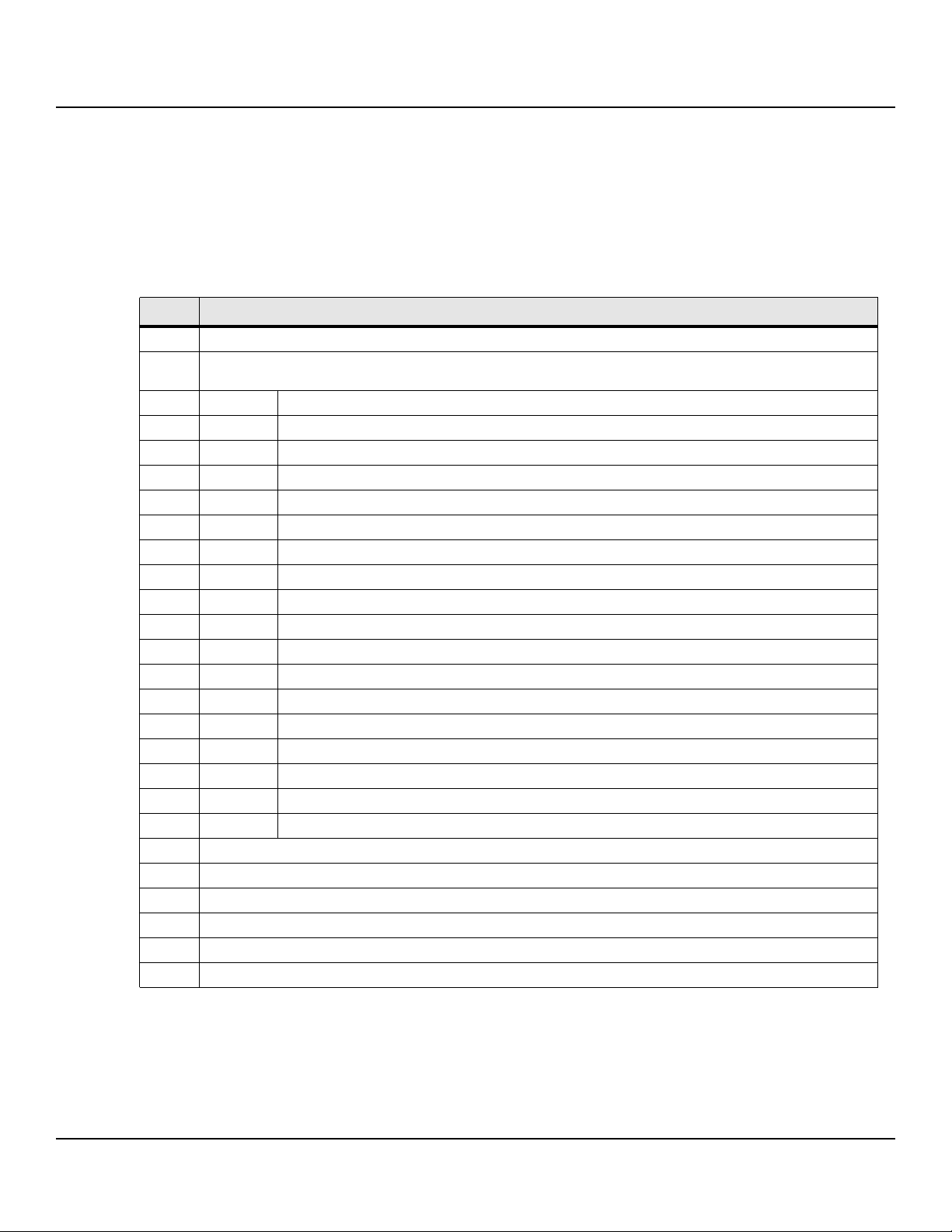
Table 27 - Set Features command values
Value Command
02H Enable write cache (default)
03H
Set transfer mode (based on value in Sector Count register).
Sector Count register values:
Value Mode
00H Set PIO mode to default (PIO mode 2)
01H Set PIO mode to default and disable IORDY (PIO mode 2)
08H PIO mode 0
09H PIO mode 1
0AH PIO mode 2
0BH PIO mode 3
0CH PIO mode 4 (default)
20H Multiword DMA mode 0
21H Multiword DMA mode 1
22H Multiword DMA mode 2
40H Ultra DMA mode 0
41H Ultra DMA mode 1
42H Ultra DMA mode 2
43H Ultra DMA mode 3
44H Ultra DMA mode 4
45H Ultra DMA mode 5
46H Ultra DMA mode 6
10H Enable use of SATA features
55H Disable read look-ahead (read cache) feature
82H Disable write cache
90H Disable use of SATA features
AAH Enable read look-ahead (read cache) feature (default)
F1H Report full capacity available