Seagate_IronWolf_Pro_SATA_Product_Manual_24-20-16-12TB_206815300B.pdf - 第48页
Seagate IronWolf Pro SAT A Pro duct Manua l, Rev B 48 www.seagate.com 4.3.5 SMART comma nds SM A RT provides near- ter m failure p redict ion for d i s k drives. When S MAR T is enabled, the driv e m onitor s predet er m…
Seagate IronWolf Pro SATA Product Manual, Rev B 47
www.seagate.com
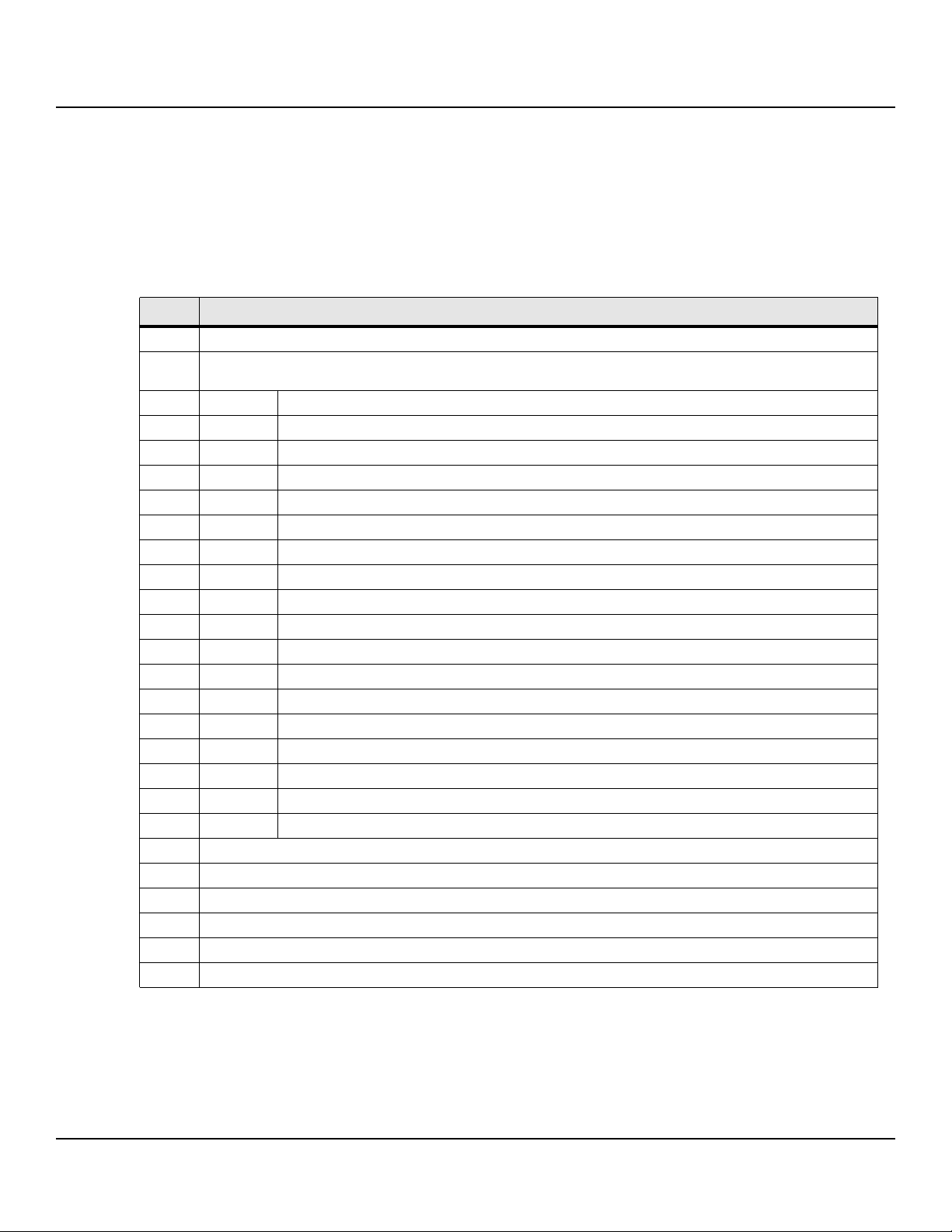
4.3.4 Set Features command
This command controls the implementation of various features that the drive supports. When the drive receives this
command, it sets BSY, checks the contents of the Features register, clears BSY and generates an interrupt. If the value
in the register does not represent a feature that the drive supports, the command is aborted. Power-on default has the
read look-ahead and write caching features enabled. The acceptable values for the Features register are defined as
follows:
NOTE At power-on, or after a hardware or software reset, the default values of the
features are as indicated above.
Table 27 - Set Features command values
Value Command
02H Enable write cache (default)
03H
Set transfer mode (based on value in Sector Count register).
Sector Count register values:
Value Mode
00H Set PIO mode to default (PIO mode 2)
01H Set PIO mode to default and disable IORDY (PIO mode 2)
08H PIO mode 0
09H PIO mode 1
0AH PIO mode 2
0BH PIO mode 3
0CH PIO mode 4 (default)
20H Multiword DMA mode 0
21H Multiword DMA mode 1
22H Multiword DMA mode 2
40H Ultra DMA mode 0
41H Ultra DMA mode 1
42H Ultra DMA mode 2
43H Ultra DMA mode 3
44H Ultra DMA mode 4
45H Ultra DMA mode 5
46H Ultra DMA mode 6
10H Enable use of SATA features
55H Disable read look-ahead (read cache) feature
82H Disable write cache
90H Disable use of SATA features
AAH Enable read look-ahead (read cache) feature (default)
F1H Report full capacity available
Seagate IronWolf Pro SATA Product Manual, Rev B 48
www.seagate.com
4.3.5 SMART commands
SMART provides near-term failure prediction for disk drives. When SMART is enabled, the drive monitors
predetermined drive attributes that are susceptible to degradation over time. If self-monitoring determines that a
failure is likely, SMART makes a status report available to the host. Not all failures are predictable. SMART predictability
is limited to the attributes the drive can monitor. For more information on SMART commands and implementation,
see the Draft ATA-5 Standard.
SeaTools diagnostic software activates a built-in drive self-test (DST SMART command for D4H) that eliminates
unnecessary drive returns. The diagnostic software ships with all new drives and is also available at
www.seagate.com/support/downloads/seatools.
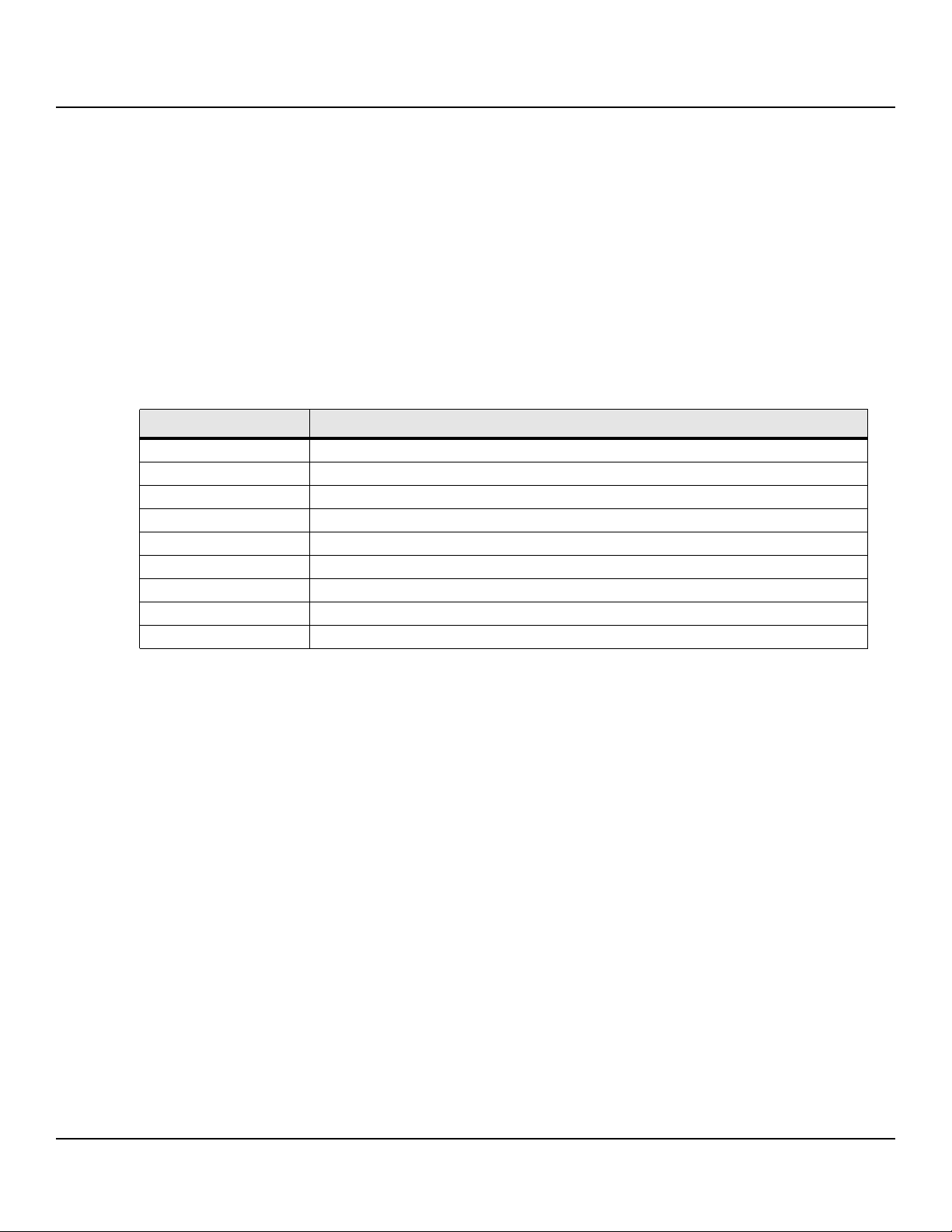
This drive is shipped with SMART features disabled. Users must have a recent BIOS or software package that supports
SMART to enable this feature. The table below shows the SMART command codes that the drive uses.
NOTE If an appropriate code is not written to the Features Register, the command is
aborted and 0x04 (abort) is written to the Error register.
Table 28 - SMART commands
Code in features register SMART command
D0H SMART Read Data
D2H SMART Enable/Disable Attribute Autosave
D3H SMART Save Attribute Values
D4H SMART Execute Off-line Immediate (runs DST)
D5H SMART Read Log Sector
D6H SMART Write Log Sector
D8H SMART Enable Operations
D9H SMART Disable Operations
DAH SMART Return Status

Seagate Technology LLC
AMERICAS Seagate Technology LLC 47488 Kato Road, Fremont, California 94538, United States, 510-661-1000
ASIA/PACIFIC Seagate Singapore International Headquarters Pte. Ltd. 7000 Ang Mo Kio Avenue 5, Singapore 569877, 65-6485-3888
EUROPE, MIDDLE EAST AND AFRICA Seagate Technology (Netherlands) B.V. Koolhovenlaan 1, 1119 NB Schiphol-Rijk, Netherlands, 31-20-316-7300
Publication Number: 206815300, Rev B
July 2025