00197696-01_IM_SIPLACE_Pro_12.0_EN.pdf - 第21页
4 Installation of SIPLACE Pro and possible Setup Types Installation Manual Edition 12/2014 SIPLACE Pro 12.0 19 4 Inst a llation of SIPLACE Pro and pos- sible Setup T ypes V arious setup types are available for in stallat…

Installation Manual 3 Important preparations prior to installation
SIPLACE Pro 12.0 Edition 12/2014
18
Note
By default, Support Media installs SQL Express editions only. If you want to use SQL Server edi-
tion instead, install it manually by following the steps described in the SQL installation documen-
tation on Support Media before using Prerequisite Analyzer for further preparation. We strongly
recommend you follow the installation documentation on Support Media, since it describes the
settings needed for SIPLACE Line Software. 3

4 Installation of SIPLACE Pro and possible Setup Types Installation Manual
Edition 12/2014 SIPLACE Pro 12.0
19
4 Installation of SIPLACE Pro and pos-
sible Setup Types
Various setup types are available for installation to enable you to install the system components
you want to have on the specific computer. To achieve this, various setup types have been defined
which install the required system components accordingly.
Note
After a new installation or reinitialization of the database, it is necessary to import the standard
shape library in SIPLACE Pro desk go to Tools-->Import-->Standard Shape Library... 4
The following setup types are at your disposal:
(1) Custom
(2) SIPLACE Pro Complete System
(3) SIPLACE Pro Desk
(4) SIPLACE Pro Line Control GUI
(5) SIPLACE Pro Line Control Server
(6) SIPLACE Pro Programming System
(7) Siplace Pro Server.
Refer to 4.3 on page 29 for details about the contents and installation procedure of the individual
setup types.
4.1 Factory Layouts and Setup Types
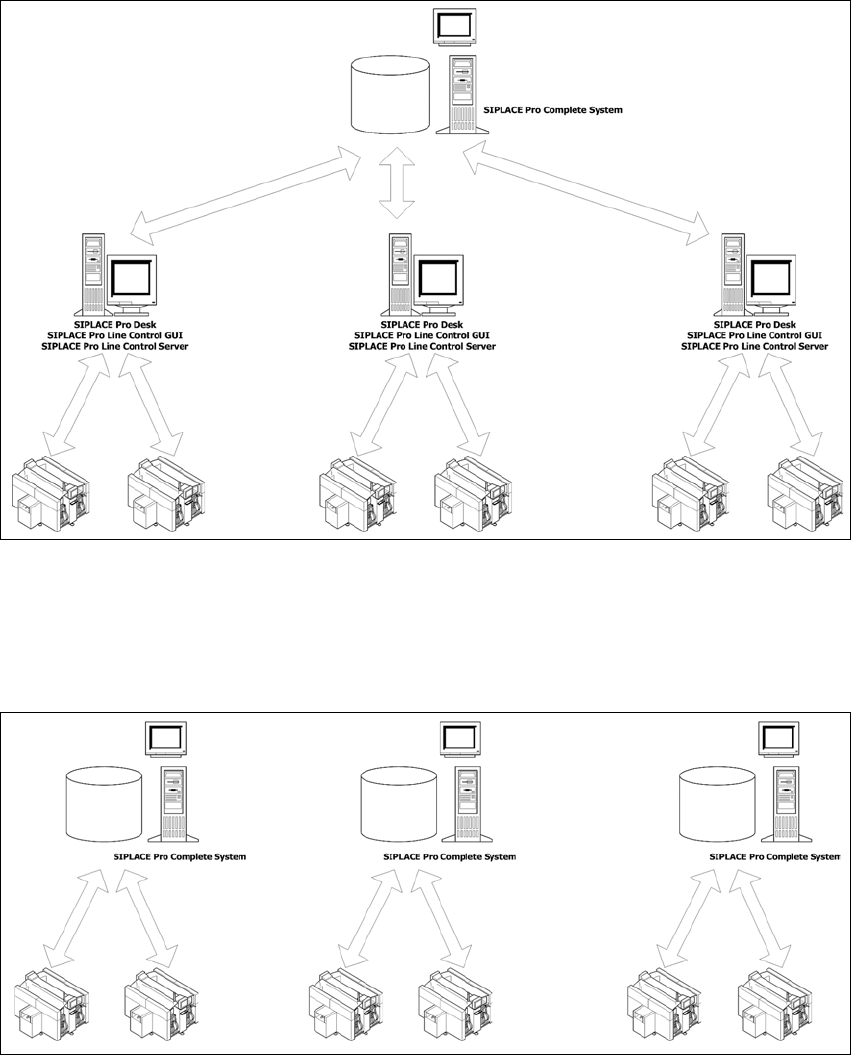
The following graphics show examples of typical factory layouts with the respective setup types
installed on the workstations.
Installation Manual 4 Installation of SIPLACE Pro and possible Setup Types
SIPLACE Pro 12.0 Edition 12/2014
20
4.1.1 Central Database
You use one central database, which contains all data for all lines. This makes it possible to share
the same data for all lines, like component shape definitions.
4
Fig. 4.1 - 1 Central Database
4.1.2 Dedicated Database
For every Line you have a dedicated SIPLACE Pro Server. Databases are independent.
4
Fig. 4.1 - 2 Dedicated Database