HM520_Operation(Chi_Ver1.0).pdf - 第74页
其他检验及已耗尽元器件的更换 第 6 章 C utting-edge Modular Mounter HM520 Ope rati on Handbook 6 -7 本 Chapter 介绍带式供料器的使用注意事项及元器件耗尽时的对应措施。 设置Ba cku p Pin > 确 认PCB平坦度 。 设置Backup※Pin 3. ※ 确认 P CB 平坦 度。 在 Conveyor 上 装上 P CB 并进行固定后 , 利 用 卷…
其他检验及已耗尽元器件的更换
第 6 章
Cutting-edge Modular Mounter
HM520 Operation Handbook
6-6
本Chapter介绍带式供料器的使用注意事项及元器件耗尽时的对应措施。
设置Backup Pin > 设置Backup Pin的高度
设置Backup※Pin
其他检验及已耗尽元器件的更换
2.※设置Backup※Pin的高度
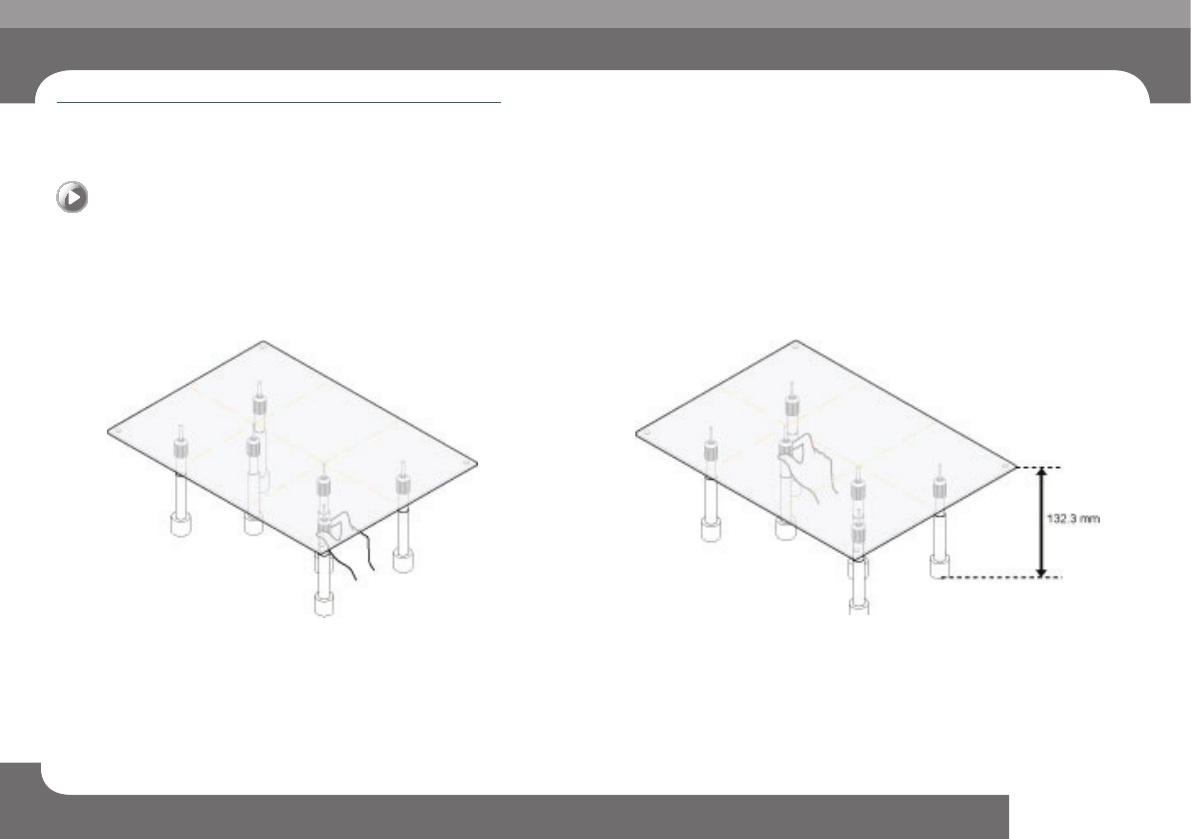
在Conveyor上固定Master PCB之后,设置Backup Pin的高度(Backup
Pin高 度 :通 常 为 132.3mm)
Step 1. 设置两边Backup Pin
Backup Pin的高度设置成PCB的两边Side和Backup Pin相互靠拢。
Step 2. 设置中央Backup Pin的高度
以两边Side的Backup Pin高度为基准,设置PCB中央部位的 Backup Pin的高度。
其他检验及已耗尽元器件的更换
第 6 章
Cutting-edge Modular Mounter
HM520 Operation Handbook
6-7
本Chapter介绍带式供料器的使用注意事项及元器件耗尽时的对应措施。
设置Backup Pin > 确认PCB平坦度。
设置Backup※Pin
3.※确认PCB平坦度。
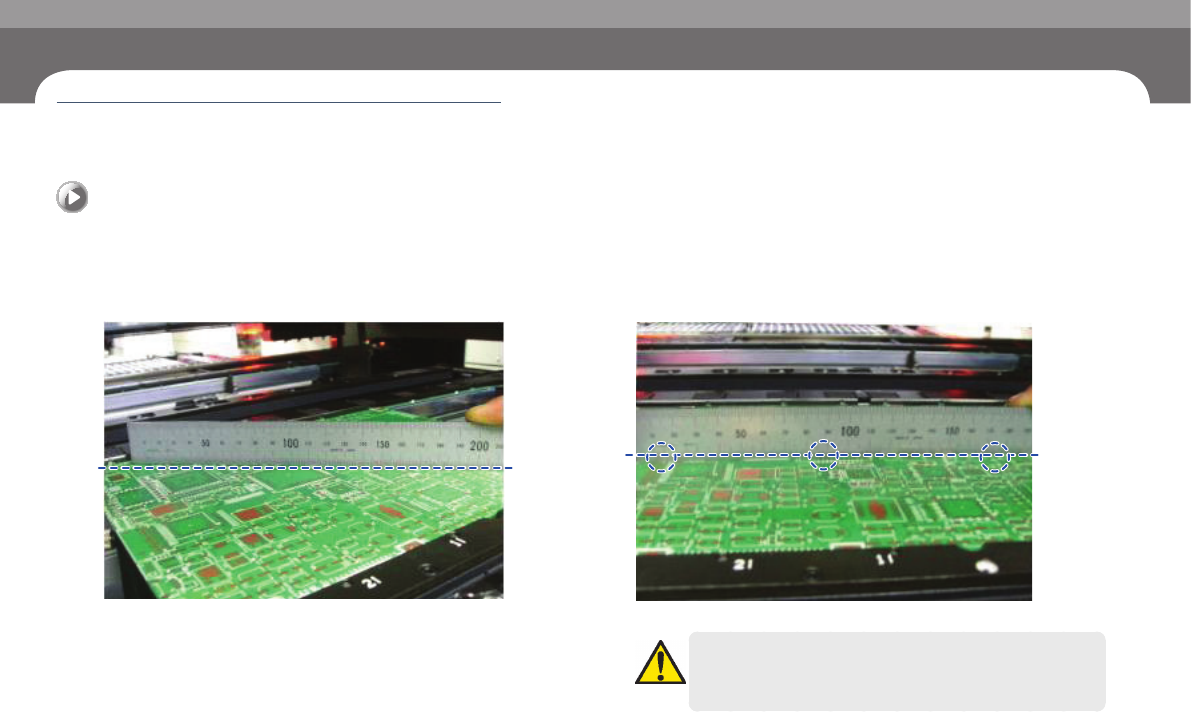
在Conveyor上装上 PCB并进行固定后,利用卷尺测定 PCB的平坦度。
Step 1. 确认对角线方向的PCB平坦度
利用卷尺,确认对角线方向的PCB的平坦度。
Step 2. 确认 对水平方向的PCB的平坦度。
利用卷尺,确认对水平方向3点的PCB的平坦度。
注 意
PCB不平坦时,有可能造成装备不良。PCB不平坦的话,请重新设置
Backup Pin 的高度。
其他检验及已耗尽元器件的更换
第 6 章
Cutting-edge Modular Mounter
HM520 Operation Handbook
6-8
本Chapter介绍带式供料器的使用注意事项及元器件耗尽时的对应措施。
已耗尽元器件的更换 > 更换元器件料盘
已耗尽元器件的更换
其他检验及已耗尽元器件的更换
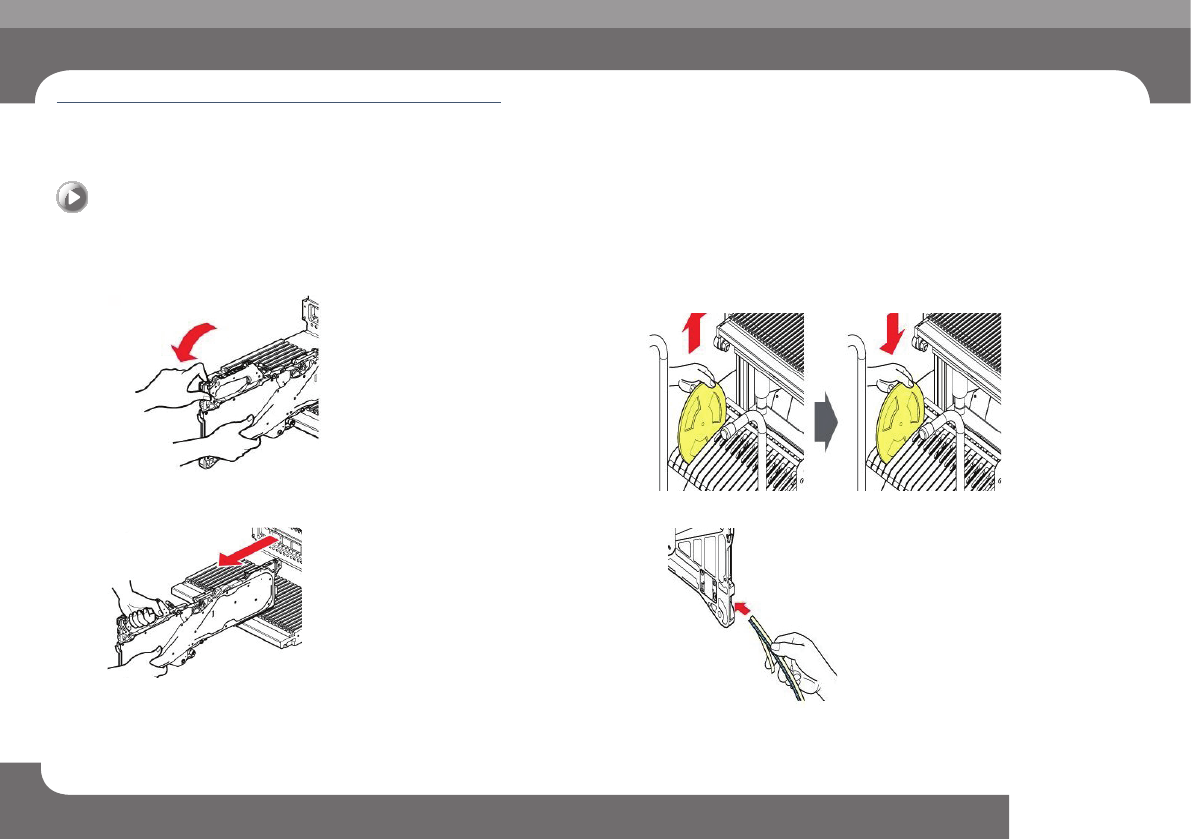
1.※更换元器件料盘
Step 1. 往后拉夹持器(Grip)。
Step 2. 拆下供料器。
Step 3. 清除现有的卷轴后,把新卷轴插入台车(Vart)的卷轴插槽。
(插入卷轴时,让其与安装供料器的插槽形成垂直)
Step 4. 把料带投入供料器的料带引入口后推到料带导件的后方。
已耗尽元器件的更换