00196678-0102_RI_CAN-Knoten_X-Serie70x_De+EN.pdf - 第46页
Installation Replacing the Tape Cutter Control Boar d with the CAN Nodes 46 Retrofit Instructions CAN Node X Series SW70x 6.2 Replacing the T ape Cutter Control Board with the CAN Nodes 6-1: Dismantling the tape cutter c…
Installation
Preparatory Steps
Retrofit Instructions CAN Node X Series SW70x
45
6 Installation
6.1 Preparatory Steps
X See also section (4.2 Preparatory Work...
J
38) .
X Move all component trolleys out of the machine with the help of the software.
X Perform shut down and switch off the machine.
X Always secure the machine against unauthorized reactivation.
X Disconnect the machine from the power and pneumatic supplies.
NOTE:
The SW70x does not support S feeders. Any component trolley feed units need to be replaced
with X feed-in devices.
Read the corresponding instructions:
MTC 2 and component trolley feed-in device SIPLACE HF series / X series, issue 07/2009, d +
e [00193892-04]
Chapter 4.9.4 Replacing the component trolley feed-in assembly for X series machines
[03015680-xx]
NOTE:
In a 1 gantry placement area the component trolley feed-in device needs to be loosened at
location 2 or 4 and pulled slightly out, so that the cable can be run. Read the corresponding
instructions:
Service manual and setting instructions for X series machines - 04/2009 - DE [00194439-08]
Chapter 4.9.4 Replacing the component trolley feed-in assembly for X series machines
[03015680-xx] or the instructions:
MTC 2 and component trolley feed-in device SIPLACE HF series / X series, issue 07/2009, d +
e [00193892-04]
Installation
Replacing the Tape Cutter Control Board with the CAN Nodes
46 Retrofit Instructions CAN Node X Series SW70x
6.2 Replacing the Tape Cutter Control Board with the CAN Nodes
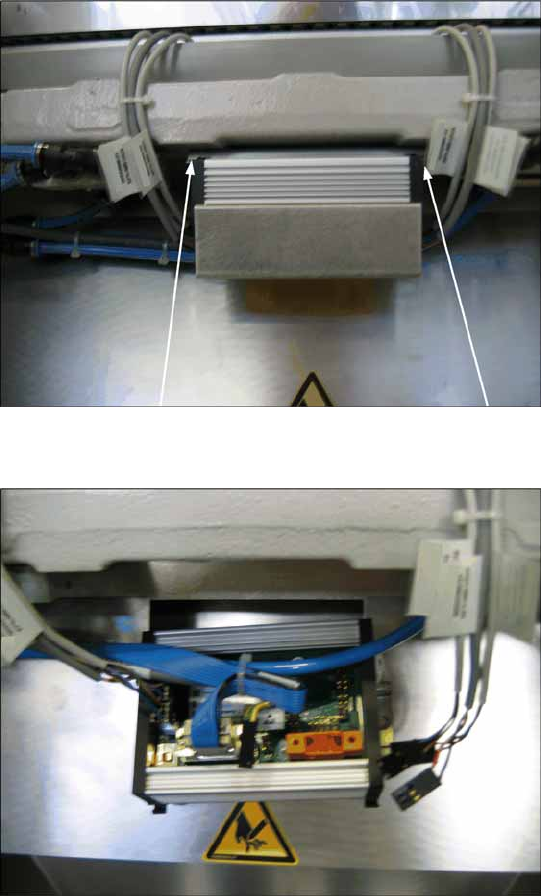
6-1: Dismantling the tape cutter control board, old
X Loosen the old tape cutter control board with
the mounting rail from the tape cutter (2
screws). You can now remove the cover on the
old control board.
6-2: Disconnecting the cable from the tape cutter control board
X Disconnect all cables from the old tape cutter
controller.
Installation
Replacing the Tape Cutter Control Board with the CAN Nodes
Retrofit Instructions CAN Node X Series SW70x
47
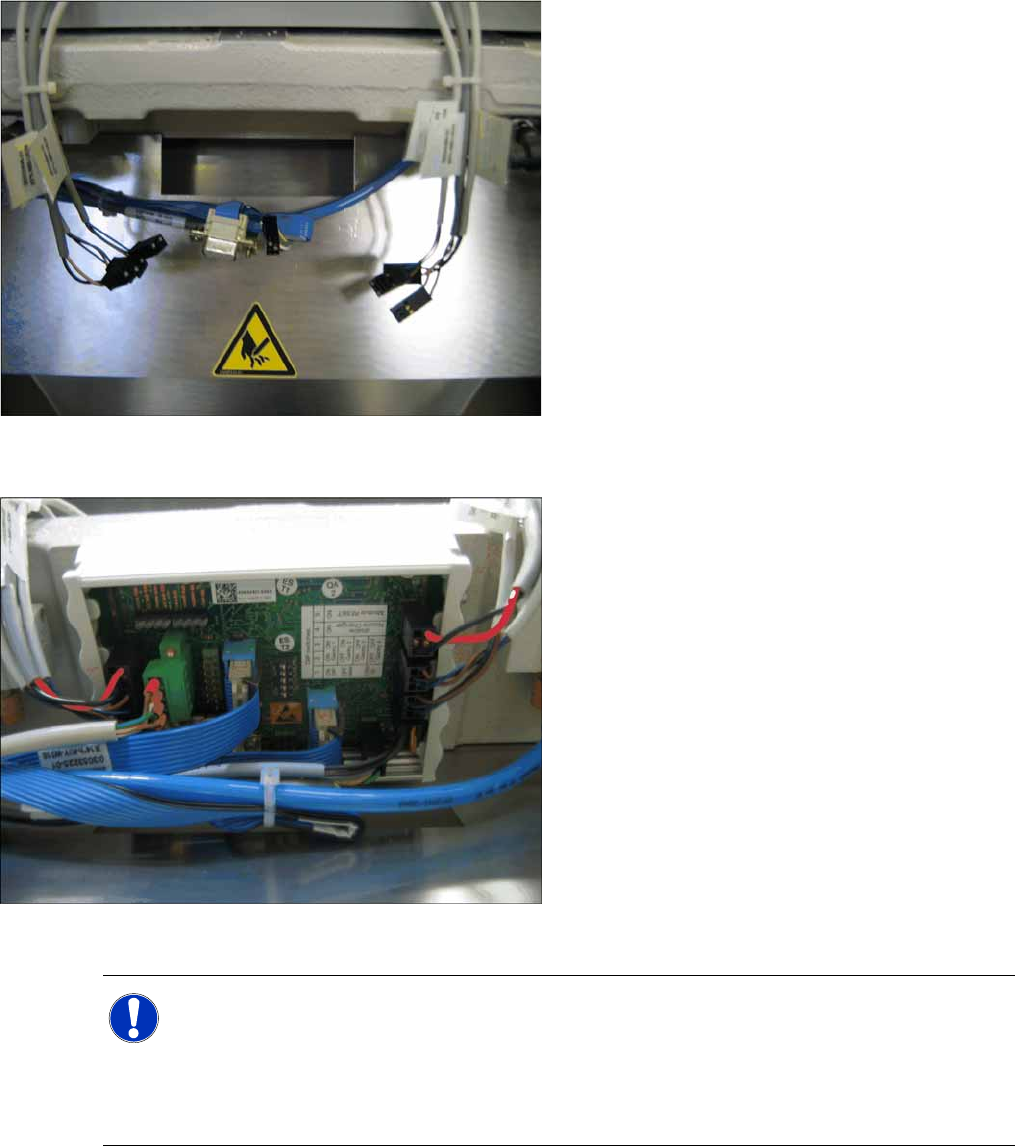
X Also connect the following cable from the retrofitting kit to the CAN nodes.
6-3: Disconnected cable on tape cutter
6-4: Connecting the cable to the fitted CAN nodes
X Disconnect the old tape cutter control board
from the mounting rail and fix this mounting rail
to the tape cutter frame.
X Connect the new CAN nodes unit to the
mounting rail. This unit is supplied with a cover
which can be also be removed once the unit
has been fitted.
X Reconnect all cables. The connections are
identical to those for the old control unit.
(connectors and contacts are labelled and
coded).
NOTE:
From SW70x, the nozzle changer and nozzle station can only be addressed via the CAN nodes.
The 1 wire is then only used for the temperature sensors on the head board.
Switch 4 on the DIP switch needs to be set to OFF: (= the nozzle changer and the tape cutter)
stand still.
See also CAN nodes. (5.4 Control Unit on Tape Cutter (CAN Node Module)
J
43)