00196429-0102 - AI Head Reconfiguration Kit SX12 C&P20A_de_en.pdf - 第51页
Installing the C&P20A Placement Head Conversion of the Head Adapter Disassembling the TwinHead Assembly Instructions / Montageanleitung Head Reconfiguration K it C&P20A 51 ► Remove the stationary camer a. Further…
Installing the C&P20A Placement Head
Disassembling the TwinHead Further Aspects for the Configuration
50 Assembly Instructions / Montageanleitung Head Reconfiguration Kit C&P20A
Disassembling the TwinHead
3.3 Disassembling the TwinHead
The TwinHead consists of 2 identical Twin segments, which are fitted at an angle of 180° to one another.
When changing over to another placement head type both segments must be removed.
Parts, Equipment and Tools
▪ Torque screwdriver 100-500 Ncm [03078400-xx]
Removal
CAUTION
► You must wear the ESD armband during all work on the placement head.
NOTICE
The removal procedure is described here for module 1 (left). Repeat the procedure for
module 2 (right).
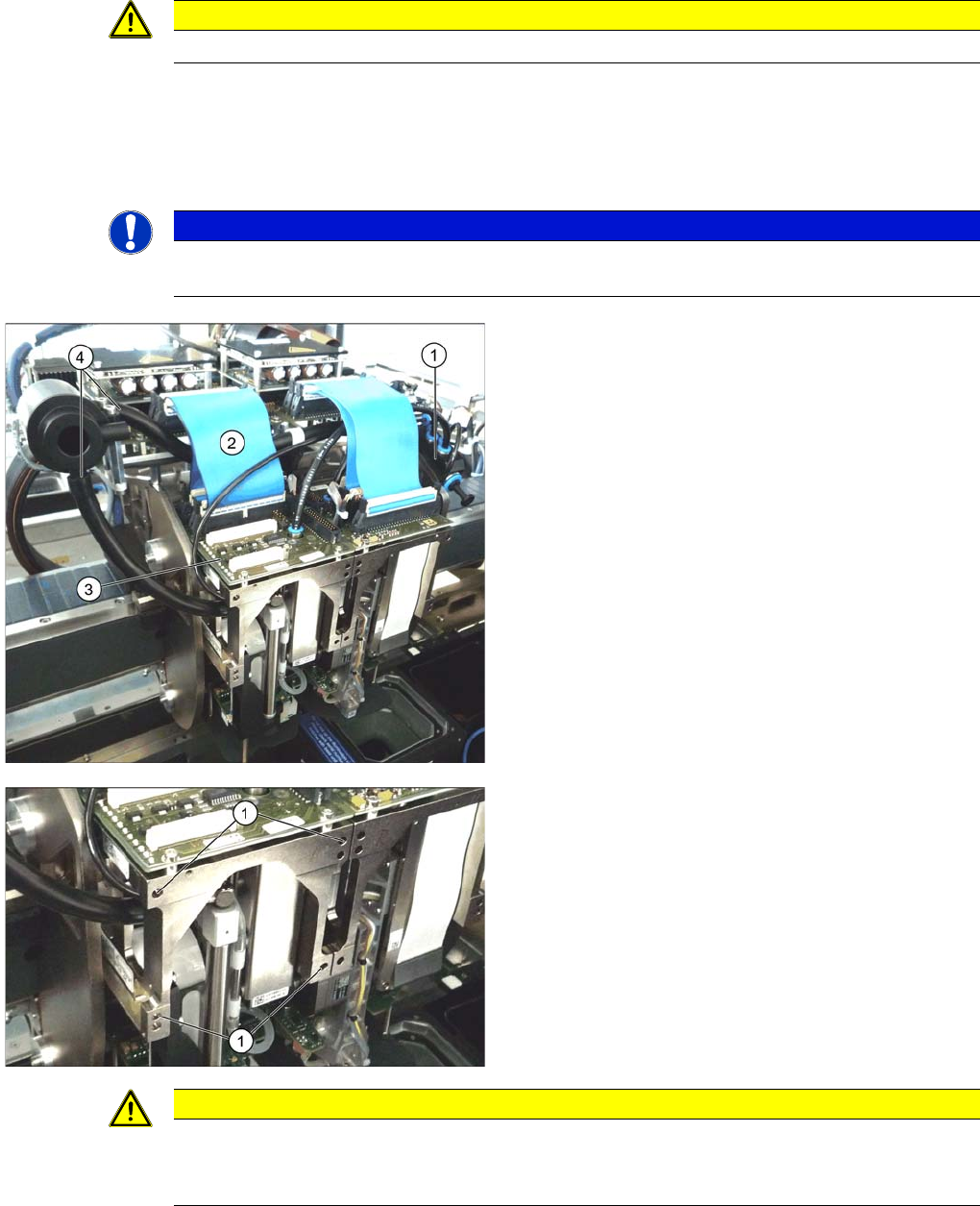
► Move the gantry into a position which allows you best
access.
► Unplug the pneumatic connection from the TwinHead
vacuum generator to the pneumatic distributor (1)
and the silencer.
► Remove both discharged air hoses from the silencer
(4).
► Unplug the pneumatic connection from the pneumat-
ic distributor (1) to the TwinHead return cylinder.
► Unplug the flat ribbon cable (2) from the head main
board (3) on the TwinHead.
Each module is fixed with 4 screws to the head plate and
is positioned with two pins.
► Loosen the 4 M4x14 fixing screws (1) with a long Al-
len key.
► Pull the module out of the locating pins.
► Remove module 2 the same way.
CAUTION
Removal instruction
The individual modules are not secured with a hook like it is the case for the C&P20A and the
CPP head. They can fall down.
Installing the C&P20A Placement Head
Conversion of the Head Adapter Disassembling the TwinHead
Assembly Instructions / Montageanleitung Head Reconfiguration Kit C&P20A 51
► Remove the stationary camera. Further information can be found in the Service Manual SX 1/2
[00196497-xx] in the section describing the exchange of the stationary component camera.
The reject bin of the stationary camera can be kept when changing over to a CPP head. When changing
over to a C&P20A head the reject bin must be removed. Further information can be found in the Assem-
bly Instructions "Reject Bin SX1/2 [00196615] or in the Assembly Instructions "Stationary Camera SI-
PLACE SX [00196608-xx].
See also
1.2 Preparatory Work... [ ➙ 38]
Conversion o f the Head Adapter
3.3.1 Conversion of the Head Adapter
The head adapter consists of the base adapter and the HCU.
Removing the head adapter of the TwinHead
NOTICE
When converting from a C&P20A to a CPP head and vice versa the present head adapter can
be kept.
When converting from a TwinHead to the CPP or a C&P20A head you have to use a HCU of
the TwinHead together with the base adapter from the parts set [03055516-xx].
When the Head Reconfiguration Kit is ordered it will be asked which head is already installed
on the gantry.
If a gantry without a head is to be retrofitted with a Head Reconfiguration Kit, another HCU has
to be ordered in addition to the parts set CPP/C&P20A and the additional parts set for the Twin-
Head.
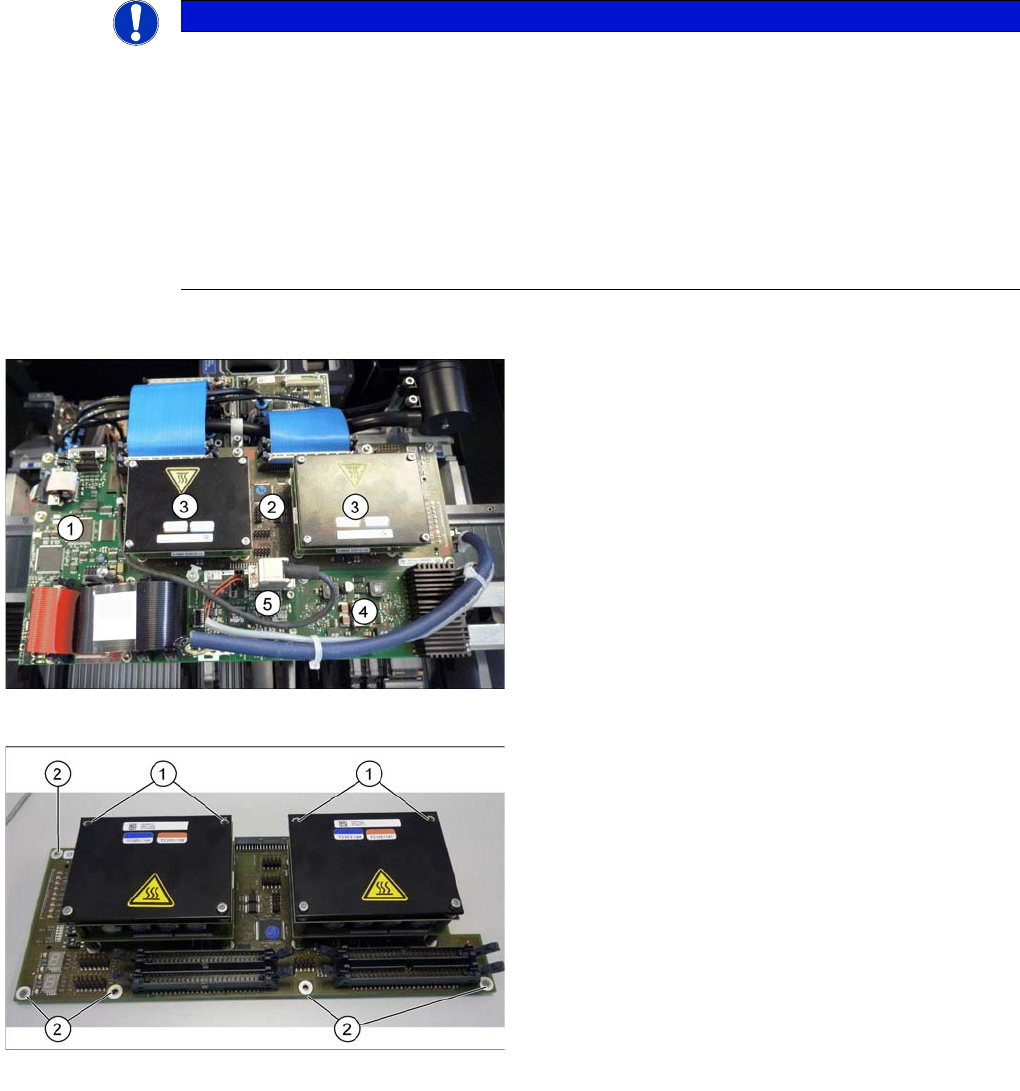
Boards on the gantry
Legend
1. Vision Board Spread Spectrum
2. Head adapter (here the version for the TwinHead with
2 HCUs)
3. HCU
4. Head interface
5. Sensor module
Head adapter of the TwinHead
► Loosen all electrical connections. You may want to
mark the position, to make clear assignment easier
later on.
► Loosen the two front screws (1) fastening the HCU in
each case. Make sure that you do not lose the shims.
Make a note of the number of shims used for each
screw, as this may well differ.
► Loosen all the screws (2) fastening the board and
then remove the board.
► Loosen both screws on the bottom side of the base
adapter to disconnect the HCU from the base adapt-
er.
Installing the C&P20A Placement Head
Disassembling the TwinHead Conversion of the Head Adapter
52 Assembly Instructions / Montageanleitung Head Reconfiguration Kit C&P20A
Fitting the HCU onto the base adapter for CPP and C&P20A head
Installing the head adapter for CPP and C&P20A head
Fitting and fixing the HCU
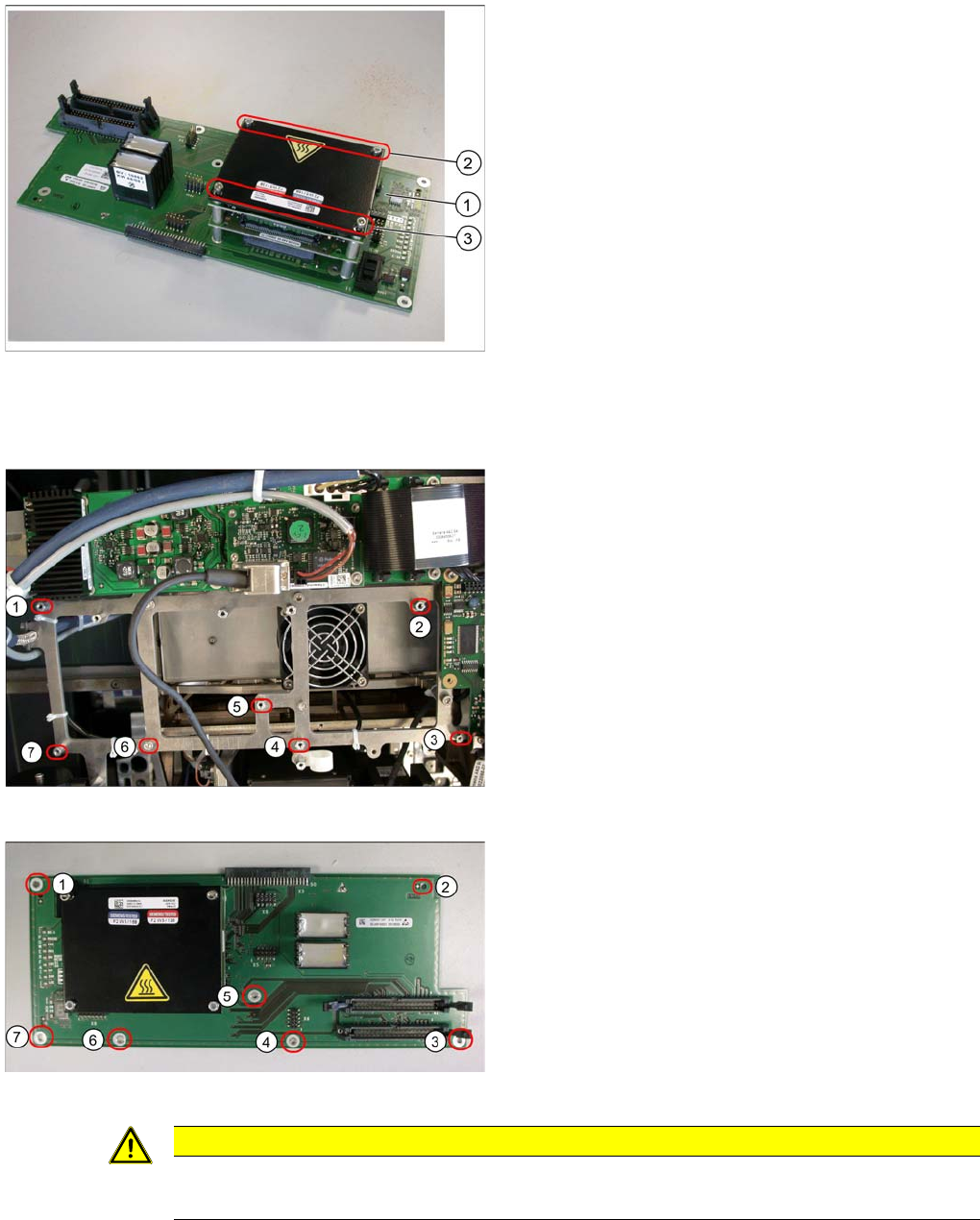
► Carefully fit a HCU of the TwinHead onto the base
adapter of the parts set (1).
► Fix the HCU with the four previously removed screws
(2 and 3).
Mounting position for the head adapter
Legend
(1) - (7) Fastening bolts on the mounting position
Head adapter
Legend
(1) – (7) Fastening points on the head adapter
► Place the head adapter onto the fastening bolts in the
mounting position and fasten it with the 7 screws.
► Connect the head interface board via the plug con-
nector with the head interface.
CAUTION
Installation instructions
► Check the firmware and perform a download, if needed.