00196743-01 - Install Guide SIPLACE Explorer 2.7_en.pdf - 第28页
3 In st alli ng SIPLA CE Expl ore r Ins ta llat i on and Con fi gur ati on Gu id e SI PLA CE Exp lo rer 3. 1 I ni tial Ins tall ati on o f SI PLA CE E xpl ore r 2. 7 Ed iti on 03 /2 010 EN 28 NOTE Before you install SI P…
Installation and Configuration Guide SIPLACE Explorer 3 Installing SIPLACE Explorer
Edition 03/2010 EN 3.1 Initial Installation of SIPLACE Explorer 2.7
27
– Microsoft Internet Explorer 6.0 SP2 or 7.0
Microsoft Internet Explorer is required to view and edit websites. 3
Microsoft Internet Explorer 6.0 SP2 is included on the Support Media DVD, MS Internet
Explorer 7.0, installed with the Windows Vista installation. 3
– Adobe Reader 7.0
This component is needed for reading the SIPLACE Explorer V.2.7 documentation. Adobe
Reader 7.0 is included on the Support Media DVD. 3
For a detailed description of the specified installations, refer to the document “Navigation
Guide for the Installation Procedure of SIPLACE Software Systems” (Art.No. 00195050-xx).3
Consider the following before beginning the installation: 3
NOTE
Before installing Tomcat 5.5, make sure that all versions of Tomcat < 5.5 have been
uninstalled. Use the Apache Tomcat uninstallation program. This can be started via the
Start → Programs → Apache Tomcat 5.5 → Uninstall Tomcat menu in Windows. 3
NOTE
You will need to specify the following information when installing Tomcat 5.5:
- Port number for Tomcat: By default, Tomcat is installed on port 8080. This means that your
users will access your website as follows:
http://yourServerName:8080/yourWebsite/index.jsp.
- Access data for the Tomcat administrator:
User name: admin
Password Policy: depending on the selected password policy, you need to enter a
password: MS128 or Siplace.1.
This password is needed for website generation.
This login will automatically be used as default login for Line Configuration - Step 7 "Website
Generation". 3
3 Installing SIPLACE Explorer Installation and Configuration Guide SIPLACE Explorer
3.1 Initial Installation of SIPLACE Explorer 2.7 Edition 03/2010 EN
28
NOTE
Before you install SIPLACE Explorer V2.7, make sure that Java 1.6 has been installed on
your computer. Install this software component via the support media DVD. 3
(3)SIPLACE Explorer V.2.7 options:
The options SIPLACE Traceability Option V2.0 and SIPLACE Maintenance Manager V1.0 are
not included in the SIPLACE Explorer V2.7 delivery package and must be ordered (installed)
separately. 3
3.1.1 Installation of SIPLACE Explorer 2.7 - Initial Installation
NOTE
You must have Windows administrator privileges to perform installation. 3
→ Place the support media DVD in your DVD drive. Follow the instructions in the document
“Navigation Guide for the Installation Procedure of SIPLACE Software Systems” (Art.No.
00195050-xx).
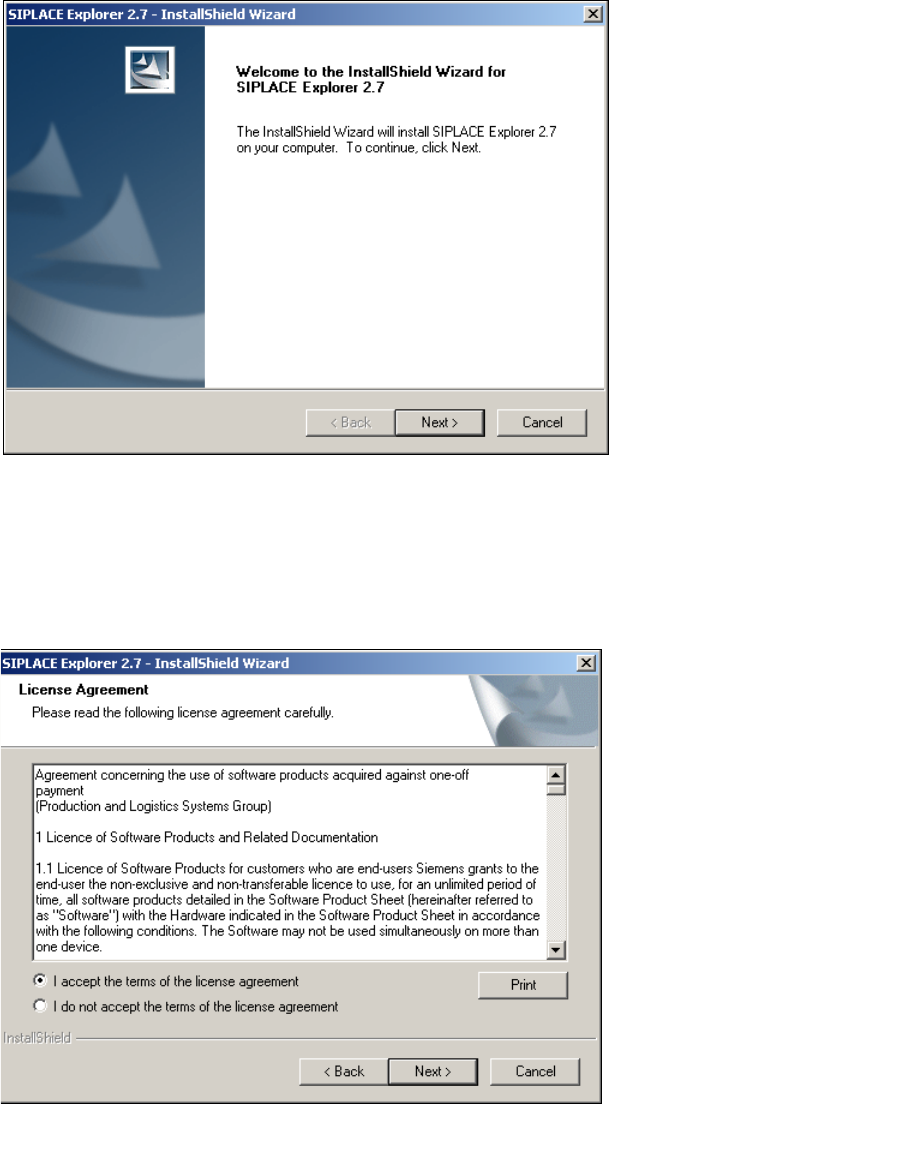
→ Place the SIPLACE Explorer CD in your CD-ROM drive. The Start screen will open.
3
Fig. 3 - 1 SIPLACE Explorer setup - Start screen
Installation and Configuration Guide SIPLACE Explorer 3 Installing SIPLACE Explorer
Edition 03/2010 EN 3.1 Initial Installation of SIPLACE Explorer 2.7
29
→ Select SIPLACE Explorer 2.7.
→ You will be guided through the SIPLACE Explorer installation procedure.
3
Fig. 3 - 2 SIPLACE Explorer welcome
→ Exit all other programs and then click on Next. The License Agreement dialog box will open.
→ Read the license agreement. If you agree with the conditions, click I accept ..., otherwise, click
on I do not accept .... If you select I do not accept ..., the installation procedure will be
terminated.
3
Fig. 3 - 3 SIPLACE Explorer setup - license agreement
→ Confirm your selection with Next.