00196743-01 - Install Guide SIPLACE Explorer 2.7_en.pdf - 第47页
In stal la tion an d Conf ig ura tion Gui de SIP LACE Ex pl orer 3 I ns talli ng SIP LACE Ex pl orer Edi tio n 03/201 0 E N 3. 5 Tomc at Con fi gurat ion 47 3 Fig. 3 - 26 Inter ne t Opt io ns → Specify the URL or the web…
3 Installing SIPLACE Explorer Installation and Configuration Guide SIPLACE Explorer
3.5 Tomcat Configuration Edition 03/2010 EN
46
3.5 Tomcat Configuration
3.5.1 Using Windows 2003 Server
If you have installed Windows 2003 Server as your operating system, you will need to reconfigure
the web server (Tomcat) before using SIPLACE Explorer V2.7. This configuration will be done via
Internet Explorer. 3
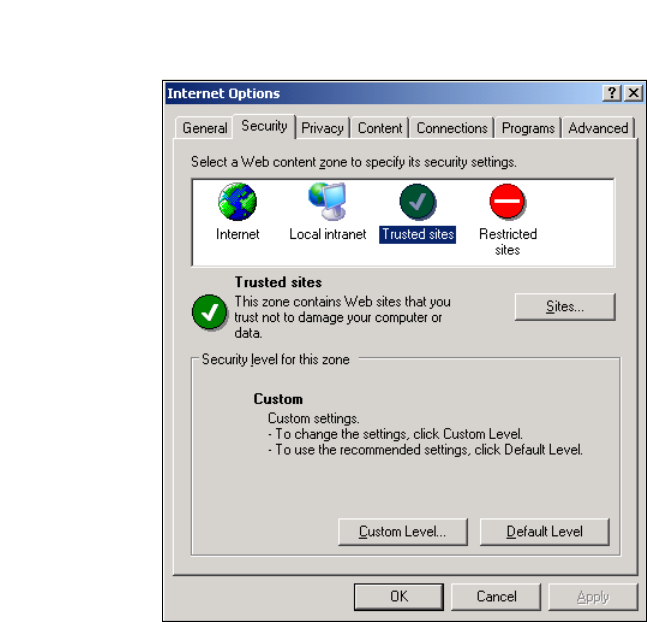
→ Select the menu Tools → Options.
→ The Internet Options dialog box will open:
3
Fig. 3 - 25 Internet Options
→ Select the Security tab.
→ Click on the Trusted Sites icon and click on Sites.
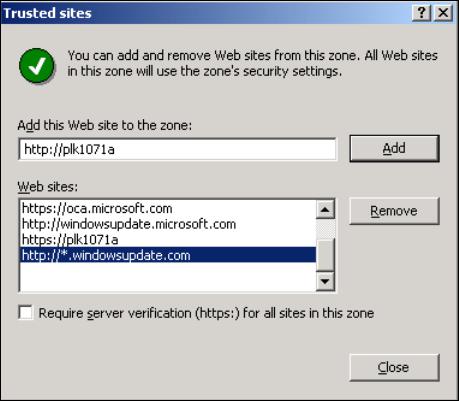
→ The Trusted Sites dialog box will open:
Installation and Configuration Guide SIPLACE Explorer 3 Installing SIPLACE Explorer
Edition 03/2010 EN 3.5 Tomcat Configuration
47
3
Fig. 3 - 26 Internet Options
→ Specify the URL or the web server (Tomcat) name. Confirm with Add.
→ Close the Trusted Sites dialog box with Close.
3 Installing SIPLACE Explorer Installation and Configuration Guide SIPLACE Explorer
3.5 Tomcat Configuration Edition 03/2010 EN
48
3.5.2 Port Configuration after Changing Tomcat Port Number
NOTE
By default, Tomcat is installed on port 8080. This means that your users will access your website
as follows: http://yourServerName:8080/yourWebsite. 3
The Tomcat port number needs to be changed (as described below) in the following cases: 3
– When the port is changed to generate a website e.g. via line configuration.
– If the default port number 8080 is already otherwise occupied and you do not want to
additionally use it for this purpose (access to the websites).
→ To change the port number, find the following lines in the file
<Tomcat-location>\conf\server.xml
→ Change the port number and change 8080 to your choice of port number as shown below:
<!-- Define a non-SSL Coyote HTTP/1.1 connector on the port specified 3
during installation --> 3
<Connector port="8080" maxThreads="150" minSpareThreads="25" maxSpare-
Threads="75" enableLookups="false" redirectPort="8443" accept-
Count="100" debug="0" connectionTimeout="20000"
disableUploadTimeout="true" /> 3
3
→ Change the specified port number 8080 (Connector port="8080") to the required port
number (Connector port="YourPort"). For further information about the port number,
please contact your system administrator.
→ To make Tomcat your default web server, set the port number to 8080.
NOTE
The port number specified in this xml file needs to be added to the URL address each time you
generate a website: http://yourServerName:yourPort/yourWebsite. 3
3
3