Stopper ASE HS60.pdf - 第33页
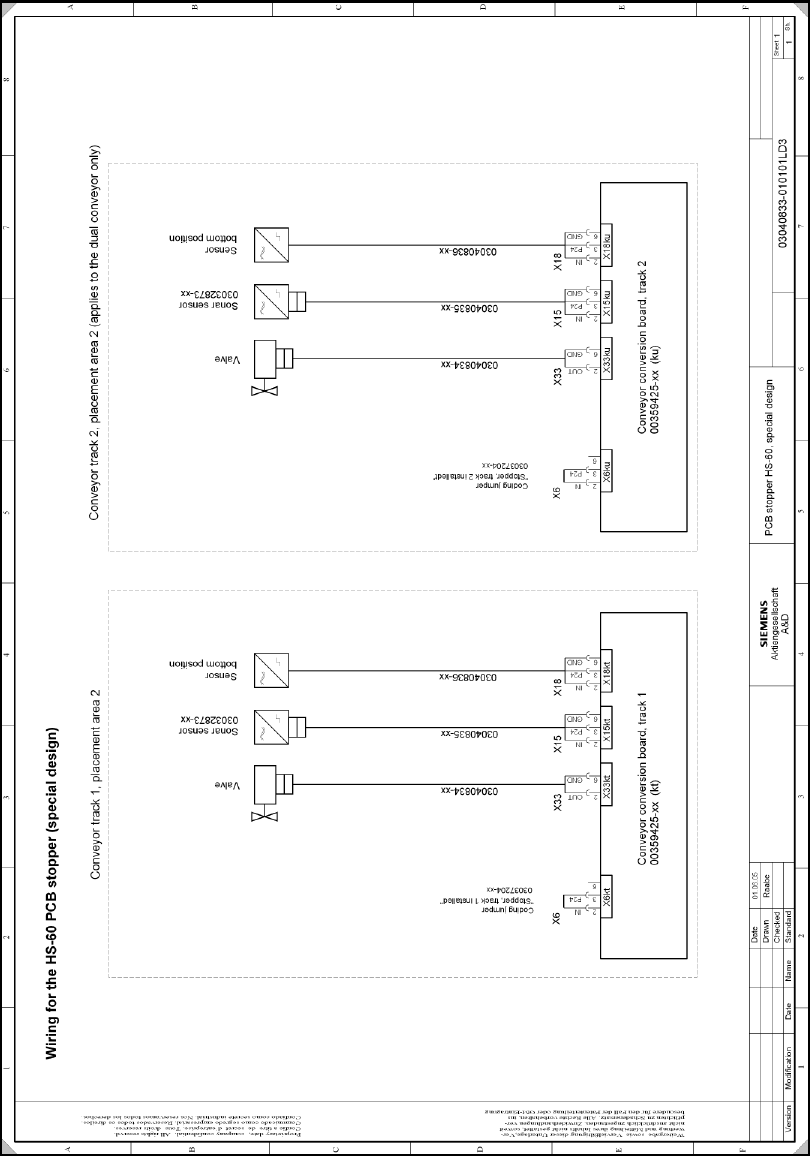
Retrofit Instructions: Stopper for ASE SIPLACE HS-60 (special design) 11/2005 Edition 33 2.12 Circuit diagram 2
Retrofit Instructions: Stopper for ASE SIPLACE HS-60 (special design)
11/2005 Edition
32
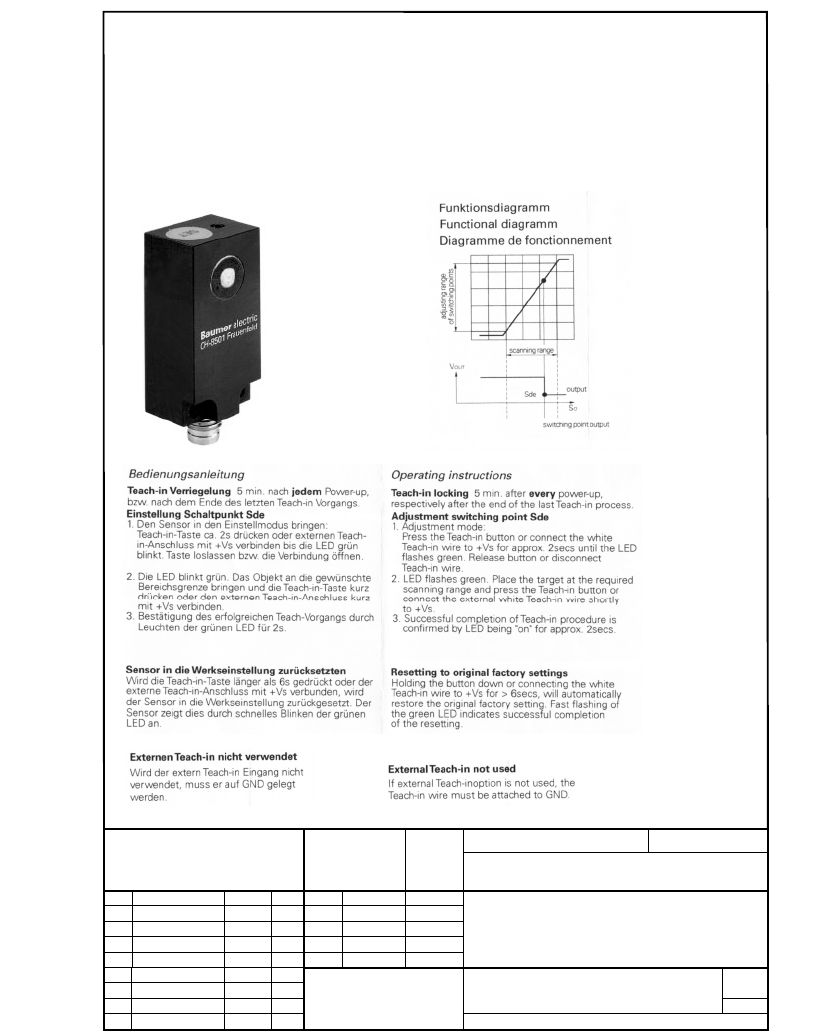
2.11 Setting the sonar sensor
To set the sonar sensor, follow the manufacturer's instructions when the stopper module is in-
stalled. 2
: Run the customer's PCB on the conveyor belt over the sonar sensor and teach it as per the
instructions.
2
Scale/Maßstab
Format
A4
Date Name
Drawn.
01.04.05 Raabe
Check.
Stand.
Item name /Benennung
Ultraschall Näherungssensor
Ultrasonic proximity sensor
(Document No./Unterlagen-Nr.)
Sheet
1
s
Aktiengesellschaft
03032873-010101BD4
3 Sh.
Vers. Modification Date Name
L&
A
Weitergabe sowie Vervielfältigung dieser U nterlage, Verwer-
tung und M itteilung ihres Inha ltes n icht gestattet, sow e it nicht
ausdrücklich zugestanden. Zuwiderhandlungen verpflichten zu
Sc hadensersa tz. Alle Rechte für d en F all der Pate nterteilung
oder GM-Eintra
g
un
g
vorbehalten.
Copying of this document, and giving it to others and the use
or com m u nication of the c on tents thereo f, are forbidd en with-
out express authority. Offenders are liable to the paym ent of
dam ages. A ll rights are res erved in the eve nt o f th e grant of
a
p
atent or the re
g
istration of the u tilit
y
model or desi
g
n.
Hersteller/Manufacturer: Baumer Electric AG, CH-8501 Frauenfeld
Teilebezeichnung/Part name: Ultraschall-Näherungsschalter, Quader
Ultrasonic proximity switch, rectangular
Bestellnummer/Ordering code: UNDK 20P6914/S35A
Technische Daten/ Specifications:
Retrofit Instructions: Stopper for ASE SIPLACE HS-60 (special design)
11/2005 Edition
33
2.12 Circuit diagram
2

Retrofit Instructions: Stopper for ASE SIPLACE HS-60 (special design)
11/2005 Edition
34
2.13 Firmware
: In SITEST, download the TSP special design firmware, version TS510446.HEX.
Make sure that the "Special design“ option is checked.
The special design firmware version only works with station computer versions 503.xx! 2
: To activate the firmware version, restart the placement machine.
2.14 Calibrating the PCB reference corner
: Switch to SITEST and recalibrate the PCB reference corner for PA2.
2
Whenever the stopper position is changed, the PCB reference corner will have to be recalibrated
in SITEST. 2
2
2.15 Possible causes of error
a The PCB camera does not find the fiducial or moves to the wrong position.
Cause: The PCB reference corner was not recalibrated after the stopper was installed or its
position was changed.
s The stopper does not move out.
Cause:
– No compressed air connection or no compressed air available. A "Temporary drop in com-
pressed air supply" error message may appear on screen.
– The sensor on the stopper is defective
d The PCB is not detected.
Cause: The sonar sensor is defective, was not calibrated or was incorrectly calibrated.
2
2