Application Backflush 1-0 to SAP Data Converter.pdf - 第38页
2 Installation instructions for the Backflush 1.0 to SAP Data Converte r application Application 04/2006 Edition 38 2.7.3.6 backflushPath This XML tag can occu r from 1 to 12 times. It is used to describe the storage loc…
Application 2 Installation instructions for the Backflush 1.0 to SAP Data Converter application
04/2006 Edition
37
2.7.3.5 logFileSettings
This XML tag must appear exactly once in the XML file. The logging method, path, file name and
the number of log files are specified at this point. 2
detail 2
Sets the level of detail in the log file. 2
Possible values: "verbose“ – writes all the messages that occur while the program is running, "me-
dium“ – writes only relevant messages, or "error“ – writes only error messages to the log file. The
number of log files is suggested (120, 60 or 30 according to the logging method). 2
Default value: "medium“ 2
path 2
Specifies the path or the location at which the log files will be stored. (In addition to these log files,
the log files that were created up until the settings file was read are also stored). If the subdirectory
does not exist when the first log file is created, then it will be created. 2
If problems occur when the setting file is read, a log subdirectory is created under Backflush.exe.
This subdirectory is used to store the log files created in the event of start-up problems. 2
Please note: Absolute path must be entered 2
Example: C:\BackflushReports\log 2
fileName 2
Name of the log files. A number is added at the end of the log file name. If this number is to be
integrated into the log file name instead, this can be done with the spaceholder "%g“. (e.g. MyLog-
File%g.log). 2
Default value: "BF_log_%g.log“ 2
logCount 2
The number of log files. This setting is used to determine the number of log files. 2
If this XML tag is not present, then the detail settings are set to verbose = 120, medium = 60 and
error = 30 log files. Once this limit is exceeded, the oldest file is deleted and all the other files are
incremented by one. The log file with the number 0 is thus always the current file. 2
The size of the log file is permanently set to 880 KB. 2
2
2
2 Installation instructions for the Backflush 1.0 to SAP Data Converter application Application
04/2006 Edition
38
2.7.3.6 backflushPath
This XML tag can occur from 1 to 12 times. It is used to describe the storage locations of the XML
files (source files ), plus the storage locations of the files identified as "good“ (processed) and
those identified as "bad“ (faulty). The source files are stored in the relevant folders. 2
Line 2
Just one name for the line, e.g. "Line 1“. 2
The value is not used and only serves to make the XML file more readable. 2
backflush 2
The path to the board backflush XML files for the line concerned. This folder contains the XML
files that have not yet been processed. 2
Please note: Absolute path must be entered 2
Example: C:\StationBoardBackflush\Line1 2
processed 2
The path to be used to store a backflush file that is processed successfully. In this folder, subfold-
ers are created with a timestamp (format: YYYYMMDD) and the backflush files are then moved
to these subfolders. 2
Please note: Absolute path must be entered 2
Example: C:\StationBoardBackflush\Line1\processed 2
faulty 2
The path to be used to store a backflush file in the event of a fault. In this folder, subfolders are
created with a timestamp (format: YYYYMMDD) and the backflush files are then moved to these
subfolders. 2
Please note: Absolute path must be entered 2
Application 2 Installation instructions for the Backflush 1.0 to SAP Data Converter application
04/2006 Edition
39
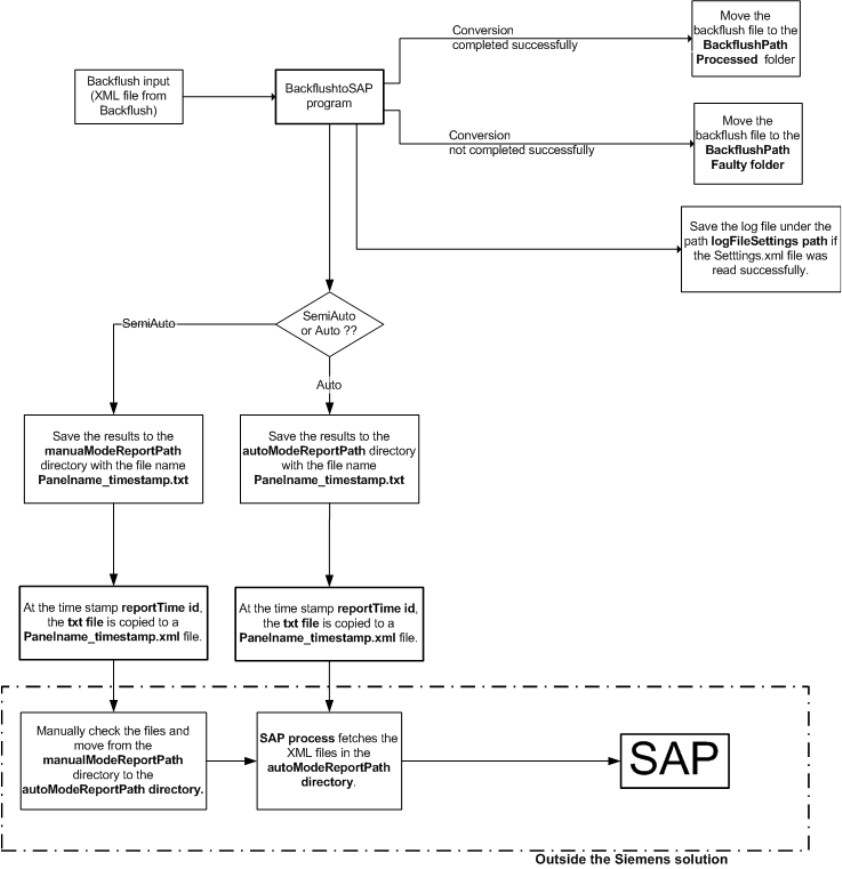
2.7.4 Graphical representation of the interaction between the software compo-
nents
2
2
2