00196800-02_InstallGuide_EN.pdf - 第96页
4 Co nfi gura tio n Ins tall ati on and Con figu rati on Gu ide S IPLA CE Exp lorer 4. 3 D ata ba s e Sett in gs Ed iti on 01 /2 01 1 EN 96 – S te p 3- Conf igu re Da ta base S tep 3 takes your modifications from S tep…
Installation and Configuration Guide SIPLACE Explorer 4 Configuration
Edition 01/2011 EN 4.3 Database Settings
95
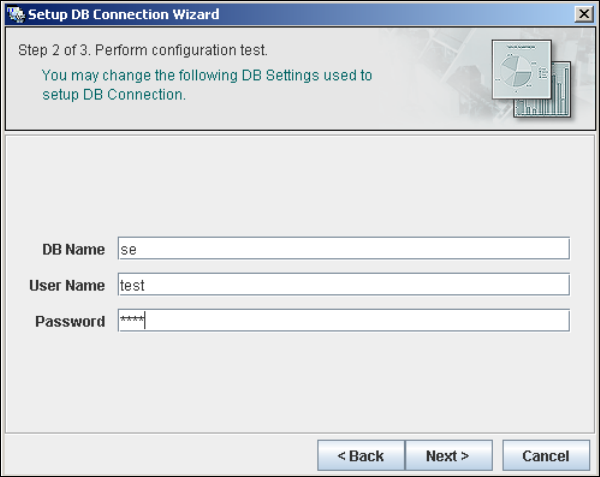
– Step 2 - Perform Configuration Test
At Step 2 you can change your settings. This is also where you define the name of the SE
system database for the line and where you specify the user (and corresponding password)
who is to have access to this database.
4
Fig. 4 - 59 Step 2- database connection wizard
Once you have made and checked all entries, click on Next to continue.
4 Configuration Installation and Configuration Guide SIPLACE Explorer
4.3 Database Settings Edition 01/2011 EN
96
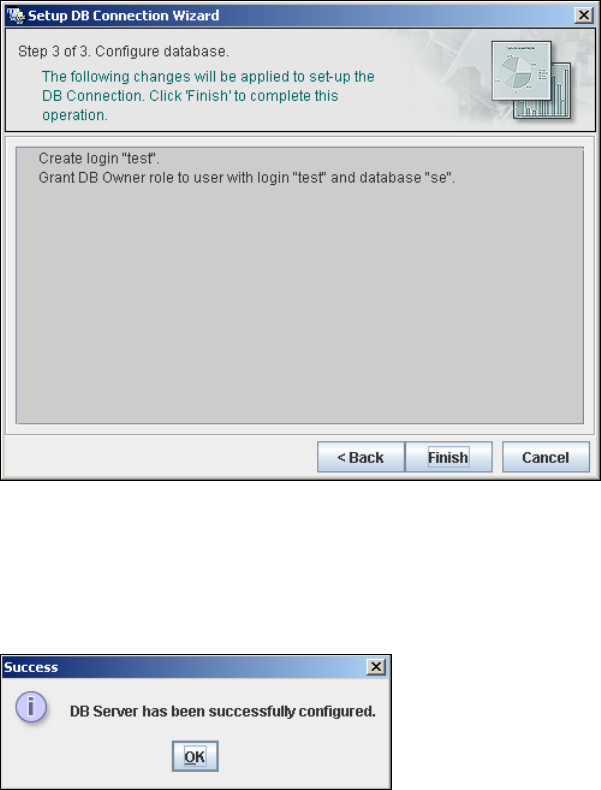
– Step 3- Configure Database
Step 3 takes your modifications from Step 2 and uses them to configure the database
connection.
4
Fig. 4 - 60 Step 3 database connection wizard
Click on Finish and the wizard will carry out the required configuration. The DB settings are
now correctly specified for your project. and the database and set user will be created.
You will receive a success message.
4
Fig. 4 - 61 Step 3 database connection wizard
Click OK. You can now configure your system database.
4

Installations- und Konfigurationsanleitung Index
Ausgabe 06/2011 DE
97
Index
A
Add Equipment
. . . . . . . . . . . . . . . . . . . . . . . . . .55
Add Line
. . . . . . . . . . . . . . . . . . . . . . . . . . . . . . .77
Add User
. . . . . . . . . . . . . . . . . . . . . . . . . . . . . . .83
Administrator Privileges
. . . . . . . . . . . . . . . 30, 38
Adobe Reader 7.0
. . . . . . . . . . . . . . . . . . . . . . . .27
Available For
. . . . . . . . . . . . . . . . . . . . . . . . . . . .57
C
Calendar
. . . . . . . . . . . . . . . . . . . . . . . . . . . . . . .58
Changing Tomcat Port Number
. . . . . . . . . . . . .46
Choose Destination Location,
SIPLACE Explorer Setup
. . . . . . . . . . . . . . . . . .33
Choose Folder’ Dialog Box,
SIPLACE Explorer Setup
. . . . . . . . . . . 34, 36
Client LAN
. . . . . . . . . . . . . . . . . . . . . . . . . . . . . .15
Configuration
. . . . . . . . . . . . . . . . . . . . . . . . . . . .49
Configuration of the System Database
. . . . . . . .94
Configurations
. . . . . . . . . . . . . . . . . . . . . . . . . . .15
Configure Production Line
. . . . . . . . . . . . . . . . .55
Configuring Production Lines
. . . . . . . . . . . . . . .76
Configuring Your Web Server
. . . . . . . . . . . . . . .45
Connect to the MS SQL Server
. . . . . . . . . . . . .94
Connection to Database
. . . . . . . . . . . . . . . 60, 72
Creation of Custom Applications
. . . . . . . . . . . . .49
D
Database Connection Wizard
. . . . . . . . . . . 92, 94
Database Settings
. . . . . . . . . . . . . . . . . . . . . . . .92
DB Administrator
. . . . . . . . . . . . . . . 64, 65, 88, 89
DB Administrator Login
. . . . . . . 63, 64, 65, 87, 88
DB Error
. . . . . . . . . . . . . . . . . . . . . . . . . . . 60, 73
DB Maintenance
. . . . . . . . . 63, 64, 65, 87, 88, 89
Default Maintenance Schedule
. . . . . . . . . . . . . .63
Default User Rights
. . . . . . . . . . . . . . . . . . . . . . .85
Default Web Server
. . . . . . . . . . . . . . . . . . . . . . .47
Development Environment
. . . . . . . . . . . . . . . . .25
Development Environment, Installation Option
. .34
E
Edit Line List
. . . . . . . . . . . . . . . . . . . . . . . . . . . 51
Edit Logbook Entries
. . . . . . . . . . . . . . . . . . . . . 82
F
Factory Calendar
. . . . . . . . . . . . . . . . . . . . . . . . 80
Factory Configuration Utility
. . . . . . . . . . . . 25, 71
Factory Configuration Utility -
Add Production Lines
. . . . . . . . . . . . . . . . . . . . 77
Factory Configuration Utility - DB Maintenance
87
Factory Configuration Utility - Factory Calendar
80
Factory Configuration Utility - Production Lines
77
Factory Configuration Utility - reports
. . . . . . . . 81
Factory Configuration Utility - SMTP Server
. . . 86
Factory Configuration Utility - User Details
. . . . 84
Factory Configuration Utility - Users
. . . . . . . . . 83
Factory Configuration Utility
Windows Start Menu
. . . . . . . . . . . . . . . . . . . . . 41
Factory Configuration Utility, Installation Option
34
Factory Configuration Utility, Starting
. . . . . . . . 71
Factory Database
. . . . . . . . . . . . . . . . . . . . . . . 87
Factory Host
. . . . . . . . . . . . . . . . . . . . . . . . . . . 76
Factory Website
. . . . . . . . . . . . . . . . . . 17, 82, 92
G
Generate Website
. . . . . . . . . . . . . . . . . . . . . . . 90
Generate website - Factory Configuration Utility
90
Generating the Website
. . . . . . . . . . . . . . . . . . 67
I
import line configuration
. . . . . . . . . . . . . . . 35, 36
Import OIS Lines
. . . . . . . . . . . . . . . . . . . . . . . . 52
Initial Installation, SIPLACE Explorer 2.6
. . 30, 38
Installation Complete, SIPLACE Explorer Setup
38
Installation Variants
. . . . . . . . . . . . . . . . . . . . . . 19
Installing SIPLACE Explorer
. . . . . . . . . . . . . . . 25