00197191-02_IM_SIPLACE_Pro_10.1_EN.pdf - 第18页
Installation Manual 2 System components and configur ations SIPLACE Pro 10.1 Edition 09/2012 16 2.3.2 Physical Layout 2 Fig. 2.3 - 2 St and-alone Configuration - Physical Layout 2.3.3 Characteristics – The SIPLACE Pro Se…
2 System components and configurations Installation Manual
Edition 09/2012 SIPLACE Pro 10.1
15
2.3 Stand-alone Configuration
Install all software components on one computer. This computer then functions as both server and
client. Optionally a second connection to the customer's network can be established via a second
network card.
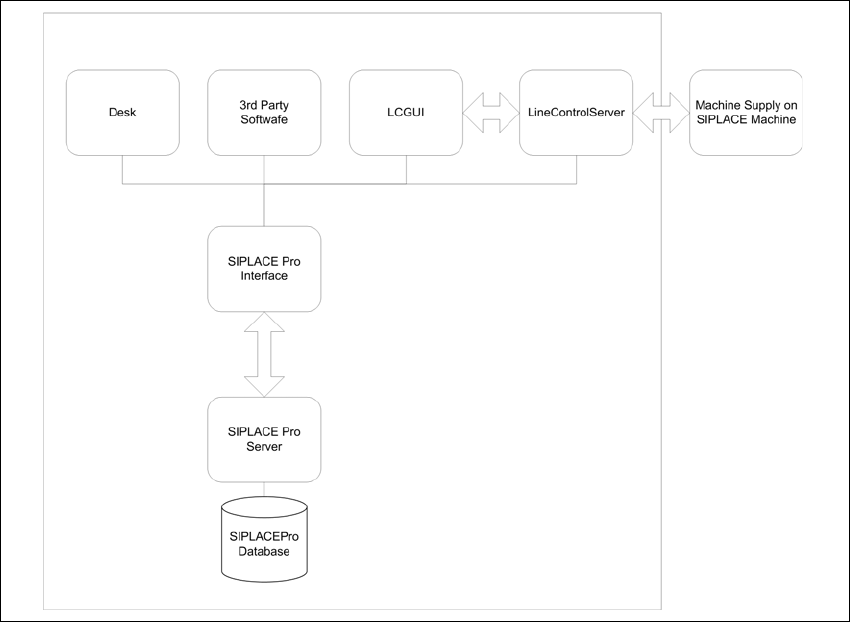
2.3.1 Logical Layout
2
Fig. 2.3 - 1 Stand-alone Configuration - Logical Layout
Installation Manual 2 System components and configurations
SIPLACE Pro 10.1 Edition 09/2012
16
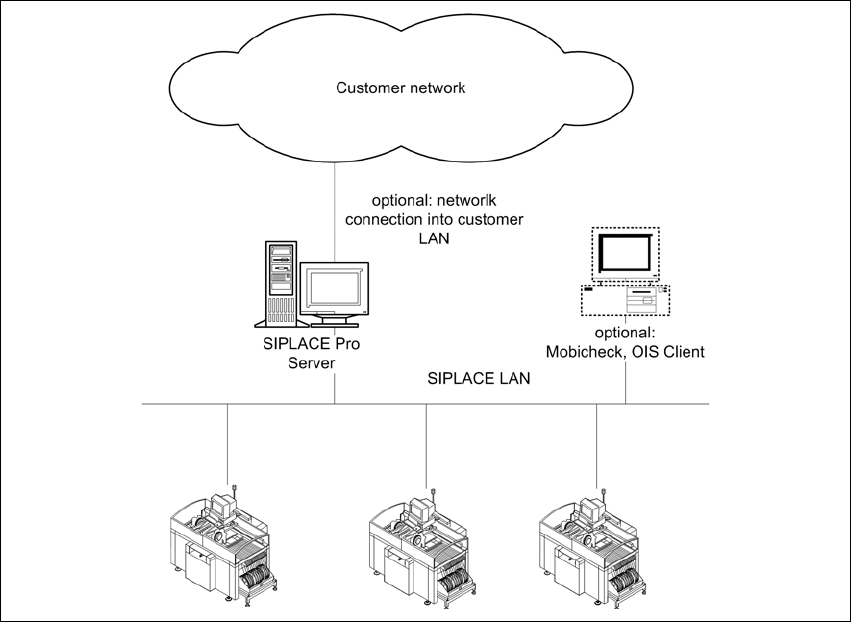
2.3.2 Physical Layout
2
Fig. 2.3 - 2 Stand-alone Configuration - Physical Layout
2.3.3 Characteristics
– The SIPLACE Pro Server is a Windows Workstation Version.
– Up to 7 SIPLACE Machines are supported.
– SIPLACE Pro Server is configured in Workgroup mode.
– SIPLACE Pro Client machines can be connected, if they are in Workgroup mode and share
a shadow account with the server (like plr/plr)
– One Option is to connect the SIPLACE Pro server to the customer network to exchange data
with customer computer.
– No WINS or DNS Server is necessary, if all computer are connected to one network segment.
If the customer network is segmented by routers the optional network connection to the cus-
tomer network must be configured by the customer.
– Security settings for different user levels (operator, programmer etc.) inside SIPLACE Pro is
possible.

3 Important preparations prior to installation (Software configuration) Installation Manual
Edition 09/2012 SIPLACE Pro 10.1
17
3 Important preparations prior to
installation (Software configuration)
All computers must have been set up and prepared appropriately in advance for the complete in-
stallation of SIPLACE Pro to function correctly.
These preparatory measures demand knowledge about the administrative functions of Windows
and SQL Server. Please contact your system administrator for assistance if required.
This installation guide only describes the procedure for a installation configuration called "stand
alone installation" and "standard configuration".
Important:
For more detailed information which software is essential and has to be sucessfully installed
before conducting the installation of SIPLACE Pro please refer to the Support Media DVD and the
respective manual.
Furthermore, you require Windows administrative rights for all computers on which you are in-
stalling SIPLACE Pro.
Before installing SIPLACE Pro make sure you use Prerequisite Analyzer of Support Media and
select SIPLACE Pro as planned Product to install all required missing prerequisites for SIPLACE
Pro (e.g. License Manager, Operation Manager, Error Reporter, .Net Framework). 3
Network access rights must have been set up in order to permit data exchange with the
UNIX line computer.
Note
By default, Support Media installs SQL Express editions only. If you want to use SQL Server edi-
tion instead, install it manually by following the steps described in the SQL installation documen-
tation on Support Media before using Prerequisite Analyzer for further preparation. We strongly
recommend you follow the installation documentation on Support Media, since it describes the
settings needed for SIPLACE Line Software. 3