DR_A_MANUAL.pdf - 第5页
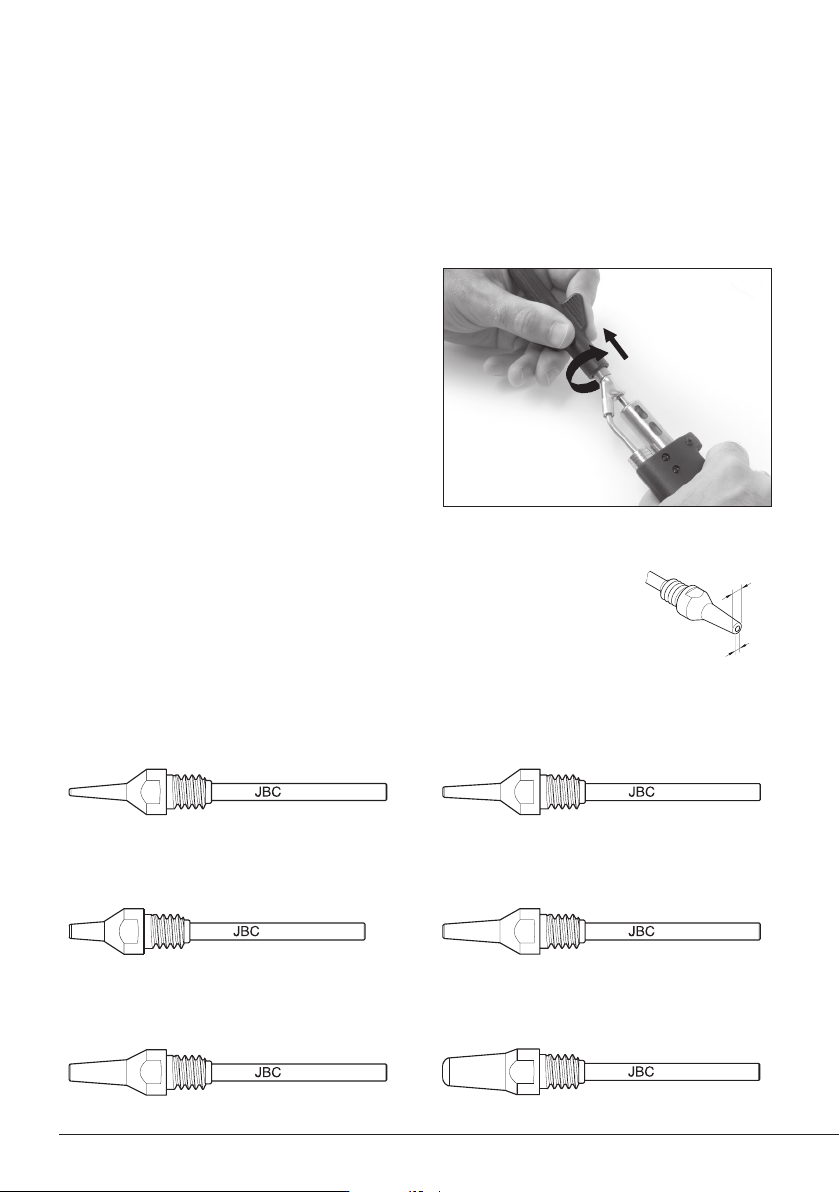
1 . Remo ving Loo sen th e dep osit l id (a) , rem ove the sc rew (b) an d withd raw the h eatin g element (c ) . For t his operation , turn o f f the station or disconnect the tool and wait until the t ool temperat ure …
A ø
B ø
C560-001
C560-002
C560-003
C560-004
C560-009
C560-014
Changing Tips
This operation should be done while the tip is hot and at a minimum temperature of 250°C, so that
any tin left inside is still molten.
1. Removing
Use the special spanner to unscrew the tip.
2. Inserting
Fit the new tip and tighten with the spanner
to make sure it is air tight.
Compatible Tips
The DR560 uses C560 tips.
Find the model that best suits your soldering needs in www.jbctools.com
Here are some C560 tips in real size:
250ºC minimum
C560-001 A=1,4 B=0,6 max. pin=0,4 mm
(A=0.05 B= 0.02 max. pin= 0.01 in)
C560-002 A=1,8 B=0,8 max. pin=0,6 mm
(A=0.07 B= 0.03 max. pin= 0.02 in)
C560-003 A=2,7 B=1 max. pin=0,8 mm
(A=0.1 B= 0.04 max. pin= 0.03 in)
C560-004 A=3,2 B=1,3 max. pin=1,1 mm
(A=0.12 B= 0.05 max. pin= 0.04 in)
C560-009 A=5 B=1,3 max. pin=1,1 mm
(A=0.19 B= 0.05 max. pin= 0.04 in)
C560-014 A=2,5 B=0,8 max. pin=0,6 mm
(A=0.09 B= 0.03 max. pin= 0.02 in)
4
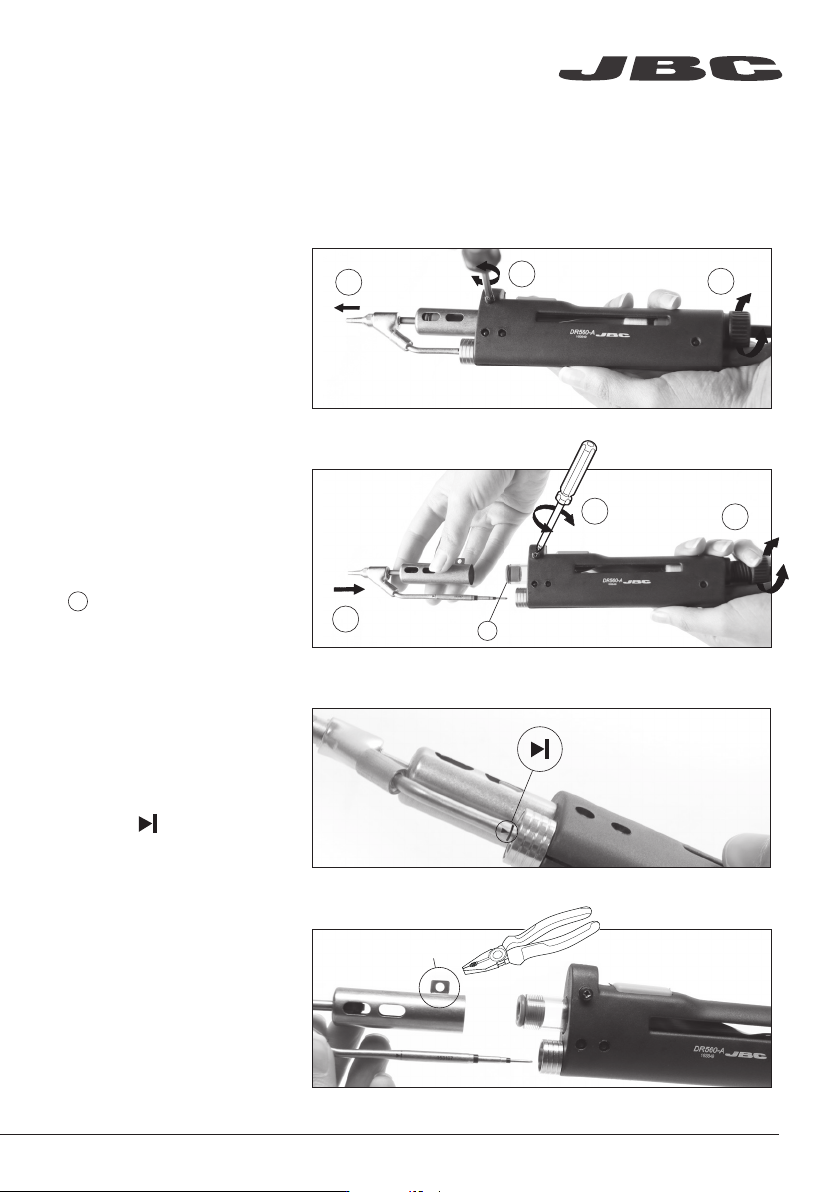
1. Removing
Loosen the deposit lid (a),
remove the screw (b)
and withdraw the heating
element (c).
For this operation, turn off the station or disconnect the tool and wait until the tool temperature
drops to room temperature.
2. Placing
Insert the new Heating
Element (a), tighten the screw
(b) and then the lid (c).
Before placing, make sure
to insert the internal gasket
into the Glass Solder Collector.
b
a
c
b
c
a
!
!
Important
For a proper connection
it is essential to insert the
cartridge by lining it up to
the mark .
washer
Changing the heating element (Ref. DSV-DR)
Compatibility
The DSV-DR also works with
the previous version DR5600
Desoldering Iron (Ref. 5600010).
In this case, you must take out
the washer with a pliers.
www.jbctools.com
5
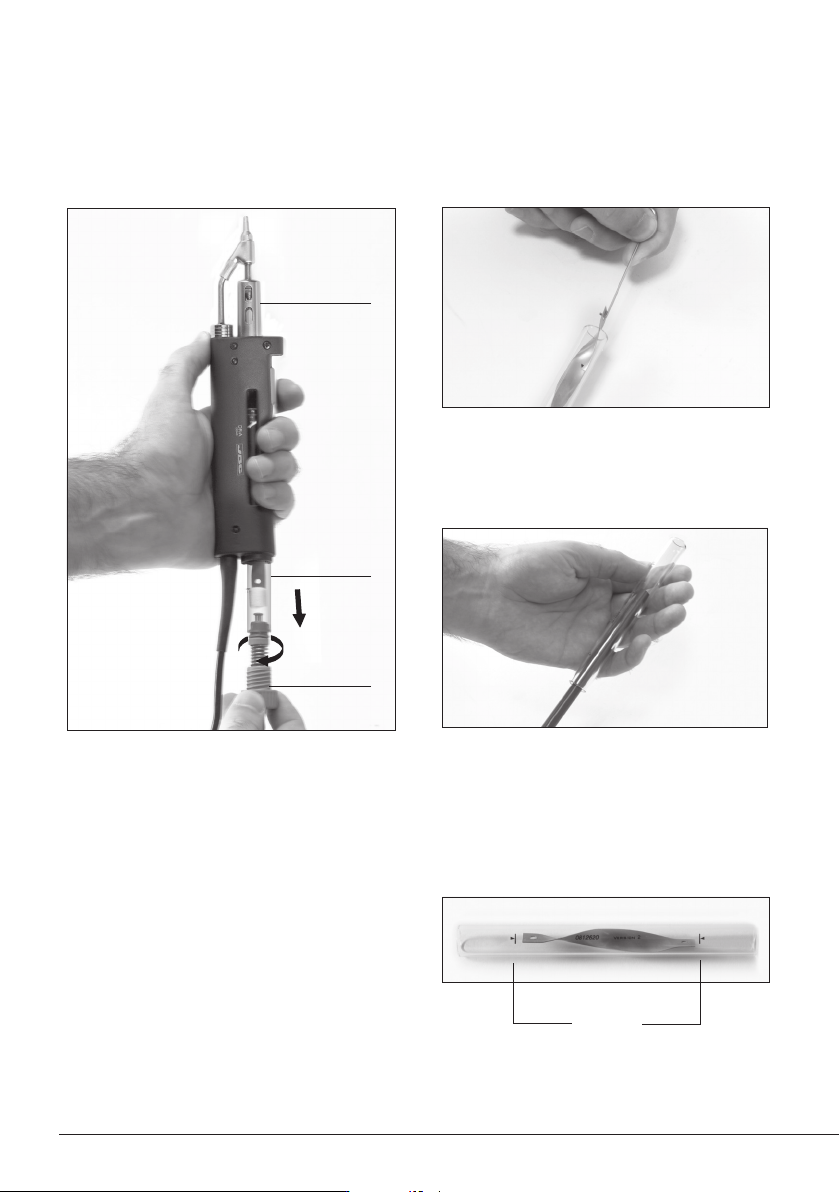
Glass Solder Collector Cleaning
1. Removing the lid
3. Inserting the glass solder collector
Check filter
Lid
Check
internal joint
2. Cleaning
Check the filter and replace it if it is dirty or
damaged.
Remove the coil and clean the inside of the glass
solder collector with the cleaning stick.
The lid must be unscrewed with the DR560 in a
vertical position.
The glass solder collector must be inserted
with coil filter in place, positioned between the
2 lines marked.
Then the whole unit must be closed by
screwing the lid.
Marks
6