Nordson_EFD_RV_Series_Operating_Manual.pdf - 第124页
RV Series Automated Dispensing Systems 124 www.nordsonefd.com info@nordsonefd.com +1-401-431-7000 Sales and service of Nordson EFD dispensing systems are available worldwide. AppendixB, Non-Wizar d Setup Pr ocedur es Al…
RV Series Automated Dispensing Systems
123www.nordsonefd.com info@nordsonefd.com +1-401-431-7000 Sales and service of Nordson EFD dispensing systems are available worldwide.
Z Clearance Setup
Click Function
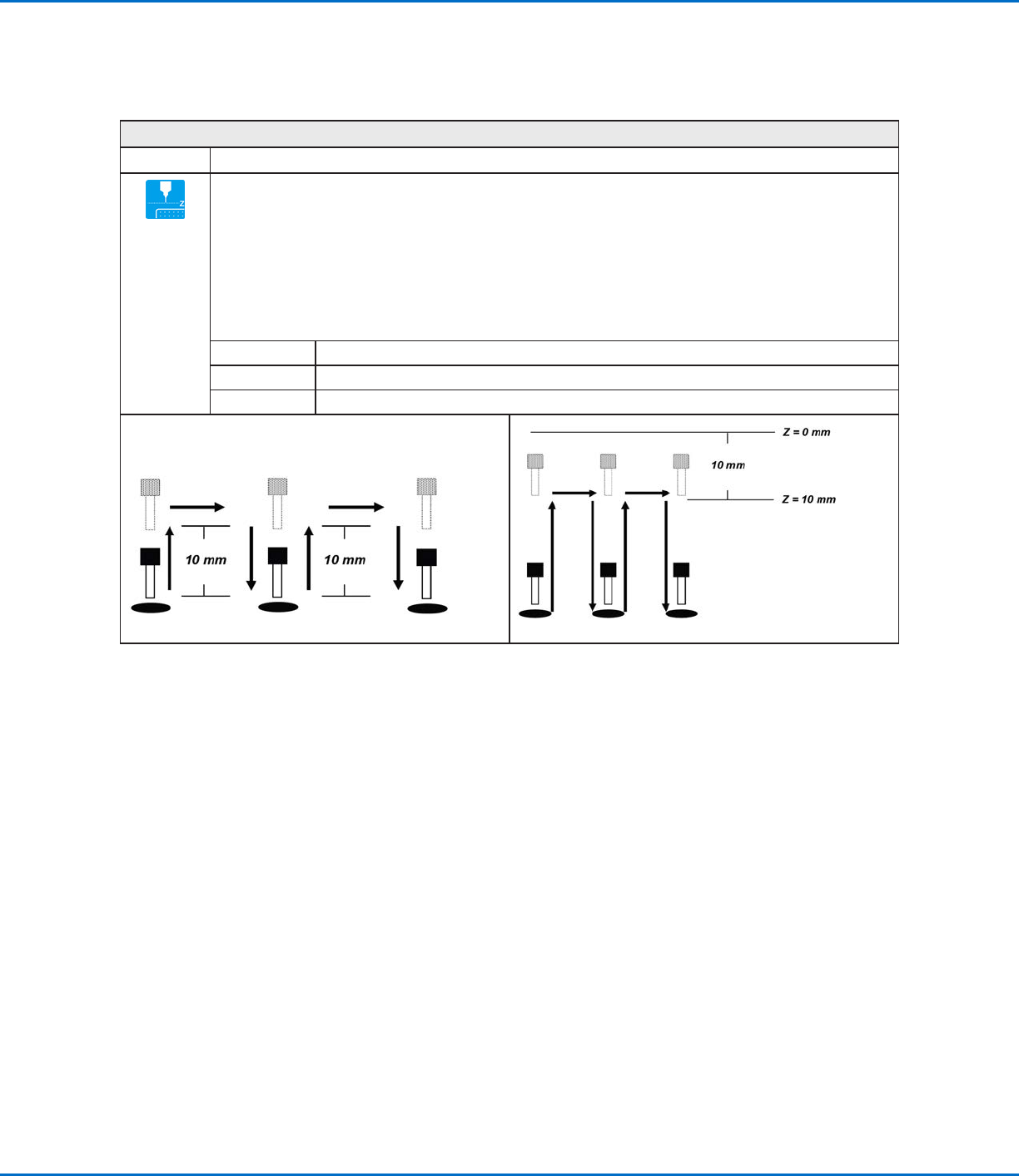
Specifies the height to which the dispensing tip raises after each dispense command. The purpose of Z
Clearance is to raise the tip high enough so that it clears all obstacles as it moves from one point to another.
If there are no obstacles between any of the points, a small Z Clearance value, such as 5mm, can be used to
minimize the program cycle time.
Z Clearance is further defined as an absolute value (0) or a relative value (1) . When specified as a relative value,
it is the distance the tip raises relative to the taught point location. When it is specified as an absolute value, it is
the distance from the Zaxis zero position to which the tip raises regardless of the Z-axis value of the taught point
location.
Nordson EFD recommends inserting a Z Clearance command at the beginning of a program.
Parameter Description (see illustrations below)
Value The distance (inmm) the tip raises after dispensing.
0(Abs), 1(Rel) How the tip raises: 0(Abs) = absolute, 1(Rel) = relative.
Z Clearance = 10mm relative Z Clearance = 10mm absolute
AppendixA, Command Function Reference
(continued)
RV Series Automated Dispensing Systems
124 www.nordsonefd.com info@nordsonefd.com +1-401-431-7000 Sales and service of Nordson EFD dispensing systems are available worldwide.
AppendixB, Non-Wizard Setup Procedures
All setup and calibration procedures are guided by the Robot Initial Setup wizard, which should be used after any
system change, including tip change-out. However, the procedures in this appendix can be performed individually
and are provided here for your reference as needed.
Setting the Camera Scale
PREREQUISITES
The system is fully installed (including the dispensing valve) and includes fluid.
The bottom of the tip is lower than the bottom of the camera.
The workpiece is present on the fixture plate.
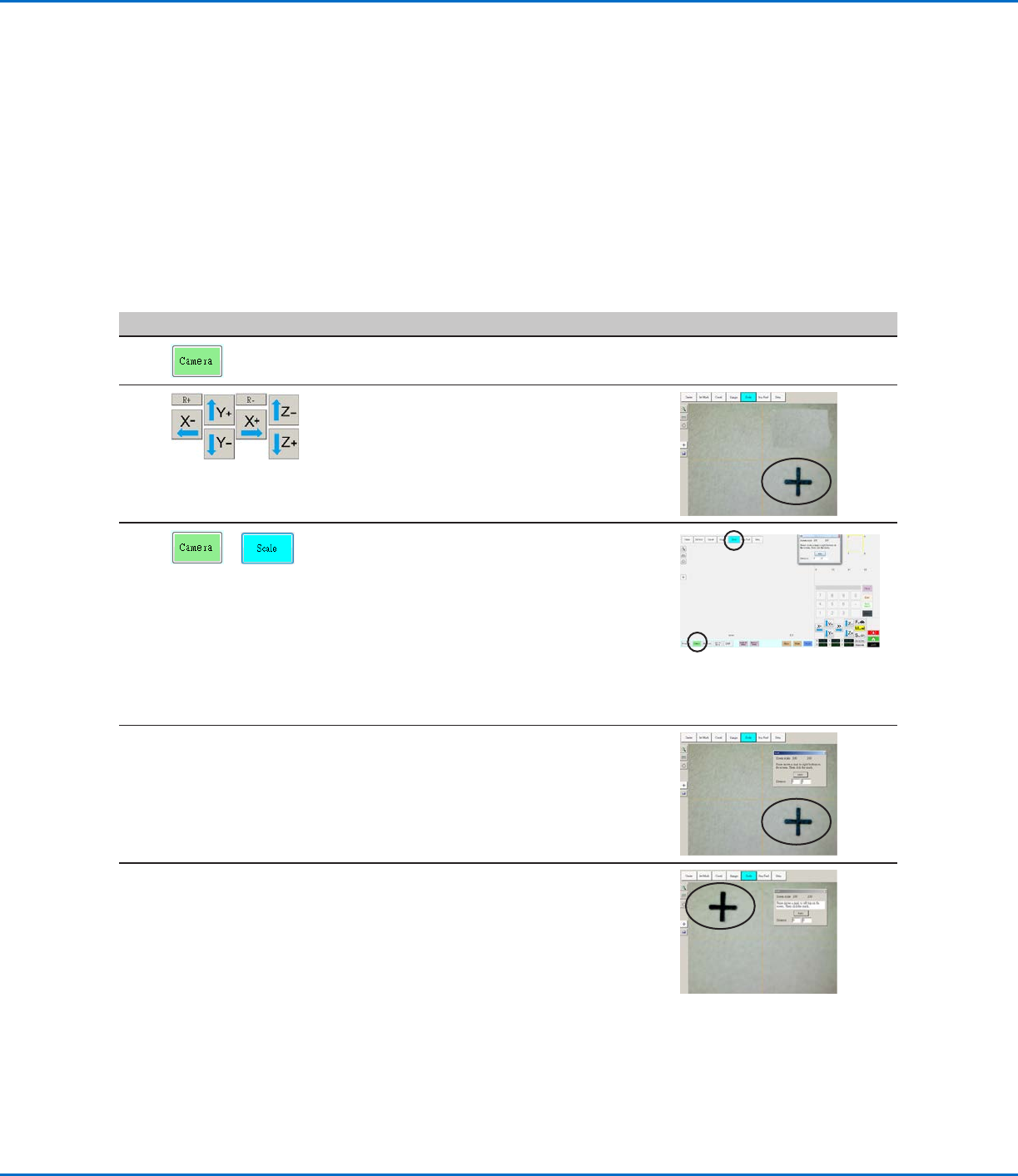
# Click Step Reference Image
1
• Click the CAMERA tab.
2
• Jog the camera to a point of reference that
is located on the lower right corner of the
workpiece.
• Bring the image into focus. Refer to
“Camera” on page16 as needed for
instructions on focusing the camera.
3
>
• Click the CAMERA tab and then click
SCALE.
The Scale window opens.
NOTE: When the camera views an object, it
converts the pixels to a true measurement.
For the camera to make this conversion
accurately, you must “teach” the camera
what the size of an object is in comparison
to pixels per inch by setting the camera
scale.
4 • Choose a point of reference on the
workpiece and jog the camera so that the
reference point is located in the lower right
quadrant of the camera screen, then click
the point.
5 • Jog the camera again until the same
reference point is located in the upper left
quadrant of the camera screen, then click
the point.
The camera scale is now set.
RV Series Automated Dispensing Systems
125www.nordsonefd.com info@nordsonefd.com +1-401-431-7000 Sales and service of Nordson EFD dispensing systems are available worldwide.
Setting Up the Optional Tip Detector or Tip Alignment Device
#
Click Step Reference Image
1
>
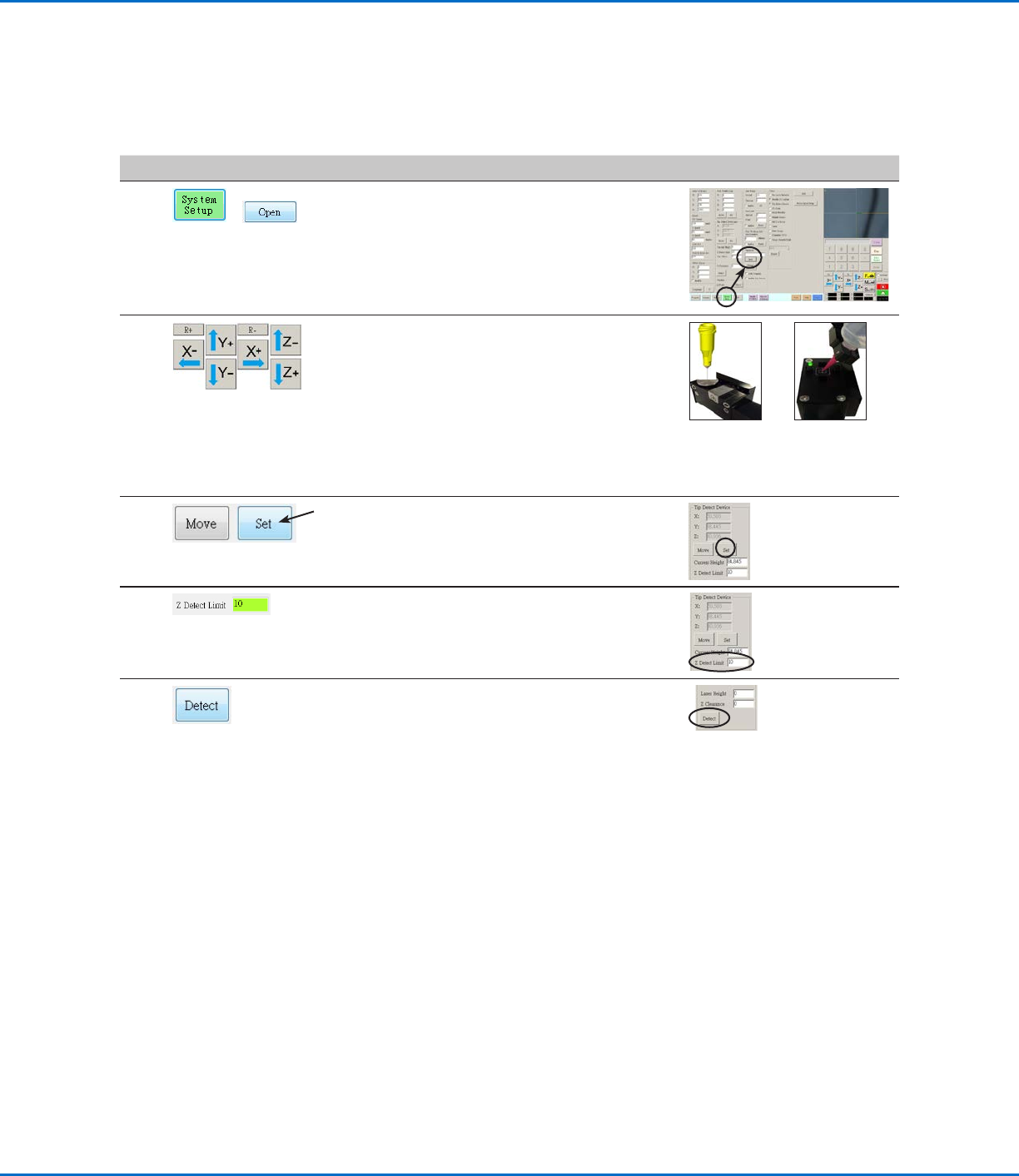
• Click SYSTEM SETUP > OPEN.
2 • Jog the tip until it is positioned about 2mm
above the sensor on the tip detector or the
crosshairs on the tip alignment device.
Sensor on
the optional
tip detector
Crosshairs on
the optional tip
aligner
3 • Under Tip Detect Device, click SET (next to
Move).
• Click YES when prompted for confirmations.
4 • Under Tip Detect Device, enter a value of
10(mm) Z Detect Limit.
5 • Under Tip Detect Device, click DETECT.
• Click YES/OK when prompted for
confirmations.
The robot raises the tip to Z = 0, then lowers
the tip onto the sensor to detect the tip
offset.
AppendixB, Non-Wizard Setup Procedures
(continued)