Vista Rail System Module.pdf - 第15页
5$,/6< 67(002' 8/( $'-8670 (176$1 '6(7 7,1* 6 Chapter Issue 1 Sep 02 Technical Reference Manual 12.15 7. If adj ustment is necessary , carry out the followi ng: a. Slacken the f our rail secur ing b…
5$,/6<67(002'8/(
$'-8670(176$1'6( 77,1*6
12.14 Technical Reference Manual Chapter Issue 1 Sep 02
Front Rail Parallelism
WARNING
BOARD CLAMPS. EXTREME CARE MUST BE EXERCISED WHEN WORKING IN
THE TOOLING AREA OF THE MACHINE TO AVOID INJURY. THE FOILS ON THE
FRONT AND REAR BOARD CLAMPS ARE VERY SHARP.
NOTE
Ensure Camera X Axis Parallelism (Camera and Vision Systems Module
Chapter refers) has been carried out prior to commencing this procedure.
1. In Camera Diagnostics, home the Camera X and Y axes. Select Drive to
Board Stop Position the camera carriage is driven to the rear of the front
rail.
2. Raise the front printhead cover.
3. Power down the machine.
4. Carry out either of the following:
a. Remove the camera (refer to Camera and Vision Systems Module Chap-
ter, Camera and Optical Unit Assembly Removal).
b. If available fit a spare camera assembly bearing to the right hand end of
the camera rail.
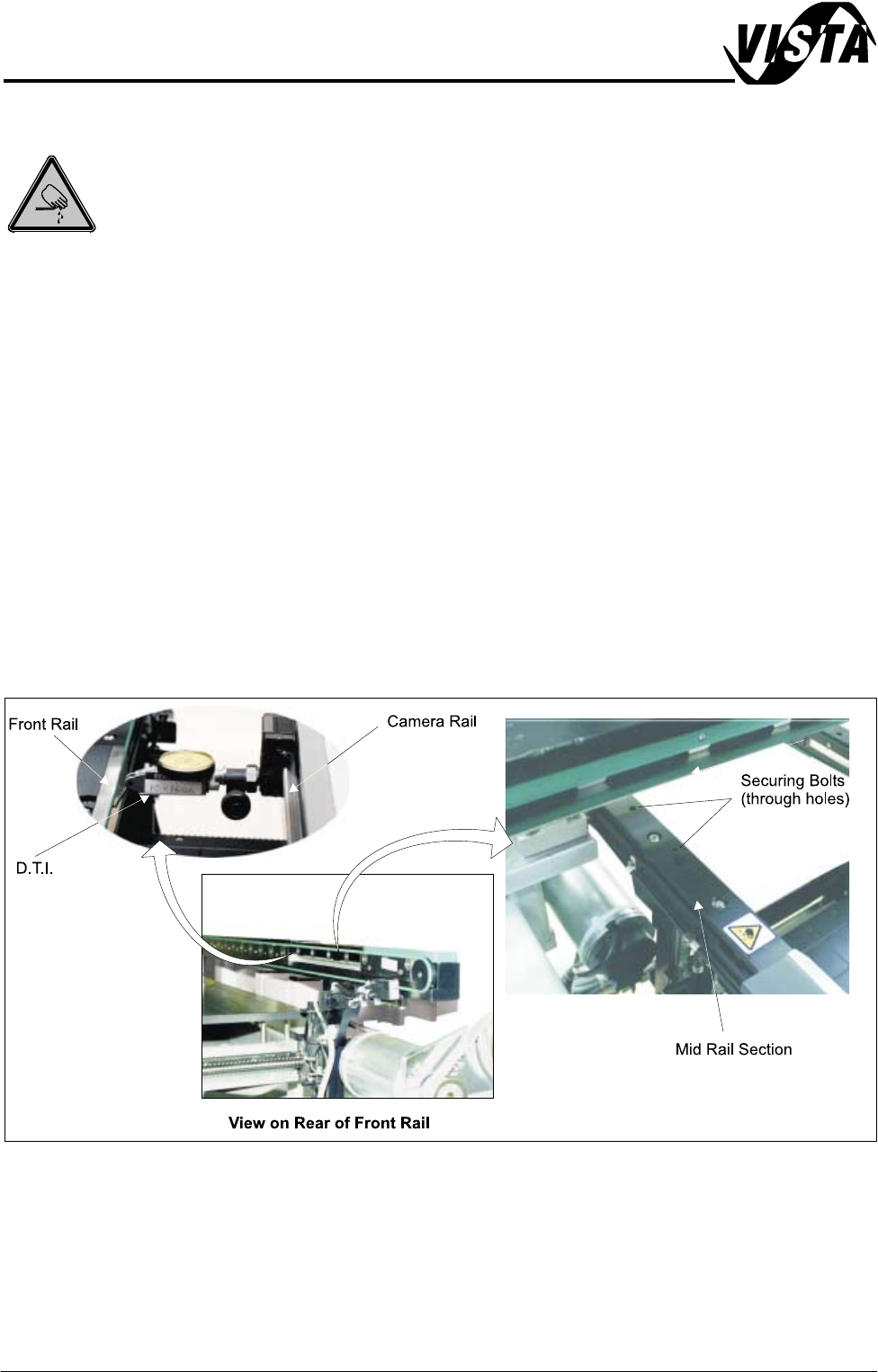
5. Fit a Dial Test Indicator (D.T.I.) to the camera carriage bearing.
6. Using the D.T.I. check the front rail parallelism to camera carriage rail over
the length of the ’O’ ring support plate to ±0.2mm.
5$,/6<67(002'8/(
$'-8670(176$1'6(7 7,1*6
Chapter Issue 1 Sep 02 Technical Reference Manual 12.15
7. If adjustment is necessary, carry out the following:
a. Slacken the four rail securing bolts (two each side) adjust the front rail as
required. Tighten the bolts, re-check the parallelism.
b. When the adjustment is complete, loosen each bolt disturbed (one at a
time), apply suitable locking compound down the thread only (allow plate
to spring up to gain access) and fully tighten. Remove the D.T.I.
8. Carry out either of the following:
a. Refit the camera (see Camera and Vision Systems Module Chapter,
Camera Refitment).
b. Remove the spare camera bearing from camera rail.
9. Switch on the machine and initialize, carry out the Home Position Rail Width
Check and Camera Reference Position (see Rail System Module Chapter
and Camera and Vision Systems Module Chapter).
Rear Rail Parallelism
WARNING
BOARD CLAMPS. EXTREME CARE MUST BE EXERCISED WHEN WORKING IN
THE TOOLING AREA OF THE MACHINE TO AVOID INJURY. THE FOILS ON THE
FRONT AND REAR BOARD CLAMPS ARE VERY SHARP.
NOTE
Ensure Camera X Axis and Front Rail Parallelism (see Camera and Vision
Systems Module Chapter and Rail System Module Chapter) has been carried
out prior to commencing this procedure.
1. In Rail System Diagnostics, select Adjust and alter board width to 250mm.
2. Select Drive Rail to Board Width. The rails are driven to the board width
selected.
5$,/6<67(002'8/(
$'-8670(176$1'6( 77,1*6
12.16 Technical Reference Manual Chapter Issue 1 Sep 02
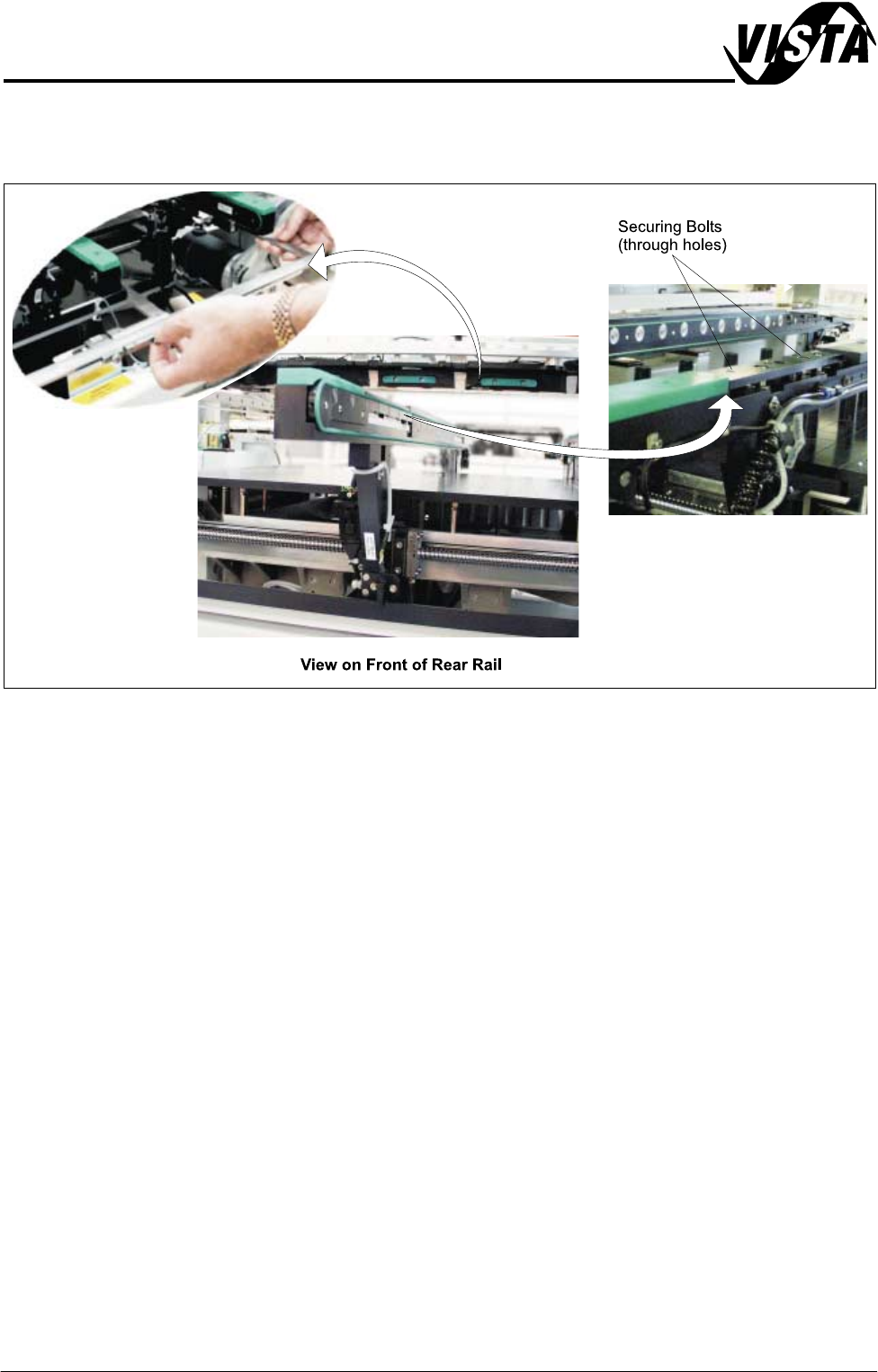
3. Using a suitable vernier caliper, check the rear rail to front rail parallelism at
each end of the rail below the transport belt pulley to within ±0.2mm.
4. If adjustment is necessary, carry out the following:
a. Loosen the rail securing bolts (in four positions), adjust the rear rail as
required. Tighten the bolts, re-check the rail parallelism.
b. When the adjustment is complete, remove each bolt disturbed one at a
time, apply suitable locking compound and fully tighten and recheck the
rail parallelism.
5. On completion, carry out Home Position Rail Width Check (see Rail System
Module Chapter).
Board Clamps
Regulator
For information on the regulator setting refer to the Pneumatic Module Chapter.