00198496-01_IM_OIB-Settings-EDM-Scenarios-R17-1_DE_EN.pdf - 第24页
EDM Scenarios and OIB Configuratio n Central 24 OIB Einstellungen - EDM Szenarie n OIB Settings – EDM Scenarios 2.1 2 . 1 C e n t r a l Central Description In the facto ry, there is only one SIPLACE Pro application. This…
EDM Scenarios and OIB Configuration
OIB Einstellungen - EDM Szenarien OIB Settings – EDM Scenarios 23
2
2 EDM Scenarios and OIB Configuration
EDM Scenarios and OIB Configuration
Depending on the EDM scenario, the OIB adapters SIPLACE.Pro.SPI and SIPLACE.Pro.LineControl
must be assigned to the relevant objects in the factory layout.
► Go to the ASM Studio and start the Factory Explorer module.
⇨ The Factory Explorer will open.
► Select Central Settings.
► In the Factory Layout of the Factory Explorer, configure the OIB adapters SIPLACE.Pro.SPI and
SIPLACE.Pro.LineControl depending on the EDM scenario.
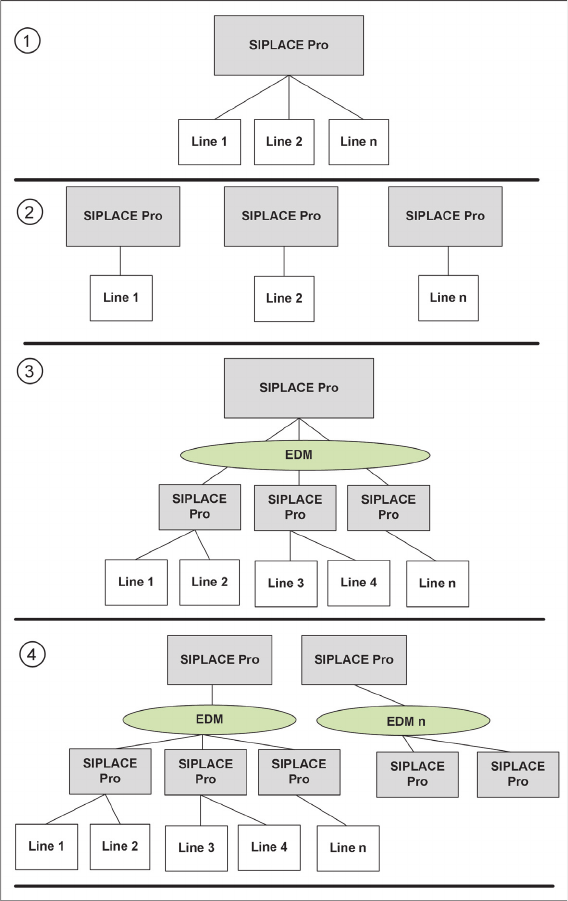
Four different EDM scenarios exist:
1. Central
2. Island
3. EDM
4. EDMn
EDM Scenarios and OIB Configuration
Central
24 OIB Einstellungen - EDM Szenarien OIB Settings – EDM Scenarios
2.1
2.1 Central
Central
Description
In the factory, there is only one SIPLACE Pro application. This is the Central configuration without EDM.
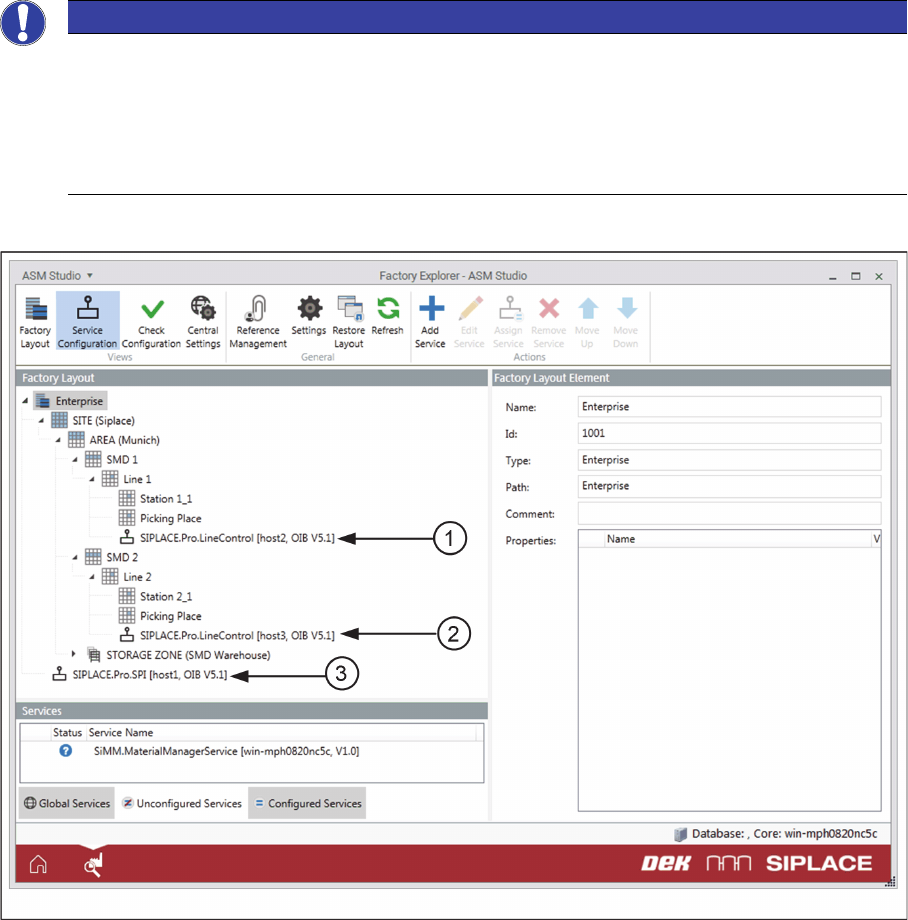
Configuration of the Services
▪The SIPLACE.Pro.SPI service must be assigned either to the Enterprise node or to „global/not con
-
figured“. It is also possible to configure this service for the site; however, this can only be done if there
is only one site in the Factory Layout.
▪The SIPLACE.Pro.LineControl services must be assigned to the work cell elements of the Lines.
Factory Layout in the EDM Scenario - Central
Example for the Factory Layout in the EDM Scenario - Central
1. SIPLACE.Pro.LineControl on the work cell element of the line (Line1)
2. SIPLACE.Pro.LineControl on the work cell element of the line (Line2)
3. SIPLACE.Pro.SPI service on the Enterprise node
NOTICE
Production Line
The Production Line object type comprises multiple work cell elements, for example, a work cell
element for the parking place, a work cell element for the picking place, and a work cell element
for the line. The individual stations are usually configured under the work cell element for the
lines. The SIPLACE.Pro.LineControl services must only be assigned to the work cell elements
of the lines.
EDM Scenarios and OIB Configuration
Island
OIB Einstellungen - EDM Szenarien OIB Settings – EDM Scenarios 25
2.2
2.2 Island
Island
Description
In the factory, there is one SIPLACE Pro application for each production line. No common SIPLACE Pro
application is installed as the master for all production lines. This is the Island EDM scenario.
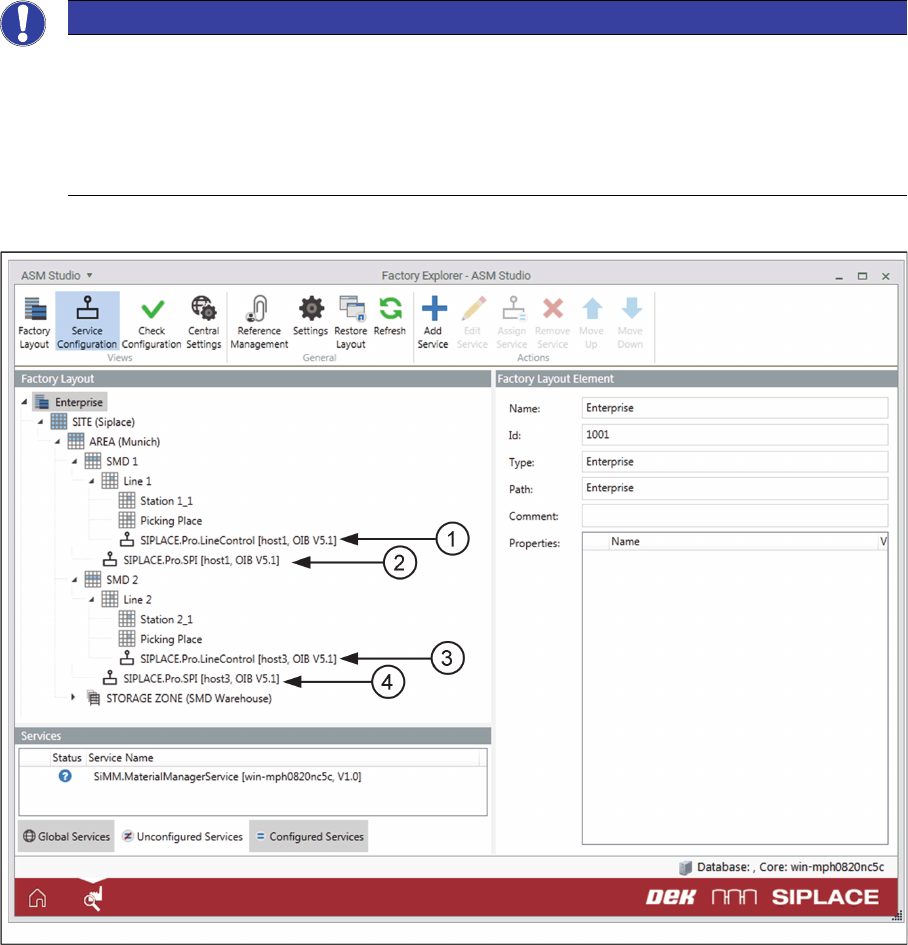
Configuration of the Services
▪The SIPLACE.Pro.SPI services must be assigned to the Production Lines.
▪The SIPLACE.Pro.LineControl services must be assigned to the work cell elements of the Lines.
Factory Layout in the EDM Scenario - Island
Example for the Factory Layout in the EDM Scenario - Island
1. SIPLACE.Pro.LineControl on the work cell element of the line (Line 1)
2. SIPLACE.Pro.SPI on the production line (SMD 1)
3. SIPLACE.Pro.LineControl on the work cell element of the line (Line 2)
4. SIPLACE.Pro.SPI on the production line (SMD 2)
NOTICE
Production Line
The Production Line object type comprises multiple work cell elements, for example, a work cell
element for the parking place, a work cell element for the picking place, and a work cell element
for the line. The individual stations are usually configured under the work cell element for the
lines. The SIPLACE.Pro.LineControl services must only be assigned to the work cell elements
of the line.