00198374-01_UG_OSC_Package_DE_EN.pdf - 第68页
4 Working with the OSC Features 4.5 Finding best acceleration 68 Bedienungsanleitung OSC Package User Guide OSC-Paket - 06/2017 4.5.1 Procedure The following overview lists the single work steps that have to be performed…

4 Working with the OSC Features
4.5 Finding best acceleration
Bedienungsanleitung OSC Package User Guide OSC-Paket - 06/2017 67
4.5 Finding best acceleration
Especially for odd shape components but also for standard components users often reduce the
acceleration of the axis to a low value just to ensure that the board is placed correctly and no
components are lost. However, by that the current acceleration is usually below the optimum.
A new teaching function supports finding the optimal acceleration or speed values for a component
shape directly at the station. The dialog for teaching component shapes has been enhanced by the
new Teach acceleration values function.
The selected component is picked up with the selected nozzle and moved around within the
machine with increasing acceleration values for each axis. Based on the Vision measurement, the
optimal acceleration is determined. The value can be tested again and after testing uploaded to
SIPLACE Pro.
Prerequisites
Activity level: Machine service
4 Working with the OSC Features
4.5 Finding best acceleration
68 Bedienungsanleitung OSC Package User Guide OSC-Paket - 06/2017
4.5.1 Procedure
The following overview lists the single work steps that have to be performed in the specified order
to find the best acceleration.
Finding best acceleration
Step Action SIPLACE program
1) Enabling OSC package SIPLACE Pro
2) Selecting the component from the list in the dialog for teaching
component shapes and starting the Teaching acceleration
values function
Station Software
3) If necessary, changing the configuration (other nozzle, disabling
automatic removal of components)
Station Software
4) Starting the execution Station Software
5) Checking the result Station Software
6) Testing the recommended acceleration Station Software
7) Uploading the acceleration values to SIPLACE Pro Station Software
4 Working with the OSC Features
4.5 Finding best acceleration
Bedienungsanleitung OSC Package User Guide OSC-Paket - 06/2017 69
4.5.2 Application Example
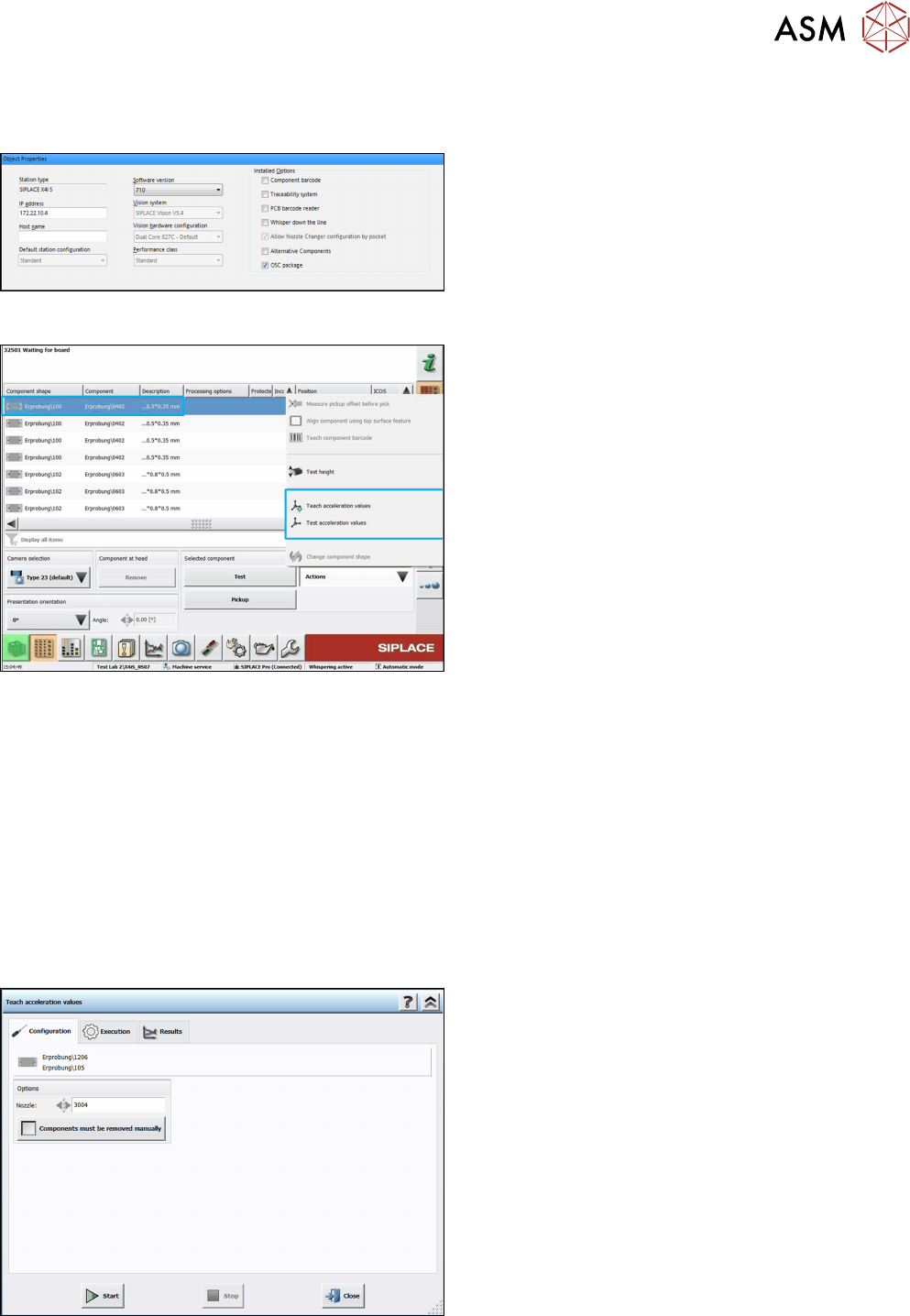
Step 1: SIPLACE Pro
► In the Station Editor under Placement Station,
enable the OSC Package option under Installed
options.
Step 2: Station software
► Switch to the Machine service activity level.
► In the dialog for teaching component shapes,
select the component from the list.
► Click on Teach acceleration values.
The Configuration teach dialog is displayed.
The following decisions can be made in this dialog:
●
Used nozzle
If you want to perform the teaching with another nozzle, the nozzle can be selected from a list.
Only available nozzles will be displayed.
●
Option for disabling the rejection of components
The default value is to reject the components automatically. But if the Components must be
removed manually option is set, you will be prompted to remove the component manually
from the placement head as soon as the check fails. The option is only available for place-
ment heads for which this is possible (please refer to the Online Help of the station software).
Once set, the value is saved for the next run.
Step 3: Station software
► If necessary, select a nozzle from the list for the
teaching.
► If necessary, enable the Components must be
removed manually option.
► Click on Start.
The function is performed automatically for the X-/Y-, star und DP axes. The Execution teach
dialog is displayed.