Queue-Inspection-Manual-REV-G-2.pdf - 第17页
Queue/In spectio n Revision G / January 2022 Page 17 of 21 Troubleshooting Some p roblem s are easy to identify a nd solve, for others more h elp m ay be n ecessary . This section is to assist in so lving probl ems bef o…
Queue/Inspection
Revision G / January 2022
Page 16 of 21
Fault Recovery Procedure
Warning: If the Emergency Stop was engaged because of system failure, do not
disengage the Emergency Stop button. Shutdown the system and have qualified
personnel repair the machine.
Recovery Procedure
For all errors that activate the buzzer do the procedure that follows, to return the module to
operation.
1. Remove all boards from the module.
2. Engage the Emergency Stop button.
3. Disengage the Emergency Stop button.
Queue/Inspection
Revision G / January 2022
Page 17 of 21
Troubleshooting
Some problems are easy to identify and solve, for others more help may be necessary. This
section is to assist in solving problems before you seek additional help. Refer to this section
if a mechanical or electrical problem occurs.
Calling Technical Support
The technical support staff is always available to help solve any problems. The phone
number is +1-518-371-2684. Have the following information before calling for help:
• The operation in progress when the machine had trouble (when did it have problems,
what was it doing, etc.).
• If the error was not serious, attempt to repeat the error. If the error does not repeat,
the problem may have been operator generated.
Queue/Inspection
Revision G / January 2022
Page 18 of 21
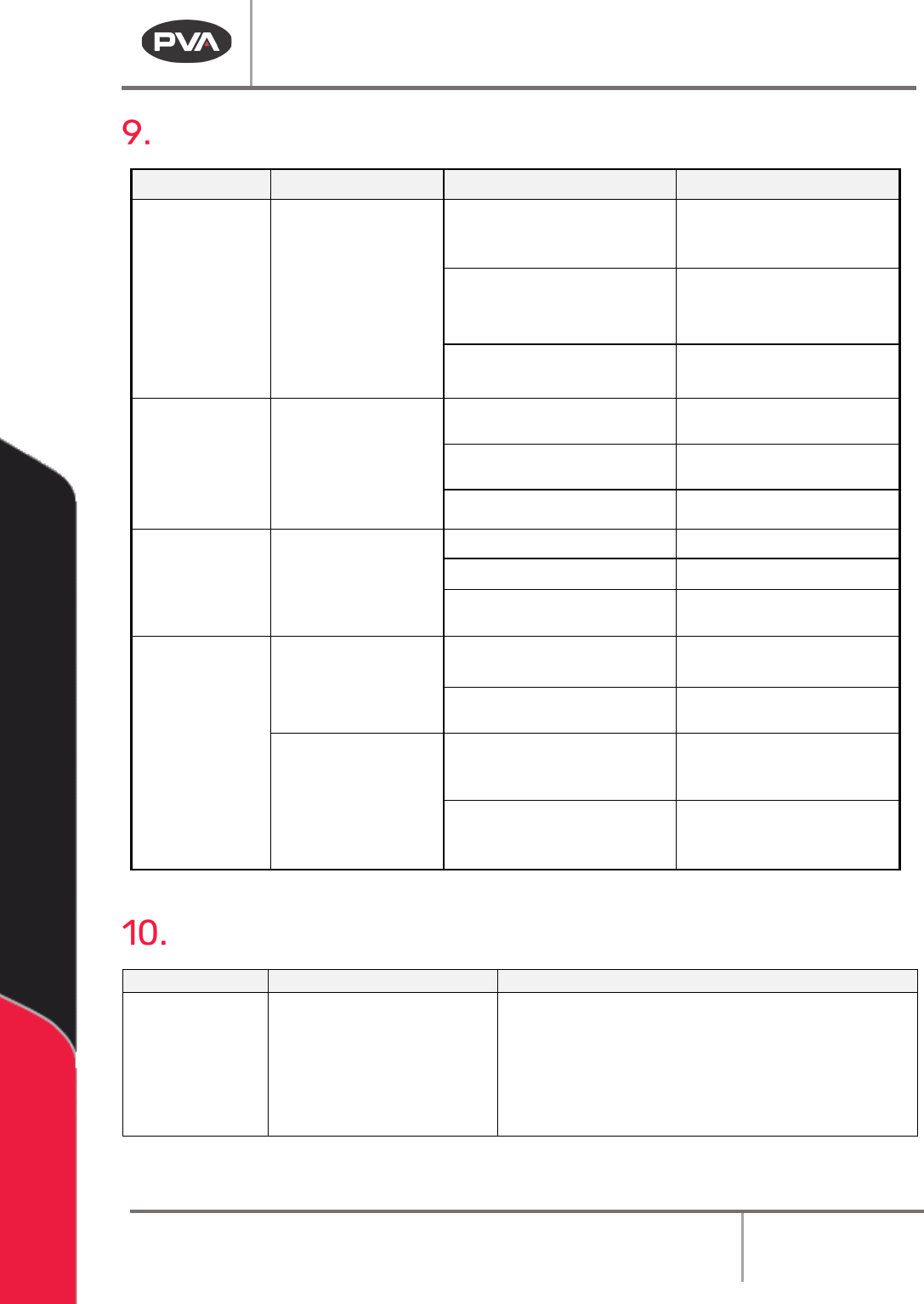
Fault Diagnosis
Operation Other Symptoms Possible Cause Corrective Action
Board doesn’t
transfer to or from
adjacent station
SMEMA connection is broken
Examine and correct the cable
connections
A module in the system is
turned off
Turn on the inactive module
The adjacent stations are not
correctly aligned
Align the adjacent stations
Part-in-place
sensor failure
Cable is loose or not connected
Examine and correct the cable
connections
The sensor is not positioned
correctly
Move the sensor
The sensor is dirty or scratched
Clean or replace the sensor
Pneumatic
position failure
The air lines are kinked or torn
Repair or replace the lines
Position sensor failure Replace the sensor
Position sensor needs to be
adjusted
Move the sensor
Conveyor does not
run or another
conveyor error
The conveyor belt is stuck to
the rails
Clean the rails or replace the
belt
Cable is loose or not connected
Examine and correct the cable
connections
There is no power to
the conveyor motor
Control relay not energized or
Power On light not illuminated
(Certain Models)
Examine voltages and
connections
The fuse is blown Correct or replace FU-3 in
the
electrical enclosure if
necessary
Maintenance
Service Area
Weekly
Monthly
Conveyor System
Belts
Examine the sensors for
material and buildup
• Examine the conveyor belts for wear
• Conveyor System Chains: Lubricates chain with
Darmex 773ND or equivalent
• Conveyor System Rails: Clean and lubricate
with Mobile DTE-24 or equivalent. You can also
use Darmex 773ND or equivalent.