00195489_Install_IIS_manual.pdf - 第15页
Manual Installation of Internet Information Server Edition 04/2007 US → Right-click on the group “Web Sites”. → Select Properties . The Web Site Properties window opens: Fig. 3-23: Web Sites Properties → Click on the tab…
Manual Installation of Internet Information Server Edition 04/2007 US
3.4 ASP.Net Support for Internet Information Server
This chapter describes the activation of ASP.Net Support for Internet Information Server (IIS) on Windows
Server 2003 and Windows XP Professional. This setting is only available if you have Microsoft .Net
Framework installed.
Please follow the instructions below for the manual activation of ASP.Net
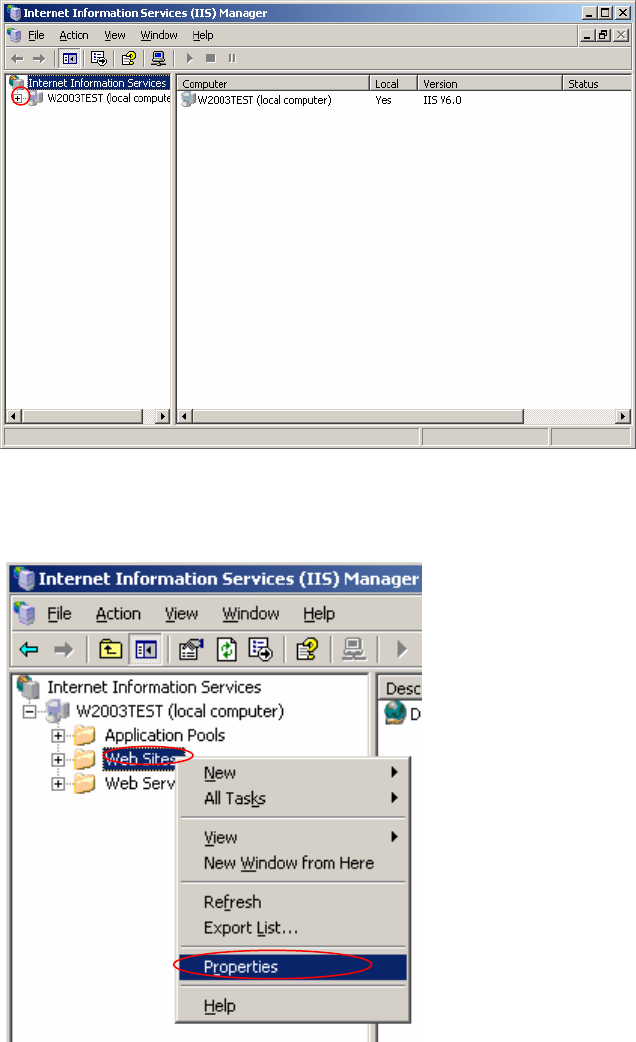
→ Click on windows main menu Start Æ Control Panel Æ Administrative Tools Æ “Internet
Information Services (IIS) Manager”.
The Internet Information Services (IIS) Manager opens.
Fig. 3-20: Internet Information Services (IIS) Manager
→ Expand the left tree view by clicking on plus symbol of the first item.
The following window appears:
Fig. 3-21: Internet Information Services (IIS) Manager – expanded view
→ Select the group “Web Sites” by clicking on it.
14/18
Manual Installation of Internet Information Server Edition 04/2007 US
→ Right-click on the group “Web Sites”.
→ Select Properties.
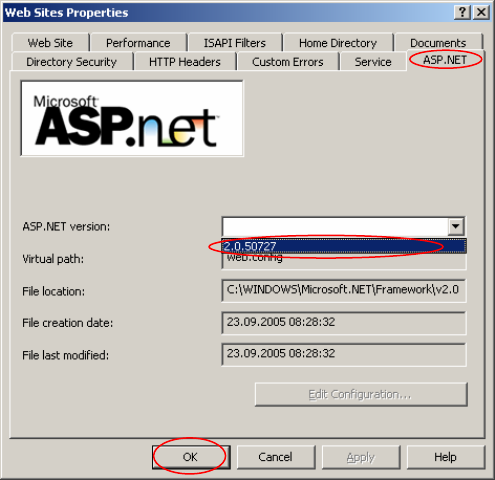
The Web Site Properties window opens:
Fig. 3-23: Web Sites Properties
→ Click on the tab “ASP.NET”.
→ Select from the dropdown menu of “ASP.NET version” the .Net Framework version, you want to use.
→ Click on the OK button.
15/18
Manual Installation of Internet Information Server Edition 04/2007 US
16/18