00195489_Install_IIS_manual.pdf - 第5页
Manual Installation of Internet Information Server Edition 04/2007 US 5/18 1 Introduction Some SIPLACE software systems, like SIPLACE FA CTS or SIPLACE OIB make use of Microsoft Internet Information Server (IIS) to provi…
Manual Installation of Internet Information Server Edition 04/2007 US
4/18
Manual Installation of Internet Information Server Edition 04/2007 US
5/18
1 Introduction
Some SIPLACE software systems, like SIPLACE FACTS or SIPLACE OIB make use of Microsoft
Internet Information Server (IIS) to provide web server functionality.
2 Scope of delivery
This document describes the manual procedure to install the Microsoft Internet Information Server
(IIS) with default settings for usage of SIPLACE software products for computer systems. Further
customization (e.g. modification of IIS settings) will be done by the specific product installations.
Manual Installation of Internet Information Server Edition 04/2007 US
3 Installation
3.1 Installation of Internet Information Server on Windows Server 2003
Please follow the instructions below for the manual installation of Internet Information Server (IIS) on
Windows Server 2003.
Note:
Close all other applications before you start with the installation of Internet Information
Server.
You may need your operating system media during installation. This installation also
requires administrative privileges.
→ Click on windows main menu Start Æ Control Panel Æ Add Or Remove Programs Æ Windows
Components
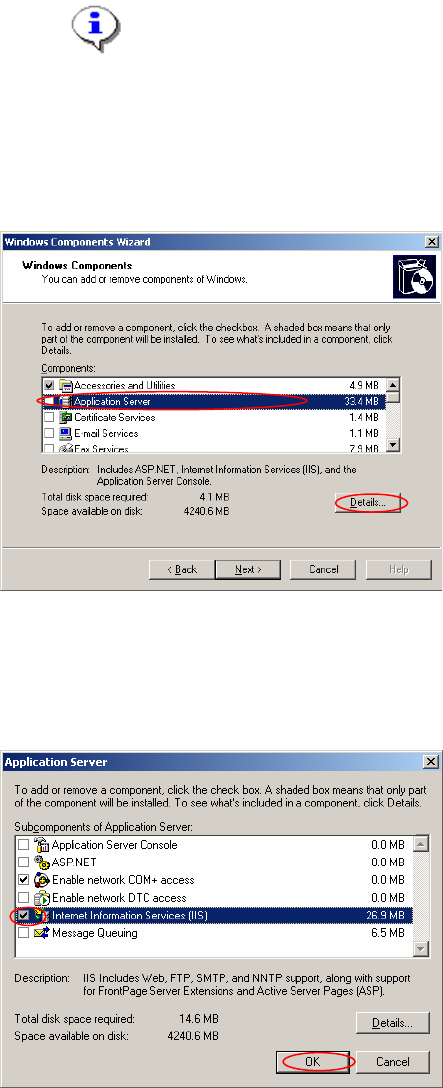
After few seconds the windows components wizard opens:
Fig. 3-1: The "Windows Components Wizard”
→ Click on the line “Application Server” (do not select/deselect the checkbox!).
→ Click on the Details… button.
The following dialog appears:
Fig. 3-2: The "Application Server” dialog
6/18