00195489_Install_IIS_manual.pdf - 第16页
Manual Installation of Internet Information Server Edition 04/2007 US 16/18
Manual Installation of Internet Information Server Edition 04/2007 US
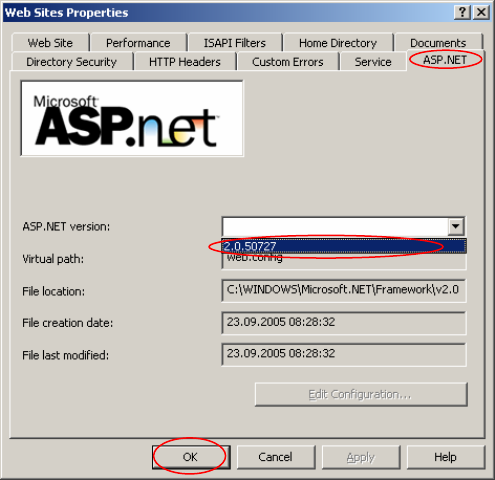
→ Right-click on the group “Web Sites”.
→ Select Properties.
The Web Site Properties window opens:
Fig. 3-23: Web Sites Properties
→ Click on the tab “ASP.NET”.
→ Select from the dropdown menu of “ASP.NET version” the .Net Framework version, you want to use.
→ Click on the OK button.
15/18
Manual Installation of Internet Information Server Edition 04/2007 US
16/18